Boost dropshipping visibility with SEO metadata on Shopify
Unlock the role of metadata in dropshipping! Learn how proper SEO metadata on Shopify can boost your store's visibility and traffic.

TL;DR:
- Most Shopify dropshipping stores unknowingly lose organic traffic due to poorly optimized or duplicated metadata that search engines penalize. Improving meta titles, descriptions, structured data, and canonical tags can significantly boost click-through rates and protect against duplicate content penalties at scale. Unique, well-crafted metadata serves as a crucial competitive advantage in saturated markets, and scalable automation tools help maintain quality without manual effort.
Most Shopify dropshipping stores are bleeding organic traffic without realising it. Poorly optimised or duplicated metadata is silently throttling your search rankings, and Shopify’s default settings simply do not fix this for you. The good news is that targeted metadata improvements can lift CTR by 20 to 40% and deliver significant organic click increases without redesigning a single product page. This guide walks you through every layer of metadata that matters for dropshipping, from basic definitions to advanced scaling tactics, so you can stop losing visibility to stores copying the same supplier pages.
Table of Contents
- What is metadata and why does it matter in dropshipping?
- How meta titles and descriptions drive clicks and sales
- Avoiding duplicate content and penalties with canonical tags
- Advanced tactics: making your metadata unique and scalable
- A practical perspective: outmanoeuvring copycat competitors with smart metadata
- Take your Shopify dropshipping SEO to the next level
- Frequently asked questions
Key Takeaways
| Point | Details |
|---|---|
| Metadata boosts visibility | Strongly optimised meta titles, descriptions, structured data, and canonical tags make your Shopify dropshipping store easier to find and more compelling to click. |
| Avoid duplicate content penalties | Unique metadata and correct canonical tagging ensure your site stays safe from traffic drops caused by duplicate product data. |
| Scale with smart tools | Bulk editors and automation apps can help manage thousands of product pages efficiently while keeping your store SEO-friendly. |
| CTR and sales gains | Well-written metas can increase your organic clicks by up to 40 percent and significantly drive your sales numbers. |
What is metadata and why does it matter in dropshipping?
Metadata is the information about your product pages that search engines read before humans do. It shapes how your listings appear in Google search results, whether they qualify for rich snippets, and whether they get penalised for looking identical to thousands of other stores. For Shopify dropshippers specifically, metadata is both an opportunity and a minefield.
There are four types you need to understand:
- Meta title: The clickable blue headline in search results. Google typically displays 50 to 60 characters.
- Meta description: The short summary beneath the title, usually 140 to 160 characters, that convinces someone to click.
- Structured data (JSON-LD schema): Code embedded in your page that tells Google about product price, availability, ratings, and more. This powers rich results like star ratings and price displays.
- Canonical tags: HTML tags that tell search engines which version of a page is the “true” original, preventing duplicate content penalties from variants, collections, and URL parameters.
“Metadata in Shopify dropshipping includes meta titles, descriptions, structured data, and canonical tags, optimising product pages for search visibility and click-through performance.”
Here is a quick reference for what each metadata type controls:
| Metadata type | Where it appears | SEO function |
|---|---|---|
| Meta title | Google SERP headline | Keyword targeting, CTR |
| Meta description | SERP summary | Behavioural CTR signal |
| Structured data | Rich snippets, product panels | Eligibility, trust, CTR |
| Canonical tag | Hidden in page code | Duplicate content prevention |
The challenge in dropshipping is scale. You might launch with 200 products imported directly from a supplier, each carrying that supplier’s original title and description. Every other store using the same supplier has identical pages. Google recognises the duplication and either downgrades all versions or picks one winner, which is unlikely to be you. Treating unique content for SEO as a core business practice rather than an afterthought is the first shift that separates struggling dropshippers from profitable ones. This matters especially in competitive niches like dropshipping fashion, where dozens of stores often stock identical products from the same sources.
How meta titles and descriptions drive clicks and sales
With the building blocks clear, let’s break down how smart meta tag choices translate directly into more visitors and higher sales.
Every time your product appears in search results, your meta title and description are your first sales pitch. Google does not charge you for impressions, so your ability to turn those impressions into clicks is essentially free revenue. A weak meta tag wastes that opportunity entirely.

Here is a real-world comparison showing what happens when you move from generic supplier copy to optimised metadata:
| Version | Meta title example | Meta description example |
|---|---|---|
| Generic supplier | “Women’s Running Shoes” | “High quality shoes. Fast shipping.” |
| Optimised | “Lightweight women’s trail shoes, free UK delivery” | “Grip more, run further. Cushioned sole for all-terrain comfort. Free UK delivery on orders over £30. Shop now.” |
The difference is not just aesthetic. The optimised version targets specific search intent, includes a benefit (“free UK delivery”), uses natural language that matches what buyers type, and ends with a clear call to action. Meta descriptions of 140 to 160 characters boost CTR indirectly through behavioural signals and should always include target keywords, a tangible benefit, and a prompt to act. Duplicate descriptions actively harm SEO because they confuse Google about which page to rank.
Follow this process to rewrite your meta tags effectively:
- Identify your primary keyword. Use search data or Google’s autocomplete to find the exact phrase buyers use, not the phrase suppliers use.
- Lead with the keyword in your meta title. Front-loading keywords gives more weight to the term in Google’s eyes.
- Add a differentiator. Free shipping, a guarantee, a unique feature, or a locality signal like “UK stock” all increase clicks.
- Write the description for humans first. Mention the keyword naturally, state the benefit clearly, and end with an action word.
- Check character counts. Titles over 60 characters get truncated in search results. Descriptions over 160 characters get cut off mid-sentence.
Optimised metadata alone can lift CTR by 20 to 40%, and rich schema implementation can double CTR whilst increasing rich result eligibility up to fourfold. These are not marginal gains. For a store doing 1,000 impressions per day, a 30% CTR improvement means 300 extra visits without spending a penny on advertising. Pair well-crafted meta tags with strong SEO product descriptions on the page itself, and you create a compounding effect where both Google and the buyer are persuaded simultaneously.
Pro Tip: Use Google Search Console’s “Search results” report to find products with high impressions but low CTR. These are your best candidates for immediate meta tag rewrites. Even a single afternoon of edits can produce measurable traffic gains within days.
Generative AI for ecommerce is also making it practical to generate dozens of unique, well-structured meta tags in minutes rather than hours. The key is always reviewing AI output against your brand voice and checking for keyword accuracy before publishing. Consult Shopify SEO best practices to ensure your entire product page ecosystem supports your metadata efforts rather than working against them.
Avoiding duplicate content and penalties with canonical tags
With click-through and sales benefits clear, you now need to safeguard your SEO gains by preventing search penalties and content duplication.
Canonical tags are arguably the most misunderstood element of Shopify metadata. They are a signal, not a directive. Google treats them as strong hints about which URL should be indexed, but it reserves the right to override them if it detects inconsistencies between pages. When Google overrides your canonical, your preferred page may not be the one that ranks.
Shopify automatically adds canonical tags pointing to the main "/products/handleURL. This handles the most common duplication risk, where the same product appears under multiple collection paths like/collections/shoes/products/trainersand/products/trainers`. However, automatic handling does not cover every scenario. Canonical tags prevent duplicate content penalties from variant parameters, collection paths, and URL filters, but you must verify self-referencing canonicals are correct for every product.
Common issues that automatic canonicals do not resolve:
- Variant URL parameters: When a customer selects a colour or size, Shopify often appends
?variant=123456to the URL. If these parameter pages get indexed separately, you accumulate thin duplicate pages. - Filter and sort parameters: Collection pages with sort order or filter parameters can generate hundreds of near-identical URLs.
- Supplier-sourced content: If your product title, description, and images are identical to those on a supplier’s site or a competitor’s store, canonical tags help internally but do not resolve the external duplication problem.
The most damaging scenario for dropshippers: 187 out of 420 products flagged for “Google chose a different canonical” in a single store audit, resulting in a 34% traffic drop over three months.
That real-world case illustrates the scale of the problem. Rewriting titles and descriptions uniquely for each product, particularly across colour and size variants, is not optional if you want to maintain stable rankings. Product page uniqueness is the foundational defence against this kind of slow-burn traffic erosion.
The steps to audit your canonical tags are straightforward. Open Google Search Console, navigate to “Pages,” and filter for “Duplicate, Google chose different canonical than user.” Any product appearing there is at risk. Cross-reference with your supplier’s product pages to identify whether the duplication is internal or external. For SEO-friendly dropshipping content strategy, the fix is always the same: unique content first, correct canonicals second. Ecommerce growth stalls quickly when a significant portion of your catalogue is either invisible or cannibalising itself in search results.
Advanced tactics: making your metadata unique and scalable
Once you understand the risks of duplication, you need effective strategies for handling metadata at scale without quality loss.
Manually rewriting meta tags for 50 products is manageable. For 500 or 5,000, it becomes the bottleneck that prevents growth. The good news is that a structured workflow combined with the right tools makes large-scale, unique metadata achievable without a team of copywriters.
Manual versus bulk editing: when to use which
Manual editing is appropriate for your highest-value products, typically your top 20 sellers or hero products that carry the most traffic. These deserve careful, human-crafted metadata with deep keyword research and brand voice alignment. Bulk editing is appropriate for the rest, especially when launching new ranges from supplier imports.
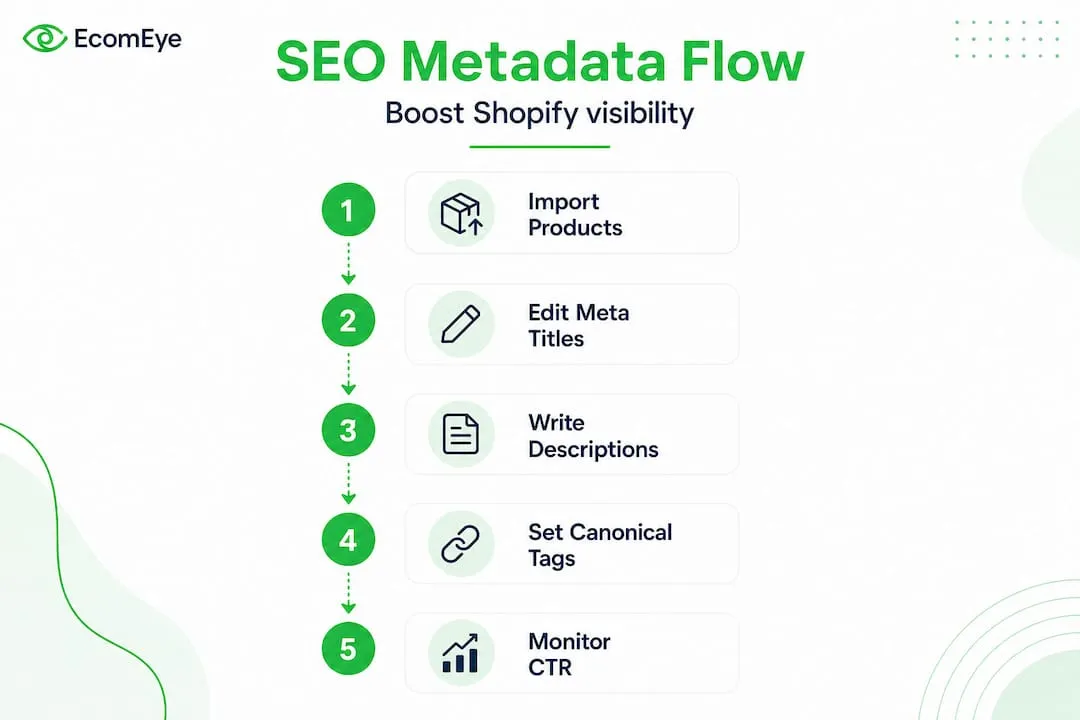
A practical workflow for scaling unique metadata:
- Import your products using a bulk listing tool that supports field-level editing, including titles and descriptions.
- Use a template structure with variable slots:
[Keyword] + [Product type] + [Key benefit] + [Differentiator]. Apply this template across categories so each product gets a structurally unique title without requiring individual effort. - Generate unique descriptions using AI tools that take product attributes as inputs and produce varied, readable output. Avoid using supplier descriptions verbatim under any circumstances.
- Run a pre-launch audit using a tool like Screaming Frog or Sitebulb to catch duplicate titles and descriptions before they go live.
- Set up regular reviews in Google Search Console every month to catch new canonical conflicts as your catalogue grows.
Bulk metadata tools and apps for Shopify dropshippers are widely discussed in the SaaS community. The consensus is clear: ensuring unique content is the critical differentiator, not just having the tools to edit in bulk.
The most common mistake at this stage is letting automation produce near-identical descriptions across similar products. If every variant of a phone case gets the description “Premium quality case for your phone. Fast shipping,” you have thin content at scale, which is arguably worse than having no metadata at all. Invest time upfront in building varied templates and testing a sample of AI-generated outputs for readability and uniqueness. The importance of unique content cannot be overstated when you are competing against stores using the exact same supplier data.
Useful tools and approaches for this stage:
- Shopify’s bulk editor for quick field-level updates across multiple products
- CSV imports for pre-prepared metadata created in spreadsheet tools
- Third-party SEO apps that support bulk meta title and description editing with character count previews
- AI content platforms that integrate directly with your product data to generate contextually relevant metadata at scale
AI content helpers are evolving rapidly, and the best implementations combine product attribute data with category-level prompts to produce genuinely varied output rather than templated repetition.
A practical perspective: outmanoeuvring copycat competitors with smart metadata
Here is what most Shopify dropshippers miss entirely: metadata is not just an SEO task. It is a competitive moat that copycats cannot easily replicate.
When a competitor imports your products using a scraper or a bulk listing tool, they pull your product images and supplier descriptions. But they cannot steal carefully crafted, brand-specific meta titles that reference your store’s unique angle, your return policy, or your specific target customer. Distinctive metadata is genuinely hard to copy at scale because it requires knowledge of your brand, your audience, and your positioning.
There is also a practical protection angle. Stores that copy supplier data wholesale are subject to the same ranking volatility you were trying to escape. When Google flags 30% of their catalogue as duplicate content, their rankings collapse. Yours do not, because your metadata is different enough to be treated as original.
The insight most dropshippers overlook is that even simple, authentic edits outperform the automated imports used by larger, higher-volume stores. A seller moving 10,000 SKUs cannot write unique copy for each one. You, managing 200 to 500 products thoughtfully, can. That asymmetry is your advantage. Use descriptive product titles that genuinely describe what makes your version of the product worth buying, and you immediately separate yourself from the noise.
The stores that win in saturated dropshipping niches are rarely the ones with the most products. They are the ones with the most trustworthy, search-optimised product pages. Metadata is the fastest lever to pull.
Take your Shopify dropshipping SEO to the next level
You now have a clear map of every metadata lever that matters for your Shopify dropshipping store. The challenge remaining is execution at scale, and that is where most dropshippers get stuck.
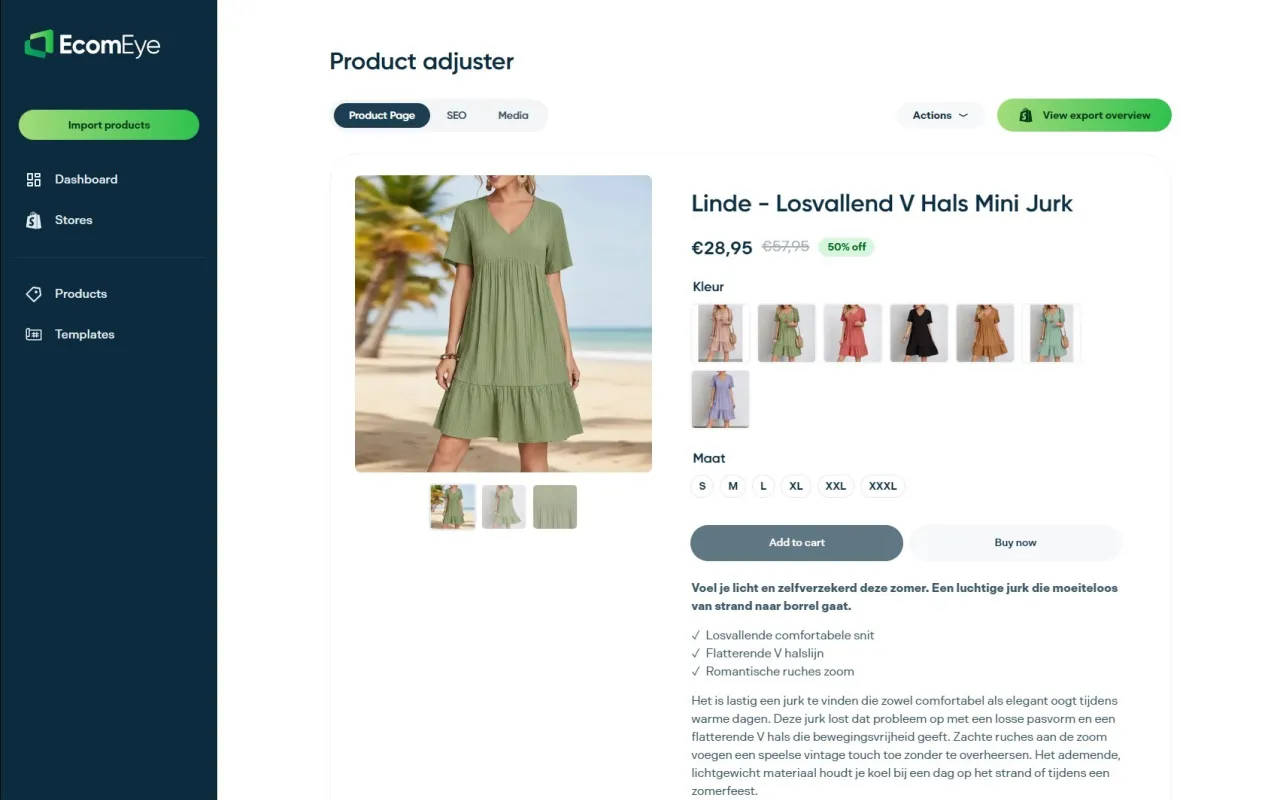
EcomEye was built specifically for this problem. Import products in bulk from AliExpress or competitor links, and EcomEye automatically generates optimised titles, clean descriptions, SEO-ready metadata, high-quality AI product images, and multi-language pages. Every output is copyright-safe and unique, solving the duplicate content issue at its root. No rewriting. No copyright risk. No manual work. Export directly to Shopify in one click and let the metadata work for you from day one. Visit EcomEye to see how it handles your entire product catalogue.
Frequently asked questions
How long should meta descriptions be on Shopify dropshipping product pages?
Meta descriptions should be between 140 and 160 characters for optimal display and click-through impact. Anything longer gets truncated in search results, cutting off your call to action.
Does Shopify automatically add canonical tags to my products?
Shopify does add canonical tags automatically, but manual verification is essential for variant and collection pages where duplication risks are highest. Do not assume the defaults are sufficient.
Why is unique metadata essential in dropshipping?
Unique metadata prevents Google from treating your pages as duplicates of supplier or competitor content. Stores that rewrite titles and descriptions uniquely avoid the canonical override issues that cause significant traffic drops.
What is the typical CTR increase after optimising Shopify metadata?
Shop owners consistently see CTR increases of 20 to 40% after optimising meta titles and descriptions, with some reporting a 40% organic click increase from metadata fixes alone.
Can I bulk-edit metadata for thousands of dropshipping items?
Yes. Bulk tools and apps for Shopify make large-scale metadata editing practical, provided you ensure each output remains unique rather than templated across similar products.
Ready to boost your product pages?
Generate high-converting, SEO-optimized product pages in bulk using AI automation used by e-commerce experts.
No credit card required