Workflow for global product listings: 2026 guide
Unlock a seamless workflow for global product listings in 2026. Streamline data management and expand your reach with expert insights!

Workflow for global product listings: 2026 guide

TL;DR:
- A structured global product listing workflow relies on a central PIM system, automation scripts, and post-upload verification to maintain accuracy. Proper data ownership, attribute design, and regular template updates are essential to prevent silent failures and scaling issues. Investing in organizational agreements upfront and verifying live data after uploads ensures reliable international marketplace listings.
A workflow for global product listings is the structured process by which product data is created, validated, localised, and distributed to multiple international marketplaces from a single authoritative source. Without this structure, product managers waste hours reconciling fragmented data across platforms like Amazon Seller Central, Shopify, and regional catalogues. The core of any reliable international product management system is a Product Information Management (PIM) tool, an ERP for operational data, and marketplace APIs that connect them. Get this architecture right and you cut time-to-market, reduce listing errors, and scale across borders without rebuilding your process from scratch each time.
What are the key components of a global product listing workflow?
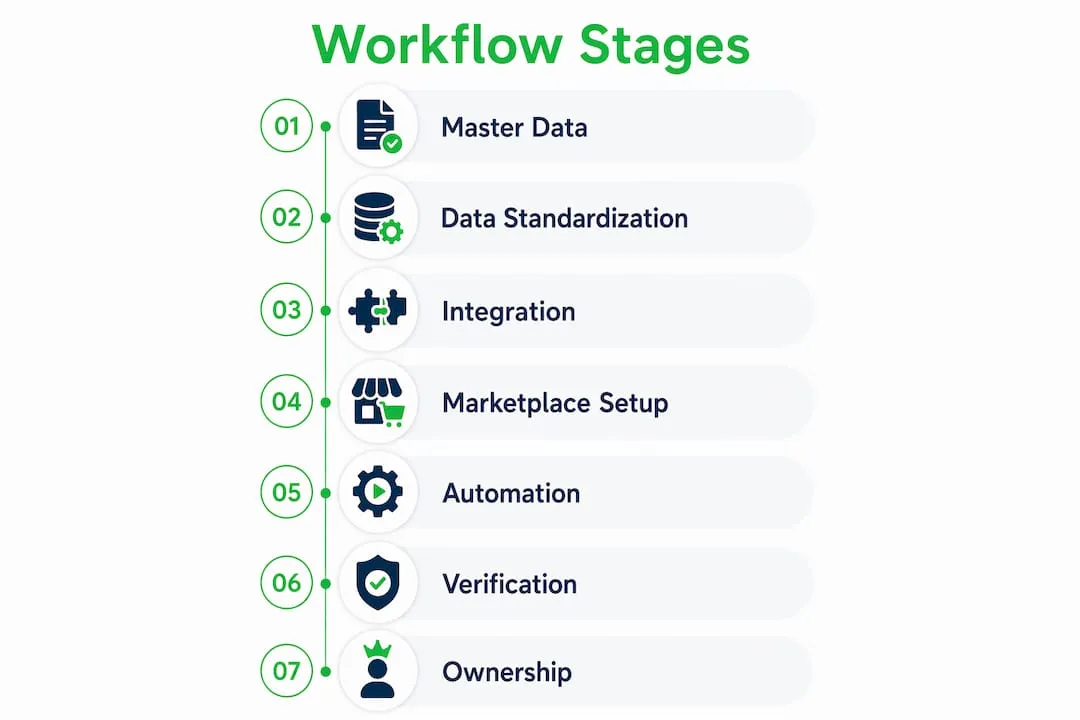
The foundation of any scalable ecommerce product workflow is a single, authoritative master data repository. This is typically a PIM system such as Inriver or Akeneo, which holds all marketing content, product descriptions, images, and regulatory attributes. Without this central source, teams end up maintaining parallel spreadsheets per market, which creates version conflicts and silent errors that are difficult to trace.

Data standardisation is the next prerequisite. Every attribute, from product dimensions to material composition, must follow a consistent taxonomy before you attempt to distribute listings across markets. A product labelled “500ml” in one system and “0.5L” in another will fail validation on marketplaces that enforce strict unit formats. Taxonomy alignment is unglamorous work, but attribute design complexity is the primary source of integration failure in global catalogues, not the workflow execution itself.
Integration with ERP and DAM (Digital Asset Management) systems completes the technical stack. The ERP supplies operational data such as stock levels, pricing, and logistics codes. The DAM holds approved image assets. Your PIM pulls from both, acting as the assembly point before data flows outward to marketplace dashboards.
Account setup across target marketplaces is a practical prerequisite that teams often underestimate. Amazon global selling onboarding takes roughly 15 minutes and requires ID, address proof, and a payment method. That is straightforward, but multiply it across Amazon Europe, Amazon Japan, and regional platforms and the administrative overhead adds up. Completing this before your workflow goes live prevents last-minute blockers.
| Tool | Primary function | Owned by |
|---|---|---|
| PIM (e.g. Inriver, Akeneo) | Marketing content and regulatory attributes | Marketing/product team |
| ERP (e.g. Dynamics 365) | Operational data: pricing, stock, logistics | Operations/finance |
| DAM | Approved digital assets and images | Creative/brand team |
| Marketplace dashboard | Listing submission and performance monitoring | Channel/ecommerce team |
Pro Tip: Map your attribute ownership before you configure any integration. Knowing which team controls each data field prevents conflicts when PIM and ERP sync cycles overlap.
How do you build and automate the content transformation process?
Once your master data is clean and centralised, the next stage is transforming it into marketplace-specific listings. Each platform has its own flatfile template, required fields, character limits, and validation rules. Amazon’s flatfiles differ from those used by Zalando, eBay, or a Shopify export. The practical approach is to maintain a neutral master data format and write transformation scripts or use middleware to generate each marketplace’s required format on demand.
Automation scripts can handle the mechanical work: category mapping, unit conversions, field truncation, and language substitution. Automation scripts generate uploads while flagging fields that require manual review, which balances speed with compliance. This semi-automated model outperforms both extremes. Fully manual workflows cannot scale beyond a few hundred SKUs. Fully automated workflows miss compliance-sensitive fields and create catalogue-wide errors that are expensive to fix.
The localisation layer sits inside this transformation stage. Language translation is not simply swapping words. Product names, marketing claims, and safety warnings must comply with local regulations. German listings require specific legal disclaimers. French law mandates French-language product descriptions. Build these rules into your transformation logic rather than relying on translators to catch them post-upload. For practical guidance on adapting content per region, the Ecom-eye guide on global SEO localisation covers region-specific content adaptation in detail.
Here is a repeatable sequence for the transformation and submission stage:
- Export the neutral master data file from your PIM for the target market.
- Run the transformation script to generate the marketplace-specific flatfile or API payload.
- Validate the output against the current marketplace template, checking required fields and character limits.
- Route compliance-sensitive fields (regulatory text, translated warnings, age restrictions) to a human reviewer.
- Submit via the marketplace API or bulk upload tool after reviewer sign-off.
- Log the submission timestamp and version number for traceability.
Pro Tip: Treat every marketplace template as a contract with an expiry date. Template version drift is one of the most common causes of silent listing failures. Download a fresh template before each major upload cycle.
What verification steps ensure accuracy after upload?
Submitting a listing does not mean it went live correctly. Marketplaces process bulk uploads asynchronously, and error reports do not catch every failure. The most reliable approach is post-upload verification via APIs within 24 hours of submission, pulling live listing data and comparing it against what you submitted. This comparison catches silent failures that the upload confirmation screen never flags.
There are three categories of upload error worth distinguishing. Validation failures are caught immediately and returned in the error report. Processing failures occur after the file is accepted but before the listing goes live. Silent failures are the most dangerous: the marketplace accepts the data, confirms the upload, but the listing displays incorrectly or fails to index. Only a live data pull via the Amazon SP-API or equivalent will surface these.
Build the verification step into your workflow as a mandatory gate, not an optional audit. Assign a team member or automated script to pull live data, run a field-by-field comparison, and flag discrepancies into a shared issue log. Resolve flagged items within 48 hours to prevent ranking loss or customer-facing errors.
Comparing submitted data against live marketplace data is the only reliable method for detecting silent failures. Error reports alone are insufficient for maintaining listing accuracy at scale.
For teams managing bulk uploads across Shopify and Amazon simultaneously, the Ecom-eye article on validating live product data covers post-upload checks in a dropshipping context.
How do leading brands manage data ownership across global markets?
The most scalable approach to multinational listing guidelines is the global master and local release model. A single global product master record holds all shared attributes: product name, core specifications, brand assets, and base regulatory data. Each legal entity or regional market then receives a released variant of that master, configured with local pricing, language, tax codes, and market-specific compliance fields. Creating a global master and releasing variants per legal entity prevents duplication errors while maintaining a single source of truth.
The ownership split between PIM and ERP is what makes this model work in practice. PIM owns marketing content and regulatory attributes. ERP owns operational data: stock levels, cost prices, and logistics parameters. These two systems sync on a defined schedule via integration contracts, which are agreed-upon field mappings and update frequencies. When the sync is well-designed, a product manager updating a description in PIM does not accidentally overwrite a price in ERP, and vice versa.
| Attribute type | System of record | Update frequency |
|---|---|---|
| Product title and description | PIM | Per campaign cycle |
| Regulatory and compliance text | PIM | Per market legislation update |
| Pricing and cost data | ERP | Daily or real-time |
| Stock availability | ERP | Real-time |
| Approved product images | DAM | Per creative refresh |
Brødrene A&O Johansen, a Danish distributor, reduced product launch time from days to hours after centralising product data in Inriver PIM integrated with their ERP. That speed gain came directly from eliminating the manual handoffs between teams that previously held data in separate systems. The lesson for product managers is that the architecture investment pays back in launch velocity, not just data quality.
For teams scaling across multiple countries simultaneously, the Ecom-eye guide on multi-country dropshipping workflows covers coordination and automation of updates across global platforms.
What are the most common pitfalls in global listing workflows?
The majority of failures in a global product listing process are not technical. They are organisational. Fragmented data ownership, where marketing holds some attributes and operations holds others with no agreed sync, is the single most common root cause of listing errors at scale.
The following pitfalls appear repeatedly across teams managing international catalogues:
- Template version drift: Using an outdated marketplace flatfile causes silent failures. Marketplaces update their templates without prominent announcements.
- Excessive manual intervention: When every listing requires human editing before upload, the workflow cannot scale. Manual steps should be reserved for compliance-sensitive fields only.
- Missing traceability: Without logging submission timestamps, template versions, and reviewer sign-offs, diagnosing a listing error becomes a forensic exercise.
- Compliance oversights in localisation: Translating product copy without checking local regulatory requirements creates legal exposure, particularly in the EU and markets with strict labelling laws.
- No performance metrics on the workflow itself: Teams measure listing quality but rarely measure workflow performance. Track error rate per upload cycle, time from data entry to live listing, and discrepancy resolution time.
Centralising product data in a connected platform resolved fragmentation for one brand managing over 200,000 SKUs across 20 legacy systems. That scale of consolidation is not typical, but the principle applies at any catalogue size: one source of truth removes the coordination overhead that slows every other step.
Key takeaways
A reliable workflow for global product listings requires a centralised PIM, automated transformation with human review gates, and mandatory post-upload verification to maintain accuracy across every market.
| Point | Details |
|---|---|
| Centralise before you distribute | A PIM system is the non-negotiable foundation for managing product data across multiple markets without fragmentation. |
| Automate transformation, not compliance | Use scripts to generate marketplace flatfiles, but route regulatory and translated fields to human reviewers before submission. |
| Verify after every upload | Pull live listing data via API within 24 hours to catch silent failures that error reports miss. |
| Separate PIM and ERP ownership | PIM controls marketing content; ERP controls operational data. Defined integration contracts prevent data conflicts. |
| Treat templates as contracts | Download fresh marketplace templates before each upload cycle to avoid version drift causing silent listing failures. |
Why attribute design is where global workflows actually win or lose
Most articles on international product management focus on the tools: which PIM to buy, which API to use, which marketplace to prioritise. In my experience, the tools are rarely the bottleneck. The real work happens before any system is configured, in the decisions about attribute design and data ownership.
I have seen teams invest heavily in Inriver or Akeneo and still produce chaotic listings because nobody agreed upfront on who owns the “product name” field when marketing and operations have different conventions. The integration contract between PIM and ERP sounds like a technical document, but it is really an organisational agreement. Getting the right people in the room to sign off on field ownership is harder than writing the sync script.
The other thing I would push back on is the instinct to automate everything as quickly as possible. Full automation feels like the goal, but a semi-automated workflow with well-placed human review gates is more reliable at scale. Compliance fields, translated safety warnings, and market-specific regulatory text are not candidates for auto-population. The cost of a catalogue-wide error in these fields far exceeds the time saved by removing the human check.
The brands that scale globally without constant firefighting are the ones that invested time upfront in attribute taxonomy, ownership contracts, and verification loops. The workflow execution itself is almost mechanical once that foundation is solid.
— Koen
Take your global listings further with Ecom-eye

If you are managing product listings across multiple markets and spending too much time rewriting, reformatting, and fixing duplicate content issues, Ecom-eye is built for exactly that problem. The platform imports products in bulk from AliExpress or competitor links and automatically generates SEO-optimised titles, clean descriptions, multi-language pages, and AI product images. Everything exports directly to Shopify in one click, with no copyright risk and no manual rewriting. For dropshipping stores scaling internationally, this is the bulk AI product lister that removes the bottleneck between product sourcing and live listings. You can also explore Amazon scaling strategies to complement your listing workflow with broader channel growth tactics.
FAQ
What is a workflow for global product listings?
A workflow for global product listings is the structured process for creating, validating, localising, and distributing product data to multiple international marketplaces from a single centralised source. It typically involves a PIM system, ERP integration, transformation scripts, and post-upload verification steps.
Which tools are needed for international product management?
The core stack includes a PIM system such as Inriver or Akeneo for marketing content, an ERP such as Dynamics 365 for operational data, a DAM for approved images, and marketplace APIs for submission and verification. Each tool serves a distinct ownership role within the workflow.
How do you prevent silent listing failures after bulk uploads?
Pull live listing data via the marketplace API within 24 hours of upload and compare it field by field against your submitted data. Silent failures are not captured in standard error reports and can only be detected through direct comparison of submitted versus live data.
How long does Amazon global selling onboarding take?
Amazon global selling onboarding takes approximately 15 minutes and requires ID, address proof, and a payment method. Completing this for each target marketplace before your workflow goes live prevents last-minute blockers when you are ready to scale.
What is the biggest risk in automating a global listing workflow?
The biggest risk is auto-populating compliance-sensitive fields such as regulatory text, translated safety warnings, and market-specific legal disclaimers. Automation should flag these fields for human review rather than populate them automatically, as catalogue-wide errors in these fields carry significant legal and operational consequences.
Ready to boost your product pages?
Generate high-converting, SEO-optimized product pages in bulk using AI automation used by e-commerce experts.
No credit card required