Bulk listing automation steps: your 2026 efficiency guide
Discover effective bulk listing automation steps to boost your e-commerce efficiency by up to 87%. Streamline uploads with proven tools!

Bulk listing automation steps: your 2026 efficiency guide

TL;DR:
- Bulk listing automation cuts e-commerce setup time by over 80 percent through AI tools and standardized data.
- Preparation, quality control, and gradual scaling are essential for successful large-scale product uploads.
Bulk listing automation is the process of uploading large numbers of product listings to e-commerce platforms quickly and accurately using AI tools, CSV templates, and platform APIs, rather than entering each item by hand. Done correctly, the bulk listing automation steps covered in this guide reduce listing time by approximately 80–87% compared to manual entry. That means a catalogue of 50 products that once took a full working day can be live within 1–3 hours. Tools like Ecom-eye, AliExpress importers, and Shopify’s bulk upload system make this achievable for any store owner, regardless of technical background.
What tools and preparation do you need to automate bulk listings?
Preparation is the single biggest factor that separates a smooth bulk upload from a failed batch. Before you touch any automation tool, your product data must be clean, consistent, and structured.
The foundation is a standardised inventory file. Every product needs a unique SKU, a consistent category label, at least one high-quality image URL, and a base price. Missing any of these fields causes platform rejection before the upload even begins. Spreadsheet software like Google Sheets or Microsoft Excel works well for this stage, provided you use the platform’s own template rather than building one from scratch.
| Tool type | Primary use | Key prerequisite |
|---|---|---|
| AI listing software (e.g. Ecom-eye) | Auto-generate titles, descriptions, images | Product images or supplier URLs |
| CSV template (platform-specific) | Bulk upload to marketplace or Shopify | Completed template with no renamed columns |
| Marketplace API (e.g. Amazon SP-API) | Large-scale catalogue management | Developer credentials and approved access |
| Spreadsheet software | Data organisation and validation | Consistent SKU and category naming |
CSV uploads should cap at 1,000 rows per file to avoid processing errors and timeouts. That is not a suggestion. Exceeding this limit frequently causes unpredictable data loss mid-batch, meaning you may not know which listings failed. Split large catalogues into separate files before you start.
One detail that trips up experienced sellers: renaming columns or deleting hidden instruction sheets in a platform’s CSV template causes complete batch rejection. TikTok Shop, for example, rejects entire files if required fields or formatting do not comply. Download a fresh template for every new upload session and never modify its structure.
Pro Tip: Run a test upload of 5–10 products before committing your full catalogue. This catches template errors, image link failures, and category mismatches before they affect hundreds of listings.
Step-by-step bulk listing automation steps that actually work
The most efficient bulk upload process follows a photo-first AI workflow rather than a text-first CSV approach. Here is the full sequence.
1. Gather and organise your product images
Collect all product images into a single folder, named consistently by SKU. Image quality directly affects AI output quality. Blurry or watermarked images produce weak titles and inaccurate descriptions.

2. Run images through an AI listing tool
AI-powered photo-first workflows auto-generate titles, categories, descriptions, and pricing from product images in under a minute per batch. Tools like Ecom-eye accept AliExpress or competitor URLs and produce SEO-ready content without manual rewriting. The seller’s role shifts from typist to quality controller.
3. Set up automated pricing formulas
Configure your pricing logic before any listing goes live. A standard formula is: supplier cost × 1.30, plus shipping, plus platform fees, with a minimum profit floor that rejects any listing that falls below it. Automating pricing logic globally before listing reduces human error and protects margins across every product in the batch.
4. Map categories and item specifics
Most AI tools suggest categories automatically, but you should review mappings for accuracy. Incorrect categories reduce search visibility and can trigger platform policy violations. Build a category mapping table in your spreadsheet so the same product type always maps to the same category.
5. Export and upload to your platform
Export your completed listings as a CSV or push them directly via API. For Shopify, Ecom-eye exports in one click. For marketplaces, use the platform’s bulk upload portal and upload your pre-validated CSV file.
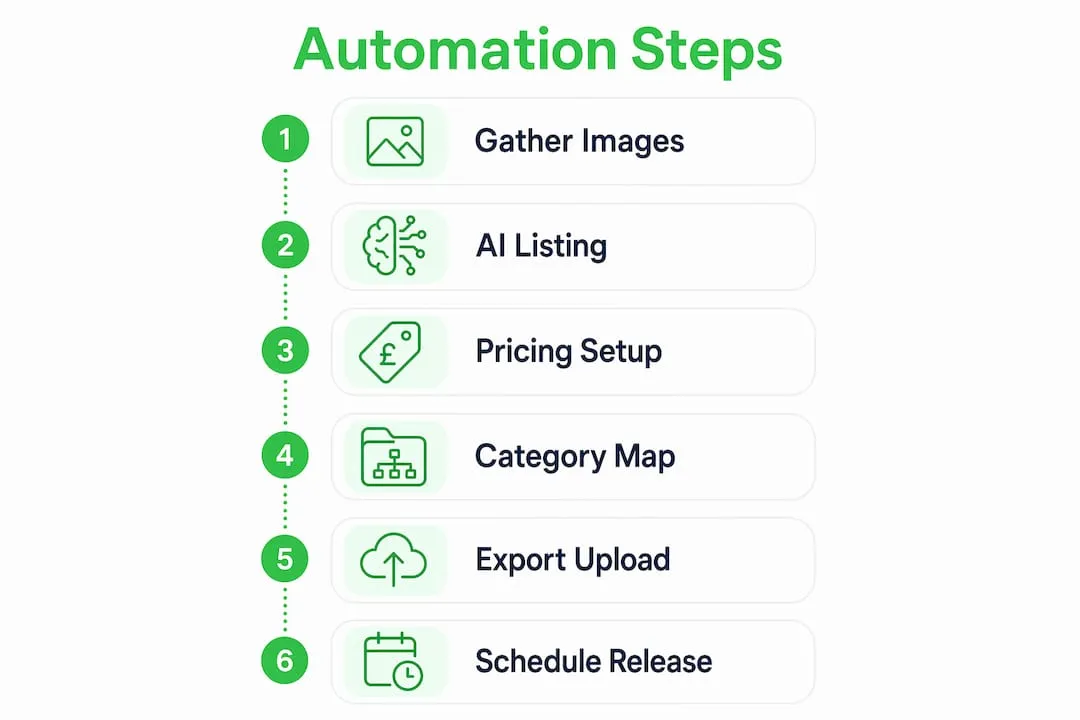
6. Schedule and stagger your listings
Publishing too many listings too quickly from a new store triggers platform fraud flags, leading to payout freezes lasting 7–21 days. Start with 40–60 listings per day and scale upward only after you have established a positive trading history. This applies to eBay, TikTok Shop, and Amazon alike.
Pro Tip: Schedule listings to go live at peak browsing times for your target market. For UK-based stores selling to British consumers, mid-morning on weekdays consistently outperforms late-night uploads in early visibility.
How to conduct quality control after a bulk upload
Quality control is not optional. A bulk upload that looks successful can still contain dozens of silent errors across variations, formatting, and mobile display.
Spot-check 10–15% of listings post-upload by selecting items at random rather than reviewing only the first or last entries in your file. Random sampling catches errors that cluster in the middle of large batches, which sequential review misses entirely. Check that titles display correctly, images load, prices reflect your formula, and variations (size, colour) are mapped accurately.
Common issues to look for after upload:
- Truncated titles caused by character limit overruns
- Broken image URLs from expired or private hosting links
- Incorrect category assignments on products with ambiguous names
- Missing item specifics that reduce search ranking
- Price formula errors on products with unusual shipping costs
- Variation mismatches where size “L” maps to the wrong stock level
Platform error reports are your first diagnostic tool. Most marketplaces generate a downloadable error log after a bulk upload. Read it line by line rather than skimming for a summary count. A single misconfigured field can cascade across every product in a category.
Pro Tip: Check listings on mobile before promoting them. Mobile display issues, such as broken image stacks or truncated bullet points, are invisible on desktop and account for a disproportionate share of poor conversion rates.
How to scale bulk listing automation as your store grows
Scaling automation is not simply doing more of the same. The tools and methods that work for 50 listings break down at 500, and break down again at 5,000.
For stores moving beyond a few hundred listings, Amazon bulk uploads for 500+ items require category-specific flat files or SP-API integration rather than Seller Central’s web interface. SP-API is preferred over the Listings API because it avoids rate-limiting errors that cause partial uploads. Relying on a web UI at this scale is not a professional approach. It is a bottleneck.
| Approach | Manual scaling | Automated scaling |
|---|---|---|
| Listing creation | One product at a time, 18–26 minutes each | Batch processing, 30–60 seconds per item |
| Pricing updates | Manual edits across individual listings | Rule-based repricing applied across catalogue |
| Inventory sync | Periodic manual checks | Real-time API sync with supplier stock feeds |
| Error detection | Noticed only when a customer reports it | Automated error logs and threshold alerts |
| Catalogue growth | Limited by available hours | Limited only by supplier catalogue size |
Inventory monitoring becomes critical at scale. An automated ecommerce workflow that syncs supplier stock in real time prevents overselling, which is one of the fastest ways to accumulate negative feedback and platform penalties. Set up automatic repricing rules that adjust prices when supplier costs change, rather than reviewing them manually each week.
For new stores scaling up, the staggered release strategy remains the safest path. Build a positive account history with 40–60 daily listings for the first two to four weeks. Then increase in increments of 20–30 listings per day, monitoring account health metrics after each increase. Platforms reward consistent, low-risk behaviour with better organic visibility.
Key takeaways
Bulk listing automation works best when preparation, AI tooling, and quality control operate as a single connected workflow rather than three separate tasks.
| Point | Details |
|---|---|
| Preparation determines success | Clean SKU data, consistent images, and unmodified CSV templates prevent batch rejection before upload. |
| AI tools cut listing time dramatically | Photo-first workflows reduce per-item listing time from 18–26 minutes to under 60 seconds. |
| Pricing logic must be automated first | Set margin floors and fee buffers globally before any listing goes live to protect profitability. |
| Spot-check 10–15% post-upload | Random sampling catches errors in variations, formatting, and mobile display that sequential review misses. |
| Stagger listings on new accounts | Starting at 40–60 listings per day avoids fraud flags and payout freezes on new store accounts. |
What I have learned from running bulk listing workflows
The biggest mistake I see store owners make is treating bulk listing as a data entry problem. They spend hours perfecting their CSV file and then wonder why their listings still underperform. The real problem is almost always upstream: poor images, inconsistent category logic, or pricing formulas that were never tested against real supplier costs.
The shift to AI-powered, photo-first workflows changed how I think about this entirely. When you feed a tool like Ecom-eye a product image and get back a complete, SEO-ready listing in under a minute, the bottleneck moves from creation to curation. You are no longer asking “how do I write this title?” You are asking “is this title accurate and does it match what my customer actually searches for?” That is a much better use of your time.
I have also found that the sellers who scale fastest are not the ones with the most products. They are the ones with the cleanest data. A catalogue of 200 well-structured listings with accurate categories, tested pricing formulas, and verified images consistently outperforms a catalogue of 2,000 listings built from rushed CSV exports. Quality control is not a final step. It is the discipline that makes every other step worth doing.
For Shopify dropshippers specifically, the bulk optimisation workflow that combines AI-generated content with direct Shopify export removes the two biggest time sinks: rewriting supplier descriptions and reformatting images. Once you have that pipeline running cleanly, scaling from 50 to 500 products becomes a question of supplier relationships, not hours in front of a spreadsheet.
— Koen
How Ecom-eye handles bulk listing automation for Shopify stores
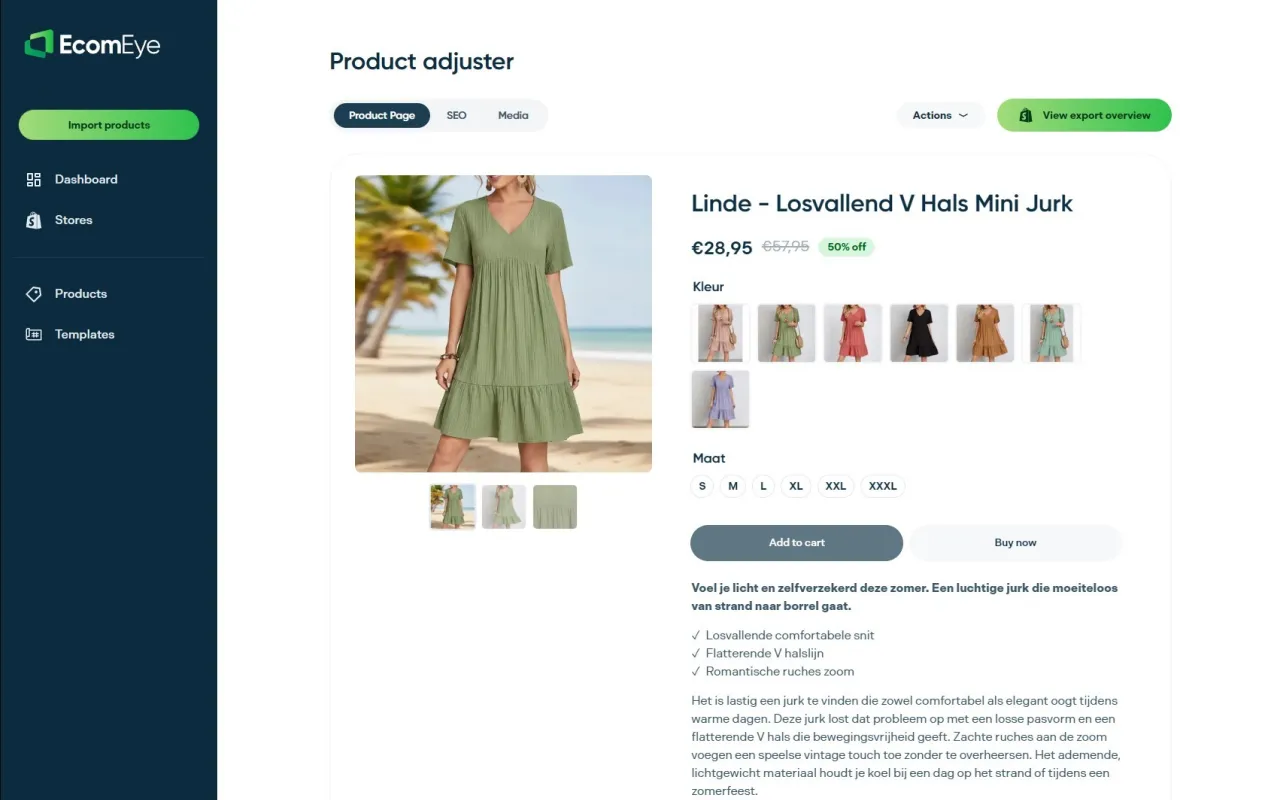
Ecom-eye is an AI-powered bulk listing platform built specifically for Shopify dropshippers who need to move fast without copying competitor content. Import products in bulk from AliExpress or competitor URLs, and Ecom-eye automatically generates SEO-ready titles, clean descriptions, copyright-safe AI product images, and multi-language pages. There is no manual rewriting and no duplicate content risk. The entire output exports directly to Shopify in one click. For store owners who want to put the bulk listing automation steps in this guide to work immediately, Ecom-eye is the fastest way to go from product idea to live listing at scale.
FAQ
How much time does bulk listing automation actually save?
Bulk automation reduces listing time by 80–87% compared to manual entry. A product that takes 18–26 minutes to list manually takes 30–60 seconds with AI tools.
How many rows should a CSV bulk upload file contain?
Keep CSV files to 1,000 rows or fewer per upload. Larger files frequently cause processing errors and unpredictable data loss during upload.
Why is my bulk upload being rejected by the platform?
The most common cause is a modified CSV template. Renamed columns or deleted hidden sheets cause complete batch rejection on platforms like TikTok Shop and Amazon. Always use a fresh, unmodified template.
How many listings should a new store publish per day?
New stores should start with 40–60 listings per day. Publishing too many listings too quickly triggers fraud flags that can freeze payouts for 7–21 days.
When should I switch from CSV uploads to API integration?
Switch to API integration when your catalogue exceeds 500 products. Amazon SP-API is the professional standard for large catalogues and avoids the rate-limiting errors that affect the Listings API.
Ready to boost your product pages?
Generate high-converting, SEO-optimized product pages in bulk using AI automation used by e-commerce experts.
No credit card required