Automated ecommerce workflows: boost SEO and efficiency
Discover automated ecommerce workflows that cut product listing time by 70%, boost SEO traffic 30 to 50%, and streamline dropshipping operations for Shopify stores.

Managing a Shopify dropshipping store means juggling hundreds of product pages, SEO metadata, inventory updates, and order fulfilment tasks. Manual workflows consume hours each week, leaving little time for growth strategies. Automated ecommerce workflows slash this burden by handling repetitive tasks like product importing, SEO optimisation, and inventory synchronisation. This article explores practical automation examples that save time, improve search rankings, and boost conversions for dropshipping entrepreneurs.
Table of Contents
- Criteria For Selecting Effective Ecommerce Automation Workflows
- Automated Product Page Creation And SEO Optimisation
- Real-Time Inventory And Order Fulfilment Automation
- Overcoming Shopify SEO Challenges With Automation
- Comparison Of Top Automated Ecommerce Workflow Tools For Dropshipping
- Streamline Your Dropshipping Business With EcomEye
- Frequently Asked Questions
Key takeaways
| Point | Details |
|---|---|
| Time savings | Automation cuts product listing time by up to 70%, freeing resources for strategy and marketing |
| SEO growth | Automated SEO optimisation can boost organic traffic by 30 to 50% within six months |
| Inventory accuracy | Real-time sync reduces stock issues and order cancellations by 10 to 15% |
| Faster fulfilment | Order routing automation halves fulfilment time and lowers manual errors |
| Content efficiency | AI tools reduce content creation time by 40 to 60%, accelerating page publication |
Criteria for selecting effective ecommerce automation workflows
Choosing the right automation workflows requires understanding how triggers, actions, and conditions connect to streamline your dropshipping operations. Automation relies on triggers, actions, and conditions connected via visual workflow builders like Shopify Flow. A trigger might be a new product import, an action could generate SEO metadata, and a condition ensures the workflow only runs for specific product types. This logic allows you to automate complex sequences without coding.
Focus on automating frequent, high-impact tasks that consume the most time. Prioritise automations in product importing, inventory syncing, order routing, and customer notifications for high impact. Product importing from AliExpress or competitor links, real-time inventory updates, dynamic pricing adjustments, and automated order confirmations deliver the greatest efficiency gains. These workflows reduce manual data entry, prevent overselling, and improve customer satisfaction.
Platform capabilities and governance also matter. Shopify’s metafield system allows you to store custom product data like SEO keywords, supplier IDs, or variant-specific details. Ensure your automation tool can read and write metafields to maintain data integrity. Shopify page automation workflows should respect your store’s existing structure and SEO settings.
Maintain brand voice by reviewing AI-generated content before publication. Automation speeds up content creation, but quality control ensures descriptions, titles, and metadata align with your brand tone. Set up approval steps in your workflow for high-value products or new collections.
Pro Tip: Start with one workflow, measure its impact, then expand. Automating product imports first often delivers the quickest return on investment.
Automated product page creation and SEO optimisation
Automating product page creation transforms how dropshipping stores scale. Automated product page creation reduces listing time by up to 70%, enabling resource reallocation to marketing and customer service. Instead of manually copying product details from AliExpress, automation pulls data, generates unique descriptions, and publishes pages in minutes. This workflow typically includes importing product images, extracting specifications, creating SEO-friendly titles, and setting pricing rules.

SEO optimisation through automation delivers measurable traffic and conversion gains. Automated SEO optimisation can increase organic traffic by 30 to 50% and conversions by 15 to 25% within six months. Tools generate meta titles, descriptions, and alt text based on keyword research and competitor analysis. They also insert structured data markup to improve rich snippet eligibility. This consistent optimisation across hundreds of products would take weeks manually.
Real-world results validate these benefits. Glowtify cut SEO optimisation time by over 90%, optimising 30 plus product listings in under an hour. The store saw improved Google rankings and increased organic sessions within weeks. AI-generated descriptions integrate target keywords naturally while maintaining readability, a balance difficult to achieve at scale manually.
Best practices involve setting quality gates. Review AI output for the first 10 to 20 products to ensure descriptions match your brand voice. Adjust templates based on product categories, as electronics need different language than fashion items. Use AI product page creation workflows that support multi-language generation for international markets.
Pro Tip: Combine automation with A/B testing. Generate multiple description variants, test them, then use the winning format as your template for future imports.
Implementing Shopify store SEO features through automation ensures consistent optimisation across your entire catalogue, not just new products.
Real-time inventory and order fulfilment automation
Inventory synchronisation prevents the costly mistake of selling out-of-stock products. Real-time inventory synchronization reduces order cancellations by 10 to 15%. When a supplier’s stock changes, automated workflows update your Shopify inventory instantly, preventing overselling and the negative reviews that follow. This synchronisation runs continuously, checking supplier APIs or data feeds every hour or even every few minutes.
Accuracy depends on your sync method. Dropshipping apps using hourly polling or webhooks cut overselling incidents by 80%. Webhooks provide instant updates when suppliers change inventory, whilst hourly polling checks stock levels on a schedule. Webhooks offer better accuracy but require supplier API support. Polling works with any data source but introduces slight delays.
Order routing automation connects incoming orders to the right suppliers automatically. Automated order routing halves fulfilment time and lowers manual errors. When a customer places an order, the workflow identifies which supplier stocks each product, sends purchase orders, and updates tracking information. This eliminates the manual step of logging into supplier portals and copying order details.
Key workflow steps for inventory and fulfilment automation:
- Connect supplier data feeds or APIs to your automation platform
- Set inventory sync frequency based on product turnover rates
- Configure order routing rules by supplier, product type, or shipping destination
- Establish alerts for sync failures or low stock thresholds
- Monitor dashboard metrics like sync accuracy and fulfilment speed
| Automation Type | Update Frequency | Accuracy Rate | Setup Complexity |
|---|---|---|---|
| Webhook-based sync | Real-time | 95 to 99% | Medium to high |
| Hourly polling | Every 60 minutes | 85 to 90% | Low to medium |
| Daily batch updates | Once per day | 70 to 80% | Low |
| Manual updates | As needed | Variable | None |
Pro Tip: Set up low stock alerts at 10 units to give yourself time to find alternative suppliers before running out completely.
Understanding Shopify dropshipping basics helps you design workflows that align with platform capabilities and avoid common pitfalls.
Overcoming Shopify SEO challenges with automation
Shopify’s architecture creates specific SEO obstacles that automation can address. Shopify creates duplicate URLs for products in multiple collections, diluting SEO relevance. A product in three collections generates three URLs, confusing search engines about which version to rank. This duplicate content issue fragments your SEO authority across multiple pages.
The platform’s rigid URL structure limits custom category hierarchies. Shopify uses /collections/category-name/products/product-name, preventing deeper nesting like /category/subcategory/product. This flat structure makes it harder to build topical authority for specific product niches. Automation can partially compensate by generating breadcrumb schema and internal linking patterns that signal category relationships to Google.
Schema markup limitations also hamper rich results. Shopify’s default schema lacks variant data, reducing chances for rich results. Product variants like size or colour don’t appear in structured data, limiting your eligibility for detailed product snippets. Automated schema enhancement apps inject this missing data, improving your visibility in search results.
Code-level fixes require theme editing but deliver lasting benefits. Editing theme code to fix canonical tags and URL filters can mitigate duplicate content issues. Disable the ‘within current_collection’ filter in your theme’s liquid code to prevent collection-specific URLs. Set canonical tags to point to your preferred product URL, consolidating SEO signals.
Automated workflows complement these fixes:
- Generate canonical tags pointing to primary product URLs during bulk imports
- Create 301 redirects from old collection URLs to consolidated product pages
- Monitor for duplicate content using automated crawlers and alert you to new issues
- Inject enhanced schema markup for variants, reviews, and availability
| SEO Challenge | Manual Fix Time | Automated Solution | Time Saved |
|---|---|---|---|
| Duplicate product URLs | 2 to 3 hours per 100 products | Canonical tag automation | 90% |
| Missing variant schema | 1 hour per product | Schema injection app | 95% |
| Broken internal links | 4 to 5 hours monthly | Link monitoring workflow | 85% |
| Outdated meta descriptions | 30 minutes per product | AI metadata generation | 80% |
Implementing Shopify page SEO layouts through automation ensures consistent optimisation across your store. Combine Shopify SEO automation with manual audits quarterly to catch edge cases.
Comparison of top automated ecommerce workflow tools for dropshipping
Selecting the right automation platform depends on your specific workflow needs and technical comfort level. PickYourApp’s Dropshee Builder automates product importing, SEO metadata, and order handling. It excels at bulk product enrichment, pulling data from AliExpress and competitor sites, then generating unique descriptions and optimised titles. The tool also handles order automation, forwarding customer orders to suppliers automatically.
Glowtify focuses specifically on SEO optimisation and content generation. Glowtify drastically reduced SEO optimisation time for Gibou and improved rankings. Its AI analyses competitor keywords, generates meta tags, and creates product descriptions optimised for search intent. The platform suits stores prioritising organic traffic growth over operational automation.
Shopify Flow provides native workflow building within your Shopify admin. It connects triggers like new orders or inventory changes to actions like sending emails or updating tags. Flow requires more manual configuration than specialised dropshipping tools but offers deep integration with Shopify’s ecosystem. It works well for custom workflows that third-party apps don’t address.
Key features to compare:
- Product import sources: AliExpress, competitor URLs, CSV files, or API integrations
- SEO capabilities: Metadata generation, keyword research, schema markup, or content optimisation
- Inventory management: Real-time sync, stock alerts, price updates, or supplier switching
- Order automation: Supplier forwarding, tracking updates, customer notifications, or returns handling
- Pricing model: Monthly subscription, per-product fees, or transaction-based charges
| Tool | Best For | Product Import | SEO Features | Inventory Sync | Pricing |
|---|---|---|---|---|---|
| Dropshee Builder | Bulk importing and order automation | Excellent | Good | Good | Mid-range |
| Glowtify | SEO optimisation and content | Limited | Excellent | None | Premium |
| Shopify Flow | Custom workflows and integrations | Manual setup | Basic | Good | Free |
| EcomEye | AI product pages and bulk listing | Excellent | Excellent | Good | Flexible |
Consider your store’s current bottlenecks. If product importing consumes most of your time, prioritise tools with robust import features. If you struggle with SEO rankings, choose platforms emphasising metadata and content optimisation. Explore ecommerce automation tools to compare additional options beyond these top picks.
Pro Tip: Most platforms offer free trials. Test two or three tools with 10 to 20 products before committing to annual plans.
Review Shopify automation platforms to understand integration requirements and technical prerequisites before selecting your solution.
Streamline your dropshipping business with EcomEye
Managing product imports, SEO optimisation, and bulk listing manually limits your store’s growth potential. EcomEye automates these critical workflows, letting you focus on marketing and customer acquisition instead of data entry.
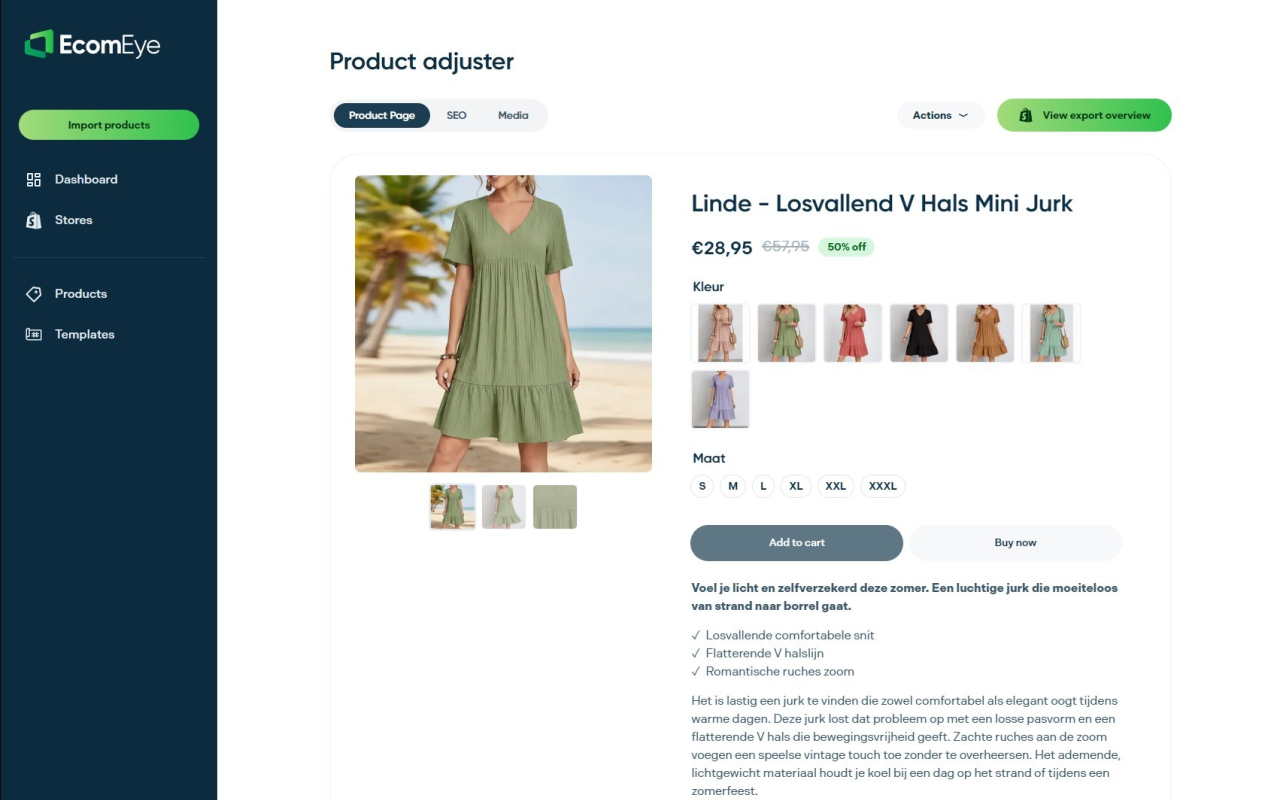
Import products from AliExpress or competitor links in bulk, then watch EcomEye generate copyright-safe descriptions, optimised titles, and SEO metadata automatically. The platform creates multi-language product pages, expanding your market reach without translation costs. Export everything to Shopify in one click, eliminating manual copy-pasting and reducing listing time by over 70%. EcomEye’s bulk AI product lister handles the repetitive work whilst you build your brand. Flexible pricing plans support stores at every stage, from testing your first products to scaling to thousands of SKUs.
Frequently asked questions
What are the most valuable automated ecommerce workflows for dropshipping stores?
Product importing, SEO metadata generation, inventory synchronisation, and order routing deliver the highest impact. These workflows eliminate hours of manual data entry, prevent stock issues, and improve search rankings. Focus automation efforts on tasks you perform daily or weekly for maximum time savings.
How do AI-generated product descriptions improve SEO performance?
AI tools analyse competitor keywords, search intent, and semantic relevance to create descriptions that rank well whilst remaining readable. They integrate target keywords naturally, vary sentence structure to avoid duplication, and generate unique content at scale. This consistent optimisation across hundreds of products would take weeks manually, making automation essential for competitive SEO.
What Shopify SEO challenges does automation help solve?
Automation addresses duplicate product URLs by generating canonical tags, fixes missing variant schema through structured data injection, and maintains consistent metadata across your catalogue. It also monitors for broken links, outdated descriptions, and technical SEO issues. Understanding AI product page creation helps you leverage these automated fixes effectively.
How often should inventory sync workflows run to prevent overselling?
Hourly polling provides good accuracy for most dropshipping stores, whilst webhook-based sync offers real-time updates for high-volume products. Daily batch updates work for slow-moving inventory but risk overselling popular items. Match sync frequency to your product turnover rates, using real-time sync for best sellers and hourly updates for standard inventory.
What factors should I consider when selecting an automation platform?
Evaluate product import sources, SEO capabilities, inventory sync methods, order automation features, and pricing models. Test platforms with a small product set before committing to annual plans. Consider your technical skill level, as some tools require coding knowledge whilst others offer visual workflow builders. Prioritise platforms that integrate seamlessly with your existing Shopify apps and workflows.
Ready to boost your product pages?
Generate high-converting, SEO-optimized product pages in bulk using AI automation used by e-commerce experts.
No credit card required