Collection vs Product Page SEO on Shopify: Which First?
Collection pages and product pages target different searches. Learn which to optimise first on Shopify, how to avoid cannibalisation, and how to scale safely.

Collection vs Product Page SEO on Shopify: Which First?

Collection pages and product pages answer different searches, so they need different SEO. Collection pages catch shoppers who are still browsing a category, such as “men’s leather boots”. Product pages catch shoppers who already know what they want. If you have limited time, start with the product pages that can convert today, then build collection pages into proper category hubs. If your catalogue is large, give your best-selling categories real collection copy early.
This guide explains the difference in search intent, how to decide where to spend your first hours, and how to stop the two page types fighting each other in Google. It is written for dropshippers and store owners who list products in bulk.
TL;DR
- Different intent: collection pages target broad category searches; product pages target narrow, close-to-purchase searches.
- Order of work: practitioners suggest product pages first when resources are tight, then collection pages once products perform. Stores with many similar products often see the biggest gap on collections.
- Biggest mistake: leaving collections as bare theme grids, or copying the same generic text across both page types, which causes cannibalisation.
- Bulk content risk: Google’s spam policies target scaled, low-value pages. Every page needs something a shopper cannot get from a supplier listing.
- Technical basics: canonical tags on filtered URLs, clean internal links from collection to product, and one clear target query per page.
Table of Contents
- What each page type is for
- Which should you optimise first?
- How to optimise a collection page
- How to optimise a product page
- Stop your pages competing with each other
- Scaling content without tripping Google’s spam policies
- Our view: product pages are the foundation, collections are the multiplier
- Where EcomEye fits
- A 30-day plan
- FAQ
- Sources
What each page type is for
A Shopify store has two page types that matter for commercial search, and they do different jobs.
A product page describes one item. It earns traffic from specific searches: a product name, a model, a feature combination, a brand plus item. The shopper is close to a decision, so the page has to answer practical questions: size, material, delivery, returns, price.
A collection page groups many products under one theme. It earns traffic from category-level searches, where the shopper is comparing options. Think “waterproof hiking boots” rather than one named boot.
A practitioner write-up on product versus collection SEO draws the same line: product pages suit narrow, bottom-of-funnel queries, while collection pages capture higher-volume, top-of-funnel demand. An agency guide goes further and argues that collection pages are where many stores leave organic traffic unclaimed, because they rely on a default grid with no category copy.
Both views are useful, and they do not really contradict each other. They answer different questions: “where is the demand?” and “what should I fix first with the time I have?”
| Product page | Collection page | |
|---|---|---|
| Typical query | Specific item, model or feature mix | Category or type of product |
| Shopper stage | Ready to compare and buy | Browsing and narrowing down |
| Search volume per query | Lower | Higher |
| Conversion per visit | Usually higher | Usually lower, but leads to many products |
| What Google needs | Unique description, specs, images, price, availability | Clear topic, helpful overview, well-linked products |
| Common failure | Supplier text copied across stores | Empty grid with a title and nothing else |
Which should you optimise first?
There is no universal answer, but there is a sensible way to choose.
When to start with product pages
Start here if your store is new, your catalogue is small, or you sell distinctive items that people search for by name or specific feature. The reasoning from the product-versus-collection analysis is that product pages carry more tangible, high-conversion demand and support richer structured data, such as reviews and price information. A product that ranks for a precise query brings visitors who are far more likely to buy.
For dropshippers, there is a second reason: product pages are where duplicate content usually starts. If your descriptions are lifted from a supplier or competitor, you are asking Google to choose between identical pages, and yours will rarely win. We cover that in detail in why product page uniqueness is vital for Shopify SEO.
When to start with collection pages
Start here if you sell many similar items, such as dozens of phone cases, rugs or jackets. No single product will out-rank the category term, and shoppers searching that term want to see a range. A well-built collection page can be the entry point for the whole category.
Also start here if your product pages are already decent and your category pages are bare. Writing an honest buying guide for one high-margin category is often a faster win than rewriting hundreds of product pages.
A simple decision rule
- List your five best-selling or highest-margin categories.
- For each, search the category term in Google. If the first page is mostly collection or category pages, shoppers want a range, so build the collection page.
- If the first page is mostly individual product pages or reviews, the intent is product-led, so strengthen the product pages.
- Do the product-page basics for every live item, then return to the collections in order of revenue.
This takes an afternoon and removes most of the guesswork.
How to optimise a collection page
A collection page should behave like a category hub. The aim is to give a shopper, and Google, a reason to treat this page as the best answer for the category.
Write a short intro that earns its place
Add a paragraph or two above the grid that says what the category covers, who it is for and how to choose. Keep it short enough that shoppers reach the products without scrolling past a wall of text. Then, if useful, add a longer buying guide below the grid, with sub-headings for the real decisions: materials, sizing, use cases, price ranges.
A useful test: could this text sit on a competitor’s collection page unchanged? If yes, it is not doing the job. Mention things specific to your range, such as which sizes you stock, which materials you favour and why, and what shoppers commonly get wrong.
Choose one primary query per collection
Give each collection a distinct target. “Women’s running shoes” and “women’s trainers” may be the same intent in the US, in which case you need one page, not two. Check what ranks, pick the phrase shoppers use most, and put it naturally in the title tag, the H1 and the first paragraph. Do not stuff it in.
Link down to products and sideways to related collections
The grid already links to products, but you can add contextual links inside the copy to your best items and to closely related sub-collections. This helps shoppers and clarifies the structure of your catalogue.
Build collections with rules, not by hand
Shopify lets you add products to collections manually or by conditions, using attributes such as tag, title or price with AND/OR logic. Automated collections save time at scale, but they only work if your product data is consistent. A tag typo means a product silently misses its category.
How to optimise a product page
Product pages need to be specific and unique. Our guide to Shopify product page structure goes through the layout; here is the short version.
- Title: include the product type and the attribute shoppers search for, in plain words. See our notes on product page titles for SEO and conversions.
- Description: lead with what the product does for the buyer, then specs. Avoid recycled supplier paragraphs. Our product description ideas cover formats that work.
- Images: original, well-named and with useful alt text. More in Shopify product images SEO.
- Structured data: Product markup helps search engines understand the page. Google’s guidance says structured data is useful but is not a substitute for people-first content.
- Variants: handle size and colour variants within one product page rather than creating near-identical pages.
Stop your pages competing with each other
Keyword cannibalisation happens when a collection and a product (or two collections) target the same phrase, so Google has no clear favourite. The guide to category versus product cannibalisation describes how stores unintentionally compete with themselves. The usual causes in Shopify are simple:
- A collection and its best product both use the same head term in the title.
- Product descriptions are copies of each other, so many products look like the same page.
- Several collections overlap almost entirely, for example “sale”, “best sellers” and “new” all containing the same items with the same copy.
A practical fix
- Map each target query to exactly one page. Keep a simple spreadsheet: query, URL, page type.
- Give collections the broad term and products the specific one. A collection owns “leather boots”; a product owns the specific style, colour or model.
- Rewrite or consolidate overlapping collections. If two collections serve the same intent, merge them and redirect.
- Use internal links with clear anchor text: collection to product, and product back to its parent collection.
Filters and sort parameters
Faceted navigation can create a new parameterised URL each time a shopper filters or sorts. Without correct canonical tags pointing back to the main collection, Google may index thin duplicate versions, which wastes crawl budget. Canonicalise filtered variations back to the original collection URL and check the result in Google Search Console.
Does the same product in several collections hurt SEO?
One of the discussions ranking for this keyword asks exactly that. In general, a product can sit in several collections because it can be reached from each, but you should have a single preferred product URL, and Shopify’s canonical handling is designed to point back to the main product page. Check that your theme outputs the canonical tag, and avoid creating collections only to hold the same products under slightly different names.
Scaling content without tripping Google’s spam policies
Bulk listing is where dropshippers get into trouble, and it affects both page types.
Google’s spam policies cover scaled content abuse and doorway abuse. Doorway abuse, in Google’s description, is about creating pages to rank for specific, similar queries that lead users to intermediate pages less useful than the final destination. If you spin up a collection for every tiny keyword variation, you risk looking exactly like that.
Google’s guidance on generative AI search also warns against creating separate pages for every slight variation and favours content with unique value over commodity content such as generic specs. Its people-first content guidance says ranking systems prioritise helpful information created for people, not to manipulate rankings.
What this means in practice:
- Fewer, better collections. Create a collection when there is a real shopper need and enough products to browse, not to catch one more keyword.
- Real differences between pages. Two product pages for similar items should differ in the details that matter to the buyer.
- Add something a supplier listing lacks. Fit advice, use cases, care instructions, comparisons, answers to the questions your customers ask.
- Human review on the pages that earn money. Automation is fine for the first draft. Read the top categories and top products yourself.
Our article on why unique content is essential for dropshipping SEO and the guide to avoiding duplicate product pages go deeper on the product side.
Our view: product pages are the foundation, collections are the multiplier
We build software for Shopify dropshippers who list in bulk, and we see the same pattern. A store imports hundreds of products, publishes the supplier descriptions, and wonders why nothing ranks. Then someone adds a clever collection strategy on top of a base of duplicated product pages. It does not work, because the collection links to pages Google sees as copies.
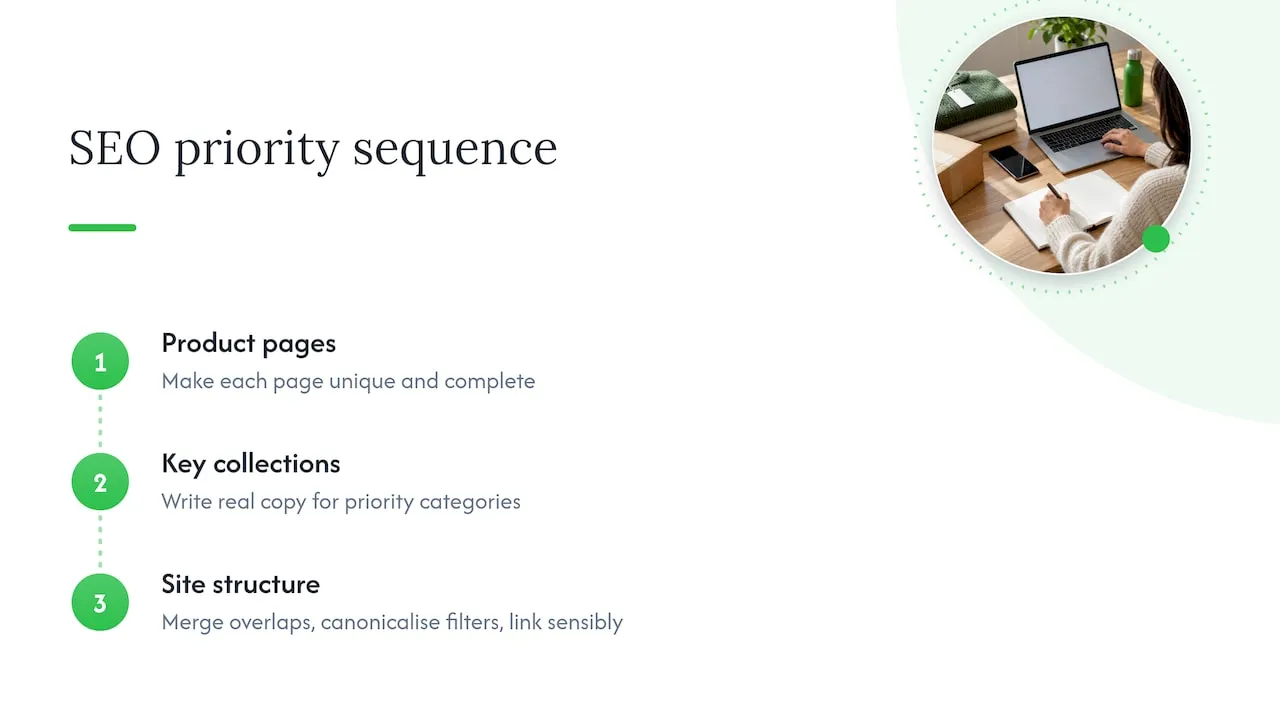
So our order is this. First, make every product page unique and complete: title, description, images, variants. That is the foundation, and it is also where Merchant Center issues tend to start. Second, choose the handful of categories that matter and write real collection copy for them. Third, tidy the structure: merge overlapping collections, canonicalise filters, link sensibly.
We would not describe this as collection or product. It is a sequence. Product pages make the store trustworthy and convertible; collection pages make it discoverable for broader searches. The mistake is to treat either as an afterthought, or to let a tool produce thousands of pages and never read them.
— Koen
Where EcomEye fits
If your bottleneck is writing unique product pages for a large import, that is the part we automate. You import products from AliExpress, Amazon, Temu or competitor Shopify links, generate titles, descriptions and AI product images in bulk, edit them with templates, and export to Shopify in one click. Each listing is generated uniquely for you, even when based on the same source link.
You can try the AI product description generator and the AI product image generator individually. Plans are published on the pricing page: Try-out is 39 EUR per month and Scaler is 99 EUR per month. Use the output as a strong first draft, then add your own category knowledge to the collection pages that matter most.
A 30-day plan
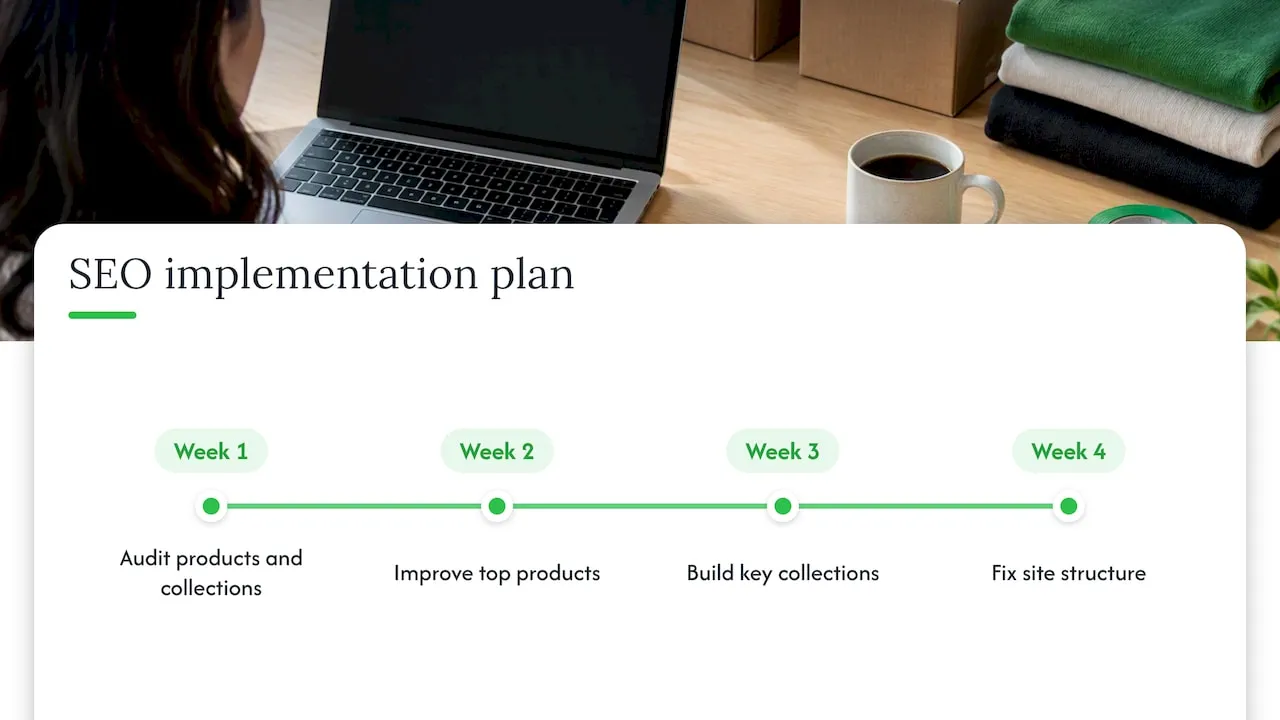
Week 1: audit. Export your product and collection list. Mark which products share supplier text, which collections have no copy, and which collections overlap.
Week 2: products. Rewrite or regenerate descriptions and titles for your top products by revenue. Check images and alt text. Review our Shopify product template checks before scaling.
Week 3: collections. Pick your top five categories. Write a short intro and a buying guide for each, set one target query per page, and add links to the best products and related collections.
Week 4: structure. Merge duplicate collections, add redirects, check canonical tags on filtered URLs, and submit updated URLs in Search Console. Then wait: our piece on moving product rankings in 6 to 10 weeks sets realistic expectations, and the wider Shopify SEO checklist covers what to do next.
FAQ
Are collection pages better for SEO than product pages?
Not better, different. Collection pages target broader category searches with more volume, while product pages target specific searches closer to purchase. Many stores under-invest in collections, but if your product pages are duplicated or thin, fix those first.
Should I optimise collections or products first if I have little time?
Practitioners generally suggest product pages first, because the demand is more specific and conversion is higher. If you sell many similar items, give your two or three biggest categories proper collection copy early, since no single product will win the category term.
How do I stop collection and product pages cannibalising each other?
Give each page one target query: the broad term for the collection, the specific term for the product. Merge overlapping collections, write unique copy for each page, and link between them with clear anchor text.
Do filtered collection URLs hurt my SEO?
They can, if each filter creates an indexable duplicate. Make sure filtered and sorted URLs carry a canonical tag pointing to the main collection, and check indexing in Google Search Console.
Can I use AI to write collection descriptions?
Yes, as a draft. Google’s spam policies target scaled content that adds no value, so edit the text to include real buying advice, specifics about your range and answers to customer questions.
Sources
- Which is best to focus your SEO on? Shopify product or collection pages?
- Shopify Collection vs Product Pages: SEO for New Zealand
- How to stop keyword cannibalization between category and product pages on Shopify
- Shopify Help Center: create a collection
- Google Search Central: spam policies
- Google Search Central: optimising for generative AI features
- Google Search Central: creating helpful, reliable, people-first content
Ready to boost your product pages?
Generate high-converting, SEO-optimized product pages in bulk using AI automation used by e-commerce experts.
No credit card required