4 Shopify Product Template SEO Checks to Fix Before Scaling
Build Shopify product templates with editable metadata, canonical tags, product schema, and a fast hero image. Validate before scaling unique pages.

4 Shopify Product Template SEO Checks to Fix Before Scaling

An SEO-ready Shopify product template needs an editable meta title and description, a correct canonical tag, Product or ProductGroup structured data, properly sized image attributes, and a fast-loading hero image. Once those pieces are in place, render a real product page and check it with Google’s Rich Results Test and a Core Web Vitals report before rolling the template out across your catalogue.
TL;DR:
- Shopify outputs Product markup for items without variants and ProductGroup markup for variants; verify brand, SKU or GTIN, offers, and review ratings when reviews exist.
- Variant, collection, and sorting URLs can create duplicates, so point them to the base product page; override Shopify’s canonical only for a genuine preferred alternate.
- Shopify’s targets are an LCP near 2.5 seconds, INP below 200 milliseconds, and CLS below 0.1; retest after theme, app, or media changes.
- Test one product in a duplicated theme, preserve the product object and form, then expand to a small sample before full catalogue rollout.
- For translated stores, give each language its own metadata and alt text, translate structured data, and assign each page a canonical while linking versions with hreflang tags.
Table of Contents
- Template features that affect SEO and how each one matters
- Shopify template types and when to create custom product templates
- How to add SEO metadata in Liquid
- Structured data and product schema: what to verify
- Images, lazy loading and Core Web Vitals
- Content strategy for product templates: generating unique descriptions at scale
- Step-by-step checklist to update or build an SEO-friendly product template
- Multi-language and localization SEO considerations
- Strategies for maintaining copyright-safe content in product templates
- Author perspective: fixing templates before generating content
- How EcomEye helps: bulk, copyright-safe, SEO-ready product pages
- FAQ
- Sources
Template features that affect SEO and how each one matters
The product title you show shoppers and the title search engines see do not have to be identical. Keep the product name as your H1 for clarity and conversions, but leave the meta title editable so you can add search-focused phrasing, like a size, material or use case, without touching the on-page heading.
Canonical tags matter more on Shopify than most merchants realise. Variant options, collection-based URLs and sort parameters can all generate near-duplicate pages, and without a correct canonical pointing to the primary product URL, search engines may index the wrong version or split ranking signals across several.
Breadcrumbs and a clear site hierarchy help search engines understand where a product sits relative to its collection and category, which supports both crawling and how listings appear in search results.
A well-built template handles these consistently:
- Unique, descriptive H1 that matches the product, not a generic label.
- Canonical URL fixed to the base product page regardless of variant or parameter.
- Breadcrumb markup reflecting the collection path.
- Variant-driven URLs excluded from indexing where they duplicate the base page.
Get this structural layer right once, in the template, and every product published through it inherits the same protections.
Shopify template types and when to create custom product templates
Shopify themes use a product template type to render product pages, and you can build this as a JSON template or a Liquid template. JSON templates assemble a page from reusable sections, which makes them easier to customise per product group without touching core theme code, while Liquid templates give more direct control over markup. Shopify’s template architecture documentation explains both formats and the limits on how many JSON templates a theme can carry, which is why larger catalogues often split products into a handful of templates by category rather than creating one for every SKU.
A custom template makes sense when:
- A product group needs distinct layout or content blocks, such as apparel with a size guide versus electronics with spec tables.
- You want to test SEO or conversion changes on a subset of products before a full rollout.
- Certain products require extra structured data fields that don’t apply store-wide.
Whatever template you build, keep the product object and product form intact. These power the add-to-cart flow and expose the data that structured data and metadata snippets pull from, so a broken reference here can silently damage both checkout and search visibility.
How to add SEO metadata in Liquid
Shopify’s theme documentation sets out a straightforward pattern for adding SEO metadata inside the <head> element: use page_title for the title tag, page_description for the meta description, and canonical_url for the canonical link. These objects pull from the product’s SEO fields in the admin by default, which means a merchant can edit them per product without a developer touching the theme.
A few practical points worth building into the template from the start:
- Keep meta title and description fields editable in the Shopify admin so non-technical team members can adjust them per product.
- Append
shop.nameprogrammatically to the title tag only when it doesn’t push the title past a readable length. - Add pagination indicators to the title on paginated collection-linked views, not on the canonical product page itself.
- Override
canonical_urlonly when a product genuinely has a preferred alternate URL, such as a primary listing versus a duplicate used for a bundle.
Getting this right at the template level means every new product inherits correct, editable metadata from the moment it’s published, rather than needing manual fixes later. For more on crafting the title text itself, see our guide on optimising product page titles.
Structured data and product schema: what to verify
Shopify’s structured_data filter does the heavy lifting: applying {{ product | structured_data }} outputs schema.org markup automatically. According to Shopify’s developer documentation, it generates a Product object for products without variants and a ProductGroup object when variants exist, which changes what fields search engines expect to see.
That doesn’t mean the output is complete. Run this check after any theme or app change:
- Render the live product page and view the page source.
- Locate the JSON-LD block and confirm it includes brand, GTIN or SKU, offers with price and availability, and aggregateRating where reviews exist.
- Paste the URL into Google’s Rich Results Test and fix any fields flagged as missing or invalid.
- Repeat the test after installing any app that touches product pages, since apps can inject or override JSON-LD without warning.
Pro Tip: Save a clean, validated JSON-LD snapshot for one product so you have a baseline to compare against after future theme updates.
Images, lazy loading and Core Web Vitals
Image handling at the template level has an outsized effect on both ranking and user experience. Shopify automatically compresses and converts images to WebP and AVIF formats, but the template still needs to reserve space for every image using explicit width and height attributes or a CSS aspect-ratio rule, otherwise the page shifts as images load.
Build these habits into the template itself:
- Prioritise the hero image for fast loading; never lazy-load the first image a shopper sees.
- Lazy-load secondary gallery images, variant swatches and below-the-fold media.
- Use descriptive file names and concise alt text rather than generic strings like “image1”.
- Reserve layout space for every media element before it loads.
Shopify recommends targeting an LCP of roughly 2.5 seconds, an INP under 200 milliseconds and a CLS under 0.1, and monitoring these in Web Performance reports after any theme, app or media change. A template that passes these thresholds once can still fail after an app installs a new carousel or review widget, so recheck after every change rather than assuming the baseline holds.
Content strategy for product templates: generating unique descriptions at scale
Copying a vendor’s product description is one of the most common reasons dropshipping stores see weak search performance and Google Merchant Center disapprovals. We’ve seen this pattern repeatedly in our own operational work with Shopify sellers: duplicate content across thousands of competing stores leaves search engines with little reason to rank any one of them.
The fix starts in the template. Separate the fields that stay fixed (specs, price, size chart) from a dedicated content slot built to hold unique narrative copy, so that generating fresh descriptions never risks breaking structured data or variant logic.
A workable publishing loop looks like this:
- Import product data in bulk from a supplier or competitor link.
- Generate unique titles, descriptions and images for each SKU.
- Validate structured data and metadata against the template.
- Export to Shopify and spot-check a sample before publishing the rest.
Pro Tip: Keep one template field reserved purely for unique copy, never shared across SKUs, so bulk generation has somewhere safe to write. For copy patterns that work well in that slot, see our product description ideas for 2026.
Step-by-step checklist to update or build an SEO-friendly product template
Work through this sequence on one test product before touching the full catalogue:
- Duplicate your live theme so changes are isolated from the storefront customers see.
- Create or edit a product template for a single test SKU.
- Add editable meta title, meta description and canonical fields using the Liquid patterns above.
- Implement or verify
{{ product | structured_data }}output and add missing image width and height attributes. - Confirm the product object and product form still render correctly for checkout.
- Run the page through Google’s Rich Results Test and a Core Web Vitals check.
- Publish the template to a small sample of products and monitor Search Console for errors.
- Roll out to the full catalogue once the sample shows clean results.
| Validation step | Tool | What to confirm |
|---|---|---|
| Structured data | Rich Results Test | Brand, SKU, offers, rating fields present |
| Page speed | Core Web Vitals report | LCP, INP, CLS within target ranges |
| Indexing | Search Console | No duplicate or canonical errors |
For a deeper look at indexing issues specifically, read our guide on product page indexing.
Multi-language and localization SEO considerations
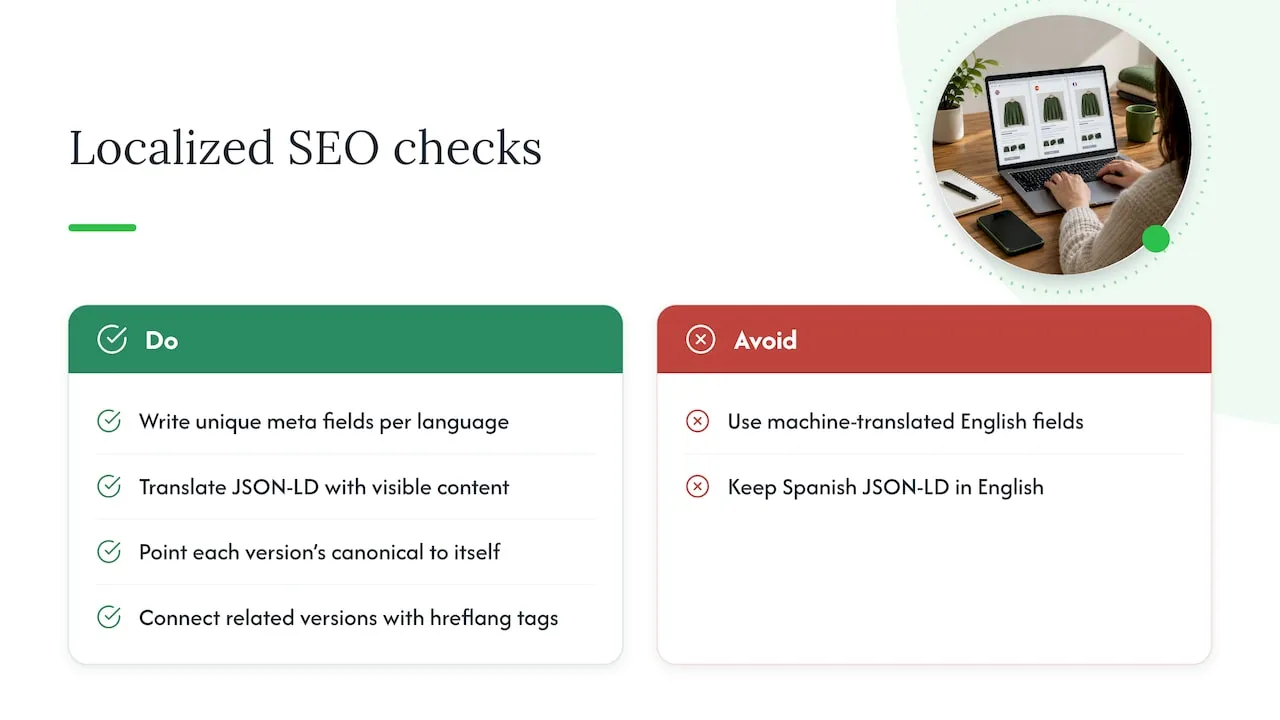
Selling across languages adds a layer most product templates aren’t built for by default. Each translated version of a product page needs its own meta title, meta description and alt text rather than a machine-translated copy of the English fields, since literal translation often reads awkwardly and ranks poorly in the target language’s search results.
Structured data should translate alongside the visible content. If the JSON-LD for a Spanish-language page still describes the product in English, search engines may index a mismatched or incomplete listing.
Canonical and hreflang handling also need attention at the template level. Each language version should point to itself as canonical, with hreflang tags linking the related versions together, so search engines serve the correct language to the correct audience rather than treating them as duplicates competing against each other.
Currency, sizing and measurement units shown on the page should match the shopper’s region, since this affects both user trust and how long a visitor stays on the page, which search engines use as a quality signal. Building a language-aware content slot into the template, similar to the unique-copy slot discussed earlier, makes it far easier to swap in localised fields without rebuilding the page structure for every market.
Strategies for maintaining copyright-safe content in product templates
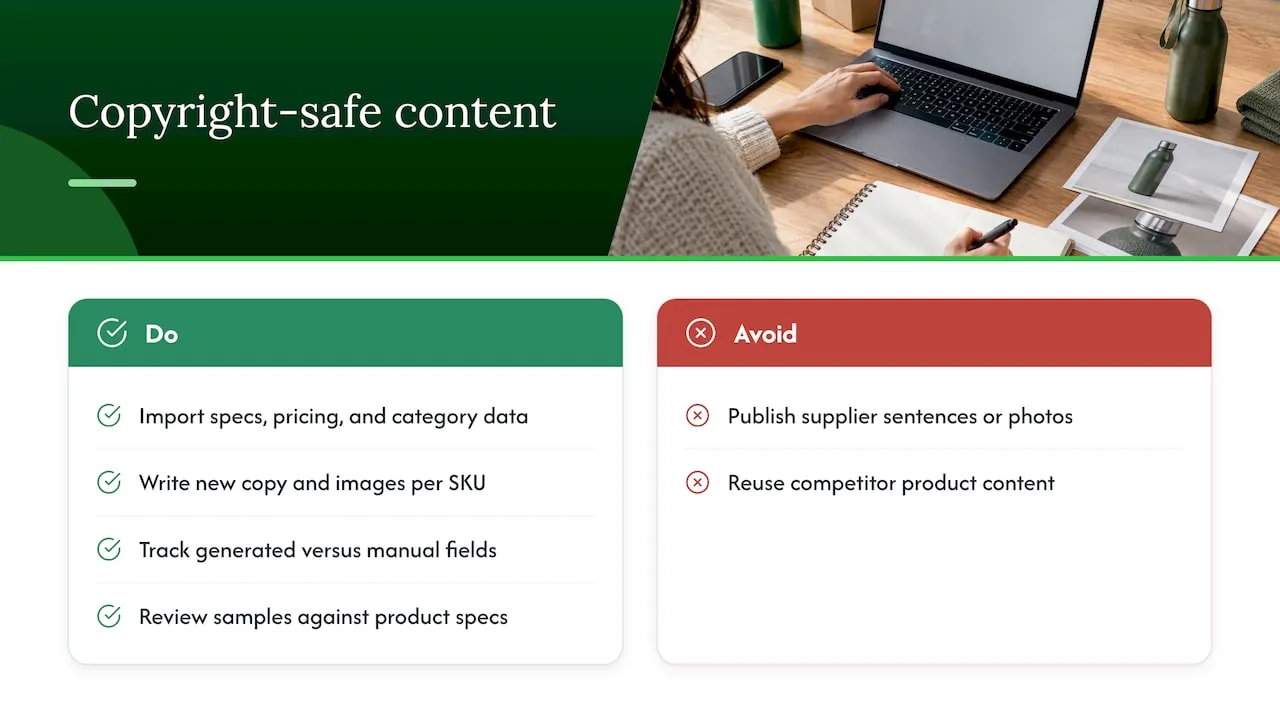
Reusing a supplier’s or competitor’s product photos and descriptions carries real risk, both legally and in terms of search performance. Beyond the duplicate content issue, lifted images can trigger copyright claims, and lifted copy can trip plagiarism checks that some marketplaces and ad platforms run before approving a listing.
A copyright-safe template separates sourced data from published content. Import specifications, pricing and category data from a supplier feed, but never publish the supplier’s original sentences or photography directly. Generate new copy and new images for every SKU, even when several SKUs are based on the same source link, so no two listings in your store, or across the wider market, end up identical.
Keep a record of which fields were auto-generated versus manually written, and review a sample regularly for accuracy, since generated content still needs a human check against the actual product specifications. Shopify’s own guidance on product descriptions recommends writing for the shopper first, leading with benefits and supporting with features, which is a useful standard to apply whether the copy is written by hand or generated at scale.
Author perspective: fixing templates before generating content
If you only have time for one fix, start with structured data and metadata: they affect every product at once. Image handling and template splits come next.
Bulk content generation earns its place once your catalogue is too large for manual unique copy to be realistic, which for most dropshippers is sooner than they expect.
— Koen
How EcomEye helps: bulk, copyright-safe, SEO-ready product pages
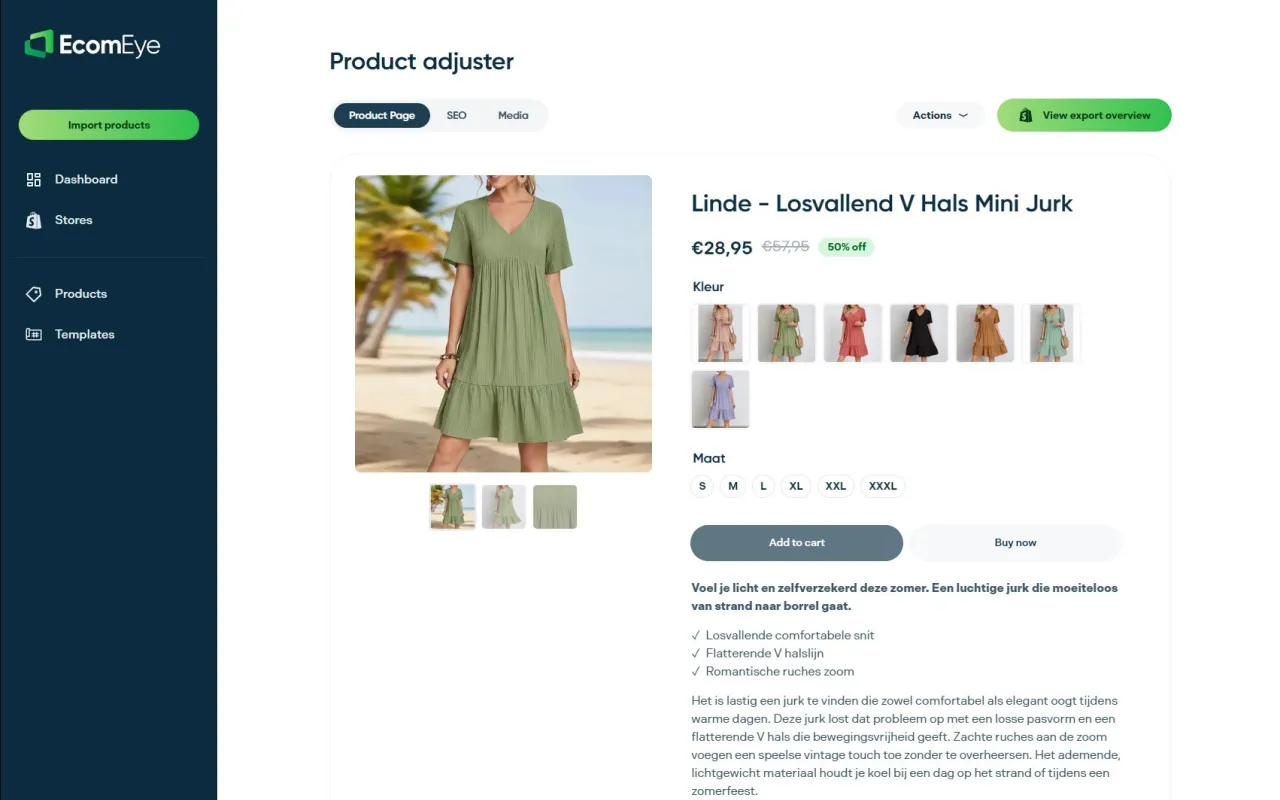
Building and validating one template is manageable by hand. Doing it for hundreds of SKUs, each needing a unique description and genuinely original images, is where most Shopify dropshippers run out of time and start copying competitor pages instead, which is exactly the pattern that causes low rankings and Google Merchant disapprovals.
We built this tool to remove that bottleneck. Import products in bulk from popular supplier or competitor links, generate unique titles, clean descriptions and AI product images for every SKU, then export the whole batch to Shopify in one click.
- Bulk import from various supplier or competitor links.
- Automated unique titles, descriptions and SEO-ready content per SKU.
- AI-generated product images with no copyright exposure.
- One-click export directly into your Shopify store.
Check pricing for Try-out and Scaler plans or see the AI product description generator in action to see how your next batch of products could be ready for Shopify within minutes.
FAQ
How do I add SEO to my Shopify store?
Start at the template level: editable meta titles and descriptions, a correct canonical tag, and Product structured data using Shopify’s structured_data filter cover most of the technical groundwork. From there, write unique product descriptions, optimise images for fast loading, and validate pages regularly in Google Search Console.
Is Shopify worth it for digital products?
Shopify supports digital products through apps and custom templates, though its core architecture is built around physical inventory and shipping. Many sellers of digital goods use it successfully, but it’s worth checking that your chosen template and apps handle delivery and licensing the way your product needs before committing.
What are some good Shopify themes for digital products?
Shopify requires Theme Store themes to support rich product snippets, so most official themes provide a reasonable structured data and metadata baseline out of the box. The better question is whether a theme’s product template can be customised for your specific content, since digital products often need fields a standard physical-goods template doesn’t include.
How do I create a custom product page in Shopify?
Duplicate your live theme, then create a new product template using either the JSON or Liquid format, as covered in the template types section above. Add your SEO fields, structured data and image attributes, confirm the product form still works for checkout, then test before publishing to the live catalogue.
How many product descriptions can I generate at once on EcomEye?
Bulk generation volume depends on the plan and credits you choose, so check current limits on the pricing page for the Try-out and Scaler plans before importing a large batch.
Ready to boost your product pages?
Generate high-converting, SEO-optimized product pages in bulk using AI automation used by e-commerce experts.
No credit card required