Move Shopify Product Rankings in 6–10 Weeks With 2026 GEO & Bulk Edits
A practical 2026 playbook to lift Shopify product rankings in 6–10 weeks. Apply attribute-first titles, factual Q&A, WebP images, complete Product schema...

Move Shopify Product Rankings in 6–10 Weeks With 2026 GEO & Bulk Edits

Prioritise attribute-first product titles, 200–350 words of unique description with a factual Q&A block, images served as WebP or AVIF, and complete Product schema. Then measure everything through Google Search Console. Do those four things properly and most Shopify catalogues see measurable ranking movement within six to ten weeks. Skip any one of them and the others carry less weight than they should.
TL;DR:
- Improving product titles with attribute-first formulas and optimizing their length can significantly boost search impressions and click-through rates within weeks.
- Adding descriptive alt text, compressing images, and serving WebP or AVIF formats can greatly improve page load times and Core Web Vitals scores.
- Implementing complete structured data, especially product schema and FAQ markup, enhances rich snippets and helps AI systems cite product facts accurately.
- Focusing on high-impression, page-two ranking SKUs first ensures the most relevant pages are moved to the top of search results faster.
- Automating large-scale catalog updates with tools like Ecom-eye enables scalable, unique SEO content while avoiding duplicate content penalties.
Table of Contents
- What is Shopify product SEO and where do you start?
- Product title and SEO title: formula, examples and bulk strategy
- Product descriptions that both rank and convert
- Image optimisation and accessibility for product pages
- Structured data: Product schema, offers and FAQ markup
- Internal linking, collections and URL handles for product discoverability
- Technical SEO and page speed actions that matter for PDPs
- How do you measure whether product SEO changes are working?
- Generative engine optimisation: making product pages citable by AI
- How EcomEye helps Shopify merchants scale product SEO
- International and multilingual SEO considerations if applicable
- Author perspective: common merchant mistakes and practical priorities
- Scale product SEO without the duplicate-content risk
- Sources
- FAQ
What is Shopify product SEO and where do you start?
Shopify product SEO is the practice of optimising individual product pages, titles, descriptions, images and structured data so they rank for the exact terms shoppers type before they buy. It sits apart from general store SEO because product pages carry commercial intent. Someone searching “waterproof hiking boots women’s size 8” is closer to a purchase than someone searching “best hiking gear,” and Google treats that query differently.
Before touching a single title, confirm two things are working: Google Search Console is verified and pulling data, and Google Merchant Center is connected if you run Shopping ads or free listings. Shopify’s own guidance treats these as the foundation for on-page, technical and off-page SEO work, and skipping this step means you’re optimising blind. You won’t know which pages are close to ranking, which titles are getting impressions but no clicks, and which products Google has effectively ignored.
Here’s the ranked order of what to fix, and roughly how long each task takes per SKU:
- Rewrite the product title using an attribute-first formula. Ten to fifteen minutes per product, biggest single-lever impact.
- Override the SEO title separately from the visible title when they need different framing. Five minutes per product once you understand the split.
- Add three or more images with descriptive alt text. Fifteen to twenty minutes per product if you’re shooting or sourcing new images; five minutes if you’re just writing alt text for existing ones.
- Implement or verify Product schema. A one-off technical job, typically under an hour for the whole store if your theme supports it.
- Fix page speed issues caused by oversized images. Ongoing, but the first pass usually takes an afternoon.
Pick your starting SKUs by opening Search Console, filtering to /products/ pages, and sorting by impressions. Anything sitting on page two of Google (average position 11 to 20) with decent impression volume is your priority list. Those pages are already relevant enough to show up. They just aren’t winning the click, which usually means the title or meta description isn’t compelling, or a competitor’s schema is generating a richer snippet.
Pro Tip: *Don’t spread effort evenly across your catalogue.
Product title and SEO title: formula, examples and bulk strategy
The product title is the single highest-leverage element on a Shopify PDP because Shopify reuses it in the H1, the URL slug, and every Shopping feed you sync. Get the title wrong and you’re fighting an uphill battle everywhere else.
The formula that works consistently: attribute + product type + distinguishing detail. Front-load the words a shopper actually searches, because earlier words in a title carry more weight for both organic search and Shopping queries, according to merchant discussions on title structure. Aim for a character length that ensures the title doesn’t get cut off in search snippets or Shopping ads.
Compare these two:
- Weak: “Boot 4521B”
- Strong: “Women’s Waterproof Hiking Boot, Vibram Sole”
The second version tells Google exactly what category, gender and key feature to match against a query, and it tells the shopper the same thing in half a second.
Shopify gives you two separate fields for a reason: the visible product title (what customers see on the page) and the SEO title (what appears in the search snippet). Most of the time these should match. Override the SEO title separately when the visible title needs to stay short and brand-friendly on the page, but the search snippet has room for an extra qualifier like a size range, material, or “free returns.” A jewellery brand might keep the on-page title as “Aria Hoop Earrings” but set the SEO title to “Aria Gold Hoop Earrings, Hypoallergenic, 14K” to capture more search terms without cluttering the product page itself.
For bulk changes across a large catalogue, don’t rewrite titles randomly. Batch them by product type, run the new titles on your highest-impression SKUs first, and give it three to four weeks before checking Search Console for movement in impressions and average position. Watch specifically for:
- Truncation in the SERP snippet if you’ve gone over 65 characters.
- Shopping feed disapprovals if the new title includes promotional language like “free shipping” or “best,” which Google’s Merchant policies generally reject.
- SKU codes or internal reference numbers leaking into customer-facing titles, which happens more often than merchants expect when titles are pulled from a supplier feed without editing.
Get the product title optimisation workflow right once and it pays off across every other channel that pulls from the same field.
Product descriptions that both rank and convert
A product description has one job that most merchants get backwards: it needs to answer the shopper’s question and give Google enough factual content to rank it, at the same time. Thin, generic copy does neither.
The framework that consistently performs is a three-layer structure: Hook, Spec, Trust.
- Hook: one or two sentences that state the core benefit in plain language. “This jacket keeps you dry in genuine downpours, not just drizzle.” No throat-clearing, no “introducing our latest.”
- Spec: the factual layer. Materials, dimensions, weight, care instructions, compatibility. This is where your primary keyword and its natural variants belong, mentioned two or three times across the full description, never forced.
- Trust: shipping timelines, return policy, warranty, and a short line addressing the one objection every shopper has before buying this exact item.
Practitioners generally land on 200 to 350 words for most boutique product pages as the point where organic performance peaks without the copy becoming padding, according to Shopify PDP SEO guidance. Longer isn’t automatically better. A description that repeats the same three selling points in different words is worse for conversion and no better for SEO than a tight 220-word version.
Variant handling trips up more merchants than title formatting does. If your “Blue Cotton T-Shirt, Size Large” and “Blue Cotton T-Shirt, Size Small” are the same product with size variants, don’t create separate SKUs. Let Shopify’s variant selector handle it on one URL. Only split into separate product pages when the variant represents a genuinely different search intent. A “Men’s” and “Women’s” version of the same shoe, for instance, often deserves separate pages because the queries behind them are different enough to justify distinct titles, descriptions and schema.
Add a short Q&A block near the bottom of the page. Something like “Does this jacket work in below freezing temperatures?” followed by a direct, factual answer. These blocks help conventional SEO through FAQ schema, and they matter increasingly for AI assistants that lift short factual answer sentences directly when the structure is clear and unambiguous.

Templates and starting points for this structure are covered in more depth in Ecom-eye’s guide to product description ideas.
Image optimisation and accessibility for product pages
Image payload is the single biggest cause of poor Core Web Vitals scores on product pages, according to HTTP Archive’s page weight tracking. Most Shopify stores are running full-resolution product photography that was shot for print, not web, and it shows up as a slow Largest Contentful Paint score every time.
Serve images in WebP or AVIF rather than JPEG or PNG wherever your theme supports it. Target a maximum display size matched to the actual rendered dimension on the page. There’s no reason to load a 3000px-wide image into a 600px product gallery slot. Lazy load every image below the fold so the browser only fetches the hero image and first gallery shot immediately, deferring the rest until the shopper scrolls.
Alt text deserves more care than most merchants give it. The rule from accessibility guidance is straightforward: describe what the image actually shows and what it does, not a keyword-stuffed guess. “Women’s waterproof hiking boot, side profile showing Vibram sole” beats “hiking boots for women waterproof best” every time, both for screen reader users and for Google’s image understanding.
A few things worth checking today:
- Every variant image should match its actual variant. A red dress showing blue thumbnail images in Google Merchant Center gets flagged and can trigger a feed disapproval.
- Run your top ten product pages through PageSpeed Insights and note which images are flagged as oversized.
- Check whether your theme is already lazy loading by default. Many Shopify 2.0 themes do this out of the box, but third-party apps sometimes override it.
Pro Tip: Compress images before upload rather than relying on Shopify to do it for you. A 400KB image uploaded at full size still costs you load time even if it displays small.
Ecom-eye’s image optimisation guide and the alt text workflow both cover bulk-editing approaches if you’re working through a catalogue rather than a handful of hero products.
Structured data: Product schema, offers and FAQ markup
Product schema is what turns a page Google can read into a page Google can understand as a product, with a price, a stock status and a rating it can show directly in the search result. Schema.org’s Product reference defines the fields, and the minimum viable set you need is smaller than most merchants assume.
At minimum, your JSON-LD needs:
- name — matching the visible product title, not a variation of it.
- image — at least one full URL to a real product photo.
- offers — price, currency and availability, nested inside an Offer object.
- aggregateRating — if you have reviews; omit entirely if you don’t, rather than faking it.
Beyond the minimum, two offer extensions are worth adding because they influence whether Google shows richer information in the result: shippingDetails, which states delivery cost and timeframe, and hasMerchantReturnPolicy, which states your return window. Stores that include both tend to show more complete rich results than stores relying on bare price and availability alone.
FAQPage markup is a separate schema type, and it only works when the questions and answers in the markup match what’s actually visible on the page. Google has been explicit for years about penalising hidden or mismatched structured data, so if your JSON-LD claims an FAQ exists, that exact FAQ needs to be readable in the page’s DOM, not tucked away in a script tag with no visible counterpart.
Test everything through Google’s Rich Results Test before publishing at scale. It’s free, it takes thirty seconds per URL, and it catches the two most common mistakes: missing required fields and a mismatch between schema and visible content. A worked example of handling schema for complex variant structures, useful if you sell jewellery, apparel with multiple attributes, or anything with heavy customisation, is covered in JewelCloud’s guide to structured product data.
For the Shopify-specific implementation steps, including which theme files to edit and what typically breaks, Ecom-eye’s product schema walkthrough covers the practical side in more depth than schema.org’s own documentation does.
Internal linking, collections and URL handles for product discoverability
Every product page should sit inside a well-structured collection, because collections are how Shopify inherits and distributes topical authority across related products. A product page floating with no collection parent and no related links is effectively an orphan page as far as Google’s crawler is concerned, even if it’s technically indexable.
Use descriptive anchor text for internal links rather than “click here” or “shop now.” A link reading “waterproof hiking boots for wide feet” tells Google far more about the destination page than a generic “view product” ever will.
Every product page should link to at minimum:
- Its parent collection.
- Two to four genuinely related products, not a random “you might also like” carousel pulling from the whole catalogue.
- A size guide or a relevant blog post if the category benefits from one (footwear, fitted apparel, technical gear).
URL handles matter more than most merchants realise, and they’re easy to get wrong retroactively. Keep handles short, descriptive and stable once published: /products/womens-waterproof-hiking-boot beats /products/product-4521b. If you need to rename a handle after it’s indexed, set up a 301 redirect from the old URL to the new one before you change it, never after, so you don’t create a dead link in Google’s index for even a day.
Tag-based filter pages (colour, size, price range combinations) can multiply into hundreds of thin, near-duplicate URLs if left unmanaged. Either noindex low-value filter combinations or set a canonical tag pointing back to the main collection page, so Google isn’t wasting crawl budget on pages that add nothing.
Technical SEO and page speed actions that matter for PDPs
Page speed on a product page isn’t a vanity metric. Slow-loading galleries and delayed “Add to Cart” buttons cost conversions directly, on top of any ranking effect. The fixes worth prioritising, in order:
- Preload the hero image so the browser fetches it before anything else on the page, cutting Largest Contentful Paint time noticeably on image-heavy PDPs.
- Inline critical CSS for above-the-fold content so the page renders visually complete before the rest of the stylesheet loads.
- Audit installed apps for render-blocking scripts. Review widgets, upsell popups and chat plugins are common offenders, each adding its own script tag that blocks rendering while it loads.
- Reduce image payload across the gallery, tying back to the format and sizing work covered earlier.
Run Lighthouse or PageSpeed Insights on your five highest-traffic product pages and note the specific Core Web Vitals scores before you touch anything. That baseline is what proves whether your changes worked. A mobile Largest Contentful Paint under 2.5 seconds is the general target Google uses to classify a page as having a “good” experience; anything past 4 seconds is flagged as poor.
Most of this you can do yourself: image compression, lazy loading toggles in theme settings, and removing unused apps. Bring in a developer when the fix requires editing theme liquid files directly, restructuring how scripts load, or you’re seeing conflicting results between Lighthouse’s lab data and the real-world Core Web Vitals report in Search Console, which usually signals something more structural than a single oversized image.
Pro Tip: Uninstall an app entirely before assuming it’s not the problem. Many apps leave scripts running even after you disable the visible widget.
How do you measure whether product SEO changes are working?
Set up a saved filter in Google Search Console scoped to /products/ so you’re not looking at blog or collection performance mixed in with PDP data. Track three numbers weekly: impressions, click-through rate, and average position, per page rather than site-wide.
- Pick one primary KPI per test. Usually add-to-cart rate or conversion rate, measured through GA4 tied to the same product pages you’re editing in Search Console.
- Set guardrails before you start. Average order value and return rate shouldn’t move in the wrong direction just because a rewritten title pulled in more traffic that wasn’t actually the right audience.
- Prioritise near-page-2 queries. Anything sitting at position 11 to 20 with real impression volume is the fastest path to a ranking jump, because it’s already relevant, just underperforming on the click.
- Give changes four to six weeks minimum before judging results. Google needs to re-crawl and re-rank, and a week of data on a low-traffic SKU is statistically close to meaningless.
- Cross-reference GA4 with GSC to see whether a page getting more impressions is also converting, not just attracting clicks that bounce.
Shopify’s own advice on this echoes the same order: start with the CTA, imagery and descriptions, test one variable at a time, and use conversion guardrails rather than chasing traffic in isolation.
Generative engine optimisation: making product pages citable by AI
Generative engine optimisation, or GEO, is the practice of structuring a page so AI systems like ChatGPT, Perplexity and Google’s AI Overviews can extract and cite its facts directly, rather than just crawling it for a traditional ranking. It sits on top of classic SEO rather than replacing it, and it rewards exactly the kind of factual, unambiguous content that good product SEO already demands.
Open your product description with a plain factual sentence rather than marketing language. “This backpack holds 28 litres and weighs 900 grams” is citable. “Engineered for the modern adventurer” is not, because there’s no fact in it for an AI system to lift.
Explicit spec lists work the same way. A short, scannable list of material, dimensions, weight and compatibility gives an AI assistant something concrete to quote when a shopper asks it a comparison question. The Q&A block covered earlier does double duty here: AI assistants tend to prefer explicit, structured Q&A content over paragraphs where the same fact is buried in the middle of a sentence.
Complete structured data matters more for GEO than most merchants assume, because AI systems parsing a page for facts lean on the same schema markup that powers rich results. A page with vague copy and missing schema gives an AI system almost nothing usable to cite, even if the product itself is genuinely well suited to the shopper’s question.
To check whether AI referral traffic is showing up at all, look at your Search Console and analytics referral sources for traffic tagged from Perplexity, ChatGPT or Bing Chat domains, and note which product pages are appearing. It’s early days for this kind of tracking, but the pages getting cited are consistently the ones with clean specs and explicit Q&A structure already in place.
How EcomEye helps Shopify merchants scale product SEO
Manual title rewrites and description overhauls work well for a catalogue of fifty products. They fall apart at five thousand, particularly when most of that catalogue is built on manufacturer copied and pasted straight from a supplier feed, which is precisely the pattern that produces the duplicate-content problems Google penalises hardest.
Ecom-eye handles that scale problem directly: bulk import from AliExpress, Amazon, Temu or a competitor’s Shopify store, automatic generation of unique titles and descriptions built around the attribute-first formula covered earlier, AI-generated product images, multi-language page creation for stores selling across markets, and one-click export back to Shopify.
Automation earns its place when you’re facing hundreds of near-identical SKUs with repeated supplier copy, or launching a new store fast enough that manual writing simply can’t keep pace. Manual, hands-on editing still wins for your highest-value hero products, where a founder’s voice or a specific brand story genuinely improves conversion beyond what a formula captures. Most merchants running Ecom-eye use both: automation for catalogue depth, manual polish for the top twenty SKUs driving most of the revenue.
International and multilingual SEO considerations if applicable
Selling into more than one language or region changes the SEO calculus, and Shopify merchants get this wrong in a specific, predictable way: they translate a product page and publish it without telling Google the two versions are related.
The fix is hreflang tagging, which tells search engines “this English page and this French page are the same product for different audiences,” so neither cannibalises the other’s rankings and the right version surfaces for the right searcher. Shopify Markets handles much of this automatically once you set up international domains, subfolders or subdomains, but it’s worth checking that the hreflang tags are actually rendering, since theme customisations occasionally strip them out.
Translation quality matters more than most merchants budget for. A literal, word-for-word translation of an attribute-first English title often produces an awkward phrase in the target language that no native speaker would actually search for. “Waterproof hiking boot” translated mechanically into German doesn’t necessarily match the term a German shopper types into Google. Localising the search term itself, not just the copy, is the part that gets skipped under time pressure.
Currency and shipping information displayed correctly for the visiting region also feeds into trust signals, which matters for conversion even when it’s not a direct ranking factor. A shopper landing on a page still showing US dollar pricing and US-only shipping terms after clicking a localised search result tends to bounce immediately, and that bounce behaviour is itself a weak signal back to Google over time. If you’re generating pages in bulk across languages, Ecom-eye’s multi-language generation handles the attribute-first title logic per language rather than running a flat translation over an English formula that wasn’t built for the target market.
Author perspective: common merchant mistakes and practical priorities
Most catalogues fail for the same three reasons: default supplier titles nobody rewrote, descriptions that repeat the same twenty words across every SKU, and product images that were never optimised because “the theme handles it.” None of these is complicated to fix. They’re just tedious across a large catalogue, which is exactly why they get skipped.
One rule cuts through the overwhelm: fix your highest-impression SKUs first, change one thing at a time, and measure before moving to the next batch. Merchants who rewrite everything simultaneously can never tell which change actually worked.
This afternoon, do three things: pull your Search Console page-two list, rewrite the top five titles using the attribute-first formula, and check that those five pages have working Product schema. That’s ninety minutes, and it’s the highest-return ninety minutes available to most Shopify stores.
— Koen
Scale product SEO without the duplicate-content risk
Ecom-eye is the practical alternative to rewriting a large catalogue by hand, one product at a time. Every tactic covered above, attribute-first titles, factual Q&A descriptions, clean images, complete schema, still has to be applied to every SKU individually if you’re doing it manually. That’s manageable for fifty products and genuinely punishing for five thousand.
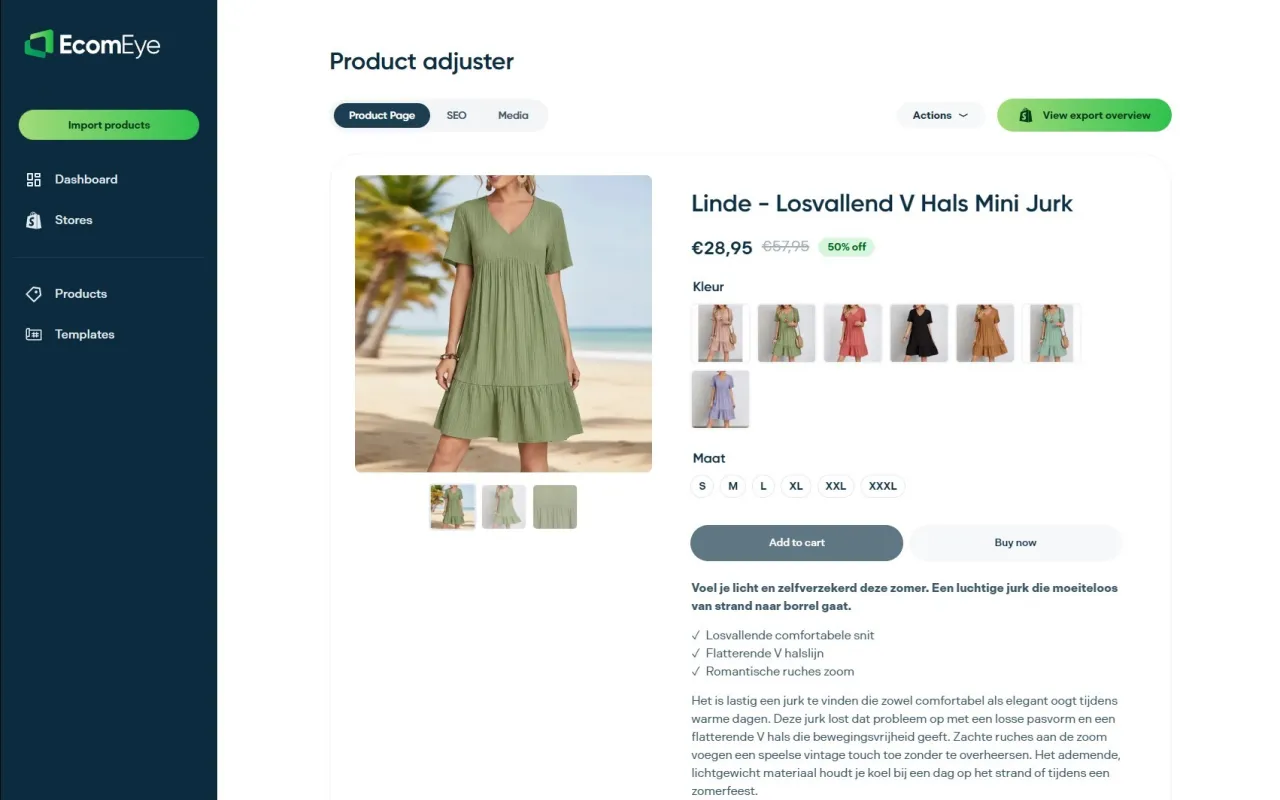
Import your product data straight from AliExpress, Amazon, Temu or a competitor’s Shopify store, and Ecom-eye generates unique titles, SEO-ready descriptions and AI product images for the whole batch, built around the same structure this guide walks through. No copied manufacturer content, no duplicate-content risk, no Merchant Center disapprovals from reused images. Multi-language pages export in one click, so an international catalogue doesn’t mean rebuilding everything from scratch per market.
If you’re sitting on a catalogue where most products still carry supplier-default titles and thin descriptions, that’s the exact scenario automation earns its keep. Try the AI product description generator on your next import batch and see how quickly a page goes from generic to genuinely search-ready.
Sources
For hands-on admin steps, Shopify’s own keyword and meta field guidance covers exactly where to add titles, descriptions and alt tags inside the platform. For structured data, Schema is the canonical field list, and Google’s Rich Results Test verifies your markup renders correctly before you publish at scale. For image accessibility, the Harvard accessibility guidance on describing content images is a clear, practical standard worth bookmarking.
- Shopify SEO: How to Generate More Store Traffic (2026)
- Shopify product page SEO: Best practices for higher rankings
FAQ
Can you do SEO on Shopify?
Yes. Shopify gives you full control over product titles, SEO titles, meta descriptions, alt text and structured data through the admin panel, and platform-level guidance actively recommends optimising these fields for every page.
Which SEO tool is best for Shopify?
It depends on the job: Google Search Console is essential for measurement, the Rich Results Test verifies structured data, and for merchants scaling a large catalogue, a bulk content platform like Ecom-eye handles unique titles, descriptions and images at volume without the duplicate-content risk of manual copy-paste.
Is Shopify still worth it in 2026?
Shopify remains a strong platform for product SEO because it natively supports clean URL structures, editable meta fields and app-based schema implementation, and Shopify’s own SEO guidance for 2026 continues to treat on-page optimisation as a core, achievable task for merchants of any size.
How much does Shopify SEO cost?
Manual optimisation costs time rather than cash, roughly fifteen to twenty minutes per product for titles, images and basic schema. Bulk platforms and SEO apps typically run on monthly or credit-based pricing, scaling with catalogue size rather than charging a flat agency retainer.
How do I know which product pages to fix first?
Filter Google Search Console to /products/ pages and sort by impressions, then prioritise anything sitting at an average position of 11 to 20. Those pages are already relevant enough to appear but are losing the click, usually because of a weak title or missing rich result.
Ready to boost your product pages?
Generate high-converting, SEO-optimized product pages in bulk using AI automation used by e-commerce experts.
No credit card required