Product image best practices for Shopify stores 2026
Discover crucial product image best practices for Shopify stores to boost conversions and enhance your online presence in 2026.
Product image best practices for Shopify stores 2026
TL;DR:
- Effective product images require technical precision, proper SEO metadata, and compliance with platform standards to maximize conversions.
- Most dropshippers struggle with supplier images that are low resolution, watermarked, and poorly framed, impacting policy compliance and performance.
Product image best practices define the technical, visual, and metadata standards that determine whether your Shopify store converts browsers into buyers or loses them to a competitor. Your images are the closest thing to a physical product experience online, and every decision you make about resolution, file format, loading behaviour, and alt text affects both your conversion rate and your Google Merchant Centre standing. Dropshippers face a particular challenge: supplier images are often low resolution, inconsistently framed, and loaded with watermarks. Getting this right is not cosmetic. It is infrastructure.
1. Technical specifications: resolution, format, and aspect ratio
The recommended upload size for Shopify product images is 2048×2048 pixels. Shopify themes typically display images at 600 to 800 pixels wide, so uploading at 2048px preserves sharpness for zoom functionality and retina screens without forcing you to re-upload later.
Format choice matters as much as resolution. Use JPEG for standard product photography, PNG when you need transparency (such as cut-out product shots on white), and WebP or AVIF for modern browsers where file size reduction without quality loss is the priority. WebP files are typically 25 to 35 per cent smaller than equivalent JPEGs, which directly improves page load speed.
Consistent aspect ratios across your product gallery reduce cognitive load and make your grid look professional. Mixed ratios create uneven grids that are harder to scan, particularly on mobile. The 1:1 square format is the most widely used in ecommerce catalogues because it works across all device sizes without cropping issues.
| Format | Best use case | Key advantage |
|---|---|---|
| JPEG | Standard photography | Small file size, wide compatibility |
| PNG | Transparent backgrounds | Lossless quality, clean edges |
| WebP | Modern browsers | 25–35% smaller than JPEG |
| AVIF | Next-gen performance | Superior compression at high quality |
Pro Tip: Upload at 2048×2048 px and let Shopify’s CDN handle resizing for different display contexts. Never upload at display size, as you cannot recover resolution later.
2. Google Merchant Centre compliance requirements
Google Merchant Centre is enforcing a minimum product image resolution of 500×500 pixels from January 2027, with warnings issued from April 2026. If your feed references images below this threshold, expect disapprovals. That enforcement window is shorter than most dropshippers realise.
Google’s own guidance goes further. Images near or above 1500×1500 pixels deliver the best performance in Shopping listing formats. This means the practical target for your primary product image is 1500px minimum, not the 500px floor. The difference in click-through rate between a sharp 1500px image and a borderline 500px image in a competitive Shopping feed is significant.
Compliance also applies to your feed attributes. The "image_linkandadditional_image_link` fields in your Google Shopping feed must reference images that meet these standards at the source. Post-upload transformations do not satisfy the requirement. Your image pipeline needs to deliver compliant files before they reach the feed.
3. Loading priority and Core Web Vitals
The primary product image is almost always your page’s Largest Contentful Paint element. Omit lazy loading on this image and add fetchpriority="high" to tell the browser to load it immediately. Every millisecond of delay on your hero image pushes your LCP score down and your bounce rate up.
Gallery images below the fold follow a different rule. These should be lazy-loaded so they do not add to the initial page weight. The same applies to your zoom source image. Embedding the high-resolution zoom image in the initial page payload substantially harms load times. Trigger it only when the user initiates a zoom interaction.
Set explicit width and height attributes on all product images. This prevents Cumulative Layout Shift (CLS), which occurs when images load and push content around the page. CLS is a Core Web Vitals metric that Google uses as a ranking signal, so layout stability is not optional.
Pro Tip: Use your browser’s DevTools Network tab to confirm your hero image loads in the first 2.5 seconds. If it does not, check whether a theme script is delaying the fetch or whether the file size is too large.
4. SEO metadata: filenames, alt text, and structured data
Descriptive, hyphen-separated filenames improve Google’s ability to index your images and associate them with specific products. A filename like navy-blue-merino-sweater-front.jpg tells Google exactly what the image shows. A filename like IMG_4821.jpg tells Google nothing. This is one of the simplest wins in any product image optimisation guide and it costs nothing to implement.
Alt text serves two purposes: accessibility for screen readers and a signal to search engines about image content. Alt text should describe the image’s function and content clearly, include variant-specific attributes such as colour and material, and stay under 125 characters. Do not stuff keywords. Write for a person who cannot see the image, and the SEO benefit follows naturally.
For structured data, implement Product schema with an ImageObject property. This helps Google understand the relationship between your product page and its images, which can improve eligibility for rich results in Google Shopping and image search. This is particularly valuable for Shopify stores competing in crowded niches where organic image visibility provides an edge.
5. How many images per product listing?
At least five to six images per product variant is the standard for high-performing ecommerce listings. Supplying multiple images from different angles can increase sales by 58 per cent, which makes the investment in a complete image set straightforward to justify. A single hero shot is not enough for a buying decision.
The types of ecommerce product images you need for each variant include:
- Hero shot: front-facing on a clean white or neutral background
- Back view: shows construction, labels, and rear details
- Close-up detail: fabric texture, stitching, hardware, or finish
- Scale reference: product shown next to a hand, person, or common object
- Lifestyle image: product in use or in context, showing aspiration
- Packaging shot: builds trust and sets delivery expectations
Fill all available Google Merchant Centre image slots, including the additional_image_link fields. Listings with multiple images receive more impressions than single-image listings in Shopping formats.
Pro Tip: Assign image sets to specific variants rather than sharing one image across all colour or size options. A customer selecting a forest green jacket should see the forest green jacket, not the navy one.
6. Common errors and compliance pitfalls to avoid
The most frequent reason for Google Merchant Centre disapprovals is promotional overlays on product images. Watermarks, price banners, “sale” badges, logos, and borders all violate Google’s image policies. The fix is straightforward: maintain a set of clean master images without any overlays, even if you use branded versions elsewhere on your site.
Here are the most common errors that damage both compliance and conversion:
- Low-resolution images. Anything below 500×500 px will trigger Google Merchant warnings from April 2026. Anything below 1000px looks unprofessional on modern retina screens.
- Placeholder or generic variant images. Using the same image for a red and a blue product confuses shoppers and signals poor catalogue management to Google.
- Product too small in the frame. Google requires the product to fill 75 to 90 per cent of the image frame. A product floating in a sea of white background fails this standard.
- Unstable image URLs. If you change an image but keep the old URL, Google’s crawler may serve the cached version for weeks. Update the URL when you update the image.
- Cluttered backgrounds. Lifestyle images are fine for additional slots, but your primary
image_linkimage should use a white or neutral background with no distracting elements.
“The preparation and organisation of product images, including compliance checks and metadata alignment, are often more critical than the photography itself for marketplace performance.” — Craftshift
This is particularly true for dropshippers who source images from suppliers. The supplier image is the starting point, not the finished asset.
Key takeaways
Strong product image performance requires combining technical precision, platform compliance, and SEO metadata into a single repeatable workflow for every product variant you list.
| Point | Details |
|---|---|
| Upload at 2048×2048 px | Preserves zoom quality and retina sharpness across all Shopify themes. |
| Meet Google’s 1500px target | Minimum 500px enforced from January 2027; 1500px delivers best Shopping performance. |
| Prioritise your hero image load | Set fetchpriority="high" and omit lazy loading on the primary product image. |
| Use descriptive filenames and alt text | Hyphenated, keyword-relevant filenames and sub-125-character alt text improve image SEO. |
| Publish five to six images per variant | Multiple angles and lifestyle shots increase sales and reduce returns. |
Why most dropshippers get product images wrong
Most dropshipping advice focuses on finding winning products. Very little of it addresses what happens after you import the product to your store. In my experience, the image pipeline is where the majority of Google Merchant disapprovals originate, and it is almost entirely avoidable.
The pattern I see repeatedly is this: a seller imports a product from AliExpress, uses the supplier’s images without modification, and wonders why their Shopping feed keeps getting flagged. The supplier image has a watermark. The resolution is 600×600 px. The product fills 40 per cent of the frame. Every one of those attributes violates Google’s policies, and none of them are the seller’s fault at the source. But they become the seller’s problem the moment they go live.
What actually works is treating image preparation as a separate step in your listing workflow, not an afterthought. That means checking resolution before upload, stripping any overlays, writing a proper filename and alt text, and building a full variant image set rather than relying on a single hero shot. It sounds like more work, but once you have a checklist and a consistent process, it takes minutes per product rather than hours.
The shift toward AI-generated product images is also worth watching. Tools that generate clean, compliant, high-resolution product visuals from a brief description are already capable enough to replace supplier images in many categories. For dropshippers who cannot afford a photography studio, this is a practical route to compliance and consistency. The role of AI images in ecommerce is not a future trend. It is a present-day operational advantage for sellers who use it correctly.
The sellers who treat image optimisation as an ecommerce infrastructure investment rather than a cosmetic task are the ones whose stores survive algorithm updates and platform policy changes. The ones who treat it as optional are the ones filing support tickets about disapprovals.
— Koen
Scale your product images with Ecom-eye
If you are managing dozens or hundreds of products, applying these standards manually to every listing is not realistic. Ecom-eye is built specifically for Shopify dropshippers who need to move fast without cutting corners on compliance or SEO.
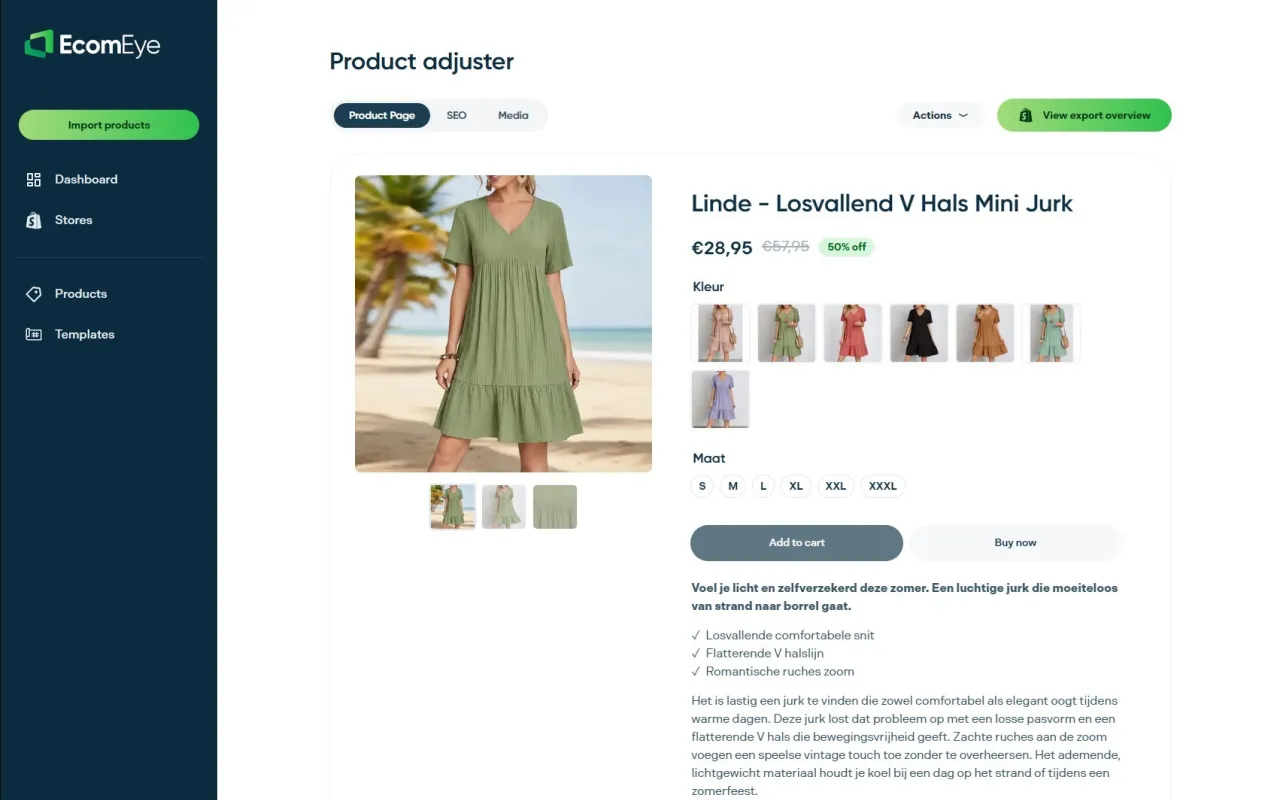
With Ecom-eye’s bulk AI product lister, you can import products from AliExpress or competitor links and automatically generate SEO-optimised titles, clean descriptions, and high-quality AI product images that meet Google Merchant Centre standards. Alt text, filenames, and metadata are handled at scale. You export directly to Shopify in one click, with no manual rewriting and no copyright risk. For dropshippers who want to compete on image quality without a photography budget, it is the most direct path from product idea to compliant, conversion-ready listing.
FAQ
What is the best image size for Shopify product pages?
Upload at 2048×2048 pixels for the best balance of zoom quality and file manageability. Shopify’s CDN handles resizing for different display contexts automatically.
Why does Google Merchant Centre disapprove product images?
The most common reasons are promotional overlays, watermarks, resolution below 500×500 pixels, and products that do not fill 75 to 90 per cent of the image frame. Google is enforcing the 500px minimum from January 2027.
How many product images should each Shopify listing have?
At least five to six images per variant, covering the front, back, close-up detail, scale reference, lifestyle, and packaging. Multiple angles can increase sales by 58 per cent compared to single-image listings.
What should product image alt text include?
Alt text should describe the image content and function clearly, include variant-specific attributes such as colour and material, and stay under 125 characters. Write for accessibility first and SEO follows naturally.
Does image loading speed affect Shopify SEO?
Yes. The primary product image is typically the Largest Contentful Paint element on a product page. Slow LCP scores harm both search rankings and bounce rates, so the hero image must load with fetchpriority="high" and without lazy loading.
Ready to boost your product pages?
Generate high-converting, SEO-optimized product pages in bulk using AI automation used by e-commerce experts.
No credit card required