Shopify Product Images SEO: A Practical Guide for 2026
How to optimise Shopify product images for search and Google Merchant Center: sizes, file names, alt text, loading, schema and unique images at scale.
Shopify Product Images SEO: A Practical Guide for 2026
To get Shopify product images working for SEO, do six things. Upload clean, large originals. Give each file a descriptive name. Write specific alt text. Load the main image first. Make sure Google can crawl it through product markup. Use images no other store has. The last point matters most for dropshippers, because supplier photos are shared by hundreds of stores. This guide covers each step, with the numbers and the official sources behind them.
TL;DR
- Upload originals at 1500×1500 px or larger. Google recommends it, and the minimum for Merchant Center is rising to 500×500 px.
- Name files and write alt text before you publish. Keep alt text short and literal, and describe what the picture shows.
- Never lazy-load the main product image. Give it high fetch priority so the page paints faster.
- Remove text overlays, badges and watermarks. They are a common reason for Merchant Center image disapprovals.
- Copied supplier images are the real dropshipping risk. Unique, clean images protect both rankings and your feed.
Table of Contents
- Why product images carry so much SEO weight
- Size and format: what to upload
- File names and alt text
- Loading: where most stores quietly lose points
- Structured data: help Google connect image and product
- Merchant Center: the image rules that cause disapprovals
- The dropshipper’s real problem: everyone has the same pictures
- Our perspective: scale breaks image SEO first
- A pre-launch checklist for each product
- Doing it in bulk with Ecom-eye
- FAQ
- Sources
Why product images carry so much SEO weight
Images affect your store in three separate ways, and each needs a different fix.
Page speed. The main product image is usually the largest element on the page, so it often decides your Largest Contentful Paint (LCP) score. A web.dev case study on Nuvemshop reported a 68% LCP improvement and 8.9% more conversions after the team prioritised its key image. That is one platform’s result, not a promise for your store. The direction is clear, though: faster hero images help.
Discovery. Google Images, Shopping surfaces and merchant listings all draw on your pictures. Google’s image SEO guidance explains how it finds and understands images through page context, alt text and crawlable markup.
Eligibility. In Google Merchant Center, a bad image is not a ranking penalty. It is a disapproval, and the product stops showing. That is why image quality for a Google dropshipper is a compliance matter as much as an SEO one.
Size and format: what to upload
Resolution
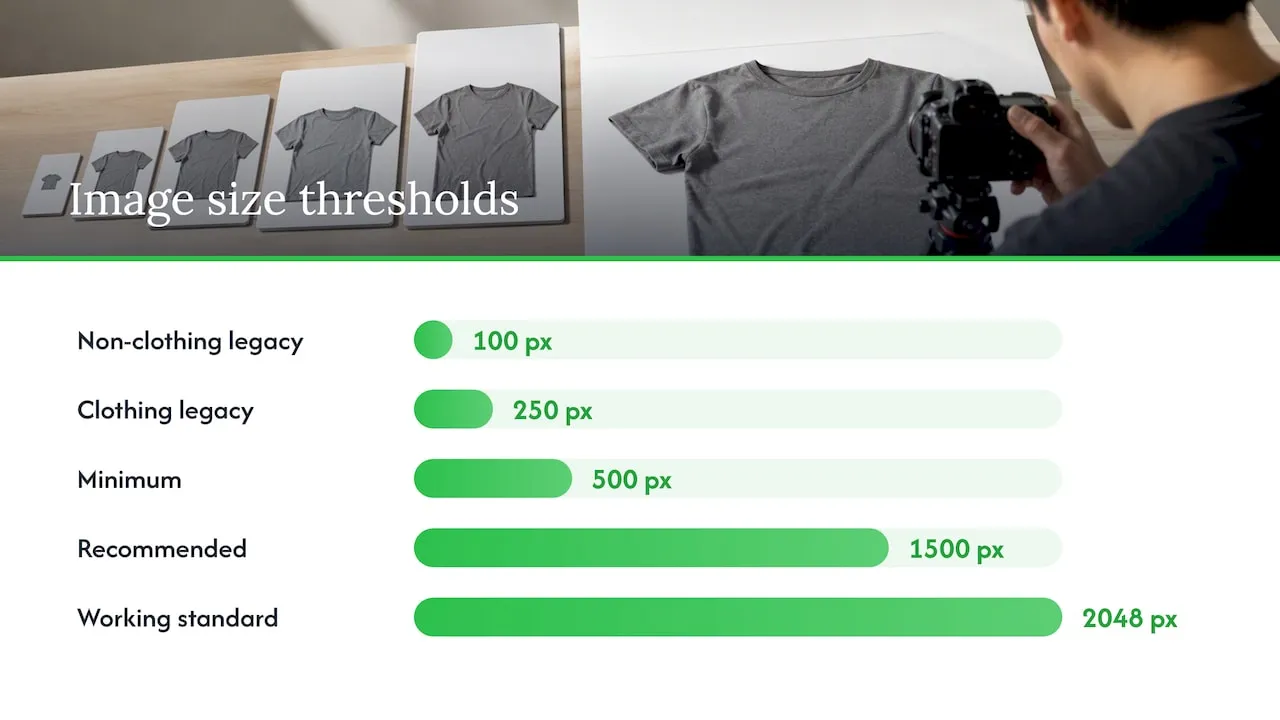
Google’s Merchant Center help says images need to be at least 500×500 px to meet the new requirements. Until 31 January 2027, you can still use 100×100 px for non-clothing and 250×250 px for clothing. After that date, small supplier thumbnails will fail across the board.
Google’s image link specification goes further and recommends 1500×1500 px or larger. It also states that the product should fill roughly 75% to 90% of the frame, and that files must stay under 16 MB. A square canvas of 2048×2048 px is a sensible working standard: sharp enough for zoom, and well above every threshold. We cover the reasoning in our guide to 2048×2048 px Shopify product images.
There is a common forum question: should you avoid uploading huge originals because Shopify resizes them anyway? Shopify does generate the delivered sizes for you, but an oversized original still slows your admin and gains you nothing past the point where zoom looks sharp. Very large files (tens of megapixels) are simply not worth it. Aim for 2048 px on the long edge and compress sensibly.
Format
Stick to standard formats Google can index: JPEG, PNG and WebP. Google’s merchant listing documentation also asks for images that Google can crawl and index. JPEG or WebP suits photographs. PNG is useful for flat graphics but heavy for photos.
Aspect ratios
Google’s structured data guidance suggests offering several high-resolution images in different aspect ratios (16:9, 4:3 and 1:1) so its systems can use the right crop on each surface. In practice, a square main image plus lifestyle shots in other ratios covers most of this.
File names and alt text
File names
Rename files before uploading. Per Shopify’s help centre, alt text and media are part of the product description, and Google’s own guidance warns against generic names such as IMG00023.JPG. A good name is short, lower case, hyphenated and literal:
- Weak:
IMG_4471.jpg,ali-1005004.webp - Better:
mens-grey-merino-crew-neck-jumper-front.jpg
Do this early. In our experience the file name is one of the hardest things to fix once a catalogue is live, so build it into your import process.
Alt text
Alt text exists first for people using screen readers and for cases where an image fails to load. Search engines use it as well. Shopify’s guidance suggests keeping it to about 125 characters or fewer. Good alt text:
- Describes what is visible: product, colour, material, angle.
- Includes the product’s main term once, naturally.
- Differs between images of the same product (front, back, in use).
- Skips phrases such as “image of” and never stuffs keywords.
Example for a variant gallery:
| Image | Weak alt text | Better alt text |
|---|---|---|
| Main | jumper | Grey merino wool crew neck jumper, front view |
| Detail | jumper jumper buy cheap jumper | Close-up of ribbed cuff on grey merino jumper |
| In use | model | Woman wearing grey merino jumper with jeans |
Our walkthrough on Shopify image alt text has fast fixes, and if you already have hundreds of products, see how to bulk edit alt text in Shopify.
Loading: where most stores quietly lose points
Most dropshippers treat image optimisation as a file-size exercise. Loading behaviour matters just as much.
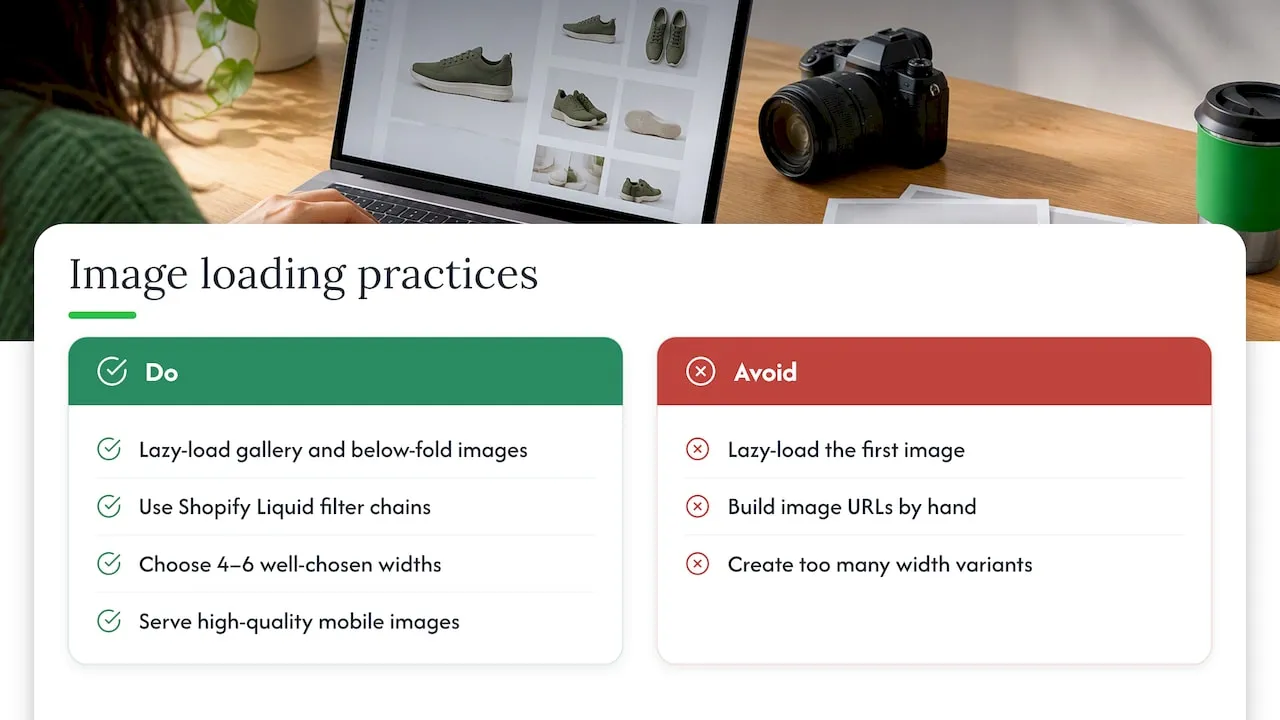
Do not lazy-load the first image. Lazy loading is right for gallery thumbnails and images below the fold. For the main product image, it delays the very element that LCP measures. Shopify’s responsive images documentation covers how to serve the right size per viewport, and the Nuvemshop case study above shows the effect of adding fetchpriority="high" to the LCP image.
Use Shopify’s Liquid filters. Shopify recommends filter chains (image_url piped into image_tag) instead of building image URLs by hand. The chain produces srcset and sizes attributes for you, so a phone does not download a desktop-sized file. If your theme is a recent Shopify one, this is probably already in place. If you run an older or heavily modified theme, ask a developer to check.
Do not over-engineer widths. You do not need a size for every screen. A handful of widths is enough, because too many variants fragment browser caching. Four to six well-chosen widths is a reasonable target.
Mobile matters too: Google indexes the mobile version first, and its mobile-first indexing guidance asks for high-quality images on mobile pages, not small or low-resolution ones. More on that in our piece on mobile optimisation for ecommerce.
Structured data: help Google connect image and product
Google’s merchant listing documentation explains that Product markup can make a page eligible for merchant listing features, including Google Images and product snippets. Most Shopify themes output this by default. Check three things:
- The
imageproperty points to a crawlable, high-resolution file, not a placeholder. - The markup also includes the fields Google asks for, such as
offers, andrevieworaggregateRatingwhere you genuinely have them. - Variant images match the variant in the markup.
Broken or thin markup is common on stores that have been bulk-edited. Our guide to Shopify product schema shows how to test and repair it.
Merchant Center: the image rules that cause disapprovals
If you sell through Google Shopping or free listings, your feed image is judged separately from your page. Google’s image_link specification is the one to read, and the practical rules are these:
- No promotional overlays. Text, “Free shipping” banners and watermarks are a frequent cause of disapprovals.
- No placeholders. A grey “image coming soon” tile will be rejected.
- Enough pixels. Below 500×500 px you will fail after 31 January 2027, as covered above.
- Right framing. The product should be prominent, not lost in a big canvas.
We lay out a clean audit in preparing your catalogue for Google’s 500×500 rule. Supplier images frequently break several of these at once: small, watermarked and carrying a shop logo.
The dropshipper’s real problem: everyone has the same pictures
Technical hygiene gets you to the starting line. The harder issue is sameness. When you import from AliExpress or a competitor, you get the same photos and the same descriptions as every other store selling that item. Google has little reason to rank the thousandth copy, and supplier or brand images can carry copyright exposure.
That is why we think of image SEO for dropshippers as a content problem first. The practical answer has three parts:
- Replace supplier shots with original or newly generated images.
- Strip overlays so the feed image is clean.
- Vary the set: main shot, angle, detail, context. Each earns its own alt text.
For wider context, see our product image best practices for Shopify stores and the broader ecommerce SEO checklist for Shopify.
Our perspective: scale breaks image SEO first
Image SEO advice is written as if you handle ten products. Dropshippers load hundreds in an afternoon, and that is where the process fails. File names stay as supplier codes. Alt text is blank or copied from the title. Thumbnails are 300 px. Every image carries someone else’s watermark.
We built Ecom-eye around that gap. Each user gets uniquely generated product content and images, so two stores importing the same product link do not end up with the same listing. That removes the copyright and DMCA worry that comes with reusing someone else’s pictures, and it keeps the feed cleaner for Merchant Center. We would still say this plainly: no tool replaces checking your own results. Open a sample of products, view the image on mobile, and look at the name, alt text and size before you export.
Our rule when scaling: fix the template, then the catalogue. A product template that handles image priority, markup and naming correctly means every new product starts right. Our checklist of Shopify product template SEO checks shows what to verify first.
— Koen
A pre-launch checklist for each product
Use this list on every product before you publish. It takes a couple of minutes once the habit forms.
- Main image is at least 1500×1500 px, product filling most of the frame, plain background.
- No text, badges or watermarks on any feed image.
- File names are descriptive and hyphenated.
- Alt text is unique per image and under about 125 characters.
- Main image is not lazy-loaded and uses high fetch priority.
- Product markup lists the main image and matches the variant.
- The description supports the images with real detail. See product description ideas for Shopify SEO.
- A mobile preview looks right, with no cropping surprises.
Doing it in bulk with Ecom-eye
If you list in volume, manual image work stops being realistic. Ecom-eye imports products from AliExpress, Amazon, Temu or competitor Shopify links, then generates unique titles, descriptions and images, with multi-language pages and one-click export to Shopify. You can try the AI product image generator or the AI product description generator directly. Plans are Try-out at 39 EUR per month and Scaler at 99 EUR per month; see the pricing page for what each includes.
FAQ
What size should Shopify product images be for SEO?
Upload at 1500×1500 px or larger, with 2048×2048 px a practical standard. Google recommends 1500×1500 px or more for Merchant Center, and the minimum becomes 500×500 px for all products from 31 January 2027. Keep files under 16 MB.
Does alt text help Shopify product SEO?
Yes. Alt text supports accessibility and gives search engines a description of the image, alongside page context. Keep it specific, aim for roughly 125 characters or fewer, and avoid repeating keywords.
Should I rename image files before uploading to Shopify?
Yes. Use short, descriptive, hyphenated names that say what the product is. Generic camera or supplier codes tell Google nothing, and renaming after the image is live is awkward, so do it before upload.
Why was my product image disapproved in Google Merchant Center?
The usual causes are text or promotional overlays, watermarks, placeholders, and images that are too small. Check the diagnostics for your specific product, then replace the image with a clean, larger version.
Sources
- Image link [image_link], Google Merchant Center Help
- How to fix: Image too small, Google Merchant Center Help
- Adding alt text to media, Shopify Help Center
- Image SEO best practices, Google Search Central
- Merchant listing structured data, Google Search Central
- Mobile-first indexing best practices, Google Search Central
- Serve correctly sized images with srcset and sizes, Shopify.dev
- Use Liquid filter chains, Shopify.dev
- Nuvemshop image prioritisation case study, web.dev
Ready to boost your product pages?
Generate high-converting, SEO-optimized product pages in bulk using AI automation used by e-commerce experts.
No credit card required