What is product import automation? 2026 guide
Discover what is product import automation and how AI tools streamline data entry for e-commerce. Transform your business efficiency today!

What is product import automation? 2026 guide

TL;DR:
- Product import automation uses AI and rules-based software to streamline supplier data into e-commerce platforms, minimizing manual effort. It enhances data quality, accelerates product listing, and maintains consistency through validation and templates, benefiting growing online retailers. Effective implementation requires balancing automation with human oversight to ensure catalogue accuracy and adapt to changing supplier formats.
Product import automation is defined as the use of AI-powered and rule-based software to ingest, map, validate, and publish supplier product data directly to e-commerce platforms, replacing manual data entry entirely. For Shopify dropshippers and multi-supplier retailers, this process transforms raw CSV files, Excel sheets, PDFs, and image catalogues into store-ready listings in minutes rather than days. Tools like Csvio, AutoDS, and Apimio have made automated product importing accessible to independent retailers who previously spent entire working weeks reformatting supplier spreadsheets. The business case is clear: automating product onboarding reduces manual cataloguing effort by 60–80% and cuts time-to-market from weeks to hours.
How does product import automation work?
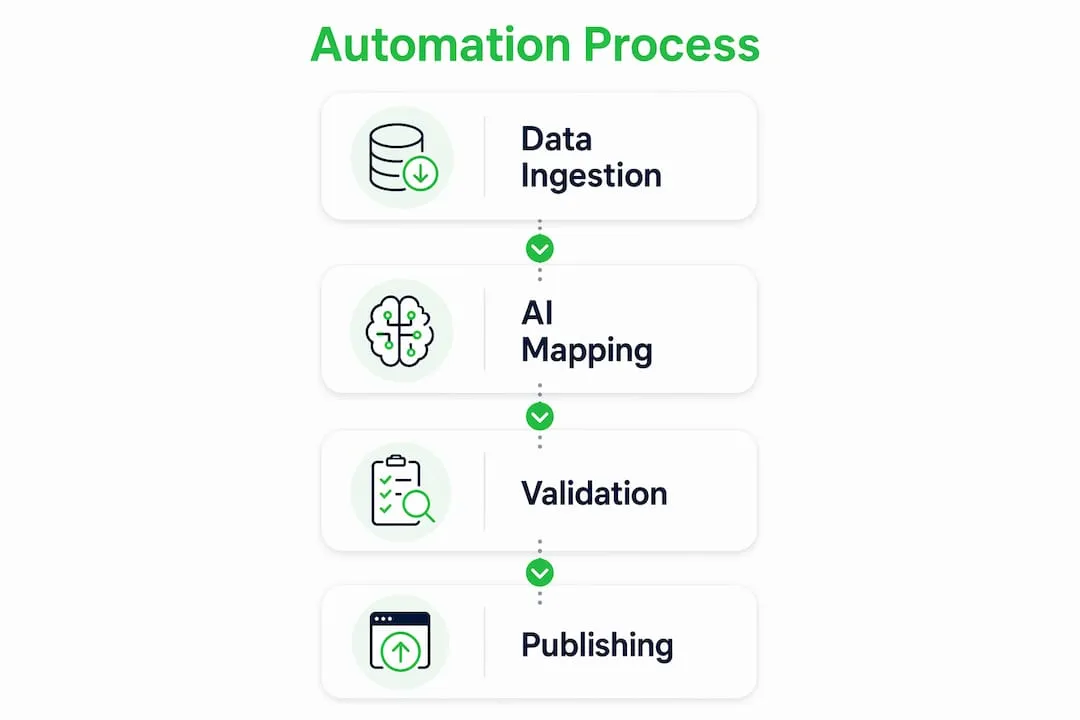
The automated import process follows a defined sequence of steps. Each step removes a manual bottleneck that would otherwise slow your catalogue growth.
Step 1: Data ingestion
The system accepts supplier files in any format, including CSV, Excel, PDF, and raw image catalogues. Tools like Csvio accept any supplier file format directly, eliminating the need to reformat data before uploading. This single capability saves multi-supplier retailers hours of preparation per import cycle.

Step 2: AI parsing and attribute mapping
Once the file is ingested, the AI reads each column header and maps it to your internal product taxonomy automatically. If a supplier labels a field “prod_colour” and your store uses “Colour”, the system resolves that discrepancy without your input. AI column mapping converts messy supplier files into store-ready products in under 60 seconds. That speed matters enormously when you are onboarding a new supplier with hundreds of SKUs.
Step 3: Validation and Quality Guard
Raw supplier data is rarely clean. Fields are missing, images are broken, and descriptions contain formatting errors. A Quality Guard workflow enforces business rules before any product reaches your live store, catching incomplete or broken records at the source. Think of it as a filter that sits between your supplier’s spreadsheet and your customer-facing catalogue.
Step 4: Platform integration and publishing
Clean, validated data pushes directly into your Product Information Management system (PIM), ERP, or e-commerce platform. Automated SKU onboarding workflows include full audit trails and human approval queues where needed, so you retain control without doing the repetitive work yourself.
Pro Tip: Save a mapping template for each supplier the first time you import their file. Future imports from that supplier become a single-click operation, with no column remapping required.
What are the key benefits of automating product imports?
Automated product importing delivers measurable gains across four areas that matter most to growing online retailers.
- Reduced manual effort. Automating product onboarding improves attribute completeness by 45% and cuts manual cataloguing effort by 60–80%. That frees your team to focus on marketing and customer experience rather than spreadsheet maintenance.
- Faster time-to-market. Products that previously took weeks to list are ready in hours. For dropshippers launching seasonal ranges or reacting to trending products, that speed is a direct commercial advantage.
- Consistent taxonomy and data quality. Automation enforces the same attribute structure across every supplier, every time. Your product pages carry complete, consistent data rather than a patchwork of whatever each supplier happened to include.
- Real-time updates during peak periods. Retailers who rely on manual copy-paste workflows hit a hard ceiling during peak sales seasons. Shifting to automation enables competitive pricing and stock updates in real time, which is the difference between winning and losing a sale during Black Friday or a flash promotion.
- Scalability without proportional headcount. Adding a new supplier to a manual workflow means hiring more staff or burning out existing ones. With import automation, adding a supplier means uploading one file and applying a saved template.
The compounding effect of these benefits is significant. A retailer managing 10 suppliers manually might spend 15–20 hours per week on data entry alone. Automation reduces that to under two hours, freeing up time that compounds into better content, stronger SEO, and faster growth. For a deeper look at how bulk listing automation fits into a broader catalogue strategy, the principles apply directly to import workflows as well.
How do product import automation tools compare?
The market for import process automation tools has matured considerably. The table below compares four widely used platforms across the criteria that matter most to e-commerce retailers.
| Tool | Best For | Key Capability | Platform Support |
|---|---|---|---|
| Csvio | Shopify retailers with multiple suppliers | AI column mapping, saved templates, CSV/Excel/PDF ingestion | Shopify |
| Apimio | Large retailers with complex supplier networks | Quality Guard workflows, PIM integration, attribute validation | Shopify, WooCommerce, PrestaShop |
| AutoDS | Dropshippers automating fulfilment and listings | Supplier monitoring, auto price and stock updates | Shopify, eBay, Amazon |
| MorningAI | Retailers wanting controlled automation | URL and sitemap extraction, manual review before commit | Shopify, WooCommerce |
Each tool takes a slightly different approach to the same core problem. Csvio prioritises speed and simplicity for Shopify merchants. Apimio targets larger operations that need governance and supplier relationship management built in. AutoDS suits dropshippers who need fulfilment automation alongside listing creation. MorningAI’s Auto-Import extracts complete product data from URLs, sitemaps, or CSVs and holds it for manual review before committing, which suits retailers who want AI assistance without full autonomy.
Choosing the right tool depends on your supplier count, your platform, and how much human oversight you want in the workflow. A single-supplier Shopify store has very different needs from a retailer managing 50 suppliers across three platforms.
Pro Tip: Before committing to any import automation tool, run a test import with your messiest supplier file. The tool’s ability to handle that file accurately tells you more than any feature list.
For retailers exploring AI-powered Shopify tools more broadly, import automation is one component of a wider automation stack that includes description generation, image creation, and SEO optimisation.
What are the common challenges in product import automation?
Automation does not eliminate all problems. It shifts them. Understanding where the risks sit helps you build a workflow that avoids them.
- Data quality at the source. Practitioners consistently underestimate the time needed for data sanitisation. Raw supplier files require validation steps to avoid garbage-in, garbage-out outcomes. If your supplier sends incomplete records, your automation will publish incomplete listings unless you have a Quality Guard stage in place.
- Supplier variability. No two suppliers format their data the same way. Column names, encoding standards, image conventions, and category structures all differ. Saving per-supplier mapping templates is the practical solution, turning what would be a multi-day reformatting task into a single-click operation on every subsequent import.
- Over-reliance on full automation. Human-in-the-loop automation balances AI efficiency with expert review to reduce catalogue corruption risk. The AI flags ambiguous data for a human to resolve rather than making uncertain assumptions. Full automation without review gates is a risk most retailers cannot afford.
- Image standardisation. Supplier images arrive in inconsistent sizes, backgrounds, and file formats. Your import workflow needs an image handling step, whether that is automated resizing, background removal, or AI image generation, to produce consistent product visuals across your catalogue. The impact of image quality on conversion rates makes this a non-negotiable part of the process.
- SEO-unfriendly descriptions. Supplier descriptions are written for internal use, not for Google. Importing them verbatim creates duplicate content across every retailer using the same supplier. Automated description generation, as part of the import workflow, solves this at scale. Understanding why automating product descriptions matters for SEO is the logical next step once your import pipeline is running.
The retailers who get the most from import automation are those who treat it as a system to design, not a button to press. Build your Quality Guard rules before you go live, update your supplier templates when formats change, and keep a human in the loop for edge cases.
Key takeaways
Product import automation delivers its full value only when AI-driven ingestion is paired with Quality Guard validation, per-supplier templates, and human review at critical decision points.
| Point | Details |
|---|---|
| Core definition | Automated product importing uses AI to ingest, map, validate, and publish supplier data to your store. |
| Manual effort reduction | Automation cuts cataloguing effort by 60–80% and improves attribute completeness by 45%. |
| Quality Guard is non-negotiable | Validation workflows must sit between raw supplier data and your live catalogue to prevent errors. |
| Per-supplier templates scale the process | Saving mapping templates per supplier turns multi-day reformatting into a single-click import. |
| Human oversight protects catalogue integrity | Full automation without review gates risks propagating supplier data errors across your store. |
Why i think most retailers automate too late
I have watched a consistent pattern play out across growing e-commerce businesses. Retailers invest heavily in paid traffic, influencer partnerships, and platform fees, then lose the competitive edge they paid for because their product data is slow, inconsistent, and full of supplier copy-paste errors. The automation was always available. They just underestimated how much the manual process was costing them.
The argument I hear most often is that automation is for big retailers with IT teams. That was true in 2018. In 2026, tools like Csvio and Apimio are built for independent operators. The setup time for a first import is measured in minutes, not months.
What I find genuinely underappreciated is the compounding quality benefit. When you automate imports with proper validation, your catalogue does not just grow faster. It grows cleaner. Every product that enters your store has passed the same quality checks, carries the same attribute structure, and meets the same content standards. That consistency shows up in search rankings, conversion rates, and Google Merchant approval rates in ways that are hard to attribute directly but impossible to ignore over time.
The one caution I would offer is this: do not treat automation as a reason to stop thinking about your data. Supplier formats change. New product categories arrive with different attribute requirements. The retailers who stay ahead are those who review their import templates quarterly and update their Quality Guard rules as their catalogue evolves. Automation handles the volume. You still need to own the standards.
For anyone building a Shopify dropshipping store in 2026, investing in scalable import automation early is one of the highest-return decisions you can make. The alternative is hiring people to do work that software does better, faster, and without sick days.
— Koen
Take your product imports further with Ecom-eye
Ecom-eye is built specifically for Shopify dropshippers who need to move fast without cutting corners on content quality.
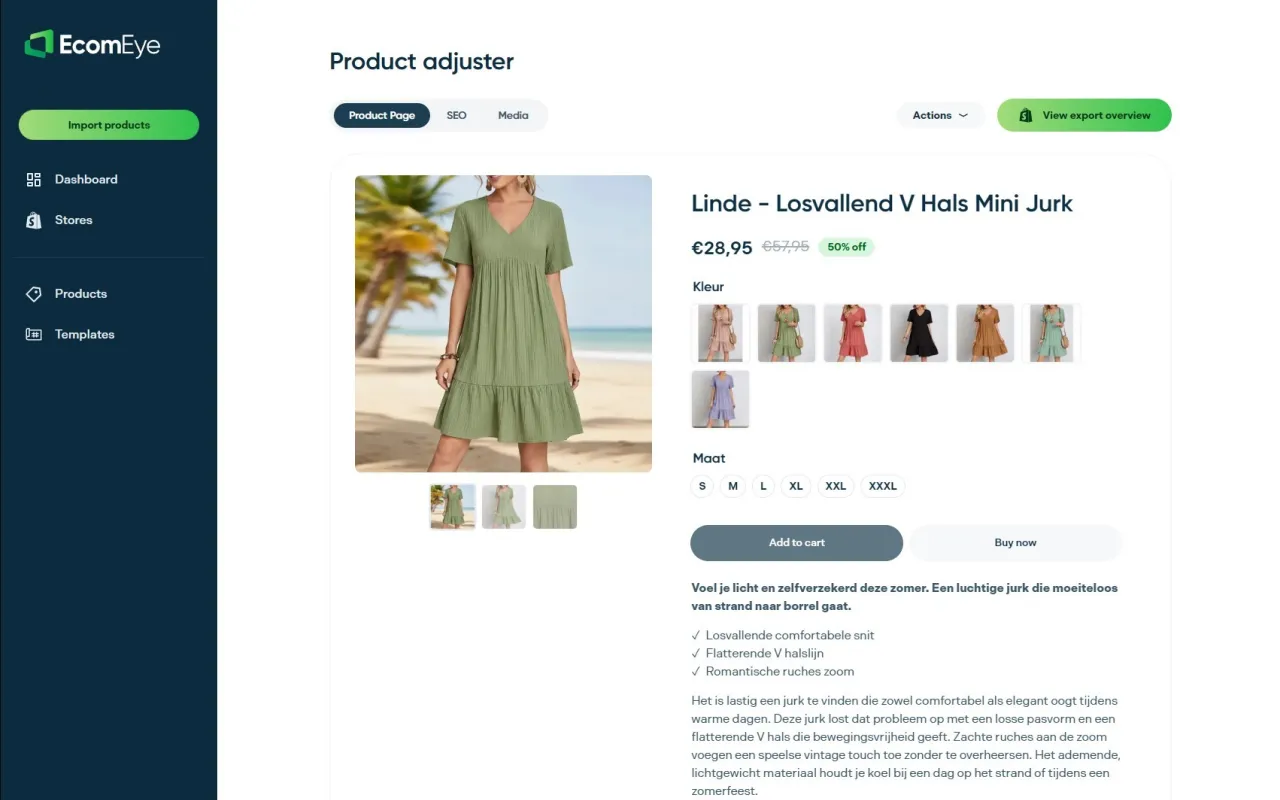
Import products in bulk from AliExpress or competitor URLs, and Ecom-eye automatically generates SEO-optimised titles, clean original descriptions, AI product images, and multi-language pages ready for Google Merchant. There is no rewriting, no copyright risk, and no manual reformatting. Every product that leaves the pipeline is store-ready and search-optimised. For retailers who have spent hours copying and pasting supplier content only to face Google Merchant disapprovals, Ecom-eye fixes that problem at the source. Visit Ecom-eye to see how bulk AI product listing works in practice.
FAQ
What is product import automation in simple terms?
Product import automation is the process of using software to pull supplier product data, map it to your store’s format, validate it, and publish it automatically, replacing manual data entry entirely.
How much time does automated product importing save?
Automating product onboarding reduces manual cataloguing effort by 60–80% and cuts time-to-market from weeks to hours, depending on catalogue size and supplier count.
Which platforms support product import automation tools?
Tools like Csvio support Shopify, Apimio covers Shopify, WooCommerce, and PrestaShop, and AutoDS extends to eBay and Amazon, giving retailers broad platform coverage.
Do i still need to review imports manually?
Yes. Human-in-the-loop validation is recommended to catch ambiguous or incomplete data that AI cannot resolve confidently, protecting your catalogue from errors.
What file formats do import automation tools accept?
Most tools, including Csvio, accept CSV, Excel, and PDF files, while platforms like MorningAI also extract product data directly from supplier URLs and sitemaps.
Ready to boost your product pages?
Generate high-converting, SEO-optimized product pages in bulk using AI automation used by e-commerce experts.
No credit card required