Shopify AI explained for UK store owners
Discover how Shopify AI can streamline your UK store operations, from designing your storefront to automating daily tasks effortlessly.

Shopify AI explained for UK store owners

Shopify AI is the set of built-in and integrable tools that let you design stores, generate product copy, edit images, and automate routine tasks with minimal setup. For UK merchants, the fastest entry point is either the AI Store Builder or Sidekick, both accessible directly from your Shopify admin with no third-party app required.
Three high-impact things you can do today:
- Generate a storefront design in seconds by describing your niche and brand to the AI Store Builder
- Draft product descriptions for any listing using Shopify Magic inside the product editor
- Automate a fraud-flagging rule with Shopify Flow in under ten minutes, no code needed
The native tools are genuinely useful for day-to-day tasks. Where they hit a ceiling is at scale: generating hundreds of unique, SEO-ready product pages with copyright-safe images is a different job entirely, and that is where a dedicated bulk tool earns its keep.
Key takeaways
Shopify’s native AI tools cover individual tasks well, but scaling a catalogue to hundreds of unique, SEO-ready pages requires a dedicated bulk generation workflow.
| Point | Details |
|---|---|
| Native AI covers daily tasks | Shopify Magic, Sidekick, and Flow handle descriptions, admin queries, and automations across paid plans. |
| AI Store Builder is free | Generate a complete storefront design from a short brief at no cost, with no design skills needed. |
| Permissions carry real risk | Always review write-access scopes before connecting any third-party AI tool; require manual confirmation for price and inventory changes. |
| Bulk publishing needs a specialist tool | For hundreds of products, use a bulk generator like Ecom-eye to produce copyright-safe, SEO-unique pages at speed. |
| QA gates protect your catalogue | Sample 10% of AI-generated outputs before export and keep a CSV backup for rapid rollback if errors appear. |
Table of Contents
- What does Shopify AI actually include?
- How to use Shopify AI for the most common jobs
- When is Shopify AI the right tool?
- Accuracy, copyright, and data handling: what UK merchants must check
- Which Shopify AI features are included in UK plans?
- Scaling hundreds of product pages: a practical bulk workflow
- What we have learned scaling stores with AI
- Publish product pages at scale without the manual work
- Sources
- FAQ
What does Shopify AI actually include?
Shopify’s native AI offering breaks into four distinct tools, each with a different job.
Shopify Magic
Shopify Magic is a suite of integrated AI features available across plans that generate product copy, edit media, and assist with theme and content creation. It sits inside the product editor, email builder, and media tools. You use it to write a product description, suggest an email subject line, or remove an image background without leaving the admin. Availability is broad, though a handful of features are not fully optimised for mobile and some are subject to language or regional caveats.
Shopify Magic combines your proprietary store data with leading language models rather than relying on a single model, which keeps outputs contextually relevant to your specific catalogue and brand voice.
Sidekick
Sidekick is an AI commerce assistant built into the Shopify admin that can access your store’s context and help with admin tasks and code generation for theme blocks. Think of it as a store-aware chat interface: you can ask it to write a ShopifyQL query, generate a new theme section, create a customer segment, or explain why a discount is not applying. It is trained specifically for Shopify, which means its answers are grounded in your actual store data rather than generic ecommerce advice.
Pro Tip: Ask Sidekick to explain a specific Shopify Flow trigger before you build it. It will describe the exact conditions and any edge cases, saving you a round-trip to the documentation.
AI Store Builder
The AI Store Builder creates personalised storefront designs from a few merchant inputs and outputs working, sales-ready theme templates. You describe your product category, brand feel, and colour preferences, and it generates a complete storefront with hero banners and layout variations. No design skills required. It is positioned as a free, rapid way to get from zero to a live-looking store in minutes.
Shopify Flow
Shopify Flow provides no-code automation templates for marketing, fulfilment, inventory management, and fraud prevention. It integrates with tags, metafields, Slack, and external services. A typical use case: flag any order above a risk threshold, pause fulfilment, and notify your team via Slack, all without writing a line of code. Flow is the practical answer to the question “how do I stop doing the same manual task every day?”
How to use Shopify AI for the most common jobs
Generate a storefront with the AI Store Builder
- Go to shopify.com/tools/ai-store-builder and click Create your store.
- Enter your product niche (e.g. “sustainable pet accessories”) and describe your brand tone.
- Choose a colour palette or let the AI suggest one based on your niche.
- Review the generated theme, hero banner, and page layout. Accept or regenerate sections individually.
- Connect your Shopify account to publish the theme directly to your store.
Expected output: a complete, mobile-responsive storefront with placeholder content you can swap for real product data.
Write and refine product descriptions with Shopify Magic
- Open any product in your Shopify admin and scroll to the Description field.
- Click the Shopify Magic wand icon and enter a short prompt: product name, key features, and target buyer.
- Review the generated copy. Check for accuracy, especially specifications and dimensions.
- Edit the tone slider if available (professional, playful, persuasive) to match your brand.
- Run a quick duplicate-content check before publishing, particularly if you sourced the product data from a supplier.
Pro Tip: Always verify AI-generated specifications against the supplier’s data sheet. Shopify Magic drafts compelling copy, but it cannot confirm whether a product is actually waterproof to 30 metres.
Apply image edits and generate hero banners
Inside the Shopify media editor, select any product image and use the AI background removal tool to isolate the product on a clean white or custom background. For hero banners, the AI Store Builder generates these automatically during setup, but you can also prompt Sidekick to suggest image dimensions and copy overlays for a specific campaign.
Set up a simple Shopify Flow automation
- Open the Shopify Flow app from your admin.
- Browse templates and select Flag high-risk orders.
- Set the trigger: order risk level equals “high”.
- Add an action: tag the order “review-required” and send a Slack notification.
- Activate the workflow and place a test order to confirm it fires correctly.
This takes roughly eight minutes from install to live automation.
When is Shopify AI the right tool?
Shopify’s native AI handles a clear set of jobs well. For most merchants, the practical use cases are:
- Store mockups and initial design: the AI Store Builder is genuinely fast for getting a presentable storefront live
- Product description drafts: Shopify Magic produces a solid first draft for individual or small batches of products
- Image touch-ups: background removal and basic edits inside the media editor save time on simple assets
- Simple automations: Flow templates cover the most common rules (fraud flagging, inventory alerts, tag-based marketing triggers)
- Admin queries: Sidekick answers store-specific questions faster than searching the help centre
Where the native tools run short is predictable. Generating 500 unique, SEO-optimised product pages from an AliExpress import is not what Shopify Magic was built for. Multi-language catalogue normalisation, bulk metafield population, and copyright-safe image generation at volume all require something more structured.
When your catalogue grows past a few dozen products, the per-product manual workflow stops being a productivity tool and starts being a bottleneck. That is the moment to consider a dedicated bulk generation pipeline.
The decision is fairly clean: use Shopify-native AI for individual tasks and store setup; bring in a specialist bulk tool when you need to publish at speed, maintain SEO uniqueness across hundreds of pages, or support multiple languages without rewriting each page manually. For a deeper look at where AI tools for dropshipping fit alongside native Shopify features, the distinction becomes even clearer.
Accuracy, copyright, and data handling: what UK merchants must check
Using AI outputs without review carries real risks. Here is what to verify before you publish anything generated by Shopify AI or a connected third-party tool.
Accuracy and hallucination risk. Shopify Magic drafts copy based on the inputs you provide. If your prompt is vague or your source data is incomplete, the output can include plausible-sounding but incorrect specifications. Always cross-check generated descriptions against supplier data.
Copyright and duplicate content. Copying product descriptions from a supplier or competitor and running them through a light AI paraphrase does not make them original. Google’s systems detect near-duplicate content, and Google Merchant Centre will disapprove listings that match existing pages. Unique, bespoke rewrites or a copyright-safe bulk generator are the practical solution. The risks of AI-generated listings and duplicate content are worth understanding before you publish at any volume.
Data handling for Shopify Magic and Sidekick. Shopify uses your merchant store data to tailor AI outputs, but does not share your data between merchants. Your catalogue, customer data, and store settings remain within your Shopify environment when using native tools.
Third-party AI tool permissions. Connecting third-party AI tools requires explicit authorisation and permission scopes. Some integrations include write access that can change products, prices, or settings. Once data leaves Shopify, it is governed by the third party’s own terms. Review every permission scope before authorising.
Key checks for UK merchants:
- Confirm which staff roles can authorise new AI app connections
- Read the app’s privacy policy for GDPR/UK GDPR data processing terms
- Enable manual confirmation steps for any write action that touches pricing or inventory
- Test automations on a staging product before applying them to live listings
Pro Tip: Before connecting any third-party AI app, check whether it offers a “read-only” mode. Start there, confirm the outputs are accurate, and only grant write access once you trust the tool’s behaviour.
Which Shopify AI features are included in UK plans?
The core Shopify Magic features, including product description generation, email subject line suggestions, and media editing tools, are available across paid Shopify plans. Sidekick access is also broadly available, though specific capabilities within it may expand as Shopify rolls out updates.
A few practical notes for UK store owners:
- Text generation: available across plans; language support is primarily English, with other languages in varying states of availability
- Image background removal: included in the media editor across plans
- AI Store Builder: free to use at shopify.com/tools/ai-store-builder, no plan restriction
- Shopify Flow: available on Basic and above; some advanced triggers require higher-tier plans
- Early-access features: Shopify periodically releases AI features in beta; availability in the UK may lag the US rollout by weeks or months
- Mobile optimisation: some Shopify Magic features are not fully optimised for mobile admin use; desktop is the more reliable environment for AI-assisted editing
Pro Tip: Check the Shopify changelog and the “What’s new” section of your admin regularly. AI features are being added at pace, and a capability that was not available three months ago may now be live on your plan.
Third-party AI tools available through the Shopify App Store carry their own pricing, typically subscription-based or usage-based credits. The Shopify build-with-AI platform supports connecting external AI builders, chat assistants, and developer tools, giving merchants flexibility to extend beyond native features.
Scaling hundreds of product pages: a practical bulk workflow
For merchants publishing at volume, a page-by-page approach collapses quickly. A structured bulk workflow looks as follows:
Stage 1: Source import. Pull product data from AliExpress, Amazon, Temu, or a competitor Shopify store. Capture raw title, description, images, category, and any available attributes.
Stage 2: Template mapping. Map source fields to your output schema: SEO title, meta description, body copy, image alt text, and metafields. Define rules for title format, word count, and tone.
Stage 3: AI generation pass. Run the mapped data through your bulk generator. Each product gets a unique title, a rewritten description, and AI-generated or background-removed images. The AI toolkit documentation explains how store-aware context keeps generated content aligned with platform requirements.
Stage 4: QA and deduplication. Check a sample of outputs for accuracy, duplicate phrases, and specification errors. Flag any product where the AI has introduced a claim not present in the source data.
Stage 5: Staged export to Shopify. Export in batches rather than all at once. Publish a first batch, check indexing and Merchant Centre status, then proceed.
| Input field | Generated output | QA check |
|---|---|---|
| Source title | SEO-optimised title | Unique |
| Raw description | Rewritten body copy | No duplicate phrases, specs verified |
| Supplier images | AI product images | Background clean, no watermarks |
| Category tags | Metafields populated | Correct taxonomy, no blanks |
| Language flag | Multi-language page | Translated and localised |
When to prefer a bulk generator over Shopify Magic: when your catalogue exceeds a few dozen products, when you need copyright-safe unique content at speed, or when you are publishing in multiple languages simultaneously.
Pro Tip: Always require manual approval for any write action that touches pricing or inventory. An AI that can update a price field can also set it to zero. Keep humans in the loop for those decisions.
For a rollback strategy: before any bulk publish, export your current product CSV from Shopify admin. If an automated publish introduces errors, you can reimport the original CSV and revert within minutes. Tag the batch with a date-stamped label so you can identify affected products instantly.
Automating ecommerce product page workflows at this level is where the gap between native Shopify AI and a dedicated bulk tool becomes concrete.
What we have learned scaling stores with AI
The part of this that most articles skip is the QA layer. Generating content in bulk is straightforward once the pipeline is set up. What actually determines whether a bulk publish succeeds or creates a mess is what happens between generation and export.
The workflow that holds up at scale: import in batches of dozens of products, run the AI generation pass, review a sample manually, check for specification errors and duplicate phrases, then export. Incremental rollouts matter because they give you a clean analytics signal. If conversion rate drops after a specific batch, you know exactly which products to investigate.
The other thing worth saying plainly: AI-generated content needs a brand voice layer on top of it. Raw AI output is competent but generic. The merchants who get the most from bulk generation are the ones who define a tone template before they run the pipeline, not after.
Publish product pages at scale without the manual work
Most Shopify store owners hit the same wall: Shopify Magic handles one product at a time, but your catalogue has hundreds. Ecom-eye is built specifically for that gap. Import products in bulk from AliExpress, Amazon, Temu, or a competitor Shopify link, and Ecom-eye automatically generates unique SEO titles, clean rewritten descriptions, AI product images, and multi-language pages, then exports everything to Shopify in one click.
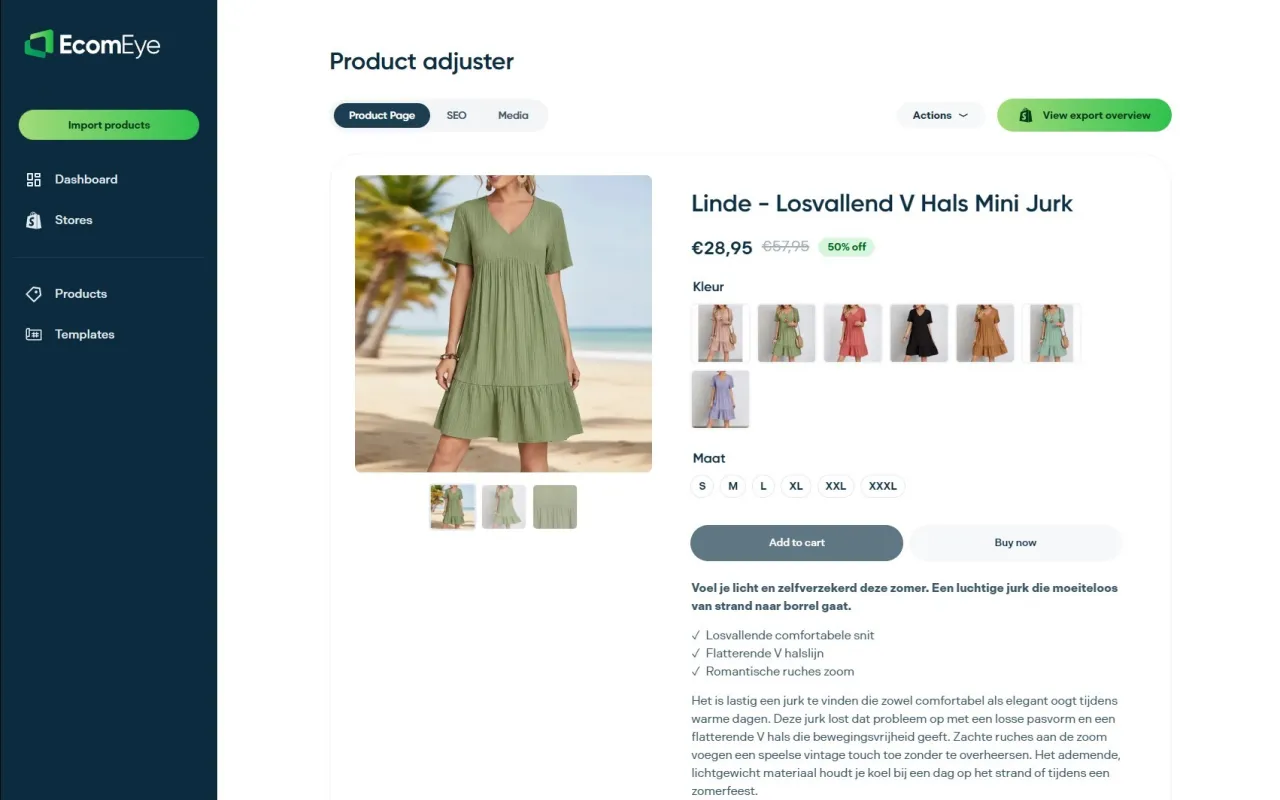
No duplicate content. No Google Merchant disapprovals. No rewriting each listing by hand. The bulk AI product description generator is available on a pay-as-you-go or subscription basis, with a free trial for new users. Start your free trial at Ecom-eye and see how many pages you can generate in your first session.
Sources
Official Shopify documentation for the features covered in this article:
- Shopify Help Center | Shopify Magic
- AI-enabled commerce assistant, Sidekick, designed to make it easier for you to start, run, and grow your business on Shopify.
- Shopify Flow - Automate everything and get back to business | Shopify App Store
Shopify’s own documentation is the most reliable source for current plan availability and regional feature rollouts. Feature access can change between updates, so check the help centre before building a workflow that depends on a specific capability.
FAQ
Does Shopify have built-in AI?
Yes. Shopify includes Shopify Magic, Sidekick, and the AI Store Builder as native tools available across paid plans, covering text generation, image editing, admin assistance, and storefront design.
Is Shopify AI worth using for a UK store?
For individual tasks like product descriptions, image edits, and simple automations, yes. For bulk catalogue publishing or multi-language SEO at scale, native Shopify AI is not sufficient and a dedicated bulk tool is more practical.
Is Shopify still worth it in 2026?
Shopify remains one of the most capable ecommerce platforms available to UK merchants, with a growing native AI layer and a large app ecosystem. The platform’s AI features are expanding quickly, which adds value without requiring additional tools for most day-to-day tasks.
Can you make serious money on Shopify?
Revenue depends on product selection, traffic, and conversion rate rather than the platform itself. Shopify’s AI tools can reduce the time spent on content and admin, freeing more time for the decisions that actually drive margin.
What is the safest way to use AI for Shopify product pages at scale?
Use a bulk generator that produces copyright-safe, unique content rather than paraphrasing supplier copy. Always QA a sample before publishing, keep a CSV backup, and never grant write access to a third-party AI tool without confirming it supports manual confirmation steps for price and inventory changes.
Ready to boost your product pages?
Generate high-converting, SEO-optimized product pages in bulk using AI automation used by e-commerce experts.
No credit card required