Stop duplicate listings for Shopify stores: 3 AliExpress import fixes
2026 workflow for Shopify store owners: compare the three AliExpress to Shopify import methods and the editing steps that prevent duplicate content and...

Stop duplicate listings for Shopify stores: 3 AliExpress import fixes

Three methods exist for AliExpress to Shopify import: a dropshipping app for automated, ongoing imports; a browser extension for one-click single-product pulls; and manual CSV upload for bulk, curated catalogues. Use an app if you’re scaling and want inventory and order sync running in the background; use an extension when testing a handful of products fast; use CSV when you need exact control over hundreds of listings at once. Whichever method you choose, always import to drafts first, rewrite the listing, and set honest shipping timelines before you publish.
TL;DR:
- Using a dropshipping app is best for scaling large catalogs because it automates inventory and order sync, but requires setup and training.
- Browser extensions are fastest for testing a few products but become impractical for importing more than a dozen items at once.
- Bulk CSV import offers the highest control and accuracy for curated, large-volume catalogs, provided the data is pre-cleaned and mapped correctly.
- After importing, extensive editing of titles, descriptions, images, and shipping info is essential to avoid duplicate content issues and improve Google ranking.
- Proper supplier vetting and testing delivery times before listing prevents most customer service disputes and order cancellations.
Table of Contents
- Which AliExpress to Shopify import method should you use?
- How do you import AliExpress products using a dropshipping app?
- How does one-click AliExpress import via browser extension work?
- How do you bulk import AliExpress products with a CSV file?
- What should you edit after import to avoid duplicate content and Merchant issues?
- What supplier and shipping checks matter before you publish?
- What are the most common AliExpress to Shopify import problems?
- What has scaling AliExpress imports actually taught us?
- How do you handle customer service issues on imported AliExpress products?
- What legal and intellectual property issues should you check before importing?
- How do you keep AliExpress and Shopify inventory in sync?
- How does order fulfilment and tracking work after import?
- The editorial take: stop treating import as the finish line
- Scale your imports without rewriting every listing by hand
- Sources
- FAQ
Which AliExpress to Shopify import method should you use?
Every method trades speed against control, and picking the wrong one wastes hours you don’t have.
Dropshipping apps (like Oberlo’s successors, DSers, or Zendrop) win on automation. They sync inventory levels, apply price rules automatically, and can push order fulfilment straight through to AliExpress once a customer buys. The catch is setup time: connecting the app, configuring pricing rules, and learning its interface takes a session before you’re actually importing.
Browser extensions are the quickest route from “I found a product” to “it’s live in my store.” You click one button on the AliExpress listing page, choose your store, and a draft product appears in Shopify in under a minute. No dashboard hunting, no bulk settings. That speed is exactly why extensions suit product testing but struggle once you’re importing fifty items in one sitting.
CSV import is the slowest to set up and the most precise once it’s working. You’re not clicking through supplier pages one at a time. You’re mapping structured data into Shopify’s exact column format, which means every title, price, and variant lands exactly where you tell it to.
Here’s the quick-reference version:
- One-product test: browser extension. Fastest path to a live draft, minimal setup.
- Scaling catalogue (20+ SKUs, ongoing): dropshipping app. Automation pays for the setup time.
- Curated brand launch (bulk, exact control): manual CSV. Slower, but nothing gets imported that you didn’t explicitly map.
When comparing apps or extensions, prioritise three automation features above everything else: draft-first import (never auto-publish), inventory sync frequency, and whether the tool lets you bulk-edit titles and descriptions before they go live. A tool that skips any of those three will cost you time later.
How do you import AliExpress products using a dropshipping app?
Connecting a dropshipping app is the backbone of most scaling Shopify stores, and it follows a predictable sequence once you know what to check at each step.
1. Install and authorise the app
From your Shopify admin, search the Shopify App Store for a dropshipping app, install it, and grant the permissions it requests. Before confirming, check the permission list actually matches what the app needs: read/write access to products, orders, and inventory is normal; anything asking for customer payment data is not.
2. Import to your list, not to your storefront
Browse AliExpress (usually through the app’s own search or a linked extension), and add items to an import list rather than publishing directly. This is the single most important habit in the whole process. Shopify’s own dropshipping guidance is explicit that products should land as drafts, not live listings, so you get a chance to fix them before a customer ever sees them.
3. Review each draft before publishing
Work through this checklist for every product:
- Title rewritten in your own words, not copied from the supplier listing.
- Description edited for tone, accuracy, and length.
- Images checked for watermarks, competitor logos, or supplier branding.
- Shipping method and estimated delivery window set at product level.
- Variants (colour, size) matched correctly to supplier SKUs.
- Metafields or tags added for filtering and SEO.
4. Set pricing rules
Most apps let you apply a markup formula (fixed percentage, fixed amount, or tiered by cost) across your whole import list rather than pricing each item by hand. This is where a lot of new dropshippers underprice, forgetting to factor in payment processing fees and ad spend on top of the supplier cost.
5. Turn on automation
Once listings are live, enable inventory sync so stock levels update automatically, order auto-placement so a customer purchase triggers the supplier order without you manually re-entering it, and tracking sync so tracking numbers flow back to the customer without a support ticket. Automation features like these are the actual reason to choose an app over manual work at scale, not the import itself.
Pro Tip: Run your first five automated orders manually alongside the automation for a week. It catches mismatched variants and pricing errors before they hit fifty orders instead of five.
How does one-click AliExpress import via browser extension work?
A browser extension is the fastest legitimate route from product page to Shopify draft, and the flow barely changes between tools.
- Install the extension from your browser’s add-on store and pin it so it’s visible while browsing AliExpress.
- Connect your Shopify store, granting the OAuth permissions it requests for product creation. If you run more than one store, most extensions show a store picker at this stage so you choose the correct destination before importing.
- Open an AliExpress product page and click the extension’s overlay import button, which appears directly on the listing.
- Choose “import to drafts” rather than publish immediately, exactly as with app-based imports.
- Review the draft in Shopify admin. Title, full HTML description, images, and variants transfer automatically, based on how direct-import extensions typically behave.
What usually needs fixing afterwards: images are often hotlinked straight to the supplier’s CDN rather than uploaded to Shopify’s own servers, which risks broken photos if the supplier changes or removes a listing later. Shipping information rarely transfers in a usable format, so you’ll need to write your own delivery estimate manually. AliDropship’s own extension documentation confirms this pattern, including bulk import options that let you pull an entire category page at once rather than product by product.
Extensions earn their place when you’re testing three or four products before committing to a supplier, or running multiple stores and need a fast picker between them. They’re the wrong tool the moment you’re importing more than a dozen items in one session. That’s what CSV exists for.
How do you bulk import AliExpress products with a CSV file?
CSV import gives you the most control of any method, but only if the file is clean before it reaches Shopify.
Building the file starts with gathering AliExpress product data, either through a scraping extension that exports to spreadsheet format or by manually compiling titles, prices, images, and variant details into a spreadsheet yourself. Manual compilation is slow, but for a smaller curated catalogue it avoids the messiness that scraping tools sometimes introduce.
Mapping Shopify’s required CSV headers correctly matters more than anything else in this process. Shopify expects specific column names like Handle, Title, Variant SKU, and Image Src, and mismatched headers are the most common reason bulk imports fail outright rather than importing incorrectly. A spreadsheet with a column labelled “Product Name” instead of “Title” won’t map automatically. You need to rename it yourself.
Before uploading, run through this cleaning pass:
- Normalise variants so colour and size options use consistent naming across every row (don’t mix “Red” and “red” and “RED”).
- Save the file as UTF-8 encoding to avoid broken characters in titles that use accented letters or symbols.
- Decide on image hosting upfront: hotlinking to AliExpress risks broken images later, so hosting images yourself (or regenerating them) is worth the extra step.
- Check Shopify’s file size and row limits before uploading a very large catalogue, since oversized files simply fail rather than partially importing.
Once uploaded, Shopify generates an import report showing exactly how many rows succeeded and which failed, with a reason attached to each failure. Read that report line by line rather than assuming a successful upload means every product landed correctly.
What should you edit after import to avoid duplicate content and Merchant issues?
The import itself is the easy part. What you do to the listing afterwards determines whether Google ever ranks it and whether Shopify’s Merchant Center approves it.
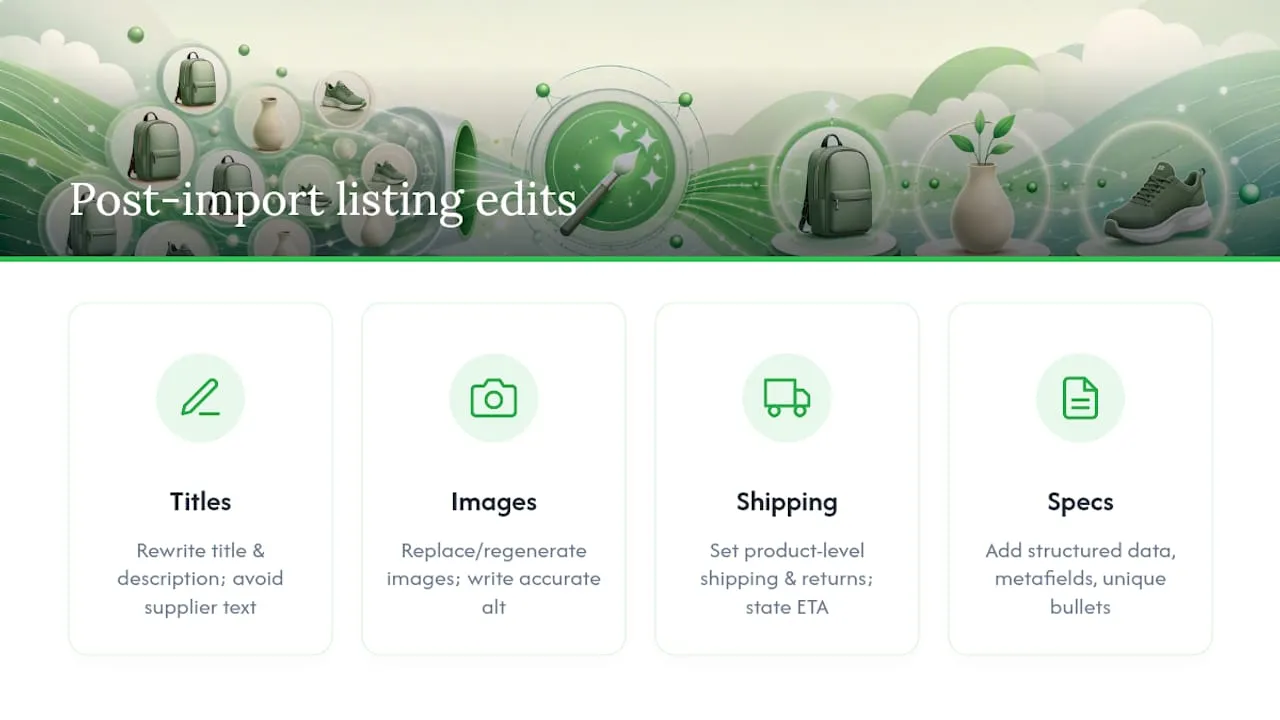
Rewrite titles and descriptions completely. Copying supplier text verbatim is the single biggest cause of duplicate-content penalties and Merchant disapprovals, because thousands of other dropshippers are importing the exact same AliExpress listing with the exact same wording. Practical guides on this process consistently flag editing every imported field as the difference between a listing that ranks and one that never gets indexed properly. A guide to bulk optimisation covers the specific editing sequence that works at scale.
Replace or regenerate every image, then write proper alt text describing what’s actually in the photo, not a copy-pasted supplier caption. Owned or AI-regenerated images beat hotlinked supplier images on two fronts: they don’t break when a supplier delists a product, and they don’t carry someone else’s watermark or branding into your store.
Set shipping and returns information at product level, not just in a generic store-wide policy page. State the estimated delivery window plainly, and where it’s relevant to the buyer’s decision, note the country of origin. Vague shipping information is one of the fastest ways to generate refund requests and chargebacks.
Add structured data, metafields, and unique specification bullets. A short set of technical specs and a genuine unique selling point, written in your own words, gives search engines something distinct to index instead of a page that reads identically to five hundred competitor stores. Bulk SEO edits at this stage are what actually move rankings, not the import itself.
What supplier and shipping checks matter before you publish?
Vetting the supplier before you commit matters more than any editing you do afterwards, because a bad supplier undoes good copywriting fast.
Check the supplier’s star rating, total order count, and how long they’ve been trading on the platform. A supplier with thousands of orders and a rating above roughly 4.5 has weathered enough transactions that problems tend to show up in reviews rather than stay hidden. Read the actual customer photos on the listing, not just the star average. They reveal quality issues text reviews gloss over.
Confirm warehouse location where the listing shows it. Suppliers with local (domestic-to-buyer) warehouses typically ship faster than those shipping direct from China, and that difference belongs on your product page as a stated delivery estimate.
Before listing anything at scale, order one sample yourself. Check packaging condition, whether the item matches the listing photos, and how long delivery genuinely takes against what the listing promised.
- Star rating and order volume, not just the headline rating.
- Response time to buyer messages (a slow responder now is a slow responder during a dispute later).
- Actual delivery time against listed delivery time on your own test order.
- Whether packaging arrives in a condition you’d be comfortable a customer receiving.
Pro Tip: Order your test product to a friend’s address in a different city, not your own. It shows you what a genuinely new customer experiences, including any regional shipping delay your usual address wouldn’t reveal.
Set the delivery promise text on the product page to match what you actually observed in testing, not the supplier’s optimistic estimate. Shopify’s own guidance treats shipping-time transparency as one of the strongest levers against refund requests, and it costs nothing to implement beyond honesty.
What are the most common AliExpress to Shopify import problems?
Most import failures trace back to five recurring causes, and each has a fast fix once you know what to look for.
- CSV header mismatch. Shopify’s importer expects exact column names. Rename your spreadsheet headers to match Shopify’s required format (
Title,Variant SKU,Image Src, and so on) rather than assuming close-enough will work. - Variant and SKU chaos. Inconsistent naming across colour or size variants causes Shopify to treat what should be one product as several, or to reject variants outright. Standardise naming conventions before you upload, not after.
- Broken image links. Hotlinked images fail when a supplier changes their listing. Re-host images in Shopify’s own media library or regenerate them rather than relying on a live external link.
- Duplicate products. Importing the same item twice through different sessions creates duplicate listings that split your reviews and confuse search indexing. Use Shopify admin’s product search to check for existing handles before a bulk import, and merge or delete duplicates you find.
- Order automation silently failing. If tracking numbers aren’t syncing or orders aren’t auto-placing, check the app’s activity log first. Nine times out of ten the fix is re-authorising a permission that expired rather than anything more complicated.
What has scaling AliExpress imports actually taught us?
Import speed was never the bottleneck. The real constraint at volume is the editing pass after the import, and that’s the part most guides gloss over.
A repeatable pre-publish gate catches most problems before they become customer-facing: does the title pass a uniqueness check, is the image hosted rather than linked, and does the listing carry an actual shipping promise? A gate structured this way tends to cut rollback rates on bulk publishes noticeably, simply because it forces the same three questions on every listing instead of relying on memory.
The stores that survive past their first hundred SKUs treat unique content as infrastructure, not an afterthought bolted onto import day. That’s a mindset shift more than a technical one. Import tools solve getting the product in. Nothing solves what happens to your Google visibility if every one of your five hundred listings reads like the same AliExpress template with a different price tag.
How do you handle customer service issues on imported AliExpress products?
Disputes on dropshipped products tend to cluster around three causes: delivery taking longer than promised, an item arriving different from its photos, and confusion over where a return actually needs to go.
Set expectations before the sale, not after the complaint. A clearly stated delivery window on the product page (based on your own test order rather than the supplier’s optimistic estimate) prevents most delivery complaints before they start. When an item does arrive later than promised, proactive tracking updates sent by email cut down the volume of “where is my order” tickets significantly, because the customer already knows.
For quality disputes, decide your return policy before you need it, not during a live complaint. Many dropshippers offer a partial refund or replacement rather than a full return shipment back to a supplier warehouse overseas, since the shipping cost alone often exceeds the item’s value. State this policy plainly on your returns page so customers aren’t surprised by it mid-dispute.
Respond fast. A same-day reply to a dispute, even one that just acknowledges the issue and asks for a photo, defuses most situations before they escalate to a chargeback or a negative public review. Chargebacks cost more than refunds, both in fees and in the platform risk they carry, so a fast, generous first response is usually cheaper than a slow, defensive one.
Keep a simple log of recurring complaints by supplier. If one supplier generates a disproportionate share of your disputes, that’s a signal to test a replacement supplier before the pattern damages your store’s reputation with Shopify or your payment processor.
What legal and intellectual property issues should you check before importing?
Importing a listing doesn’t transfer any rights to the branding, photography, or written content attached to it, and that’s the root of most legal exposure in dropshipping.
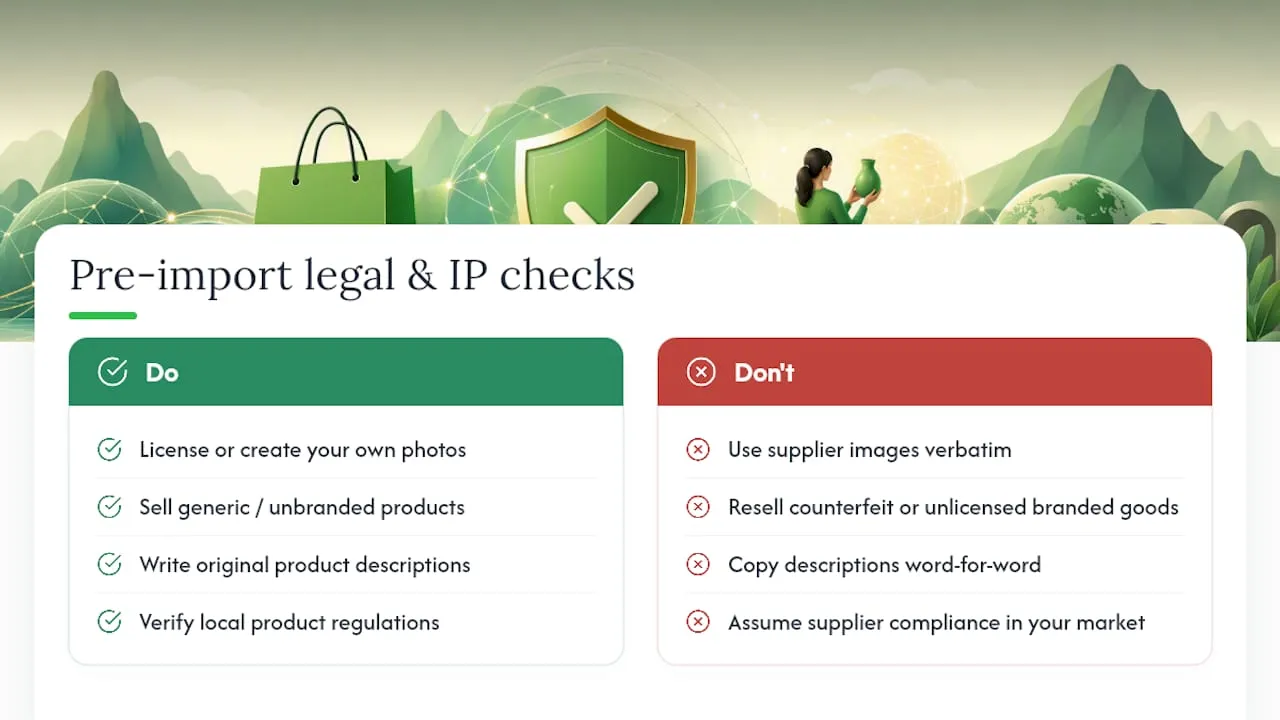
Product photography on AliExpress often belongs to the original manufacturer or a stock photography source, not the individual supplier account you’re buying from. Using those images verbatim on your own store carries copyright risk even though the practice is common. Regenerating or licensing your own images sidesteps that risk entirely rather than hoping nobody notices.
Branded products (anything carrying a recognisable logo, character, or trademark that isn’t the actual manufacturer’s authorised product) are a harder line. Reselling counterfeit or unlicensed branded goods exposes your store to intellectual property claims regardless of how the product was sourced, and Shopify itself will remove listings and can suspend accounts over confirmed IP violations. Stick to generic, unbranded products unless you have an actual reseller agreement with the brand.
Product descriptions copied word-for-word from a supplier listing rarely trigger legal action directly, but they do create the duplicate-content problem that tanks your SEO, which is a business risk even where it isn’t strictly a legal one. Writing your own copy solves both problems at once.
Country-specific product regulations (electrical safety standards, children’s product rules, cosmetic ingredient restrictions) vary by where you sell, and a supplier’s compliance in their own market doesn’t guarantee compliance in yours. When in doubt on a regulated product category, check your own market’s specific requirements before listing it, rather than assuming a popular AliExpress product is automatically safe to resell.
How do you keep AliExpress and Shopify inventory in sync?
Stock mismatches are the most common cause of order cancellations in dropshipping, and they’re almost entirely preventable with the right sync settings.
Most dropshipping apps offer automatic inventory sync on a set interval, pulling current stock levels from the supplier and updating your Shopify listing accordingly. Set this to sync as frequently as the app allows, ideally hourly rather than daily, because AliExpress stock levels on popular items can shift several times within a single day.
If you’re running manual or CSV-imported products without an app handling sync, build a weekly manual check into your routine at minimum. Open each supplier listing, confirm stock is still available, and update the Shopify quantity field if anything has changed. This is tedious at fifty products and unworkable at five hundred, which is exactly why most stores past a certain size move to app-based automation regardless of how they originally imported.
Set a buffer rather than trusting the exact number shown. Supplier-reported stock counts sometimes lag reality by a few hours, so treating “12 in stock” as “10 in stock” for your own listed quantity gives you a small margin against overselling. When a product does sell out on the supplier side, switch your Shopify listing to “out of stock” immediately rather than leaving it purchasable, since a cancelled order after payment creates far more customer service friction than a temporarily unavailable listing.
How does order fulfilment and tracking work after import?
Once a customer places an order on your imported listing, the fulfilment sequence needs to run smoothly enough that neither of you notices it happening.
With an app handling automation, the customer’s order triggers an automatic purchase from the AliExpress supplier using the details the app already has on file, meaning you don’t manually re-enter shipping addresses for every sale. Confirm this automation is actually working correctly on your first handful of live orders rather than assuming it from the setup screen. A misconfigured shipping address field or an expired payment method on the linked account can silently break automated ordering.
Tracking numbers should sync back from the supplier to your Shopify order automatically once the supplier ships, and from there to the customer via Shopify’s order notification emails. If tracking sync isn’t working, the fix is almost always in the app’s connection settings rather than anything on the supplier side.
Without an app, fulfilment is manual: you place the order on AliExpress yourself using the customer’s shipping details, then paste the resulting tracking number into Shopify’s order screen so the customer receives a notification. This works fine at low volume but becomes the actual limiting factor on how many orders you can process once volume climbs, which is usually the point a store owner switches from manual to app-based fulfilment.
The editorial take: stop treating import as the finish line
The conventional advice on this topic obsesses over which app or extension imports fastest, and that’s largely the wrong question. Import speed was solved years ago. Every method covered here gets a product into Shopify in minutes. The actual differentiator between stores that scale and stores that stall is what happens in the hour after the import finishes.
Store owners consistently underestimate how much duplicate content costs them. A listing copied from AliExpress isn’t just uninspired copywriting. It’s a direct signal to Google that your page adds nothing the internet doesn’t already have, and it’s a direct trigger for Shopify Merchant disapprovals that can throttle your entire catalogue’s visibility.
Prioritise the editing pass before you scale the import volume, not after. A hundred well-edited listings will outperform a thousand raw imports every time, because search engines and shoppers both reward specificity over volume. Get the workflow right on ten products first.
— Koen
Scale your imports without rewriting every listing by hand
Ecom-eye is the answer to the exact bottleneck this article keeps circling back to: import speed was never the problem, editing at scale was. Ecom-eye pulls product data directly from AliExpress, Amazon, or a competitor’s Shopify link, then generates bulk, unique titles, descriptions, and SEO-ready content, along with AI-generated product images, so nothing goes live carrying the same wording as ten thousand other stores selling the same item.
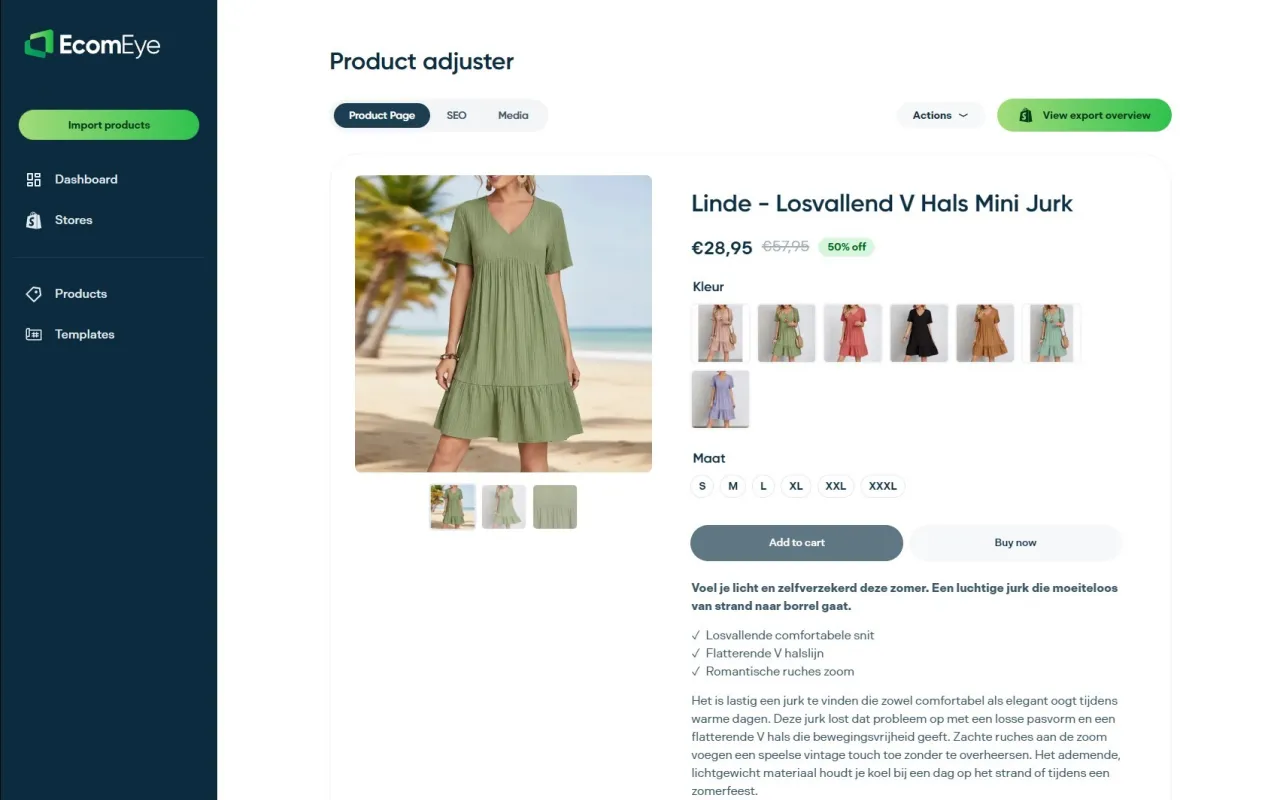
That solves the three problems covered throughout this piece in one pass: duplicate content that tanks your rankings, Merchant disapprovals triggered by copied listings, and the hours normally spent manually rewriting each product after import. Instead of editing titles one draft at a time, you export the finished, unique pages straight to Shopify with one click, in multiple languages if your store sells beyond one market.
Try the AI product description generator on your next import batch and see how much of that editing checklist it clears automatically. For listings still carrying supplier watermarks or hotlinked photos, the AI product image generator replaces them without the copyright risk of reusing someone else’s product shots.
Sources
- AliExpress Dropshipping in 2026 With Shopify
- AliExpress Shopify Import Tutorial 2026 (v23) | AliShopping Tools
- Migrate your store to Shopify: CSV guidance
- How To Import Products From AliExpress To Shopify In 2026
- Direct import from AliExpress | AliDropship Knowledge Base
FAQ
Is AliExpress compatible with Shopify?
Yes. AliExpress connects to Shopify through dropshipping apps, browser extensions, or CSV upload, and all three methods are widely used and officially documented by Shopify itself.
Is AliExpress dropshipping still worth it in 2026?
It remains viable, but success now depends far more on unique, well-edited product pages than on the import itself, since duplicate listings struggle against Google’s SEO standards and Shopify’s Merchant policies.
Can I create a dropshipping store using Shopify and AliExpress?
Yes, this is the standard dropshipping model: connect an import app or extension to Shopify, import AliExpress products to drafts, edit each listing, and enable order automation so purchases route to the supplier automatically.
How do I import Amazon products to Shopify instead of AliExpress?
The same three methods apply: dedicated apps that support Amazon sourcing, browser extensions built for Amazon listings, or manual CSV export and mapping, though Amazon’s stricter reseller policies mean supplier vetting matters even more.
Which import method reduces the risk of Merchant disapprovals?
None of the three methods alone prevents disapprovals. What matters is rewriting every imported title and description before publishing, since tools like Ecom-eye handle that editing step in bulk rather than leaving it to manual rewriting.
Ready to boost your product pages?
Generate high-converting, SEO-optimized product pages in bulk using AI automation used by e-commerce experts.
No credit card required