Detect AI Content on Shopify: AEO-First 20-SKU Audit & 12-Point Checklist
Audit 20 SKUs with a 12-point AEO checklist, choose the right Shopify bulk workflow, and fix templated AI pages so Google and AI answer engines will cite...

Detect AI Content on Shopify: AEO-First 20-SKU Audit & 12-Point Checklist

For Shopify dropshippers, detecting AI content means auditing your own product pages and images to confirm they read as unique, copyright-safe, and structured for both Google and AI answer engines, not templated filler lifted from a supplier feed. The fix starts with a 20-SKU audit against a specificity checklist, then a switch to an AEO-first bulk generation workflow so every new page is built to be extracted and cited rather than just published.
TL;DR:
- Auditing 20 SKUs for unique, structured signals helps identify pages that lack specific details, objection handling, and proper schema, which AI and Google favor.
- Generating pages with SKU-specific inputs and current timestamps prevents duplicate content issues and improves AI citation chances.
- Use the twelve-point checklist, including answer-first opening and machine-readable specs, to ensure product pages meet answer engine optimization standards.
- Bulk publishing methods vary based on SKU count; always backup before large imports and stage initial batches to avoid costly errors.
- Automating the process with tools like EcomEye generates compliant, SKU-specific pages at scale, reducing manual workload and increasing AI and merchant trust.
Table of Contents
- What does “detect AI content” actually mean for ecommerce stores?
- How do you generate and publish unique pages at scale on Shopify?
- What are the warning signs of low-value AI-generated pages?
- How do you make product pages machine-readable and merchant-friendly?
- How do you track whether AI systems are citing your pages?
- Practitioner roadmap: what to do first on a 1,000-SKU store
- How EcomEye handles the AEO checklist automatically
- Where to check the technical detail further
- Sources
- FAQ
What does “detect AI content” actually mean for ecommerce stores?
Most guides frame AI content detection as a policing exercise, running text through a checker to catch a robot. For a Shopify store shipping from AliExpress or Temu, that framing misses the point. The real question is whether your product pages carry enough unique, structured signal that Google and AI answer engines treat them as trustworthy source material rather than duplicate noise.
That is answer engine optimisation (AEO), and it now sits alongside traditional SEO as a ranking factor. AEO-first structure, meaning a short direct answer, question-based headings, and current FAQ schema, matters to AI citation roughly the way keyword density mattered to search a decade ago.
Here’s the checklist every generated page needs before it goes live:
- Answer-first opening: the first sentence states what the product does and who it suits, not a scene-setting intro.
- H2/H3 structure built for extraction: subheadings phrased as real questions (“Does this fit a size 10 shoe?”) rather than vague labels.
- Machine-readable specs in HTML, not images: brand, model, dimensions, materials, and use case belong in Product schema and an HTML table, never baked into a graphic.
- An FAQ block with FAQPage schema on every product, pulling from actual customer questions.
- A current dateModified field, since stale timestamps signal abandoned pages to crawlers.
- Descriptive alt text and captions on every image, written for a screen reader, not a search bot afterthought.
AI systems parse page HTML directly, and semantic structure with explicit attribute naming measurably improves how accurately they extract product details, according to Semrush’s ecommerce AI SEO guidance.
Pro Tip: Run one product through a text-only browser view. If you can’t find the price, material, and size chart without scrolling past a wall of marketing copy, neither can an AI crawler.
How do you generate and publish unique pages at scale on Shopify?
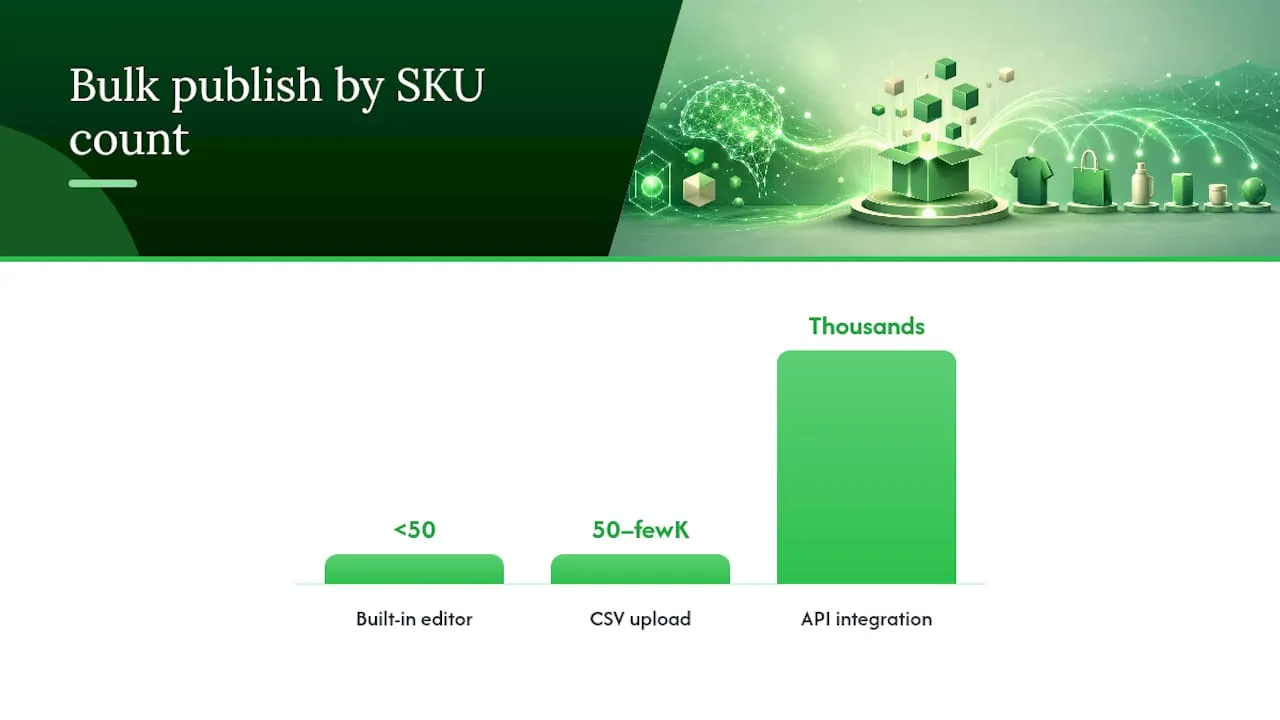
Shopify gives you four ways to push bulk content live, and picking the wrong one for your catalogue size wastes hours. Shopify’s own bulk editing guidance breaks the choice down by SKU count and complexity:
- Built-in bulk editor for quick edits across fewer than 50 SKUs, titles, prices, and tags only.
- CSV upload for mid-size catalogues (50 to a few thousand SKUs) where you’re changing descriptions, metafields, and images together.
- Third-party apps when you need templated variation logic or image generation baked into the upload.
- API integration for stores running thousands of SKUs with automated feeds from suppliers.
Whichever method you choose, uniqueness only happens if the generation step gets SKU-specific inputs, not a generic prompt. Feed it a spec sheet, two or three review snippets, and the top customer objection for that product, and the output stops reading like every other AliExpress reseller’s page.
Pro Tip: Always take a full backup of your store before a bulk import, and stage the first batch on a limited collection. A bad CSV mapping can overwrite thousands of handles in one pass, and reverting from memory is not a plan.
What are the warning signs of low-value AI-generated pages?
Templated AI output has a signature, and it’s usually invisible until you run the same twelve checks across a sample of pages. This is the audit that catches it before Google or a shopper does.
- Does the opening line contain a specific detail (a measurement, a material, a use case) rather than a generic claim?
- Would swapping the product name for a competitor’s still make sense? If yes, it fails the swap test.
- Does the page name one real objection a buyer would have (fit, durability, shipping time)?
- Is there any language that sounds like an actual customer, not marketing copy?
- Are specs sitting in HTML, not locked inside an image?
- Is proof (reviews, ratings, guarantees) placed near the buy button, not buried at the bottom?
- Can a reader scan the page in under 15 seconds and know what it does?
- Does the closing line prompt a decision rather than trail off?
- Is delivery information stated plainly, not vague (“fast shipping”)?
- Is a return or guarantee policy visible on the page itself?
- Does the FAQ answer real questions, not padding?
- Is dateModified current within the last content refresh cycle?
| Audit signal | What it catches | Fix priority |
|---|---|---|
| Swap test failure | Generic, interchangeable copy | High, top revenue SKUs first |
| Missing objection handling | Pages that read as sales pitch, not answer | High |
| Specs inside images | Blocks AI and accessibility extraction | Medium |
| No FAQ schema | Missed citation opportunity | Medium |
Running swap tests across a full catalogue by hand doesn’t scale, so treat it as a sampling exercise: pull 20 SKUs at random, then prioritise a full rewrite on whichever SKUs already drive the most traffic. Assembling review language, an objection stack, and full specs before generation is what separates pages that convert from pages that quietly get filtered.
How do you make product pages machine-readable and merchant-friendly?
Schema markup is the part most dropshippers skip, and it’s the part that decides whether Google Merchant Centre trusts your feed or flags it.
- Product schema for price, availability, brand, and GTIN, filled in completely, not left with placeholder values.
- FAQPage schema matched exactly to the visible FAQ text on the page.
- BreadcrumbList and Organization schema so crawlers understand where the page sits in your store structure.
- A current dateModified every time you meaningfully edit a page, not just on publish day.
- Robots.txt configured to allow OAI-SearchBot and GPTBot where you want AI visibility, alongside standard server-side rendering so bots see rendered content, not a blank shell.
- HTML tables for specifications, never a screenshot of a spec sheet.
Submitting a complete, accurate feed to merchant portals increases your odds of being surfaced in AI shopping results, and it costs nothing beyond the discipline of keeping the feed genuinely current.
How do you track whether AI systems are citing your pages?
Set up AI-referral tracking in GA4 as a segment separate from organic search. Most stores lump ChatGPT and Perplexity traffic into “other,” which hides the signal entirely.
- Tag AI referral sources in GA4 and check weekly, not monthly.
- After updating dateModified on a batch of pages, watch impressions and citation-linked traffic for two to three weeks before judging results.
- Run small-batch A/B publishes: rewrite ten pages fully, leave ten as-is, compare.
- Prune pages with zero organic or AI traffic after 90 days, and redirect that effort to your top 20% of SKUs.
Answer-first copy with question-format subheadings measurably improves the odds an AI overview will extract and cite a page, which makes this tracking loop worth running monthly rather than treating it as a one-off launch task.
Practitioner roadmap: what to do first on a 1,000-SKU store
Start narrow. Audit 20 SKUs against the twelve-point checklist this week, not your whole catalogue. Rewrite your six highest-revenue products by hand, feeding in real specs, review language, and named objections. Automate the long tail with structured inputs rather than blank prompts, and keep a full backup before every bulk push. Monitor AI citations and conversion for three weeks before touching the next batch. Reserve manual review for the pages actually earning money; let structured automation carry the rest.
— Koen
How EcomEye handles the AEO checklist automatically
Building all of this by hand across a thousand SKUs is a full-time job, which is exactly the gap EcomEye was built to close. It imports products directly from AliExpress, Amazon, Temu, or a competitor’s Shopify store, then generates titles, descriptions, and AI product images structured against the same specificity and schema standards covered above, before exporting straight to Shopify in one click.
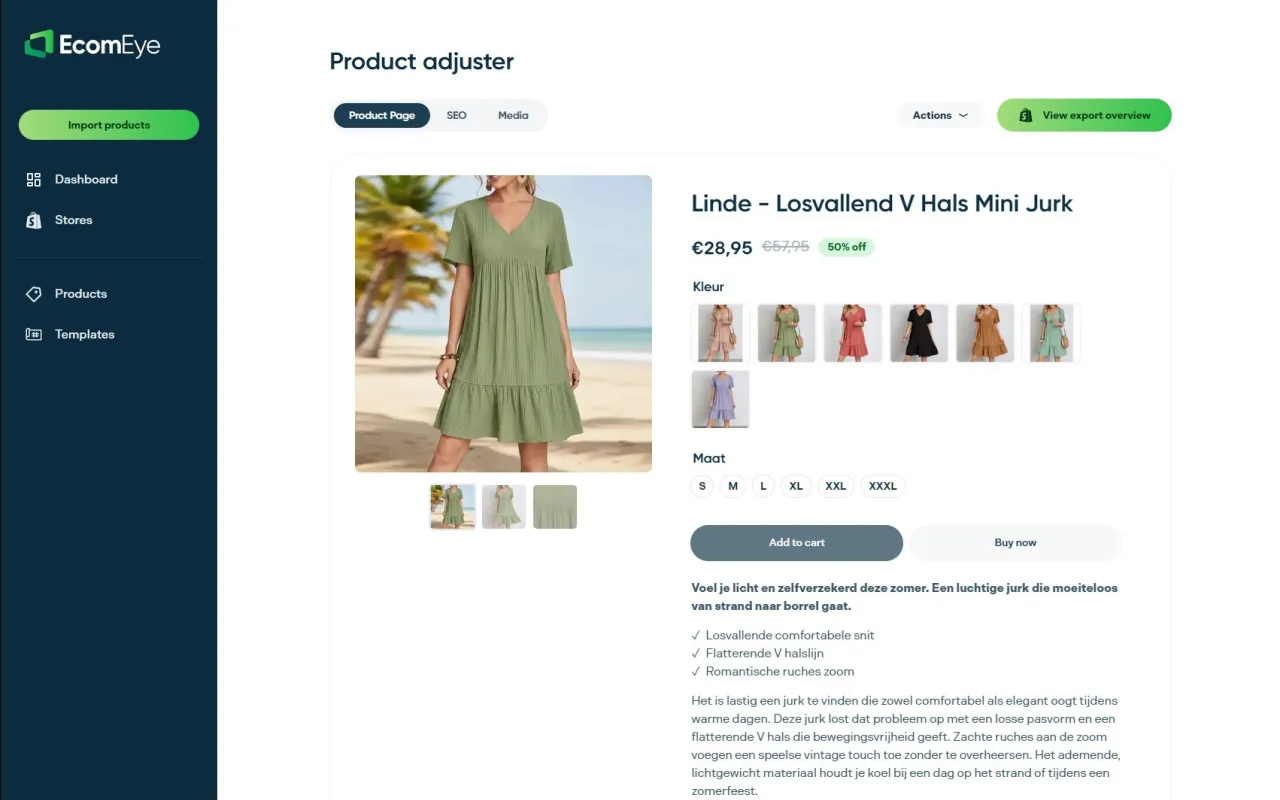
Instead of manually checking twelve audit points per page, you get bulk output already built around unique, SKU-specific inputs, so pages avoid the duplicate content problem that triggers Google Merchant disapprovals in the first place. Multi-language generation and size conversion come built in, which matters if you’re scaling into new regions without hiring a second content team. If you’re staring at a spreadsheet of 500 unedited AliExpress listings, the AI product description generator is the fastest way to turn that backlog into pages built to be read by both shoppers and the AI systems now sending them your way.
Where to check the technical detail further
- Shopify’s bulk editor guidance covers CSV, API, and app-based publishing in more depth.
- Semrush’s ecommerce AI SEO guide details schema and bot allowance settings.
- Baby Love Growth’s AEO playbook offers a broader look at answer engine tactics beyond Shopify specifically.
Sources
- Ecommerce AI SEO: How to optimize online stores for LLMs
- Shopify SEO bulk editor guidance
- Best AI SEO tool for dropshipping (2026): How to rank and get cited in AI search
- Do AI product descriptions hurt Shopify conversion rate?
FAQ
What does detecting AI content mean for a Shopify store?
It means auditing your product pages for genuine specificity, correct schema, and current timestamps rather than checking for a “robot wrote this” flag, since the real risk is duplicate or low-value content getting filtered or disapproved.
How many product pages should I audit first?
Start with a sample of 20 SKUs run through the twelve-point checklist, then prioritise a full rewrite on whichever pages already generate the most traffic or revenue.
Does AI-generated content hurt Google rankings?
Not inherently. What hurts rankings is templated, duplicate, or unstructured content, whether a person or an AI wrote it, so the fix is structure and specificity, not avoiding AI generation altogether.
Can AI tools help with copyright-safe bulk generation?
Some AI tools import supplier listings and generate unique titles, descriptions, and images per product, helping avoid copy-paste duplication that can cause Merchant Centre disapprovals.
How often should dateModified be updated?
Update it whenever you meaningfully change page content, and treat any batch of pages older than a few months without a refresh as a priority for review.
Ready to boost your product pages?
Generate high-converting, SEO-optimized product pages in bulk using AI automation used by e-commerce experts.
No credit card required