Shopify Product Description Length: How Many Words You Need
How long should a Shopify product description be? Word counts by product type, what Shopify and Google say, and how to structure copy for mobile and desktop.

Shopify Product Description Length: How Many Words You Need

Shopify does not cap the length of a product description, so the real question is how many words your product needs to sell and rank. A simple, low-cost item can work with 50 to 100 words. A complex or expensive product often needs 200 to 300 words or more. Shopify’s own SEO guidance points to at least 250 words of descriptive text on a page, as long as those words are unique and useful.
This guide sets out the numbers, explains where they come from, and shows how to apply them across a catalogue of ten products or ten thousand.
TL;DR
- Shopify’s product description field has no word limit. What limits you is shopper patience, your theme’s layout and the search engine’s view of your page.
- Match length to the product: roughly 50 to 100 words for simple, cheap items, and 200 to 300 or more for complex or pricey ones.
- Shopify recommends at least 250 words of descriptive text per page for SEO, but copied manufacturer text defeats the purpose, however long it is.
- Put the facts first, use short paragraphs and bullets, and keep one complete description that shows on both mobile and desktop.
- In bulk catalogues, uniqueness matters more than hitting an exact count. Every page needs its own wording.
Table of Contents
- Does Shopify limit product description length?
- How many words should a Shopify product description have?
- What Shopify says about 250 words and SEO
- What Google rewards: usefulness, not word count
- What shoppers need: enough, and in the right order
- How to structure a long description so it stays readable
- Fixing a description that is cut off or too long in your theme
- Length at scale: what changes with a big catalogue
- Our perspective: length is a result, not a target
- Generate descriptions sized to each product
- A practical checklist before you publish
- FAQ
- Sources
Does Shopify limit product description length?
No. The description box in the Shopify admin is a rich text field, and Shopify does not publish a word or character limit for it. The limits people run into come from elsewhere.
Your theme. Some themes truncate descriptions in collection grids, or hide long text behind a “read more” toggle. If a description looks cut off, the cause is usually theme code, not Shopify’s database. The forum threads that rank for this keyword are almost all about this: people who stay within a length they believed was safe and still see text cut off on desktop or mobile.
Meta descriptions. These are a separate field. Shopify recommends 160 characters for meta descriptions, because search results show only a short snippet. Do not confuse this with the product description on the page itself.
Product titles. Titles are also separate. If you want to read more about how title length and wording affect rankings, see our guide to optimising product page titles for Shopify SEO and conversions.
So the practical answer is that you can write as much as you like. The useful answer is how much is worth writing.
How many words should a Shopify product description have?
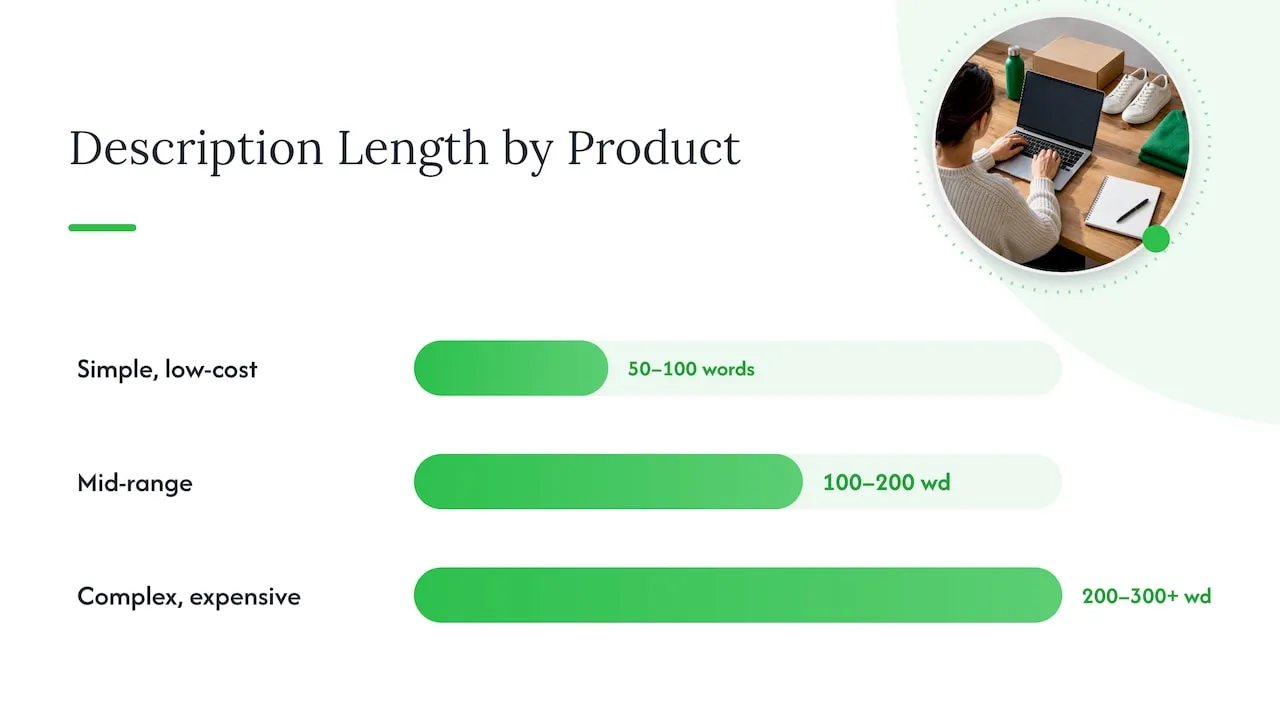
There is no single correct number, and anyone quoting one is simplifying. Shopify’s own guidance ties length to the product: simple, low-cost items typically need 50 to 100 words, while complex or expensive products often require 200 to 300 words or more to answer what a buyer needs to know.
Shopify’s enterprise team makes the same point in terms of buyer awareness. Products with lower awareness, such as new categories or complex items, need more explanation, while high-awareness items like basic apparel need less. A plain white T-shirt does not need a 300-word essay. A new type of water filter does.
Here is a working guide you can adapt. These are our practical ranges built on the guidance above, not official limits.
| Product type | Typical examples | Working length |
|---|---|---|
| Simple, low price, familiar | Phone cases, basic tees, hair ties | 50 to 100 words |
| Mid-range with some choices | Backpacks, kitchen gadgets, pet beds | 100 to 200 words |
| Complex or expensive | Electronics, furniture, skincare with ingredients | 200 to 300 words or more |
| Products with sizing or compatibility issues | Shoes, jewellery, car accessories | Add a dedicated size or fit block on top of the above |
Treat the table as a starting point. The test is simple: after reading your description, could a shopper answer every question they had before buying? If yes, stop. If not, add the missing answer, not more adjectives.
What Shopify says about 250 words and SEO
Shopify’s help centre says that longer content can help search engines understand a page, and recommends at least 250 words of descriptive text per page. It also advises readable, unique phrases that include relevant keywords, rather than copied manufacturer text. Search engines also compare the page content with its headers to check that the page is about what it claims to be.
Notice the two halves of that advice. The 250 words is a floor for descriptive text, and the uniqueness is the condition. Two hundred and fifty words lifted from a supplier listing add length but no value.
There is an apparent conflict with the 50 to 100 word range above. The way through it is to think about where the words live. A product page is more than one description box. Titles, bullet specs, size guides, shipping and returns notes, FAQs and reviews all add text. For a cheap, simple item, a short description plus a few supporting blocks can reach a reasonable total without padding. For a product where the buyer has lots of questions, 250 words or more in the description itself is natural.
If you want the long version of this argument, our post on why 150 to 300 unique words beat manufacturer copy covers it in more detail.
What Google rewards: usefulness, not word count
Google has never published a target word count for product pages. Its guidance on people-first content asks questions instead. Does the content provide original information? Does it avoid simply copying or rewriting other sources? Does it show first-hand expertise, such as knowledge that comes from actually using a product?
For a store owner, that translates into a few habits:
- Describe what the product is like to use, not only its specification.
- Include details a competitor listing leaves out: dimensions, materials, what is in the box, who it suits and who it does not.
- Avoid placeholder pages. Google’s long-standing advice on duplicate content includes avoiding stubs with no real substance, and a one-line description on a product with a dozen variants is close to one.
The duplicate content point is where most dropshipping stores come unstuck. When hundreds of stores paste the same supplier text, the pages are interchangeable. Length does not fix that. Our posts on why copied product descriptions carry an SEO cost and why product page uniqueness is vital go deeper.
What shoppers need: enough, and in the right order
The strongest evidence on length comes from usability research, not SEO folklore.
Baymard Institute’s research found that a significant share of e-commerce sites provide product descriptions that are insufficient, so shoppers’ needs go unmet when they are evaluating a product. The problem it describes is too little useful information, not too many words.
Nielsen Norman Group says descriptions should be complete but not wordy. They should quickly explain what the product is, how it is used, what it looks like and what it does, and put the most useful information at the beginning because shoppers skim.
Together, these give you a sound rule: be complete first, then be brief. A 60-word description that answers every question beats a 300-word one that circles the point. A 300-word description that answers every question beats both of them for a complex product.
A quick audit for each product
Before you decide on a length, write down the five questions a buyer would ask. Typically they are:
- What exactly is it, and what is it for?
- What is it made of, and how big is it?
- Will it fit or work with what I own?
- How do I use and care for it?
- What happens if it is wrong for me (shipping and returns)?
If your draft answers all five, its length is right, whatever the count says.
How to structure a long description so it stays readable
Once a description passes about 100 words, structure does more work than the word count. The guidance from Shopify is to use short paragraphs of two to three sentences, bulleted lists for scannability and subheadings for longer content, and to front-load the most important benefits. Semrush gives similar advice: short sentences, no unnecessary words, and copy broken up with line spaces, headers and bullet points. It adds that useful descriptions can include features, benefits, technical specifications, usage and maintenance instructions, and FAQs.
A layout that works for most products:
- Opening, 30 to 60 words. What it is and the main reason to buy, in plain language.
- Key specifications, as bullets. Materials, dimensions, capacity, compatibility.
- Use and care. Two or three sentences.
- Size, fit or comparison notes where choices cause returns.
- Short FAQ for the questions support keeps getting.
For how different formats suit different products, see our overview of five effective product description types for Shopify stores.
Mobile and desktop
Most shoppers will meet your description on a phone, so check it there first. Shopify’s developer documentation says product description content should remain visible on both mobile and desktop rather than being left out on one viewport. In practice, write one complete description rather than a short mobile version and a long desktop version.
Two more practical points from Shopify’s developer docs:
- Content wider than the screen forces horizontal scrolling and hides content. Fixed-width elements and wide tables are common causes, so keep size charts narrow or use a theme section built for them.
- Prefer a single adaptable content structure to duplicated mobile and desktop markup, which adds complexity.
Expandable sections are a good way to keep long specification lists from overwhelming a small screen while keeping the details available. Shopify’s guidance notes that this lets desktop users reach technical details without overwhelming mobile shoppers with excessive text. Keep the text in the page itself, not in an image.
Fixing a description that is cut off or too long in your theme
If you searched this keyword because your description is truncated, work through these checks:
- Preview on a real phone, not only the desktop editor.
- Look for a character limit in your theme, usually in the product card or product template. Some themes clip the text in collection grids by design.
- Check for fixed-height containers or “read more” toggles that hide text without a visible control.
- Remove pasted formatting. Text copied from a supplier page or a document can carry styling that breaks the layout. Paste as plain text and reapply headings and bullets.
- Consider whether the description is simply too long for the position it sits in. A 400-word block above the add-to-cart button pushes the buy action off the screen. Move detail below the fold and keep the opening tight.
If you edit theme code, duplicate the theme first so you can roll back.
Length at scale: what changes with a big catalogue
The advice above is easy to follow for 20 products. It breaks down at 2,000. A dropshipper importing hundreds of items from AliExpress or similar sources faces a real tension: the supplier text is thin, often badly translated, and identical to what every other store uses.

The temptation is to rewrite each description by hand, which does not scale, or to publish the supplier text as is, which gives you duplicate pages. A third route is to generate a fresh, unique description for every product, sized to the product, and then review the ones that matter most.
A sensible process for bulk listings:
- Sort products into tiers using the table above: simple, mid-range, complex.
- Set a target length per tier and generate drafts to match it.
- Check the top sellers by hand. Add first-hand details such as real dimensions, a tested use, or a care tip.
- Keep titles and descriptions consistent with each other, as search engines compare page content with its headings.
- Review the catalogue periodically, and lengthen the descriptions of products with high traffic but low conversion.
Our posts on why to automate product descriptions and product description ideas to boost Shopify SEO cover the workflow. For the wider picture, see our ecommerce SEO best practices for Shopify stores, and for why the copy matters commercially, why product descriptions matter for sales, SEO and trust.
Our perspective: length is a result, not a target
We build for dropshippers who list products in bulk, and the same pattern shows up again and again. Store owners ask us for the ideal word count, when the problem is that their pages say the same thing as everyone else’s.
In our view, three things matter, in this order:
- Uniqueness. If a description is copied from a supplier or a competitor, it adds no information that search engines or shoppers cannot find elsewhere. That is also where copyright and Google Merchant Center disapproval risks start. Every listing we generate is written fresh for the user, even when two users start from the same product link.
- Completeness. The description has to answer what the buyer needs to decide. That is why we size copy to the product, not to a fixed count.
- Structure. Short paragraphs, clear bullets and facts up front, so the text works on a phone.
Word count comes last. If you get the first three right, the count usually lands in the ranges above without effort. If you chase the count first, you tend to pad.
— Koen
Generate descriptions sized to each product
If you are listing products in bulk, you can import them from AliExpress, Amazon, Temu or competitor Shopify links into Ecom-eye. The AI Product Description Generator then produces unique titles and descriptions for each one, and you can edit them in bulk before exporting to Shopify in one click. If your supplier photos are also shared with other stores, the AI Product Image Generator creates images for your own pages.
Plans are published on the pricing page: Try-out at €39 per month and Scaler at €99 per month.
A practical checklist before you publish
- The description is unique, not pasted from a supplier or competitor.
- It answers the five buyer questions for this product.
- The first two lines contain the most useful facts.
- Paragraphs are two to three sentences, and specs are bullets.
- It is within the working range for the product’s type, or you can say why it is not.
- It displays in full on a phone and on a desktop.
- The meta description is separate and around 160 characters.
- The title and description describe the same product in consistent terms.
FAQ
What is the maximum length of a Shopify product description?
Shopify does not publish a word or character limit for the description field. Any truncation you see is normally caused by your theme’s layout or code. Check the theme settings and preview on mobile before assuming a limit.
Is 100 words enough for a product description?
For a simple, low-cost product, yes. Shopify’s guidance puts simple items at around 50 to 100 words. For complex or expensive items, 200 to 300 words or more is more typical, because buyers have more questions to answer.
Should every product page have at least 250 words?
Shopify’s help centre recommends at least 250 words of descriptive text per page for SEO. You can count supporting content such as specifications, size guidance and FAQs towards this, but only if the text is unique and useful. Padding a simple product with filler is worse than keeping it short.
Does a longer description rank better on Google?
Not by itself. Google’s guidance asks whether content is original, helpful and shows real knowledge of the product, and says nothing about a target word count. Longer descriptions tend to help when they cover details shoppers want and that other pages lack.
How long should a Shopify meta description be?
Shopify recommends 160 characters for meta descriptions. It is a separate field from the product description, and it controls the snippet shown in search results.
Sources
- Shopify Help Center: Adding keywords for SEO
- Shopify: How to write a product description that sells
- Shopify Enterprise: SEO product descriptions
- Google Search Central: Creating helpful, reliable, people-first content
- Google Search Central: Deftly dealing with duplicate content
- Baymard Institute: Product descriptions
- Nielsen Norman Group: Tips for better product descriptions
- Semrush: SEO product descriptions
- Shopify.dev: Ensure content parity between mobile and desktop
- Shopify.dev: Fix content wider than the viewport
- Shopify.dev: Build responsive layouts
Ready to boost your product pages?
Generate high-converting, SEO-optimized product pages in bulk using AI automation used by e-commerce experts.
No credit card required