Google Shopping for Dropshippers: A US Setup Guide
Can dropshippers use Google Shopping in the US? Yes, if the feed, store pages and policies hold up. Here is how to get approved, stay live and launch ads.
Google Shopping for Dropshippers: A US Setup Guide
Yes, you can run a dropshipping store on Google Shopping in the United States. Google does not ban the model. It bans the behaviour that often comes with it: copied product pages, vague shipping, feeds that disagree with the store, and a business that looks like a front for someone else’s warehouse. Get those four things right and Shopping becomes one of the few channels where buyers arrive with their wallets already half open.
This guide covers what Shopping is (and the difference between free listings and ads), what Google expects from a dropshipper, how to connect a Shopify store, how to keep products approved, and how to launch and measure your first campaign.
TL;DR
- Dropshipping is allowed on Google Shopping, but you must be the seller of record: clear business details, honest shipping times, a visible returns policy and products people can buy directly on your site.
- Free listings and paid Shopping ads both draw on the same Merchant Center feed, so you can get approved first and add budget later.
- Most rejections trace back to duplicated or thin product content, price or availability mismatches, and shipping settings that do not match the website.
- Fix data at the source, in bulk, before you spend on ads. Then launch a small Performance Max campaign and judge it on profit, not clicks.
Table of Contents
- What Google Shopping means for a dropshipper
- Why dropshippers get rejected (and what Google actually asks for)
- Set up Merchant Center and connect Shopify
- Product data that stays approved
- What to do when products are disapproved
- Launching your first campaign
- Our view on Google Shopping for dropshippers
- Bulk-creating unique product pages with Ecom-eye
- FAQ
- Sources
What Google Shopping means for a dropshipper
Google Shopping is not one product. It is a set of places where your products can appear, all fed by product data you submit to Merchant Center. Google explains that eligible products may appear in free listings at no cost across Search, Maps, Images, Lens, YouTube, Gemini and the Shopping tab, while Shopping ads also take paid ad slots on the Shopping tab.
That split matters for a new store with no budget. Google said when it opened free listings to US sellers that small and medium-sized businesses were benefiting from incremental traffic. You can therefore get your feed approved, see which products Google will show, and fix problems before paying for a single click.
| Free listings | Shopping ads (Performance Max or Standard Shopping) | |
|---|---|---|
| Cost | No charge per click | You pay for performance, such as clicks |
| Needs Merchant Center feed | Yes | Yes, plus a linked Google Ads account |
| Control over placement | Low | Higher: budget, targeting, bidding |
| Best use | Validate approval, collect early data | Scale products that are already profitable |
If you want the broader picture of how the model works on Shopify, our seller’s guide to Google dropshipping goes through it end to end.
Why dropshippers get rejected (and what Google actually asks for)
Google’s rules do not mention dropshipping as a crime. They describe a merchant. Read them as a checklist of what a real store looks like, and the pattern is plain.
Be the seller, not a middleman link
Products promoted in Shopping must be available for purchase through your own online store. Affiliate and pay-per-click links are not allowed, apart from the Comparison Shopping Service exception, which does not apply to a normal store. If your product pages send shoppers to another site to check out, you are outside the rules.
Show who you are
Google recommends clearly stating your operational hub and a verifiable street address that matches your business registration, showing your legal business name where possible, and offering an active phone number and an email on your store’s own domain. Active, professional social profiles and a presence on external review sites are also recommended for credibility.
A store with a free webmail address, no address and a contact form only is the classic profile of a rejected dropshipper.
Be honest about fulfilment
The same guidance asks for transparency about where items are housed and dispatched from, including fulfilment partner details. Anything that affects the purchase or the customer experience, including handling and transit times, must be stated before checkout.
If your supplier ships from overseas and delivery takes two to four weeks, say so on the product page and in the shipping policy. Promising “fast US delivery” while shipping from abroad is how stores end up with misrepresentation suspensions.
Publish a real returns policy
Return policies must be in your product data and easy to find on the site. They should explain what the customer has to do, when returns or refunds apply, the return window and when the refund will arrive. “Contact us” is not a policy.
Follow the law where you sell
Retailers are responsible for complying with all applicable laws and regulations where their business operates and where their listings appear. Google may block listings that appear to break local law. For a US store, that means checking product-specific rules (electronics, cosmetics, supplements, children’s items) before you list, not after a disapproval.
Our dropshipping Google compliance guide and the piece on why dropshippers fail Google checks go deeper on the failure patterns.
Set up Merchant Center and connect Shopify
The order below saves the most rework.
- Fix the store first. Add your legal name, address, phone, domain email, shipping policy, returns policy and terms. Make checkout work on your own domain.
- Create the Merchant Center account. Enter the same business details that appear on the site. Mismatches between the two cause avoidable reviews.
- Connect Shopify. Install the Google & YouTube channel in Shopify. Google’s help centre notes that it syncs product data automatically and lets you manage listings from the Shopify admin, whereas with a manual feed you have to send the data yourself.
- Set shipping in Merchant Center. Shopify apps that calculate shipping rates automatically may not import correctly, so you may need to configure shipping manually in Merchant Center.
- Review diagnostics. Look at every warning before you switch on any ad spend.
On shipping, Google says settings in Merchant Center must match the ones on your website, and if you cannot match costs precisely, it recommends overestimating rather than underestimating. A dropshipper with variable supplier costs should take that advice literally.
If you want a plain-English explainer of the platform itself, we have one on what Google Merchant Center is.
Product data that stays approved
The feed is your shop window. Google asks for accurate, current product data that matches your website, with structured data markup showing the correct price and availability. It also checks regularly whether the price and availability on your site match what you submitted, and mismatches can lead to disapproval.
For dropshippers, the trouble usually comes from three places.
Copied content
Importing a supplier’s title and description, or lifting a competitor’s page, produces text that appears across dozens of stores. Even when it is not an explicit policy hit, it gives Google no reason to prefer your listing, and it creates copyright exposure when images and copy belong to someone else. Every product needs its own title, its own description and its own images.
This is the reason we built Ecom-eye. Product text and images are generated uniquely for each user, so two stores importing the same supplier link do not end up with the same page. More on that below.
Titles and attributes that do not match the product
Generic titles such as “Hot sale 2026 new fashion women dress” waste your most important feed field. Put the product type, key attribute (colour, size, material) and brand if you have one near the front. Check that the colour, size and gender in the feed are what the page says.
Our guide to Shopify feed fixes that help Performance Max lists eight changes that move the needle.
Price and availability mismatches
Suppliers change prices and run out of stock. If your site updates and the feed does not (or the reverse), Google sees a mismatch. Variants are a frequent culprit: one size sells out, the parent product still says in stock. We walk through the fix in variant and availability mismatches in Merchant Center.
A simple pre-flight check
| Check | What to confirm |
|---|---|
| Title | Unique, descriptive, no promotional filler |
| Description | Original text, accurate to the product |
| Images | Clean, no watermarks, not lifted from another seller |
| Price | Same in feed, page and checkout |
| Availability | Same in feed and page, variants included |
| Shipping | Matches the site, handling and transit times stated |
| Returns | Visible on site and in product data |
Our five product data checks cover the same ground in more detail.
What to do when products are disapproved
Google uses a mix of AI and human evaluation to enforce its policies. When something is flagged, you receive information about the action. The route is the same each time: read the reason, fix the issue, and appeal through Merchant Center if you believe the decision is wrong.
Two habits help.
- Fix the cause across the catalogue, not one product. If a description pattern or a shipping setting triggered the flag, it triggered it everywhere. Editing items one at a time is how a 500-product store loses a month.
- Do not appeal blind. Resubmit only after the store and feed truly match. Repeated appeals on an unchanged site waste time.
We list four common fixes for disapproved products that restore Shopping clicks, and the common listing challenges guide helps when the issues are about page quality rather than the feed.
Launching your first campaign
Once products are approved and showing in free listings, you can add paid reach. For most new dropshipping stores the simplest start is a Performance Max campaign created from Merchant Center. Google says it advertises your products across channels such as YouTube, Search and Discover, and that you need your product and business information added and a Google Ads account linked first. Google also states that you pay for performance, such as clicks or engagements, and that a campaign can cost up to 30.4 times your daily budget in a month.
A sensible first-month plan:
- Start with a small test. Pick a daily budget you can lose without panic. Remember that the monthly cap is about 30 times the daily figure.
- Advertise only your best products. Choose items with healthy margin after supplier cost, shipping, payment fees and expected refunds. Do not push the whole catalogue.
- Set up conversion tracking before spending. The Google & YouTube app in Shopify can handle this, so purchases are reported back to Google Ads.
- Split by margin where you can. Putting every product into one campaign hides which ones make money.
- Leave it alone for a while. Changing budgets and targets daily resets learning and muddies the data.
Measure profit, not clicks
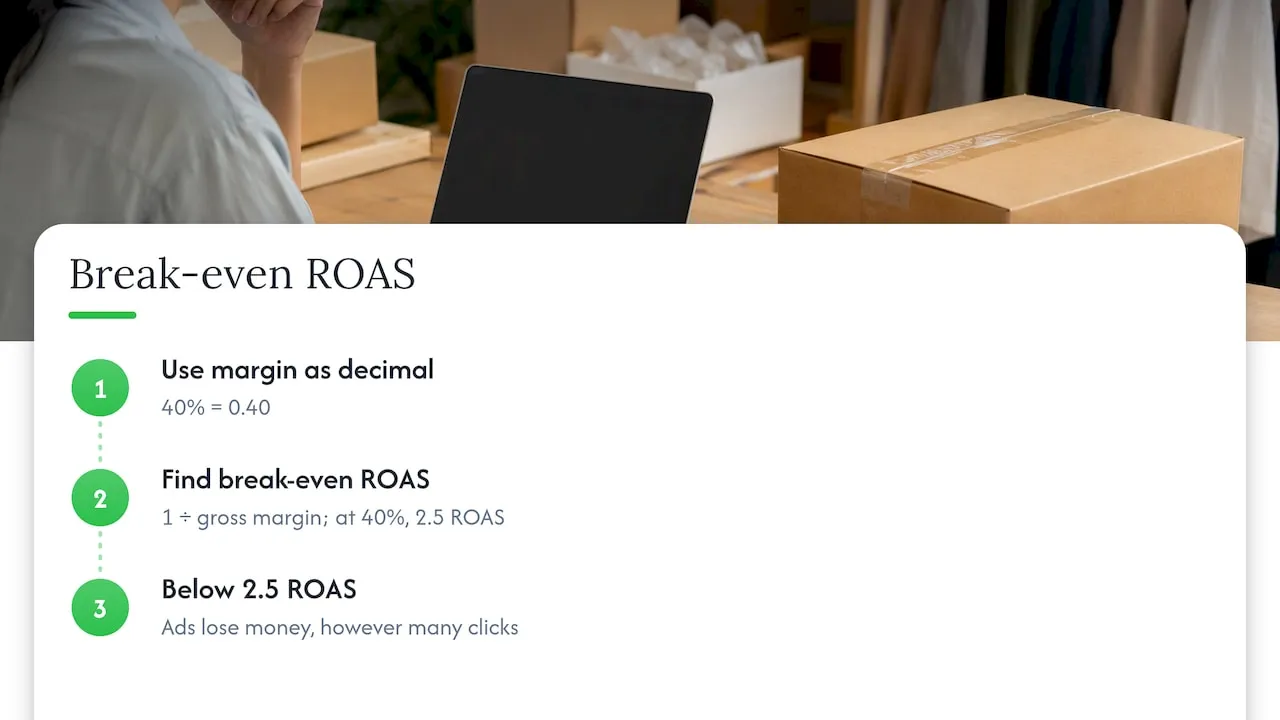
The numbers that matter are the ones after cost of goods. Work out your break-even return on ad spend: divide 1 by your gross margin percentage as a decimal. At a 40% margin, you break even at a 2.5 return on ad spend (1 ÷ 0.40). Anything under that loses money, however many clicks arrive. Track revenue per product, refund rate and cost per purchase, and cut the products that sit below break-even after a fair test.
As for the usual question about whether a small daily budget is enough: it depends on your price, margin and conversion rate. A low-priced product with thin margin needs many sales to learn anything, so test on items where one sale pays for several clicks.
Our view on Google Shopping for dropshippers
We talk to store owners who spent weeks on ad structure and none on the feed. The ads were fine. The feed was the problem.
Our view is that approval is mostly a content and data problem you can solve before spending, and that the cheapest ad click is the one you do not buy because a free listing already shows the product. The stores that survive Merchant Center review tend to share three habits: each product page is genuinely unique, the data in the feed equals the data on the page, and the business details are real and easy to find.
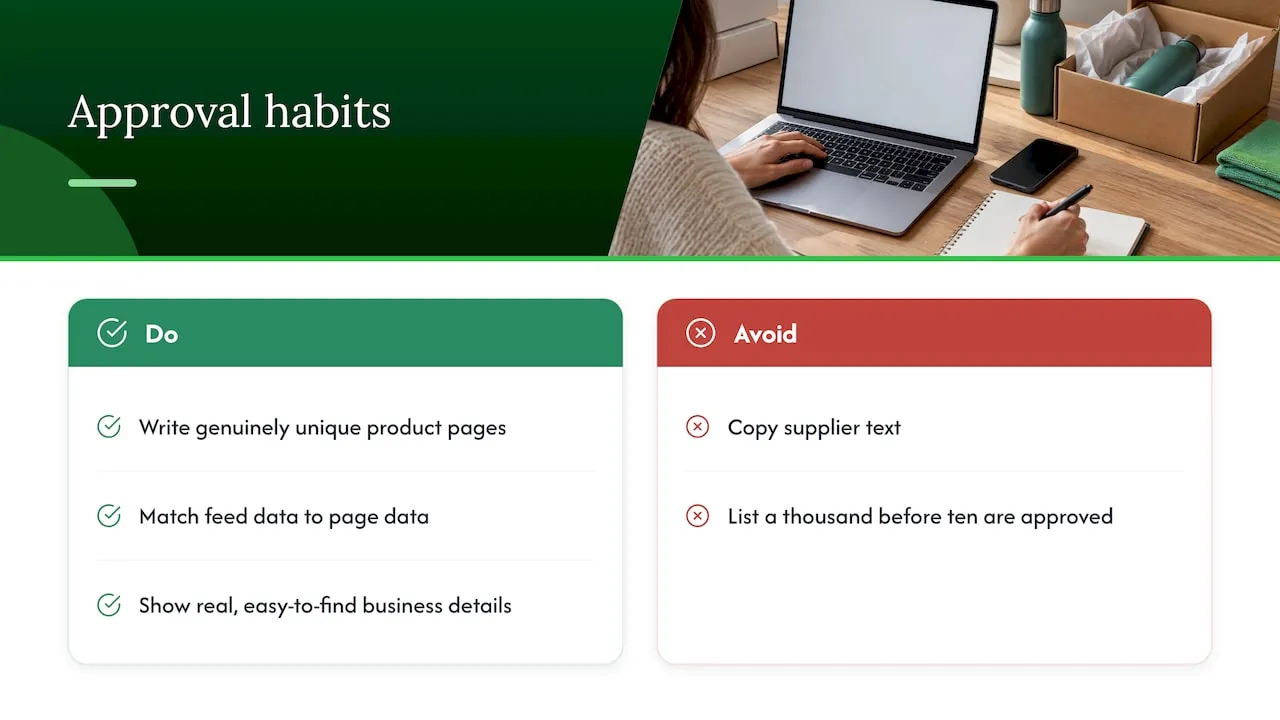
The dropshipping stores that struggle copy the same supplier text as everyone else, then wonder why their pages never get traction. We built our platform around the opposite approach: generate each page from the product link with its own title, description and images, so no two users publish the same copy and you are not carrying duplicate-content or copyright risk from a supplier’s photos. Add Merchant Center and variant tools on top, and bulk listing stops being the risky part.
Our advice: get ten products clean and approved before you list a thousand.
— Koen
Bulk-creating unique product pages with Ecom-eye
If your catalogue comes from AliExpress, Amazon, Temu or a competitor’s Shopify store, the slow part is rewriting every page so it is original. Ecom-eye imports the product data in bulk, generates a unique title, description and AI product images for each item, supports multi-language pages, lets you edit in bulk and exports to Shopify in one click. Variants and size conversions are handled in the same workflow.
Plans on our pricing page start with Try-out at €39 per month and Scaler at €99 per month. You can see how the writing side works with the AI product description generator, and the AI product image generator covers the visuals that replace supplier photos.
FAQ
Is Google Shopping allowed for dropshipping?
Yes, as long as you act as the real seller. Products must be purchasable on your own store, your business details must be verifiable, and fulfilment, shipping times and returns must be stated clearly. Stores that hide those things are the ones that get suspended.
Do I need to pay to appear on Google Shopping?
No. Eligible products can appear in free listings across Google surfaces, and you only pay if you run Shopping ads. Many stores get their feed approved first and add a campaign once they know which products Google shows.
Why was my dropshipping store suspended or disapproved?
The usual causes are copied or thin product content, price or availability that differs between the feed and the site, shipping settings that do not match the store, and missing business or returns information. Read the reason in Merchant Center, fix it across the whole catalogue and then appeal if you still think the decision is wrong.
How should I start with ad spend?
Start small with a Performance Max campaign for a few products that have good margin, with conversion tracking in place. Judge results against your break-even return on ad spend, not against clicks or impressions.
Sources
- Free listings for products, Google Merchant Center Help
- Bringing free retail listings to Google Search
- Follow Merchant Center guidelines to keep your account active
- Prepare your business and website for Merchant Center
- Legal requirements, Google Merchant Center Help
- Set up shipping settings for an entire account
- Shipping settings and automated rate apps
- Provide high-quality data, Google Merchant Center Help
- Google’s Shopping ads and listings policies
- Create a Performance Max campaign in Merchant Center
Ready to boost your product pages?
Generate high-converting, SEO-optimized product pages in bulk using AI automation used by e-commerce experts.
No credit card required