50–100 Characters: Write Google Shopping Titles That Scale With AI
Aim for 50–100 characters and front load brand, product type, and one key variant before character 70. Use AI to extract attributes, apply rules based...

50–100 Characters: Write Google Shopping Titles That Scale With AI

Submit titles up to 150 characters, but write them as if only the first 70 will ever be seen, because that’s usually all a shopper gets. Put brand, product type and the one variant that matters most (size, colour, model) before that 70th character. Data on high-performing listings points to a sweet spot of roughly 50 to 100 characters overall. Anything padded past that risks getting cut off exactly where shoppers stop reading.
TL;DR:
- Titles must prioritize brand, product type, and key variant within the first 70 characters, as most shoppers only see up to that limit on mobile.
- The optimal title length averages around 65 characters, with over half of high-performing listings falling between 50 and 100 characters.
- Duplication and mismatched titles across variants frequently cause feed disapprovals, emphasizing the need for unique, structured titles.
- Using AI for attribute extraction combined with deterministic templates ensures consistent, scalable, and optimized title generation across thousands of SKUs.
- Regular monitoring of impression, click-through, and conversion metrics helps identify when title length or structure needs adjustment to improve performance.
Table of Contents
- How does Google use your product title, and what are the hard limits?
- What’s the data-backed sweet spot for title length?
- How should title structure change by product category?
- When should you use structured_title, and how does AI fit in?
- How do you test and monitor title performance over time?
- Quick templates and before/after examples you can copy
- Rolling this out across a real catalogue is where it gets hard
- Scale compliant titles without duplicating competitor content
- Sources
- FAQ
How does Google use your product title, and what are the hard limits?
Google Merchant Center caps the title attribute at 150 characters. Anything longer gets rejected or truncated at the feed level, not gracefully at the edges but wherever the 150th character happens to fall, which can chop a size or colour clean off. That’s the ceiling, not the target.
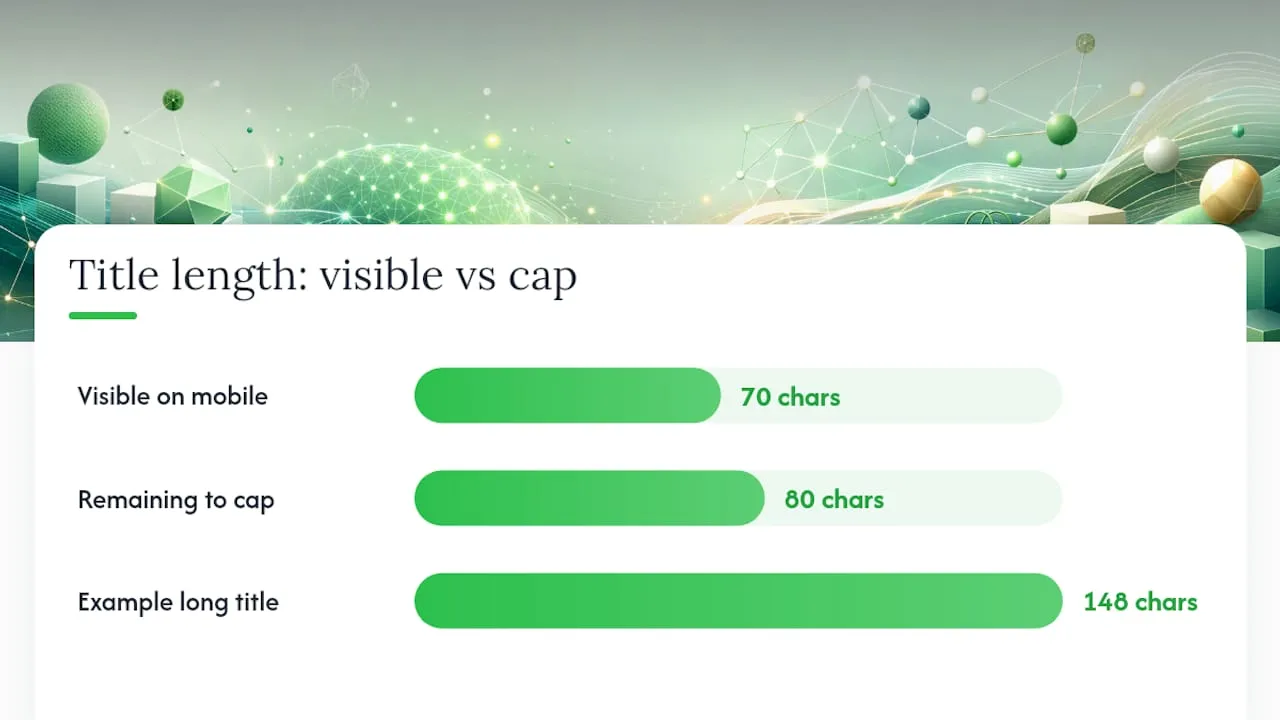
The more consequential number is 70. Across most Shopping placements, particularly mobile, only the first approximately 70 characters display before truncation. A shopper scrolling a results grid on their phone never sees character 90 unless they tap through. So a technically valid 148-character title can still perform like a bad one if the useful information sits at the end.
Google’s own product data guidance reinforces this: put distinctive attributes first, because titles get truncated constantly and the system has no way of knowing which words you consider important unless you put them where they’ll actually be read. Uniqueness matters here too. Two listings with near-identical titles and mismatched IDs confuse Google’s matching and can trigger feed warnings, which is often the real reason a “good enough” title still underperforms.
A few technical points worth locking in before you touch a single title:
- The
titlefield allows 1 to 150 characters; there’s no minimum beyond “not blank,” but very short titles usually under-describe the product. - Each product needs a unique title and a unique ID. Google flags duplicates, and duplicate titles across variants are one of the most common causes of feed disapprovals.
- Feed warnings for truncation or missing attributes tend to compound; fix the title structure once rather than patching individual products.
- Schema.org’s
Product.nameproperty is the canonical structured-data field for a product name, and it should mirror your feed title closely. When your on-page markup and your Shopping feed disagree, Google has less confidence in either.
Get this part right and everything downstream, testing, monitoring, category structuring, gets considerably easier.
What’s the data-backed sweet spot for title length?
A large-sample analysis of Shopping titles found that just over half of them, 50.6%, fall between 50 and 100 characters, with the average sitting around 65. That’s not a coincidence. It’s close to the 70-character visibility line, and it gives just enough room for brand, product type and one distinguishing variant without drifting into filler.
Statistic callout: Long-running, high-performing Shopping ads in the same dataset consistently favour product-first structures over retailer-first ones, and they tend to skip discount language entirely, “Sale,” “Best Price,” and similar phrases show up far more often in short-lived, underperforming listings.
Length on its own doesn’t win anything. A 95-character title stuffed with vague adjectives will lose to a 60-character title that leads with brand, model and the one spec a shopper is actually filtering by. Structure is doing the work; length is just the container.
The practical version of this rule looks like:
- Lead with brand (if the brand carries real recognition; skip it for generic goods where it adds nothing).
- Follow with the specific product type, not a category umbrella term.
- Add the single most decision-relevant variant, capacity, size, colour, model number, before character 70.
- Treat anything past 100 characters as optional context, useful for search matching, invisible to most browsers.
If you’re auditing an existing feed, sort by title length first. Titles under 40 characters are usually under-described and losing matches; titles over 120 are usually stuffed with attributes nobody front-loaded properly. The fix in both cases is the same: rebuild around brand, product, and the one variant that matters, in that order, inside the first 70 characters.
How should title structure change by product category?
The 50 to 100 character range holds across categories, but what goes in the first 70 characters shifts depending on what shoppers actually filter by. Category-specific attribute prioritisation exists precisely because an electronics buyer and a clothing buyer are scanning for completely different signals.
- Electronics: Lead with brand, then model number or name, then the spec that drives the purchase decision, storage capacity, screen size, colour. “Samsung Galaxy A55 128GB Awesome Navy 5G” front-loads everything a shopper needs before character 45.
- Apparel: Lead with brand (where recognisable), then product type, then size, colour, and gender or age category if relevant. “Nike Air Zoom Pegasus Women’s Running Shoe Size 8 Black” gets the essentials in early; “Comfortable Stylish Running Shoes for Active Women” doesn’t, because it never says what it is or in what size.
- Home goods: Lead with brand or material, then product type, then size or dimensions. A “Solid Oak Dining Table 180cm Seats 6” beats “Beautiful Handcrafted Dining Table for Your Home” on every axis that matters for matching, because it answers the two questions a shopper actually has: what material, and will it fit.
The poor version in each category has a pattern: it opens with a subjective adjective (“Beautiful,” “Premium,” “Comfortable”) instead of an identifying attribute. Subjective language does nothing for matching and eats characters that should be doing structural work. Swap the adjective for the missing fact, size, material, model, and the title improves without adding a single character.
When should you use structured_title, and how does AI fit in?
Google’s structured_title attribute lets you submit a title built from discrete components rather than one free-text string, and it comes with its own content sub-attribute limits that mirror the standard title cap. It’s useful when you’re generating titles programmatically and want Google’s system to understand which part of the string is the brand versus the variant, rather than inferring it from word order alone.
Where this gets interesting is generative AI. Used well, AI is excellent at the extraction step, pulling brand, model, material, and size out of messy supplier data or scraped competitor listings. Used badly, it writes flowery, inconsistent, unpredictable titles that vary from product to product for no good reason. The fix that most practitioners land on is a hybrid: let AI extract structured attributes, then apply a deterministic rules-based template to assemble the final title. That way every product in a 5,000-SKU catalogue follows the same brand, product, variant order, and you can audit or debug the output at scale instead of reading each title individually.
A few rules worth holding firm on regardless of how the title gets built:
- Never include promotional language, “Sale,” “Free Shipping,” “Best,” in the title field; Google’s own guidance flags this as a common source of poor matching.
- Don’t repeat the same attribute twice (brand name appearing both at the start and buried mid-title).
- Keep the title consistent with what’s actually on the landing page; a mismatch between feed and product page is a disapproval risk and a trust problem.
Pro Tip: Keep a small, human-reviewed seed set of titles for each category before you scale with AI. When the automated output drifts, and it eventually will, that seed set is your fastest way to spot the drift and correct the template, rather than the pattern.
How do you test and monitor title performance over time?
Title length isn’t something you set once and forget. It’s a variable worth testing the way you’d test ad copy, because the “right” length can shift slightly depending on category, competition, and how crowded the search term is.
- Pull your search query reports. Shopping and Performance Max asset reports show which actual search terms are matching your listings. If a high-intent query isn’t triggering a match, check whether the relevant attribute has been pushed past character 70.
- Run controlled A/B tests. Rotate title variants across a subset of your feed, same products, different attribute order or length, and compare performance rather than guessing.
- Track four numbers specifically: impressions (matching breadth), click-through rate, conversion rate, and disapproval count. A title that boosts impressions but tanks conversion rate is matching the wrong queries, not the right ones.
- Watch for feed-level warnings continuously, not just at upload. Character counters and automated anomaly alerts catch length creep before it becomes a disapproval problem across hundreds of SKUs.
- Re-test after any bulk edit. Bulk title regeneration, whether manual or automated, has a habit of quietly reintroducing the exact truncation problems you fixed last quarter.
Feed diagnostics inside Merchant Center will flag outright errors, but they won’t tell you that a title technically passes validation while still underperforming on click-through. That gap only shows up once you’re reading query and conversion data side by side, which is why monitoring has to be an ongoing habit rather than a one-off audit.
Quick templates and before/after examples you can copy
The formula holds across categories: [Brand] + [Product/Model] + [Key Variant], front-loaded, everything else optional past character 100.
A few before/after fixes:
- Before: “Amazing Comfortable Running Shoes On Sale Now” → After: “Adidas Ultraboost 22 Men’s Running Shoe Size 10 Black”
- Before: “Beautiful Wooden Coffee Table for Living Room” → After: “Oak Coffee Table 120cm x 60cm Rustic Brown Finish”
- Before: “Premium Quality Wireless Earbuds Great Sound” → After: “Sony WF1000XM5 Wireless Noise Cancelling Earbuds Black”
- Before: “Best Selling Women’s Summer Dress Free Delivery” → After: “Zara Floral Wrap Dress Women’s Size Medium Blue”
Run every title through this checklist before it ships:
- Character counter shows 50 to 100, essentials sit before character 70.
structured_titleused where you’re generating titles programmatically.- No promotional language anywhere in the string.
- Variant (size, colour, model) is specific, never vague (“Assorted,” “Various”).
| Check | Target |
|---|---|
| Overall length | 50 to 100 characters |
| Essentials placed before | Character 70 |
| Hard cap | 150 characters |
| Promotional language | None |
Rolling this out across a real catalogue is where it gets hard
Getting one title right is easy. Getting three thousand titles right, consistently, without introducing duplicate content across variants, is where most merchants actually struggle. The temptation is to hand the whole job to AI and walk away, but unreviewed generative output drifts: one batch leads with brand, the next leads with material, and your feed ends up looking like five different people wrote it.
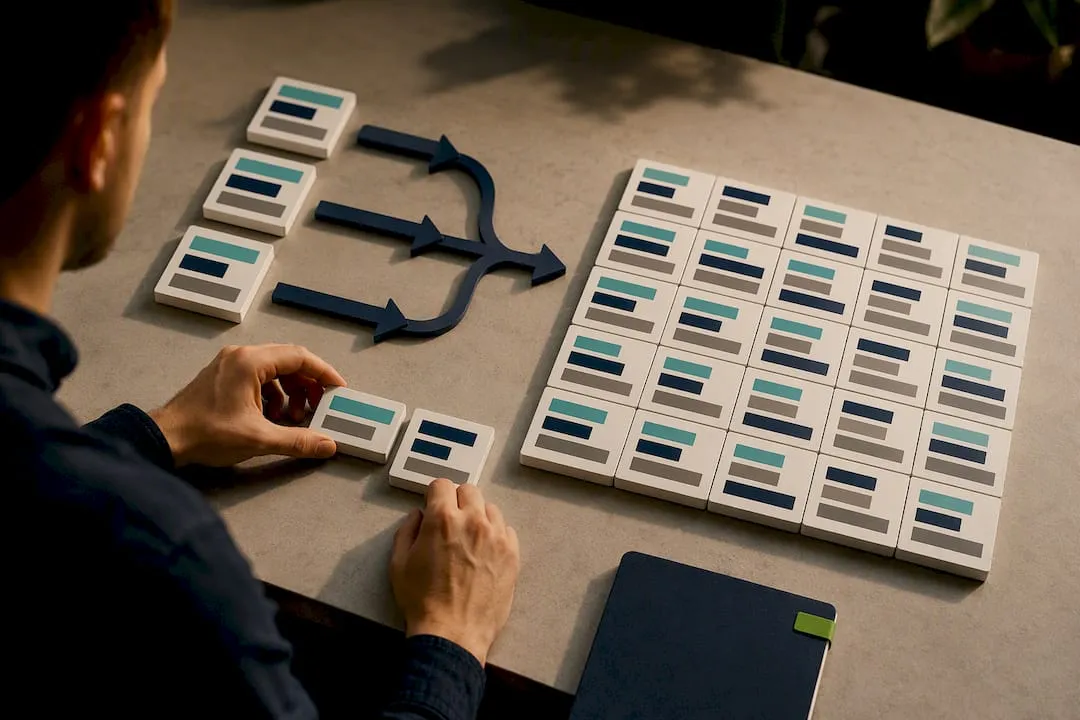
The workflow that holds up is a pilot first. Take a high-volume subset, run attribute extraction, apply a fixed template, and compare matching breadth against your historical query data before touching the full catalogue. If it improves impressions without cratering conversion rate, scale it. If it doesn’t, you’ve found the problem on a hundred SKUs instead of ten thousand.
My three rules for anyone doing this at scale: keep the attribute order deterministic even when the content is AI-generated, never let promotional language creep back in through a template variable, and always keep a small human-reviewed seed set to catch drift early. Speed matters, but a fast rollout of a broken pattern just multiplies the mistake.
— Koen
Scale compliant titles without duplicating competitor content
Most Shopify dropshippers who fail at this don’t fail because they misjudged the 70-character rule but rather miss out on powerful tools like Exclusively, Your Brand. Your Platform. that help ensure brand consistency and optimized listings across their catalogue. They fail because they copied a competitor’s title and description wholesale, and Google Merchant flagged the duplicate content across hundreds of listings at once. This bottleneck can be solved by importing product data in bulk from sources like AliExpress, Amazon, Temu or competitor Shopify links, then generating unique, rules-based titles and descriptions for every SKU, structured to be front-loaded as described in this article.
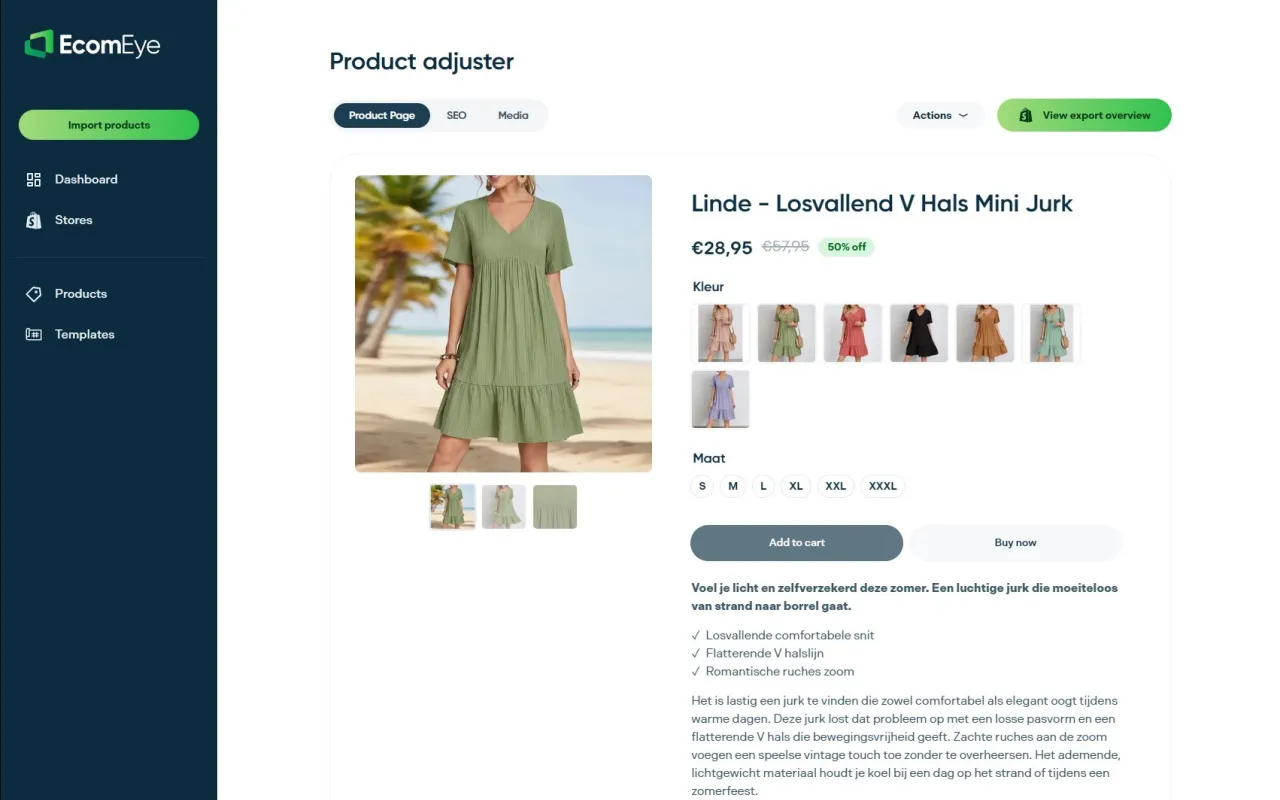
That means brand, product and key variant land inside the first 70 characters automatically, across your entire catalogue, with no manual rewriting and no copyright risk from lifted competitor copy. The workflow can also generate AI product images and export listings directly to Shopify. If you’re about to rebuild titles across a few thousand SKUs, start with the AI product description generator and run your next feed update through it before you touch a spreadsheet.
Sources
- Title title and structured title structured_title - Google Merchant Center Help
- Winning Google Shopping Product Titles | May 2026 Data Study
- Schema
FAQ
What happens if a title goes over 150 characters?
Google Merchant Center will reject or truncate it at the feed level, often cutting off exactly the attribute, size, colour, model, that a shopper needed to see.
How long can Google Shopping descriptions be?
Descriptions can run up to 5,000 characters, but Google recommends placing the important details within the first 160 to 500 characters, since that’s typically what displays before a shopper clicks through.
What are the image requirements for Google Shopping?
Google requires clear, accurate product images on a plain background for most categories, with minimum resolution thresholds and no promotional overlays or watermarks; a mismatch between the image and the actual product is a common disapproval reason.
Is $20 a day a reasonable Google Ads budget?
For Shopping campaigns, a modest daily budget can work for a narrow, well-targeted catalogue, but it’s the title and feed quality, not the budget, that usually determines whether that spend turns into qualified clicks rather than wasted impressions.
How long should Google Shopping titles actually be?
Aim for 50 to 100 characters, with brand, product type and the key variant placed before character 70; the hard technical limit is 150 characters, but that’s a ceiling, not a target.
Ready to boost your product pages?
Generate high-converting, SEO-optimized product pages in bulk using AI automation used by e-commerce experts.
No credit card required