Google Merchant Account Suspension: Causes and a Fix Plan
Google Merchant Center account suspended? Learn why it happens, what to fix on a Shopify dropshipping store, and how to file a review that can succeed.

Google Merchant Account Suspension: Causes and a Fix Plan

A Google Merchant Center suspension means Google has judged that your store, or the product data you send it, breaks its Shopping policies, and your products stop appearing in Shopping ads and free listings until you fix the problem and win a review. For Shopify dropshippers the usual trigger is misrepresentation: a gap between what your store promises and what a customer would actually get. This guide explains how that happens, what to check first, and how to ask for reinstatement without making things worse.
TL;DR
- Most suspensions we see discussed for dropshipping stores come from the Misrepresentation policy, which covers unclear business identity, unrealistic shipping or return promises and misleading product information.
- Google treats misrepresentation as egregious, so it can suspend without a warning period and without naming the offending product.
- Fix everything first, then request one review. Failed attempts can lengthen the cool-down.
- Check that price and availability match across your feed, product page, structured data and checkout.
- Replace copied supplier text and images with unique content before you appeal.
Table of Contents
- What a Merchant Center suspension actually is
- Why dropshipping stores get suspended
- What Google says about warnings and suspensions
- A step-by-step recovery plan
- Perspective: why unique content is part of the fix
- Where EcomEye fits in your recovery
- How to avoid a second suspension
- FAQ
- Sources
What a Merchant Center suspension actually is
Google’s own help page says your products or your whole account may face warnings, disapprovals or suspension when your website or product data does not meet Shopping policies and requirements. Those are three different levels, and it pays to know which one you are in.
| Level | What it affects | Typical response |
|---|---|---|
| Item disapproval | One or more products | Edit the feed or page, wait for re-crawl |
| Warning | Account, with a deadline | Fix the issue before the warning expires |
| Account suspension | Every product you submit | Fix, verify identity if asked, request review |
If you are still at the disapproval stage, our guide to fixing Google Merchant Center disapprovals will save you from escalating. If the account is already suspended, read on.
Why dropshipping stores get suspended
Google does not ban dropshipping as a model. What it penalises is the lack of transparency that often comes with it. GMCCheck’s dropshipping compliance guide makes this point, citing examples such as promising three-day delivery when goods ship from overseas and take 15 days or more, and publishing generic, non-unique product descriptions that signal little genuine business effort.
In practice the causes fall into five groups.
1. Unclear business identity
Google expects a visible, real business behind the store. The same compliance guide lists a physical business address, a domain-based email rather than Gmail or Yahoo, a working phone number and shipping, return and privacy policies linked in the footer of every page. A Shopify community thread on a persistent suspension makes the same point: legal name, contact details, transparent shipping timelines for third-party fulfilment and clear refund terms are what reviewers look for.
2. Shipping times that do not match reality
If a product ships from a supplier abroad, say so. A shipping policy that quotes domestic speeds for goods that cross an ocean is the single most common promise a store cannot keep. State a realistic range on the product page, in the policy and in the Merchant Center shipping settings, and make all three agree.
3. Data that disagrees across surfaces
The StoreCanary team argues that the most overlooked requirement is data sync: your feed, landing page, structured data and checkout need to line up on price and availability. Any discrepancy reads as a promise you cannot fulfil. Web Solutions PH adds that Google crawls these surfaces automatically, and that a mismatch on even one product can lead to an account-wide suspension.
Typical Shopify culprits:
- A sale price changed in Shopify but cached in the feed
- A supplier sells out and the product page stays “in stock”
- Structured data showing a different currency or price from the visible page
- Shipping costs that appear only at checkout
4. Deceptive patterns and stale trust signals
The GMCCheck guide says countdown timers and “X people viewing this” alerts can count as policy violations. Another source, Useful Patch, warns that payment icons for cards you no longer accept, left in the footer, can be flagged as an implied promise you cannot keep. Strip out anything on the page that makes a claim you are not prepared to honour.
5. Copied, thin or unoriginal product content
This is the cause that sits closest to what we do, so we will be direct. Supplier descriptions pasted unchanged across hundreds of stores tell Google nothing about your business, and they come with their own problems. Copied images can carry a brand mark that brings in the counterfeit goods policy, which prohibits listing items that carry a trademark or logo identical to, or hard to tell apart from, another brand’s. We cover the wider pattern in why dropshippers fail Google checks.
What Google says about warnings and suspensions
Google’s policy-violation help page is the document to read before you do anything else. Three points from it and related documentation matter most.
- No grace period for egregious violations. Misrepresentation is in this class. You may be suspended immediately, and Google may not give you item-level examples.
- Reviews take time. Reviews typically take around seven business days, and accounts are reinstated only when the improvements are thorough, accurate and honest.
- The review button can lock. Sometimes Request Review is disabled for a cool-down period. Google will not override it, and the wait can grow after each unsuccessful attempt.
That third point is why rushing an appeal is a mistake. If you are in the lockout right now, our first-hour checklist for suspensions during cool-down lays out what to do while you wait.
A step-by-step recovery plan
Step 1: Read the notice and stop changing things blindly
Open Merchant Center, find the suspension reason and the policy it names. Screenshot it with the date. Note which issue is listed, because a misrepresentation case needs a different fix from, say, a counterfeit or shipping-policy case. Our deeper explainer on what misrepresentation means and how to fix it covers the common reasons.
Step 2: Complete identity verification if prompted
If your account shows a verification prompt, deal with it first. Useful Patch reports that appeals submitted while verification is pending may not get a substantive review. Rob Tronic Media stresses that the business details must match across Merchant Center, Google Ads and your payment profile, and that verification is only one part of the review, not the full fix. Use the exact legal name and address everywhere, character for character.
Step 3: Audit the store like a stranger would
Walk through your store as a first-time customer in the United States would. Check each item:
- Legal business name, address, phone and domain email in the footer and contact page
- Shipping policy with realistic delivery windows and the true origin of goods
- Return and refund policy that you can honour, with who pays for return shipping
- Privacy policy and terms, written for your store rather than pasted from a template
- No fake urgency, fake stock counters or fake review badges
- Only payment icons for methods you actually accept
- Checkout that shows the same price and shipping the product page promised
Step 4: Align the four data surfaces
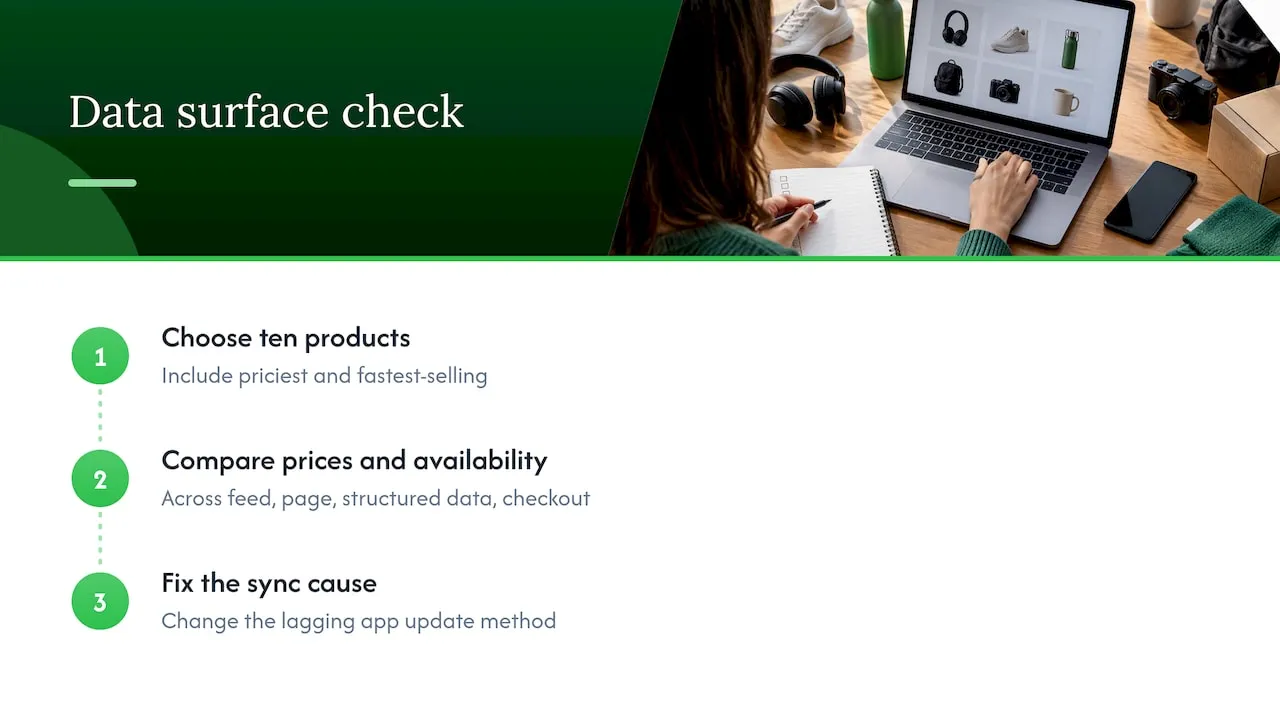
Pick ten products, including your most expensive and your fastest-selling, and compare feed price, page price, structured data price and checkout price. Compare availability the same way. Fix the cause, not just the symptom: if a sync app lags, change how it updates.
Step 5: Rewrite the content that looks borrowed
Search a distinctive sentence from three of your product descriptions in quotation marks. If the same wording appears on other stores or on the supplier’s page, that content needs replacing. Do it across the catalogue, not just the products you suspect, because the review is of the whole account. Check images too: remove watermarks, logos and any branded packaging you have no right to show. For image guidance see our product image best practices for Shopify.
Step 6: Gather proof, then request one review
Write a short, factual review request. Say what you found, what you changed and where a reviewer can see it. Do not argue or blame. If you hold physical stock, Web Solutions PH suggests an unedited three-to-five-minute video walkthrough of your facility as often the fastest route when Google asks for proof. A pure dropshipper has no warehouse to film, so your proof is the transparent policies, supplier-origin shipping times and original content.
Then submit once and wait. Resist the urge to resubmit after three days.
Perspective: why unique content is part of the fix
We build a tool for Shopify dropshippers, and the pattern we keep running into is simple: stores that grow fast by importing hundreds of listings tend to import the same text and photos as everyone else selling that product. Google does not need to prove intent. It sees a catalogue with no signs of an independent business behind it.
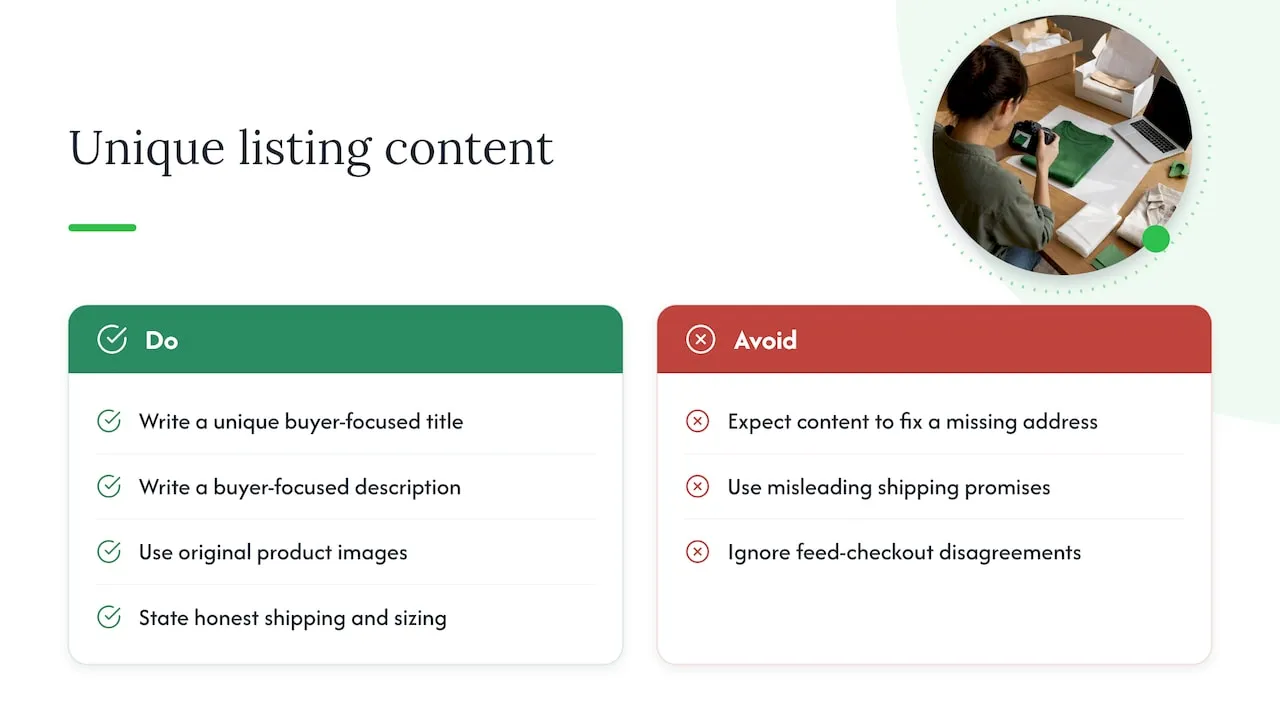
The fix is not clever wording. It is making each listing genuinely yours: a unique title, a description written for your buyer, images that are not lifted from a supplier, and shipping and sizing details that are honest. Doing that by hand for 300 products is the reason many sellers cut corners in the first place, and why we built EcomEye to generate that content in bulk, with every listing unique even when two users start from the same product link.
Be realistic about what content can do. Original product pages do not fix a missing address, a misleading shipping promise or a feed that disagrees with your checkout. They remove one common reason for doubt, and they do it before the next product import repeats the mistake. Treat identity, policies and data accuracy as the foundation, then scale on top.
— Koen
Where EcomEye fits in your recovery
Once your policies and data are sorted, the content workload is what is left. EcomEye imports product data from AliExpress, Amazon, Temu or competitor Shopify links, then generates unique titles, descriptions and AI product images, with multi-language pages, bulk editing, size system conversion and one-click export to Shopify. You can see how that works on our AI product description generator and AI product image generator pages. Plans are listed on the pricing page: Try-out at 39 EUR per month and Scaler at 99 EUR per month.
To be clear, no tool can promise reinstatement. That decision belongs to Google. What we can do is take the copied-content problem off your list.
How to avoid a second suspension
Reinstatement is not the end. Build habits that keep the account clean.
- Review after every bulk import. Check a sample of new listings for price, availability and shipping claims before they reach the feed.
- Keep one source of truth for policies. When your supplier changes shipping times, update the policy, product pages and Merchant Center settings the same day.
- Monitor the Diagnostics tab weekly. Catching an item disapproval early beats facing an account-level problem. Our dropshipping Google compliance guide gives a longer routine.
- Do not sell what you cannot deliver. If a supplier goes out of stock, take the listing down.
- Grow listings at the pace you can check. Speed matters, as we explain in why fast product listing drives dropshipping success, but fast and unchecked is how mismatches appear.
If Shopping is your main traffic channel, it is worth the discipline. We make the case in why to optimise for Google Shopping, and the wider context is in our guide to Google dropshipping. For other recurring problems, see common product listing challenges.
FAQ
Why does my Google Merchant Center account keep getting suspended?
Repeat suspensions usually mean the root cause was never fixed, only the visible symptom. A new policy page on top of mismatched feed prices, or a fresh bulk import of copied descriptions, can bring the same flag back. Audit identity, shipping promises, data sync and content originality together before asking for another review.
How long does a Merchant Center suspension review take?
Google’s documentation says reviews typically take seven business days. Some accounts also face a cool-down during which the review button is disabled, and that period can lengthen after each failed attempt, per Google’s review help page.
Can I just open a new Merchant Center account?
We would not rely on it. Merchant Center business details are checked against your identity and website, so a new account for the same store with the same problems is likely to hit the same wall. Fix the store first, then work through the appeal on the existing account.
Does Google ban dropshipping?
No. According to GMCCheck, what gets stores in trouble is the lack of transparency around the model: hidden shipping times, unclear business identity and generic descriptions. A dropshipping store that is honest and original can meet Google’s standards.
Sources
- Misrepresentation, Google Merchant Center Help
- Fixing Merchant Center warnings and account suspensions, Google Merchant Center Help
- Request a review of your issues, Google Merchant Center Help
- Counterfeit products, Google Merchant Center Help
- Dropshipping compliance guide, GMCCheck
- Merchant Center misrepresentation on Shopify, StoreCanary
- Fix Google Merchant Center Misrepresentation Error, Web Solutions PH
- Fix Google Merchant Center Misrepresentation Suspension, Useful Patch
- Google Merchant Center Identity Verification Step by Step, Rob Tronic Media
- Shopify Community thread on a persistent misrepresentation suspension
Ready to boost your product pages?
Generate high-converting, SEO-optimized product pages in bulk using AI automation used by e-commerce experts.
No credit card required