How to maximise store exposure: Shopify playbook 2026
Learn how to maximize store exposure with essential SEO tips, Google Business Profile optimization, and product feed strategies for Shopify.

How to maximise store exposure: Shopify playbook 2026

Publish SEO-optimised, copyright-safe product pages at scale, claim your Google Business Profile, and get your feed into Google Merchant Center. Those three moves cover the majority of exposure wins available to a Shopify store owner or dropshipper in the UK right now. Most in-store purchases start with online research, so the gap between a well-optimised store and a neglected one translates directly into lost footfall and lost revenue.
Start here, in the next 24–72 hours:
- Verify and complete your Google Business Profile (GBP) with accurate hours, photos, and action buttons
- Audit your top 10 product pages for duplicate titles and missing meta descriptions
- Submit a product feed to Google Merchant Center
- Check NAP (Name, Address, Phone) consistency across Google, Bing Places, and any UK directories you appear in
Table of Contents
- What should you tackle first to increase store visibility?
- How do you optimise Shopify product pages for search?
- Which image approach actually lifts rankings and conversions?
- Which Shopify technical settings most affect your exposure?
- How do you scale product pages with a bulk workflow?
- How do you turn nearby searches into store visits?
- Which promotion channels reliably amplify store exposure?
- How do you measure whether your exposure efforts are working?
- Key takeaways
- The approach that actually moves the needle
- Ecom-eye gives you unique, SEO-ready pages at scale
- Useful sources
- FAQ
What should you tackle first to increase store visibility?
Think in three time horizons. The fastest wins come from GBP and Merchant Center because they surface your store without waiting for organic rankings to move.
Within 7 days: Verify GBP, upload at least five storefront photos, set holiday hours, and enable the Directions and Call action buttons. Many local conversions happen directly on the GBP profile, never touching your website.
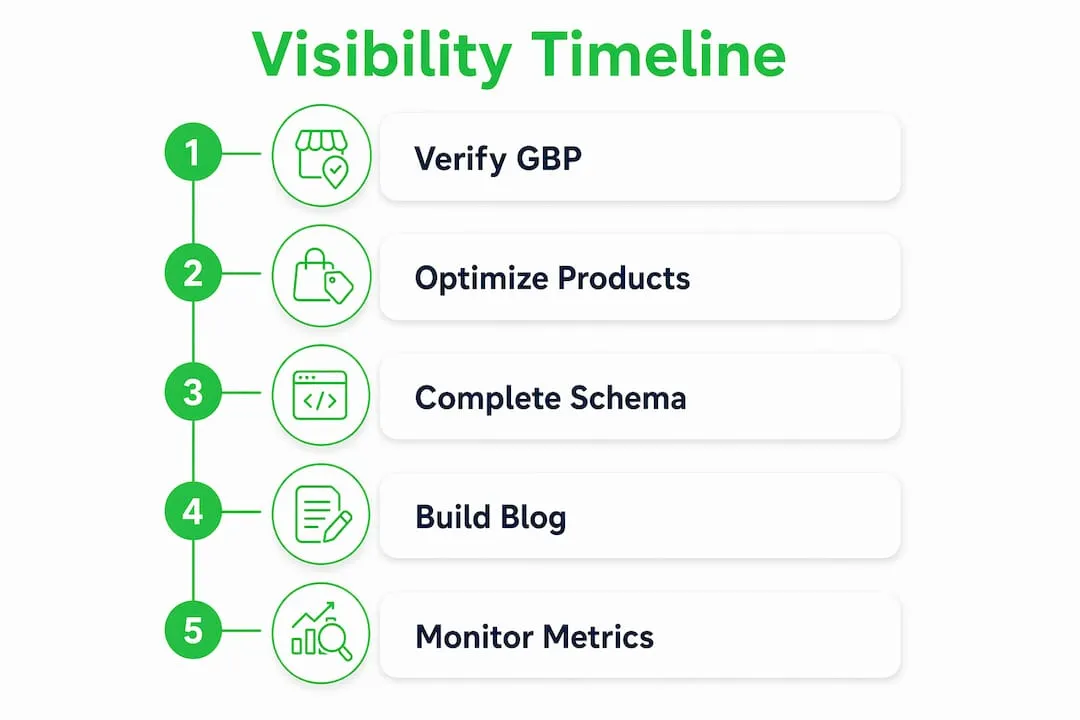
Within 30 days: Rewrite your top 20 product page titles and meta descriptions, fix any Merchant Center disapprovals, and publish your first two neighbourhood or location-specific pages.
Within 90 days: Complete structured data (product schema) across all product templates, build a Shopify blog with at least four SEO-targeted posts, and run a first Performance Max campaign to amplify organic gains.
Pro Tip: Set up GBP action paths (Directions, Call, Order Online / Click & Collect) before you touch anything else. These buttons convert without a website visit, and fixing them takes under an hour.
How do you optimise Shopify product pages for search?
Duplicate content is the single biggest exposure killer for dropshippers. Copying a supplier’s description verbatim means Google sees hundreds of identical pages and ranks none of them well. The fix is structural.
Titles: Write every product title as [Brand or Type] + [Key Feature] + [Model/Variant] + [UK-relevant qualifier]. Keep it under 70 characters. Shopify uses the product title as the default <h1>, so it doubles as your on-page heading.

Meta descriptions: Target 150–155 characters. Lead with the benefit, include a purchase-intent phrase (“free UK delivery”, “in stock now”), and close with a soft call to action. Shopify’s theme editor lets you set a global meta template for collections and override it per product.
Unique descriptions: Structure every description as: one-sentence hook, three to five bullet features, a short paragraph on use case or fit. AI generation works well here when you feed it a product spec sheet and instruct it to avoid the supplier’s exact phrasing. The output needs a quick human review for accuracy, but it eliminates the copyright risk entirely.
Schema placeholders: Add Product schema to your Shopify theme’s product.json template, covering price, availability, GTIN, and aggregateRating. Shopify’s built-in theme editor supports JSON-LD blocks; you do not need a separate app for basic implementation.
Verified, complete product listings surface significantly more often in Google results than sparse or duplicated ones. That applies to both organic search and Shopping.
Pro Tip: For multi-market exposure, use Shopify Markets to publish alternate-language versions of your product pages. Pair each with a hreflang tag in the theme’s <head> to avoid self-competing pages. Ecom-eye generates multi-language pages in bulk, which removes the translation bottleneck entirely.
Which image approach actually lifts rankings and conversions?
Use a hero image (white or clean background, 2000 × 2000 px minimum), one lifestyle shot, and one detail or scale image per product. That combination satisfies Google Shopping’s image quality requirements and gives shoppers enough context to buy.
For dropshippers pulling supplier images, the problem is identical photos appearing on thousands of stores. AI-generated product images solve this: they are unique, copyright-safe, and can be styled to match your brand.
Key rules for images:
- Format: Convert to WebP on upload. Shopify’s CDN serves WebP automatically to supported browsers, but uploading WebP directly gives you smaller source files.
- File names: Use descriptive, hyphenated names (
blue-ceramic-mug-250ml.webp) rather than supplier codes. Google indexes file names. - Alt text: Write
[Product name] + [key feature] + [colour/size if relevant]. Keep it under 125 characters and never stuff keywords. - Lazy loading: Shopify themes handle this natively from Dawn onwards, but check your Lighthouse score to confirm images below the fold are deferred.
Pro Tip: When generating AI images in bulk, name files consistently from the start. A naming convention like [SKU]-[angle]-[colour].webp makes Shopify bulk imports and Merchant Center feed updates far faster to manage.
Which Shopify technical settings most affect your exposure?
Speed and crawlability are the two levers most store owners ignore until something breaks. A slow-loading store directly reduces both organic rankings and Merchant Center approval rates.
Core checks:
- Canonical tags: Shopify adds canonical tags automatically, but collection-filtered URLs (e.g.
?sort_by=price) can create duplicate indexing. Verify in Google Search Console’s Coverage report. - URL structure: Keep product URLs as
/products/[product-handle]. Avoid deep nesting. - Robots.txt: Shopify’s default
robots.txtblocks/cart,/checkout, and/account. Do not override these unless you have a specific reason. - CSS/JS: Merchant Center disapproves feeds when it cannot render product pages. Run the URL Inspection tool in Search Console to confirm Googlebot can load your theme assets.
For structured data, the aggregateRating field is worth the effort. Products with visible star ratings in Shopping results consistently achieve higher click-through rates. Use Shopify’s review apps (Judge.me or Okendo) that output schema-compliant markup automatically.
Common errors that block exposure include mismatched currency/locale tags (use en-GB and GBP in your theme’s <head> meta), duplicate collection titles, and missing GTIN fields in the Merchant Center feed.
How do you scale product pages with a bulk workflow?
The workflow that consistently preserves SEO quality at scale follows six steps:
- Import product data from AliExpress, Amazon, Temu, or a competitor Shopify URL in bulk.
- Map to a template that defines title structure, description format, and schema fields.
- Generate AI content for titles, descriptions, and meta fields, using the template as the prompt scaffold.
- Generate AI images for each SKU, applying your brand’s background and style settings.
- QA batch: check for duplicate titles (no two products should share an identical title), verify pricing and size variants, and confirm GTIN fields are populated where available.
- Export to Shopify in one click, with the feed simultaneously updated in Google Merchant Center.
Human review is worth the time on titles and the first sentence of each description. Pricing and size variants should always be human-checked before export. Everything else, including image naming, alt text, and schema population, can be automated reliably.
The benefits of bulk content generation for SEO are well-documented: unique pages at scale outperform thin or duplicated catalogues in both organic and Shopping results.
Pro Tip: After each bulk export, run a Merchant Center feed fetch immediately. Catching disapprovals within hours of upload is far easier than diagnosing a feed that has been live for two weeks with silent errors.
How do you turn nearby searches into store visits?
For merchants with a physical location, GBP completeness is the highest-ROI task available. Verified, complete profiles surface 80% more often and generate four times as many website visits as incomplete ones.
GBP checklist:
- Accurate NAP matching your Shopify store footer and all UK directory listings
- Holiday hours updated at least two weeks in advance
- At least 10 photos (storefront, interior, products, team)
- Posts/Updates published weekly
- Q&A section seeded with your own common questions and answers
Consistent NAP data across third-party platforms is a verification signal. Mismatched entries on Yell, Yelp UK, or Bing Places actively reduce your local ranking even when your website is well-optimised.
For local content, create one page per neighbourhood or nearby area you serve. Mention local landmarks, parking, and in-stock signals. Effective organic reach for nearby searchers often falls within a 3–5 mile radius, so hyper-local pages outperform broad keyword targeting for foot traffic.
On reviews: 97% of consumers read reviews before choosing a local business, and 47% will not visit a business with fewer than 20 reviews. Aim for at least 20 reviews as your baseline. Ask for reviews at the point of purchase via a QR code at the till or a follow-up email. Respond to every review, positive or negative, within 48 hours.
Pro Tip: Never incentivise reviews with discounts or gifts. Google’s policies prohibit it, and a sudden spike of reviews from incentivised customers is a pattern their systems flag.
Which promotion channels reliably amplify store exposure?
Combine organic local SEO with Google Merchant Center and targeted paid formats. Local inventory ads paired with Shopping ads produced a 21% increase in in-store visits and a 9% increase in online conversions in reported trials. That is a meaningful return on a channel most small UK retailers have not yet activated.
Channel priorities:
- Google Shopping: Keep your Merchant Center feed updated daily. Fix disapprovals within 24 hours. Use Performance Max campaigns once your feed is clean and your product pages are unique.
- Instagram Reels: Short-form video is the fastest organic reach channel for product discovery. Film new arrivals in-store; authenticity outperforms production value here.
- Email and SMS: Abandoned browse sequences and new-arrival emails drive repeat visits. Email marketing generates strong returns relative to spend, making it one of the most cost-efficient retention channels available.
- Marketplaces: Listing on eBay UK or OnBuy alongside your Shopify store broadens exposure without cannibalising direct traffic, provided your Shopify store offers a reason to buy direct (price, bundle, loyalty points).
Use paid channels to accelerate organic gains, not replace them. A clean product feed and unique pages are prerequisites; paid spend on a disapproved or duplicate catalogue wastes budget.
How do you measure whether your exposure efforts are working?
Track these KPIs from day one, grouped by speed of feedback:
Immediate (days 1–14): GBP actions (calls, direction requests, website clicks), Merchant Center impression share, Search Console query impressions.
Medium-term (weeks 4–12): Organic click-through rate per product page, product page impressions in Search Console, Shopify Analytics sessions from organic search.
Longer-term (months 3–6): Organic conversions, repeat visit rate, branded search volume trend in Search Console.
| Metric | Tool | Realistic timeline |
|---|---|---|
| GBP direction requests | GBP Insights | Days |
| Merchant Center impressions | Google Merchant Center | Days |
| Organic impressions | Google Search Console | 2–4 weeks |
| Product page CTR | Google Search Console | 4–8 weeks |
| Organic conversions | Shopify Analytics | 8 weeks |
Local SEO improvements typically show measurable movement in 4–8 weeks. Organic product page rankings take longer, usually 3–6 months for new or thin catalogues. Paid Shopping results are immediate once a feed is approved.
Key takeaways
Maximising store exposure requires unique product pages, a complete Google Business Profile, and a clean Merchant Center feed working together from day one.
| Point | Details |
|---|---|
| GBP is your fastest win | Complete and verify your profile; it surfaces 80% more often and drives four times more website visits than incomplete profiles. |
| Duplicate content blocks rankings | Every product page needs a unique title, meta description, and description to avoid Google Merchant disapprovals. |
| Bulk workflow preserves quality | Import, generate, QA, and export in sequence; human-review titles and pricing before every batch upload. |
| Measure the right KPIs | Track GBP actions and Merchant Center impressions first; organic conversions follow in months 3–6. |
| Ecom-eye automates the hard part | Bulk-generate copyright-safe titles, descriptions, and AI images, then export directly to Shopify in one click. |
The approach that actually moves the needle
Most store owners spend their time on the wrong things. They tweak their homepage copy, run a discount, post sporadically on Instagram, and wonder why nothing changes. The stores that grow consistently do one thing differently: they treat product pages as infrastructure, not content.
Every page you publish is a permanent asset. A unique, schema-complete product page can surface in organic search, Google Shopping, and local inventory results simultaneously. A copied supplier description does none of those things. The maths is straightforward.
The sequence I recommend is unglamorous but it works. Fix your GBP first because it is free and fast. Then get your Merchant Center feed clean. Then scale your product catalogue with unique, AI-generated pages. Only then does paid spend make sense, because you are amplifying something that already works rather than paying to send traffic to pages that will not convert.
Automation is not a shortcut; it is a prerequisite for scale. Writing 500 unique product descriptions by hand is not a realistic option for a dropshipper managing a live catalogue. The tools exist to do this properly and at speed. Use them.
Ecom-eye gives you unique, SEO-ready pages at scale
Copying supplier pages is the fastest way to stay invisible on Google. Ecom-eye generates bulk, copyright-safe product pages with unique titles, clean descriptions, and high-quality AI images, then exports them directly to Shopify in one click. No rewriting. No copyright risk. No manual work.
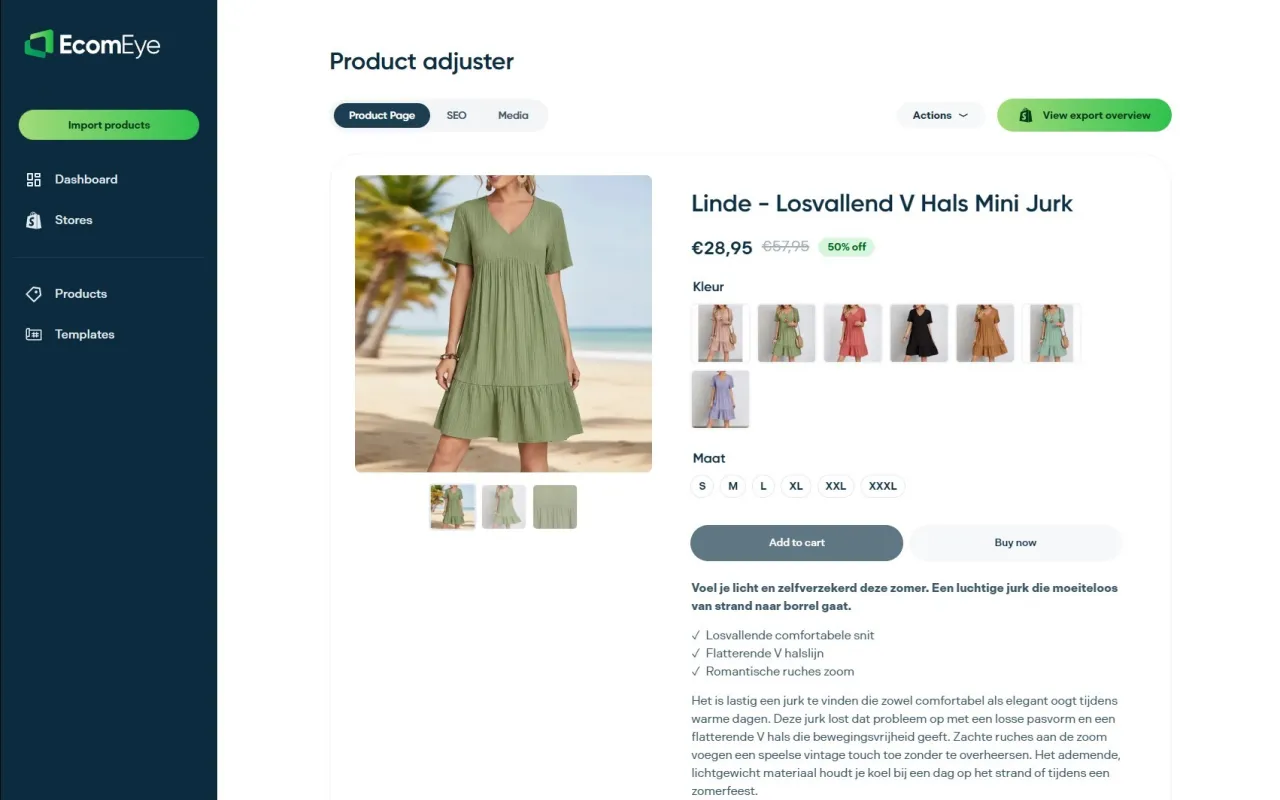
- Import products in bulk from AliExpress, Amazon, Temu, or competitor Shopify links
- Generate SEO-optimised titles, descriptions, and meta fields automatically
- Produce unique AI product images that pass Google Shopping’s image quality requirements
- Publish multi-language pages for UK and international markets without a separate translation workflow
If you are scaling a Shopify dropshipping store and need unique, Google-compliant pages fast, start with Ecom-eye’s AI product description generator and see how many pages you can publish this week.
Useful sources
- How to rank in Google ‘near me’ search results (Shopify) — covers GBP completeness, local pack ranking factors, NAP consistency, and the proximity curve for retail.
- Optimise Google Places: 7 tips to drive store traffic (Shopify) — step-by-step GBP optimisation guide including categories, photos, reviews, and Posts/Updates.
- Google Merchant Center: in-store sales goals — official guidance on local inventory feeds and Performance Max campaigns for physical retailers.
- How to increase foot traffic using SEO (SearchXPro) — data on local inventory ad performance and the online-to-in-store research journey.
- Retail store local SEO (Flento) — practical breakdown of GBP action paths and their conversion value for local retailers.
- Ecommerce SEO best practices for Shopify stores (Ecom-eye) — Shopify-specific SEO checklist covering structured data, canonical tags, and feed optimisation.
FAQ
How long does it take to see results from store SEO?
GBP and Merchant Center improvements show measurable results within days to weeks. Organic product page rankings typically take 3–6 months for new or thin catalogues.
Why does Google keep disapproving my Shopping feed?
The most common causes are duplicate product titles, missing GTIN fields, mismatched pricing between your Shopify store and the feed, and pages Googlebot cannot fully render due to blocked CSS or JavaScript.
Can AI-generated product descriptions hurt my SEO?
Not if they are unique and accurate. The risk is using AI to spin supplier copy that remains recognisably similar. Ecom-eye generates descriptions from structured product data rather than paraphrasing existing pages, which avoids the duplicate-content penalty.
What is the minimum number of reviews needed to rank locally?
47% of consumers will not visit a business with fewer than 20 reviews. Aim for 20 as your baseline, then focus on review velocity (steady new reviews over time) rather than a single burst.
Do I need a physical address to benefit from Google Business Profile?
GBP is designed for businesses with a physical location or a defined service area. Online-only Shopify stores without a public address cannot create a standard GBP listing, but they can still benefit from Google Merchant Center and Shopping feeds for product exposure.
Ready to boost your product pages?
Generate high-converting, SEO-optimized product pages in bulk using AI automation used by e-commerce experts.
No credit card required