Scale Shopify Product Descriptions for Dropshippers With API Workflows
Scalability first Shopify guide for dropshippers. Move from the admin UI to the GraphQL Admin API to publish multilingual product descriptions, avoid...

Scale Shopify Product Descriptions for Dropshippers With API Workflows

Enable the locales you need under Settings then Languages in the Shopify admin, publish them, and choose your translation method by catalogue size. Small to medium catalogues do fine with Translate & Adapt or a CSV import. Anything larger, or updated often, needs the GraphQL Admin API and an automated workflow to keep translations synchronised as products change.
TL;DR:
- Shopify limits published locales to 20, so prioritize markets and plan your language rollout carefully before adding new ones.
- To keep translations accurate over time, assign ownership for updates, establish a change log, and regularly review content, especially for high-traffic products.
- Large or frequently updated catalogs benefit from automated workflows using the GraphQL Admin API to stay in sync and prevent stale translations.
- Handling variant options requires creating a fixed glossary of terms like sizes and colors to ensure consistency across the entire catalog.
- Translation quality and SEO accuracy depend on proper publishing, including translating meta descriptions, verifying hreflang tags, and ensuring URL handles remain stable.
Table of Contents
- How do you add and publish languages in Shopify?
- Which product fields can you actually translate?
- Translate & Adapt vs. CSV vs. third-party apps
- Scaling translations with the GraphQL Admin API
- What are the SEO implications of translated product pages?
- How do you keep translations accurate over time?
- Translating variants, sizes and colours without breaking your catalogue
- How do you keep tone and branding consistent across languages?
- What goes wrong most often with multilingual product pages?
- How much do third-party translation apps cost?
- Practitioner perspective: why automation beats manual translation at scale
- If you need bulk multilingual product pages, here’s a faster route
- Where to go for the technical detail
- Sources
- FAQ
How do you add and publish languages in Shopify?
Getting a language live on your storefront takes four steps, and most merchants get tripped up on the same one: forgetting to actually publish the locale after adding it.
- Enable the locale. Go to Settings, then Languages (or Markets if you are setting up region-specific pricing alongside language). Search for the language you want and add it to your store.
- Add the translations. Shopify’s free Translate & Adapt app opens automatically for the new locale. You can type translations manually, accept its machine-translation suggestions, or use a compatible third-party app instead.
- Publish the locale. Nothing shows on the storefront until you flip the locale from draft to published inside Translate & Adapt. This is the step people forget, then wonder why their new language selector is empty.
- Test it properly. Visit the language-specific URL directly, run a test checkout, and check that order confirmation emails arrive in the right language. Checkout and notification translations often lag behind product translations because they live in separate settings.
One limit catches growing stores off guard: Shopify caps every shop at 20 published locales at once. That sounds generous until you are running a global dropshipping operation targeting a dozen European markets plus Latin America and Southeast Asia. Plan your language rollout in priority order, because you cannot simply keep adding locales indefinitely.
Which product fields can you actually translate?
Shopify only exposes a defined set of fields for translation, and knowing the boundaries saves you from chasing text that will never show up in the Translate & Adapt interface.
- Title — the product name customers see in search and on the product page.
- Body HTML — your main product description, including any formatting.
- Product type — the internal category label, which can affect filtering and navigation.
- Meta title and meta description — the SEO tags that appear in search engine results.
- Handle — technically translatable via the API, though Shopify’s own developer documentation notes handles usually stay in the language they were created in and carry practical constraints around uniqueness and redirects.
What you cannot translate matters just as much. Product tags generally do not have a dedicated translation field, so any tag-based filtering or search will keep showing your primary language. Many app-generated fields, and non-public metafields tied to third-party apps, sit outside the standard translation system entirely. If a translation is missing for any field, Shopify quietly falls back to the primary language rather than showing a blank space, which is helpful for avoiding broken pages but easy to miss during a QA pass.
Translate & Adapt vs. CSV vs. third-party apps
Three non-developer methods cover most merchants, and each suits a different stage of growth.
Translate & Adapt gives you the most hands-on control. You work field by field, review machine-translation suggestions before accepting them, and see exactly what is published. It is the right tool when accuracy matters more than speed, such as translating your ten best-selling product descriptions into German with a native reviewer checking the copy.
CSV import and export wins on speed once you are past a handful of products. Export your translatable fields, hand the spreadsheet to a translator or agency, then re-import. The common pitfall is column mapping: get the locale code or field header wrong and Shopify either rejects the file or, worse, imports translations against the wrong field silently.
Third-party apps trade some quality control for convenience, auto-translating entire catalogues in minutes. The trade-off is that machine output varies wildly by language pair, and not every app preserves your custom meta titles and descriptions during translation, which quietly undermines the SEO work you did on the English version.
| Method | Best for | Main risk |
|---|---|---|
| Translate & Adapt | Small catalogues, high accuracy needs | Slow at scale |
| CSV import/export | Medium catalogues, agency workflows | Field mapping errors |
| Third-party apps | Large catalogues, fast turnaround | Inconsistent quality, SEO metadata gaps |
Pro Tip: Run a five-product pilot in your new locale before committing your whole catalogue to any method. It exposes handle conflicts, missing meta descriptions, and awkward machine phrasing while the fix is still a quick edit rather than a full rollback.
Choose by catalogue size and budget: under 50 products, Translate & Adapt is fine. Fifty to a few hundred, CSV with a professional translator strikes the best accuracy-to-effort ratio. Beyond that, or if you add new products weekly, you need the API.
Scaling translations with the GraphQL Admin API
Manual tools break down once you are publishing hundreds of products a month, which is exactly the position most serious dropshippers find themselves in. The fix is the GraphQL Admin API, and the workflow follows the same logic developers use for any content that needs to stay in sync across languages.
- Query translatableResources to pull every translatable field and value for a given product, along with its content digest.
- Call the translationsRegister mutation to write each translation back, passing the translatableContentDigest so Shopify can detect when the source content has changed.
- Watch the outdated flag on each translation. Shopify’s developer guide on managing translated content explains that this flag flips the moment your primary-language content is edited after translation, telling you exactly which items need resyncing.
- For headless storefronts, add the @inContext directive to your Storefront API queries so each request returns locale-specific content automatically.
The digest check is the piece most homegrown scripts skip, and it is the one that prevents stale translations from quietly going live. Without it, you edit a product description in English, forget to update the French version, and a customer in Lyon reads copy that no longer matches your current pricing or stock claims. Build a weekly reconciliation job that checks outdated flags across your catalogue, rather than relying on someone noticing by accident.
Headless implementations carry their own trap: the Storefront API documentation is explicit that if a query does not include @inContext, it returns the primary language even when a perfectly good translation exists and is published. That is a silent failure your analytics will not flag as an error.
What are the SEO implications of translated product pages?
Each published locale gets its own indexable URL, which is the whole point of translating in the first place. Shopify builds these as language subpaths, so a French version of a product sits at something like /fr/products/product-handle, letting Google index the English and French pages as distinct results rather than duplicate content.
Handles themselves generally stay in the language they were created in, even when everything else on the page is translated. That is deliberate. Changing a handle breaks existing links and requires a redirect, so most merchants leave the English handle in place across all locales and let the subpath do the language signalling instead. Plan your redirect strategy before you start renaming anything, because retrofitting canonical tags across a live multilingual catalogue is tedious work.
Practical checklist for each new locale:
- Confirm the locale is published, not just added, in Translate & Adapt.
- Translate meta titles and meta descriptions if you have customised them from the defaults. Shopify’s localisation guidance notes that leaving them untranslated still works because the storefront falls back to your translated title and body content, but a purpose-written meta description converts better in search results than a fallback.
- Check that your sitemap includes the new locale’s URLs. Most themes handle this automatically, but confirm it in Google Search Console rather than assuming.
- Verify hreflang tags are present and pointing to the correct locale pairs, particularly if you run multiple domains or subdomains for different markets.
How do you keep translations accurate over time?
Translation quality decays the moment nobody owns it. Set up a governance model before your second language goes live, not after your third one starts drifting.
- Pick a single source of truth. Your primary language is the master copy. Every translation is derived from it, and every edit to the primary triggers a review of dependent locales.
- Assign ownership. One person or team should be responsible for catching outdated flags and coordinating with translators, rather than leaving it to whoever happens to notice a mismatch.
- Build a change log. Even a simple spreadsheet noting which products changed and when saves hours of guessing which translations need attention.
- Run a review cadence. Monthly for high-traffic products, quarterly for the long tail, is a reasonable starting split for most catalogues.
Quality control matters as much as process. A native reviewer catching tone problems before a page goes live is worth more than any machine-translation setting. Keep a short glossary of brand terms, product names, and phrases you never want auto-translated, because generic tools frequently mangle brand names or turn a deliberate phrase into something generic.
Pro Tip: Checkout and transactional emails often use Shopify’s own default translations rather than your custom copy. Test an actual order in each locale rather than assuming your product-page translations extend automatically to the confirmation email.
Translating variants, sizes and colours without breaking your catalogue
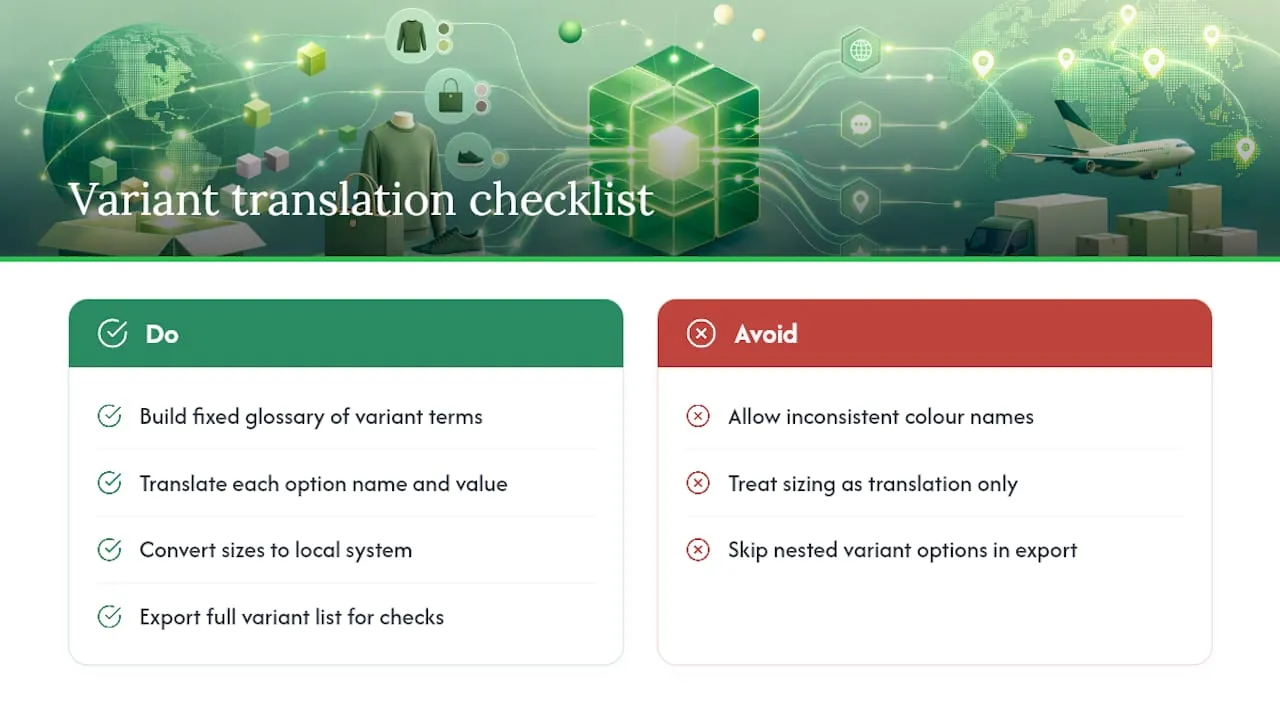
Variant options such as size and colour translate through the same system as other product fields, but they trip people up because they are structured differently from a product title or description. Each option name (Size, Colour) and each option value (Small, Red) needs its own translation entry, and missing even one value means a customer sees a mix of translated and untranslated text on the same dropdown.
The bigger practical issue is consistency across your catalogue. If “Red” is translated as “Rouge” on one product and “Rouge Vif” on another purely because two different translators handled them, customers browsing by colour filter get an inconsistent experience, and your filtering logic may not group products the way you expect. Build a fixed glossary of variant terms before you translate a single product, covering every size system and colour name you sell, and apply it identically everywhere.
Size systems carry an extra wrinkle beyond language. A UK size 10 shoe is not a US size 10, and translating “Medium” into French does nothing to fix that a French customer expects sizing in centimetres rather than the S/M/L convention you might use for a US audience. This is a conversion problem as much as a translation one: get it wrong and you are looking at return rates, not just clunky copy.
Bulk workflows via CSV or the API handle variants the same way they handle any other field, but always export a full variant list to check nothing was silently skipped. It is easy for a translation tool to catch the parent product title while missing three of five colour options nested underneath it.
How do you keep tone and branding consistent across languages?
A product description that sounds punchy and confident in English can read as stiff or oddly formal once machine-translated, because tone rarely survives literal translation. This is the difference between a page that merely says the right words and one that actually sells.
Write a short style guide before translating anything at volume: sentence length preference, whether you use contractions, how formal the brand voice is, and a list of phrases that should never change no matter which language you are working in. Hand this to every translator or app you use, because consistency across fifty products in one language matters more than perfect literary quality on any single page.
Watch for regional register differences within the same language. French for a France-based customer and French for a Quebec-based customer carry different conventions, and formal “vous” versus informal “tu” changes the entire feel of a product description depending on your brand’s personality and target market. Decide this once, document it, and apply it uniformly rather than letting each translator choose.
The safest guardrail is spot-checking live pages in each locale on a rolling basis, not just reviewing translations before publish. Tone drift creeps in gradually as new products get added by different people over months, and nobody notices until a customer flags that half your German catalogue sounds like a different brand wrote it.
What goes wrong most often with multilingual product pages?
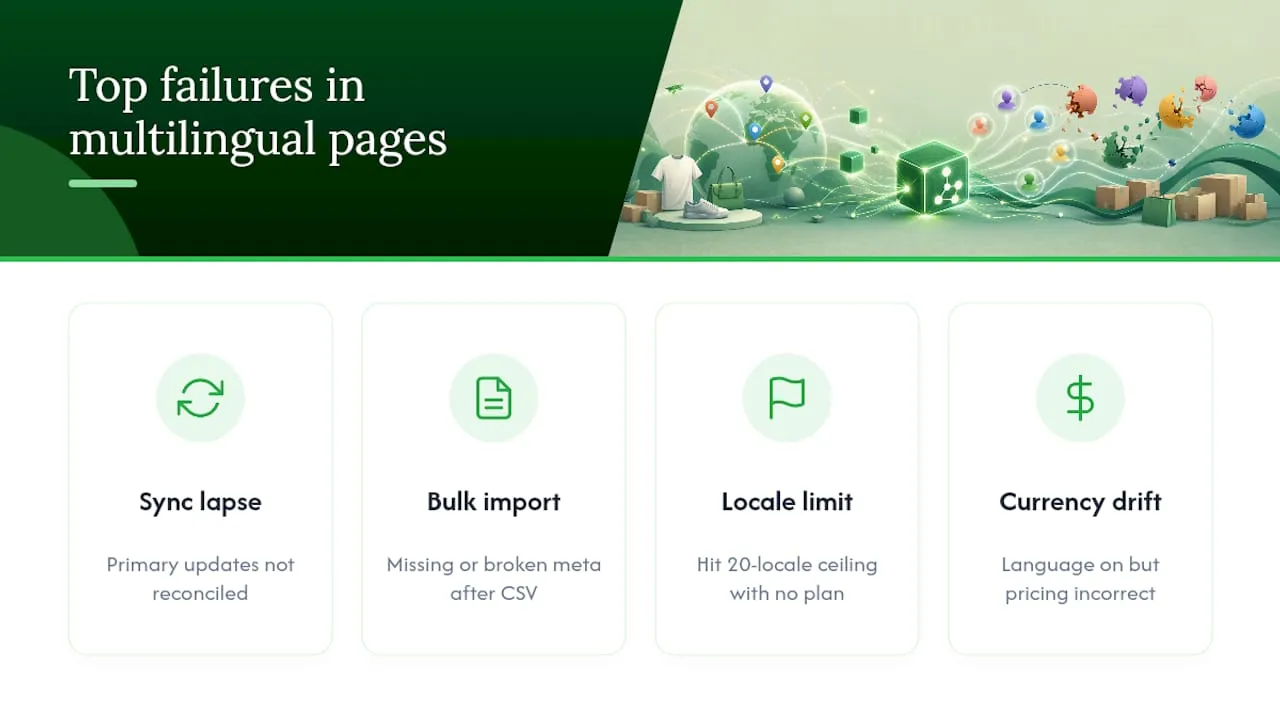
The most common failure is not a translation problem at all: it is a synchronisation problem. Someone updates a price claim or a shipping detail in the primary language, forgets the outdated flag exists, and three other locales quietly show information that is no longer true. Building the reconciliation habit described earlier is the actual fix, not a better translation tool.
Second most common: broken or missing meta descriptions after a bulk import. CSV workflows are especially prone to this, because a mismatched column header does not throw an obvious error, it just imports blank or wrong data into the wrong field. Always spot-check five to ten products manually after any bulk import, rather than trusting a success message.
Third: hitting the 20-locale ceiling without a plan. Merchants expanding market by market sometimes add locales reactively, then discover they are at the limit and have no process for deciding which to consolidate or drop. Decide your target market list before you start enabling languages, not after.
Fourth, and easy to miss: currency and locale settings drifting apart. A published language does not automatically mean pricing displays correctly for that market. If you are using Shopify Markets alongside languages, check that the pairing is actually configured, since a customer reading a fluent French description with US-dollar pricing looks unfinished even when the translation itself is flawless.
How much do third-party translation apps cost?
Pricing for Shopify-compatible translation apps generally follows one of two models: a flat monthly subscription tied to a word or product limit, or a usage-based fee tied to how much content you translate per month. Entry-level plans on most apps in the Shopify App Store sit in the free-to-low-cost range for small catalogues, covering a limited word count or a handful of languages, with costs climbing as you add languages or exceed the included volume.
Mid-tier plans typically unlock more languages simultaneously and higher word caps, aimed at stores with a few hundred SKUs expanding into three or four markets. Enterprise-tier plans, aimed at large catalogues with frequent updates, tend to charge based on translation volume or API call frequency rather than a flat fee, because that usage pattern maps more closely to actual cost for the app provider.
Two costs are easy to underestimate. First, human review on top of machine translation, whether that is a freelance native speaker or an agency, usually costs more per product than the app subscription itself once you factor in ongoing catalogue growth. Second, re-translation cost after primary-language edits: if your workflow does not track the outdated flag automatically, you either pay to re-translate content that has not actually changed, or you miss genuine changes and publish stale copy. Budget for the review-and-resync labour, not just the software line item.
Practitioner perspective: why automation beats manual translation at scale
Most guides treat translation as a content task. For dropshippers running large catalogues, it is closer to a supply chain problem, and treating it that way changes what you build first.
The pattern that works: bulk import product data from your suppliers, generate unique descriptions and their translations at the same time rather than translating an already-published English page, then export everything to Shopify in one pass. This is the workflow behind Ecom-eye, and the sequencing matters more than it looks. Translating a description that started as scraped supplier copy just multiplies the duplicate-content problem across languages instead of solving it. Google Merchant disapprovals and thin-content penalties do not care which language the copied text is in.
The unglamorous discipline that actually protects a catalogue is treating every language version as original content that happens to be generated together, not a translation layered on top of a shortcut. Get that sequencing wrong once at scale, across a few hundred SKUs and four languages, and you are not fixing four translations. You are fixing a structural content problem four times over.
— Koen
If you need bulk multilingual product pages, here’s a faster route
A solution exists for the bottleneck this article has walked through: getting from one product description to multiple language versions without triggering duplicate-content flags or burning days on manual translation. Such services import product data in bulk from major suppliers or competitor’s Shopify stores, then generate copyright-safe titles, descriptions, and matching AI product images across multiple languages in one pass, ready to export to Shopify efficiently.
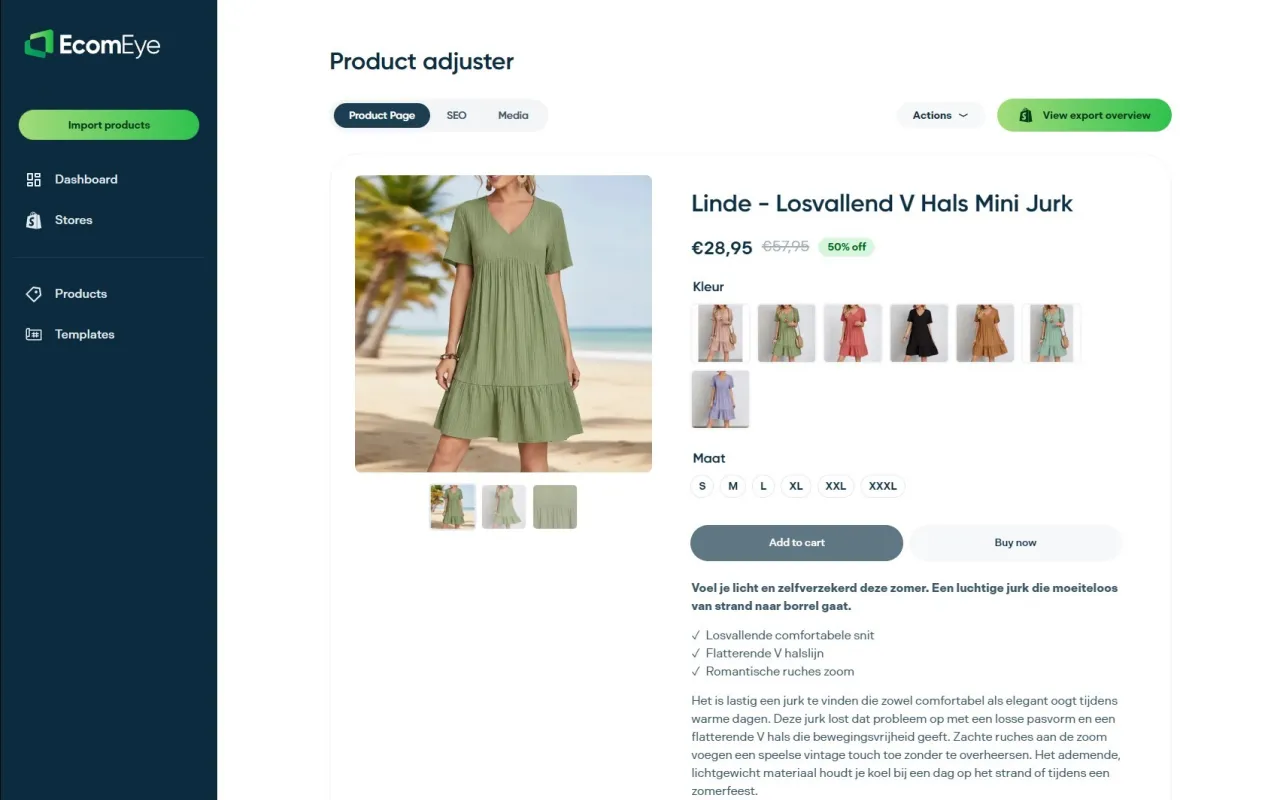
It fits best if you are running a large or fast-growing catalogue, adding new products weekly, or building out several international markets at once, the exact scenario where Translate & Adapt and manual CSV work stop being practical. Rather than translating pages after the fact, the descriptions are generated unique and multilingual from the start, sidestepping the duplicate-content risk that gets slower-moving stores flagged in Google Merchant. If your catalogue fits this pattern, try the AI product description generator and run a batch through it before your next big import.
Where to go for the technical detail
- TranslatableResourceType — the full list of translatable fields and the 20-locale limit, straight from Shopify’s Admin GraphQL reference.
- Manage translated content — the developer guide covering translationsRegister, content digests and the outdated flag.
- Storefront API: multiple languages — how @inContext works for headless storefronts.
- Localization and translation — the Help Centre walkthrough for admin-level setup and SEO basics.
- Multi-language Shopify workflow for global sales growth — a deeper look at scaling translation workflows across large catalogues.
Sources
- TranslatableResourceType — Shopify developer documentation
- Manage translated content — Shopify developer documentation
- Localization and translation — Shopify Help Center
FAQ
What are the language codes used in Shopify?
Shopify uses standard two-letter language codes such as en for English, fr for French, and es for Spanish, sometimes paired with a region code like pt-BR for Brazilian Portuguese. These codes appear in your language-specific URLs and in API calls when specifying a locale.
How do I switch the language on my Shopify storefront?
As a shopper, most themes show a language selector, usually in the header or footer, once the store owner has published more than one locale. As a store owner, you switch or add languages under Settings, then Languages, in your Shopify admin.
Can I use a translation app or translator for Shopify?
Yes. Shopify’s own Translate & Adapt app handles manual and machine-assisted translation for free, and a range of compatible third-party apps in the Shopify App Store offer auto-translation with varying levels of quality and SEO support. For high-volume catalogues, tools like Ecom-eye generate multilingual descriptions directly rather than translating after publishing.
How many languages can one Shopify store support?
A single Shopify store can publish up to 20 languages at once, so prioritise your target markets rather than enabling every locale you might eventually need.
Does a translated product page hurt my SEO?
No, provided each locale gets its own indexable URL and unique metadata. Shopify’s language subpath structure lets search engines treat each language version as distinct content rather than a duplicate, as long as you translate customised meta titles and descriptions rather than leaving them blank.
Ready to boost your product pages?
Generate high-converting, SEO-optimized product pages in bulk using AI automation used by e-commerce experts.
No credit card required