Keep Catalog Consistent: CSV Bulk Product Image Generation for Shopify
Workflow-led guide to CSV-driven bulk product image generation for Shopify. Run a 20–30 SKU test, enforce crop and color rules, and publish consistent...
Keep Catalog Consistent: CSV Bulk Product Image Generation for Shopify
Template-driven bulk generation, feeding a CSV of SKUs through a shared visual template, is the fastest repeatable way to produce full product image sets at scale. Pick a tool built for e-commerce specifically, one with background removal, consistent crops and one-click Shopify export, rather than a generic AI art generator. EcomEye fits that brief directly: start with a small test batch, check the crops against your theme, then run the full catalogue.
TL;DR:
- Bulk image generation is ideal for catalogues over 30 SKUs, especially when producing images faster than manual editing or photography can manage.
- Using consistent templates, source images should have minimum 2000 pixels on the longest edge, with proper metadata and clear brand rules.
- File names should describe products, and alt text must follow a structured format to meet marketplace and SEO standards.
- Complex outputs like lifestyle images or textured products may require manual review and still benefit from photography for high-fidelity items.
- Choosing the right integration method depends on store size and workflow, with Shopify apps, APIs, or CSV exports offering scalable automation options.
Table of Contents
- How does bulk product image generation actually work?
- When does bulk generation make sense for your store?
- Building a repeatable bulk image workflow
- What makes a bulk product image set actually convert?
- Which integrations actually matter for a bulk workflow?
- How EcomEye runs bulk product image generation in practice
- What are the real limits of bulk image generation?
- When should you still use a studio photographer?
- Get your bulk image sets live on Shopify faster
- Where to go next
- FAQ
How does bulk product image generation actually work?
A bulk job starts with inputs: usually one reference photo per product, or a CSV listing SKUs alongside a chosen template and any brand rules (background colour, logo placement, crop ratio). From there, the software applies the template across every row in one pass rather than editing images one at a time.
The processing stage handles the repetitive work a photo editor would otherwise do by hand:
- Template application, mapping each product photo onto a fixed layout
- Batch rendering across the full SKU list in one job
- Automated background removal and colour correction
- Resizing and cropping to the formats each channel needs
Outputs typically cover more than one shot type per SKU: a clean packshot for the main listing, a detail crop showing texture or stitching, sometimes a lifestyle variant, and channel-ready sizes for Shopify, Instagram or a marketplace feed. Throughput varies by provider, but batch tools built for this purpose can generate hundreds of images per run once a template is locked in. Pricing generally follows a credits model, so budget per image rather than per subscription tier, since complex outputs (lifestyle composites especially) often cost more credits than a plain packshot.
When does bulk generation make sense for your store?
Not every catalogue needs automation on day one. It earns its place once you’re producing images faster than a photographer or single designer can keep up, or when a launch deadline forces the issue.
- Catalogue launches. Onboarding 200+ SKUs from a supplier feed makes manual editing impractical inside a normal timeline.
- Seasonal refreshes. Swapping backgrounds or props across an existing range for a sale event or new season.
- Marketplace and ad crops. One base image, reshaped into the aspect ratios Amazon, Google Shopping and social ads each demand.
- A/B creative testing. Generating variant shots to test which composition converts before committing to one across the whole range.
As a rough guide, catalogues under 30 SKUs are often faster to handle manually or with a hybrid approach. Above that, automation starts paying for itself, though your highest-margin or best-selling SKUs still deserve a manual quality pass regardless of scale.
Building a repeatable bulk image workflow
A workflow that works twice is worth ten times what a one-off fix is worth. Start with preflight checks: source images above a minimum resolution (aim for at least 2000px on the longest edge), consistent SKU metadata, and a written brand rule sheet covering background colour, logo placement and crop ratio.
Your template should define, in advance:
- The shot list per product (hero, detail, lifestyle)
- Standard crop dimensions for each output channel
- A file naming convention tied to SKU codes
- Alt-text placeholders that pull from product data automatically
A CSV feeding the job typically needs columns for SKU, product title, source image URL, template ID and target output size. The chain then runs generate, edit, resize, export, in that order, with a review step inserted before anything goes live.
Pro Tip: Run your first batch at 20 to 30 SKUs before committing the whole catalogue. Catching a cropping error at that scale takes minutes; catching it after 2,000 images have exported to Shopify takes an afternoon.
Version your templates the same way you’d version code. If a template changes mid-catalogue, you need to know which SKUs used which version when a customer flags an inconsistent image.
What makes a bulk product image set actually convert?
Consistency is the difference between a catalogue that looks professional and one that looks assembled from five different sources. Every listing should share the same lighting angle, the same background tone and the same scale relationship between product and frame, because shoppers notice inconsistency even when they can’t name it.
SEO matters here too, and it’s routinely skipped. File names should describe the product rather than default to a camera-generated string like “IMG_4821.jpg”, and alt text should follow a consistent structure: product name, colour or variant, and shot type. Marketplaces are stricter than most sellers expect. Google Merchant Center rejects listings for watermarks, placeholder text or backgrounds that don’t meet its plain-background rule for certain categories, and a batch of otherwise good images can get flagged over one repeated template flaw.
On composition, structure each product’s set the same way every time:
- One hero shot on a clean background for the main listing image
- A lifestyle or in-context shot to support the buying decision
- One or two detail close-ups on texture, stitching or hardware
- A thumbnail-optimised crop, since thumbnails compress detail hard and busy images lose readability at small sizes
Run a final check on printed text and labels specifically. AI-generated and heavily edited images can distort small text (care labels, size charts, packaging copy) in ways that are easy to miss at full resolution but obvious once a customer zooms in. Colour fidelity deserves the same scrutiny, particularly for apparel, where a shade shift between the product photo and the item that arrives is one of the most common drivers of returns. EcomEye’s guide to product image standards for 2026 covers export-ready crop specifications in more depth, and image quality itself carries weight beyond aesthetics: sharper, more consistent product photography measurably affects conversion and search visibility rather than just looking better on the page.
Which integrations actually matter for a bulk workflow?
The integration type you choose determines how much manual handling survives in your workflow. Four patterns cover most stores:
- Direct Shopify app: images generate and push straight into product listings without a separate export step.
- REST API: fits stores with a developer on hand who wants generation triggered from an existing internal system.
- CSV import/export: the simplest option, and often the fastest to set up for a first batch.
- PIM/DAM connectors: relevant once you’re managing product data across more than one sales channel or warehouse system.
On automation, look for scheduled jobs that run on a set cadence, folder or webhook triggers that fire when new product data lands, and no-code connectors like Zapier or Make.com for linking generation into a wider content pipeline without custom development.
Before committing to any tool, check four things on the selection list: supported export formats, whether brand templates are reusable across future batches, whether the platform logs an audit trail of what ran and when, and how pricing scales once you’re well past a starter batch.
How EcomEye runs bulk product image generation in practice
EcomEye’s bulk pipeline pairs image generation with the rest of the product page: SEO-ready titles, descriptions and product images generate together rather than as separate jobs, then export straight to Shopify. That matters for dropshippers specifically, since a mismatched title and image set is one of the fastest routes to a Google Merchant disapproval.
The bulk-specific features cover the ground store owners actually need:
- CSV import from AliExpress, Amazon, Temu or a competitor’s Shopify link
- Reusable templates across product ranges, rather than rebuilding a template per batch
- Multi-language page generation for stores selling across more than one market
- Volume-based credit pricing that scales with catalogue size
The practical outcome store owners report is speed to a live listing: a full product page, image included, ready to publish rather than sitting half-finished in a draft queue. Consistent PDP sets across a catalogue also reduce the back-and-forth with Google Merchant Center that duplicate or low-quality images tend to trigger.
What are the real limits of bulk image generation?
AI-generated batches still have blind spots worth planning around rather than discovering mid-launch. Material fidelity is the biggest one: fabric texture, metallic sheen and glass transparency are notoriously hard for generative tools to render convincingly at scale, which is why premium or texture-heavy products often still need a studio shot as the anchor image.

Small printed text inside a generated or heavily edited image, like care labels, ingredient lists or size charts, can distort in ways that pass a quick glance but fail on zoom. Colour accuracy is another recurring issue, especially across a large batch where lighting presets drift slightly from one run to the next without anyone noticing until customer complaints start.

There’s also a throughput ceiling worth knowing about before you commit a full catalogue to one tool. Complex outputs, lifestyle composites, multi-angle sets or video, generally cost more in credits than a standard packshot, and providers vary in how transparently they price that difference upfront. Some production services keep review loops inside the same workspace as generation to catch these issues before export, which cuts down the back-and-forth compared with switching between a generation tool and a separate editor. Whichever platform you choose, budget time for a manual review pass, not just a generation run.
When should you still use a studio photographer?
AI bulk generation wins on scale and templating, not on material truth. Luxury goods, anything with fine texture, and products where colour accuracy drives returns still benefit from a real photograph as the anchor shot. The sensible split: AI for catalogue breadth, photography for your best-selling or highest-risk SKUs. Always put a human eye on packaging text and regulated product claims before publishing, whichever route produced the image.
— Koen
Get your bulk image sets live on Shopify faster
EcomEye is the alternative to hiring a photographer or juggling a separate editing tool for every batch: import your product data from AliExpress, Amazon, Temu or a competitor’s Shopify link, and get finished images alongside SEO-ready titles and descriptions in the same run, not two separate jobs.
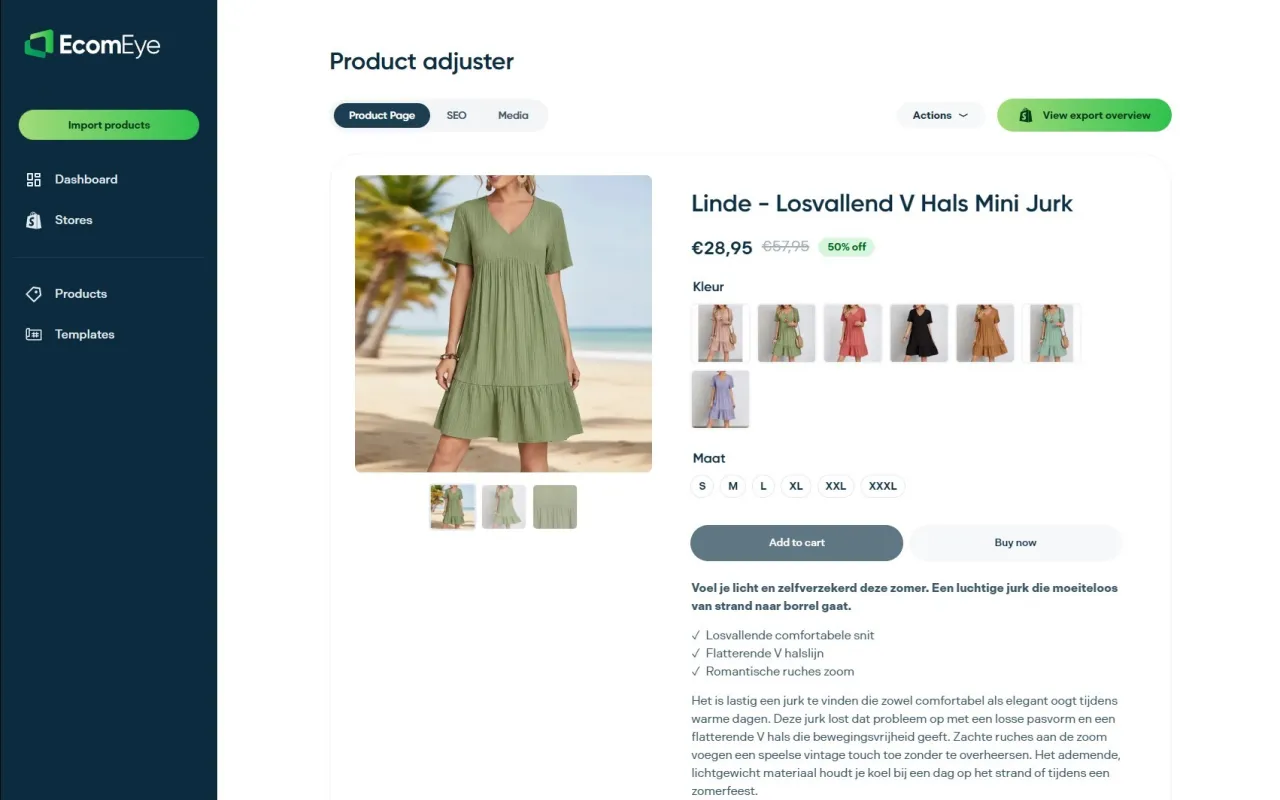
The bulk generator handles CSV import, reusable templates and one-click Shopify export, so a batch that would take a designer days to edit by hand can go from raw product data to a published listing in one pass. Pricing runs on volume-based credits, so a small test batch costs proportionally less than committing a whole catalogue upfront. If you’re planning a launch or a seasonal refresh, try the AI product image generator on a sample batch first, check the crops against your store’s theme, then scale up once you’re happy with the output.
Where to go next
Start with the AI Product Image Generator for hands-on setup, then read the 2026 guide to AI product images for crop specifications and export standards before running a full batch.
FAQ
How can I generate AI images in bulk?
Upload a CSV of SKUs alongside a chosen template into a bulk generation tool, then run the batch in one job rather than editing each image individually. Platforms built for e-commerce, like EcomEye, also export the finished set straight to Shopify.
Is there an AI photo generator built specifically for products?
Yes. Tools such as EcomEye focus specifically on product images, background removal and Shopify-ready crops, rather than general-purpose AI art generators that weren’t designed for catalogue work.
What’s the best free bulk photo editor?
Some Shopify apps, including Pictu, offer a free tier for basic bulk editing, though free plans usually cap the number of images or limit template options compared with paid credits.
How do I generate a single product photo well?
Start from a clean, well-lit source image, apply a template that removes the background and standardises the crop, then check the output for colour accuracy and any distorted text on labels before publishing.
How many images can a bulk job realistically produce per batch?
It depends on the provider and output complexity, but template-driven tools can process hundreds of SKUs in one run for standard packshots, with lifestyle or multi-angle sets typically taking longer per image.
Ready to boost your product pages?
Generate high-converting, SEO-optimized product pages in bulk using AI automation used by e-commerce experts.
No credit card required