Dropshipping from Amazon to Shopify: a practical guide
Learn effective strategies for dropshipping from Amazon to Shopify. Discover pathways that maximize profits and minimize risks in your business.

Dropshipping from Amazon to Shopify: a practical guide

Yes, you can dropship from Amazon to Shopify, but treating Amazon as a long-term supplier is usually the weakest of three routes. The safest, most durable option is building your Shopify catalogue on vetted supplier networks or apps and reserving Amazon retail arbitrage for quick, throwaway market validation only.
Here are the three paths sellers actually use:
- Retail arbitrage — buy from Amazon at retail price when an order lands on your Shopify store, then ship direct to the customer. Fast to start, thin margins, real policy risk.
- Amazon-as-supplier under a proper agreement — you stay the seller of record, strip Amazon’s branding from packaging and paperwork, and treat it as a genuine supply relationship rather than a manual buy-and-ship hustle.
- Alternative supplier networks — tools like Shopify Collective, Syncee, or DropCommerce connect you to vetted brands and wholesalers built for multi-channel fulfilment, with none of the marketplace policy exposure.
| Route | Risk level | Typical margin | Ease of setup |
|---|---|---|---|
| Retail arbitrage from Amazon | High | Low (commonly 5–10% after fees) | Very easy |
| Amazon-as-supplier (compliant) | Medium | Low to moderate | Moderate |
| Alternative supplier networks | Low | Moderate to good | Moderate |
The dropshipping market itself is forecast to grow at a 22.8% compound annual rate through 2030, which sounds like good news until you realise it means more competitors chasing the same low-margin Amazon products you are. Sellers who treat this as a real business, not a weekend arbitrage experiment, are the ones still standing in two years.
Key Takeaways
The safest way to dropship from Amazon to Shopify is short-term validation only, moving winning products onto vetted supplier networks with unique, AI-assisted product pages before scaling.
| Point | Details |
|---|---|
| Amazon works for testing, not scaling | Use retail arbitrage to validate demand, then migrate to a compliant supplier or network. |
| Stay seller of record | Remove Amazon packing slips and invoices, or risk account action under Amazon’s own policy. |
| Sync inventory weekly at minimum | Track fulfilment ratio, cancellation rate, and chargeback rate to catch price and stock drift early. |
| Never copy descriptions verbatim | Duplicate content triggers Google ranking penalties and Merchant Center disapprovals. |
| Run a disciplined 6 to 8 week test | Set a margin threshold, sample-order every supplier, and judge by numbers, not instinct. |
| Scale content with EcomEye | Generate bulk, copyright-safe titles, descriptions, and images, then export to Shopify in one click. |
Table of Contents
- How dropshipping from Amazon to Shopify actually works
- Does Amazon allow dropshipping, and what gets sellers flagged?
- Apps and automation tools for Amazon to Shopify workflows
- Keeping inventory and orders in sync when Amazon sellers supply you
- Shipping, packaging, and returns customers actually notice
- What it costs and how long a fair test should take
- The real risks and how to manage them
- Building product pages that survive Google’s duplicate-content rules
- Safer alternatives to sourcing directly from Amazon
- A ten-step checklist to test this safely
- How EcomEye helps you scale past the Amazon arbitrage phase
- Sources
- FAQ
How dropshipping from Amazon to Shopify actually works
Three operational models cover almost everyone doing this. Each has a different failure point, and knowing where yours sits before you launch saves you from finding out the hard way.
Model A: retail purchase per order. A customer buys on your Shopify store, you manually (or semi-automatically) place the matching order on Amazon, and it ships to the customer’s address. This is the model most beginners start with because it needs no supplier relationship at all.
- Customer places order and pays through Shopify checkout.
- You (or an automation tool) buy the equivalent item on Amazon, entering the customer’s shipping address.
- Amazon ships direct; you manually update tracking on the Shopify order.
- Returns get routed back through Amazon’s standard return window, which you then have to reconcile against your own returns policy.
Model B: multi-channel seller flow. You already sell on Amazon Seller Central and want your Shopify store to pull from the same inventory pool. Orders on either channel decrement one shared stock count, usually through an integration app.
- List the product once, with variant and barcode data structured correctly for both platforms.
- Connect Shopify and Seller Central through a sync app so stock levels update in near real time.
- Fulfil orders from your own inventory or an FBA pool, not from a separate Amazon purchase.
- Track fulfilment ratios across both channels to spot stockouts before they hit your Shopify listings.
Model C: import then fulfil elsewhere. You use import tools to pull product data and imagery for research or catalogue building, then fulfil through a different supplier entirely, one on Shopify Collective or a dropshipping app.
- Import product data as a starting template, not a final listing.
- Rewrite descriptions and swap in your own supplier’s images before publishing.
- Route actual fulfilment through the vetted supplier, never back to Amazon.
Model A suits a fast validation test. Model B suits sellers who already have Amazon inventory and want a second storefront. Model C is the closest thing to a sustainable build, and it is the direction most serious sellers end up moving toward within a few months.
Does Amazon allow dropshipping, and what gets sellers flagged?
Amazon’s own Drop Shipping Policy is specific, and most account suspensions trace back to ignoring one clause in it.
That single clause explains why so many arbitrage sellers get suspended: an Amazon packing slip inside a box a customer ordered from your Shopify store is direct evidence you broke the seller-of-record rule. Shopify’s own guidance echoes this, noting that Amazon dropshipping is technically possible but recommends multi-supplier strategies precisely because relying on one marketplace as your sole fulfilment source is fragile.
On the Shopify side, the risk shows up differently. Payment processors watch chargeback rates closely, and orders fulfilled from a marketplace supplier tend to generate more disputes, longer delivery windows, wrong-item complaints, and customers who spot an Amazon box, then wonder why they paid your markup. A high chargeback ratio can trigger a payout hold or a request for additional documentation from your payment provider, independent of anything Amazon does.
Pro Tip: Keep a simple supplier file for every product line: the agreement or terms you’re operating under, screenshots of the current listing, and a dated sample-order confirmation. If a payment processor or Amazon ever asks you to justify your fulfilment process, having this ready in five minutes looks like a real business. Scrambling to explain it after the fact looks like exactly the kind of seller policies are designed to catch.
Apps and automation tools for Amazon to Shopify workflows
Four categories of tool cover almost every workflow need here, and picking the wrong one for your stage wastes both money and time.
- Marketplace importers (AI URL importers such as Reputon Amazon Importer) pull product data, images, and specs from a live Amazon listing into your Shopify catalogue as a starting draft.
- Dropshipping automation apps (Syncee, DropCommerce) connect you to supplier catalogues with built in order forwarding and stock synchronisation, so you are not manually placing individual orders.
- Supplier networks (Shopify Collective) link your store directly to other Shopify brands willing to fulfil orders on your behalf, with inventory and tracking handled natively inside Shopify.
- Inventory-sync services handle the narrower job of keeping stock counts and pricing aligned across multiple source catalogues without necessarily managing fulfilment itself.
Importing raw Amazon data is harder than it looks. Amazon’s public listing pages don’t map cleanly to Shopify’s product schema: per-variant barcodes, weights, and high-resolution images are often missing or buried several clicks deep, and Shopify’s own migration documentation warns that scraping without normalisation regularly misses variants and images entirely. A rushed copy-paste import produces a catalogue full of gaps you will not notice until a customer orders the wrong size.
| Tool category | Automates | Watch for |
|---|---|---|
| Marketplace importers | Data extraction, image pulling, initial listing draft | Per-variant accuracy, duplicate-content risk if unedited |
| Dropshipping automation apps | Order forwarding, stock sync, supplier messaging | Update frequency, support responsiveness |
| Supplier networks | Native fulfilment, real-time inventory | Product range fit for your niche |
| Inventory-sync services | Price and stock alignment across sources | Sync delay, error alerting |
Before committing to any app, read the Shopify App Store reviews with a specific eye on three signals: how quickly the developer responds to support tickets, how often the app has shipped updates in the last six months, and whether reviewers complain about stock accuracy. An app with a 4.8 rating built on reviews from three years ago tells you far less than one with a 4.3 rating and active weekly responses.
Keeping inventory and orders in sync when Amazon sellers supply you
Price and stock drift is the single most common reason Amazon-sourced Shopify stores lose money quietly. A product priced at $19.99 on Amazon last week can be $24.99 today, and if your Shopify listing hasn’t caught up, you are fulfilling every order at a loss until someone notices.
The usual failure points are predictable:
- Price changes on Amazon that outpace your Shopify pricing rules, eroding or reversing your margin without triggering any alert.
- ASIN variant mismatches, where a colour or size on Amazon no longer lines up with the variant structure you imported months ago.
- Missing GTINs or barcodes, which cause Google Shopping disapprovals and make matching returns to the correct SKU harder than it should be.
- Image quality drift, where a supplier swaps in lower-resolution photos that make your product page look amateurish overnight.
Mitigating this is mostly a scheduling and discipline problem, not a technical one. Shopify’s own advice for dropshipping sellers is to manage inventory across suppliers using apps like Syncee, DropCommerce, or AI Dropship for synchronisation, and to order samples before scaling any product line. Beyond that, set a minimum margin rule that automatically flags any product where the source price has risen enough to eat your buffer, and keep a second supplier on standby for every product line that matters to your revenue, so one price spike doesn’t take a bestseller offline.
Pro Tip: Track three numbers weekly: order fulfilment ratio (orders shipped on time versus total), cancellation rate, and chargeback rate. If cancellation rate climbs past a few percent on any single product, that’s usually a stock or price sync failure, not a demand problem, and it’s fixable within a day if you catch it early.
Shipping, packaging, and returns customers actually notice
Setting the right delivery promise on your product page is the difference between a five star review and a chargeback dispute. If your Amazon-sourced supplier typically ships in 5 to 9 days, and your Shopify checkout says “2 to 3 business days,” you have manufactured a complaint before the order has even shipped.
Packaging is the part sellers underestimate most. A customer who ordered from your branded Shopify store, then opens a box with Amazon’s smile logo on the tape, immediately questions what they actually bought and from whom. This is precisely why Amazon’s own policy requires removing third-party identifying information from packaging before it ships, but it’s also a brand-trust issue independent of policy: every unbranded or mismatched box chips away at repeat-purchase intent.

Returns need a clear routing decision made before you launch, not after your first refund request. Decide upfront whether returns come back to you directly, get redirected to the original supplier, or are handled via a refund-without-return policy for low-value items, then write that into your returns page in plain language.
Shopify’s guidance on this is blunt: sellers should give clear shipping estimates, a proper returns page, and visible contact information specifically to cut down support overhead. Underpromise the delivery window by a couple of days versus your supplier’s average, and you convert a borderline experience into a pleasant surprise instead of a support ticket.
What it costs and how long a fair test should take
Budgeting this properly means accounting for five separate cost lines, not just the product price. Most first-time sellers only plan for the product and the ad spend, then wonder why the numbers never add up.
- Product cost — retail price if buying from Amazon directly, or wholesale cost through a supplier network.
- Shipping — either baked into the retail price or a separate line depending on your model.
- Shopify plan — your monthly subscription tier.
- App subscriptions — importer, sync, or automation tools running in the background.
- Payment processing fees — typically a percentage plus a fixed fee per transaction.
- Ad and traffic budget — the spend needed to actually generate orders to test against.
Here’s how markup levels play out on a representative $25 retail-sourced product, before ad spend:
| Moderate | — | — | — |
| Aggressive (100%) | — | — | — |
That gross figure has to absorb payment fees, app costs, and every returned or cancelled order, which is exactly why industry guidance flags retail-Amazon-as-supplier margins as commonly running only 5 to 10% net after fees once everything is accounted for. A conservative markup rarely survives contact with real ad costs; moderate to aggressive markups give you room to actually learn something from the test.
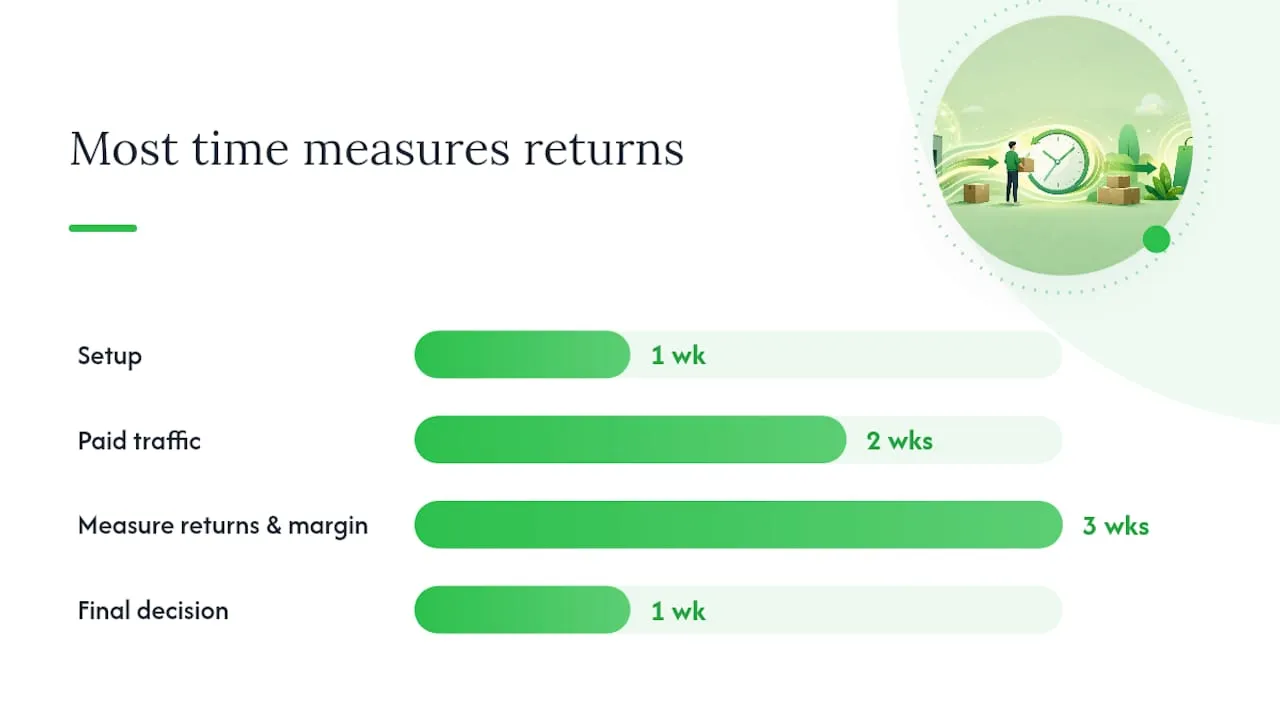
A sensible test runs 6 to 8 weeks: week one for store and product setup, weeks two and three for a modest paid traffic test, weeks four through six to measure return rates and real margin against your ad spend, and the final stretch to decide whether to scale the winning products or shut the test down before it costs you more than it teaches you.
The real risks and how to manage them
Three failure modes account for most of the damage in this business model, and each has a specific, learnable warning sign.
Account suspension shows up when Amazon-branded packaging, invoices, or packing slips reach a customer, or when return volume on a product spikes enough to draw scrutiny.
Duplicate content penalties hit stores that copy Amazon descriptions verbatim across dozens of listings, which Google’s algorithms and Merchant Center reviews both flag as low-value or thin content.
Margin squeeze happens quietly through price drift, unexpected return rates, or ad costs creeping past what your markup can absorb.
A practical mitigation checklist, roughly in order of priority:
- Place a real test order on every new supplier before listing it, so you know packaging, timing, and quality firsthand.
- Get a written agreement or documented terms with any supplier you rely on for volume, not a handshake understanding.
- Run at least two suppliers per product category so one price spike or stockout doesn’t take your bestseller offline.
- Rewrite every product description into something original before it goes live, never a straight copy-paste.
- Set shipping promises a few days more conservative than your supplier’s stated average.
The moment you see repeated return spikes, an unexplained payout hold, or a supplier who can no longer guarantee unbranded packaging, that’s your signal to stop treating Amazon as a supplier and move that product line onto a proper wholesaler or supplier network instead. Our analysis of why Shopify stores fail covers several of these same failure patterns in more depth.
Building product pages that survive Google’s duplicate-content rules
Copying an Amazon description word for word does more damage than most new sellers expect. Google’s indexing systems and Merchant Center reviews both treat near-identical content across multiple stores as thin or duplicate, which suppresses organic ranking and can trigger a Merchant disapproval that blocks your Shopping ads outright.
A workable scale-safe workflow follows four stages:
- Import the raw product data (title, specs, variant structure, images) as a working draft, never a publish-ready page.
- Rewrite the description and title using AI assistance or manual editing, so no two competitor stores selling the same item show identical text.
- Map metadata and taxonomy correctly, matching structured specs, categories, and GTINs to what Shopify and Google Merchant Center expect.
- Publish with a clear shipping promise, unique imagery, and structured product data intact.
Shopify’s own migration documentation warns that scraping product data without normalising it “produces low-quality product pages,” and that practitioners typically rewrite descriptions, remaster images, and map taxonomy before publishing anything sourced from Amazon.
Pro Tip: If you’re importing more than a handful of SKUs a week, manual rewriting becomes the bottleneck long before your ad budget does. This is exactly the gap tools like EcomEye are built to close, generating unique, SEO-ready descriptions and images in bulk so your catalogue scales without turning into duplicate-content liability.
On-page signals worth adding to every listing before it goes live: unique product images rather than supplier stock photos, structured specification tables, a stated shipping window, and a returns summary visible above the fold. Our guide to Shopify page layouts that improve dropshipping SEO covers the layout side of this in more detail, and the listing optimisation checklist from Nectar is a solid cross-check for anyone migrating listings between marketplaces.
Safer alternatives to sourcing directly from Amazon
Amazon retail arbitrage earns its place as a fast, zero-commitment way to test demand, but it is rarely the best long-term supply strategy once a product proves itself.
- Shopify Collective connects your store to vetted Shopify brands offering reliable fulfilment and real-time inventory sync, with none of Amazon’s policy exposure.
- Vetted dropshipping apps like Syncee or DropCommerce give you supplier catalogues built for this exact workflow, with order forwarding handled automatically.
- Wholesaler portals suit sellers who want tighter margin control and are willing to hold a small stock buffer.
- General product suppliers (AliExpress, CJ Dropshipping) offer breadth and low unit costs, at the tradeoff of longer international shipping times.
- Direct brand wholesale works best once you know exactly which branded products sell, giving you legitimate resale rights and often better margins than any marketplace route.
Choose Shopify Collective or a dropshipping app when speed matters and you want native Shopify integration. Choose a wholesaler when margin and quality control matter more than speed. Choose direct brand wholesale once you have proof a specific product sells and want to lock in supply properly.
Pro Tip: Amazon-as-supplier still earns its keep for one narrow use: validating whether a product category sells at all before you commit to a wholesale minimum order. Run it for two or three weeks, then migrate anything that works onto a proper supplier the moment it proves demand.
A ten-step checklist to test this safely
Running a disciplined test, rather than diving in blind, is what separates sellers who learn something useful from sellers who burn a few hundred dollars and quit confused.
- Pick two or three candidate products with clear demand signals, not just personal taste.
- Confirm your markup clears at least a moderate margin threshold after estimated fees.
- Place a real sample order with your intended supplier before listing anything live.
- Set a modest test ad budget you’re genuinely comfortable losing entirely.
- Write a shipping promise that’s conservative relative to your supplier’s actual average.
- Publish a clear, specific returns policy before your first sale, not after your first complaint.
- Rewrite every product description so nothing matches the source listing verbatim.
- Launch traffic and let the test run a minimum of two full weeks before judging results.
- Monitor cancellation rate, net margin after ad spend, and fulfilment lead time weekly.
- Decide to scale, switch supplier, or stop, based on those three numbers, not gut feeling.
Watch cancellation rate and net margin most closely; a product that sells well but cancels often is a supply problem in disguise, not a marketing one. Our piece on common dropshipping mistakes costing sellers sales is worth a read if your test numbers come back mixed rather than clearly good or bad.
A candid take on speed versus sustainable margin
Every seller wants the fast version of this business: find a winning product on Amazon, list it on Shopify by lunchtime, and start collecting orders. That speed is real, and it’s exactly why so many people try this route first. What gets underplayed is how quickly that speed advantage turns into a liability once you’re managing thirty SKUs with drifting prices, mismatched variants, and a returns inbox nobody’s watching.
My honest rule of thumb: use Amazon-as-supplier for validation, never for scale. The moment a product proves itself, the smart move is migrating it onto a proper supplier relationship and rebuilding the page with original content, because the margin math on retail arbitrage simply doesn’t survive real ad spend at volume. Tools that generate genuinely unique, SEO-sound product pages in bulk earn their cost back fast here, precisely because manual rewriting is the bottleneck every scaling seller hits eventually, not the sourcing itself.
How EcomEye helps you scale past the Amazon arbitrage phase
The gap between Amazon-arbitrage testing and a real Shopify catalogue is almost always content, not sourcing. Rewriting fifty or a hundred product descriptions by hand so nothing duplicates a competitor’s page is the exact bottleneck that stalls sellers right after their first successful test.
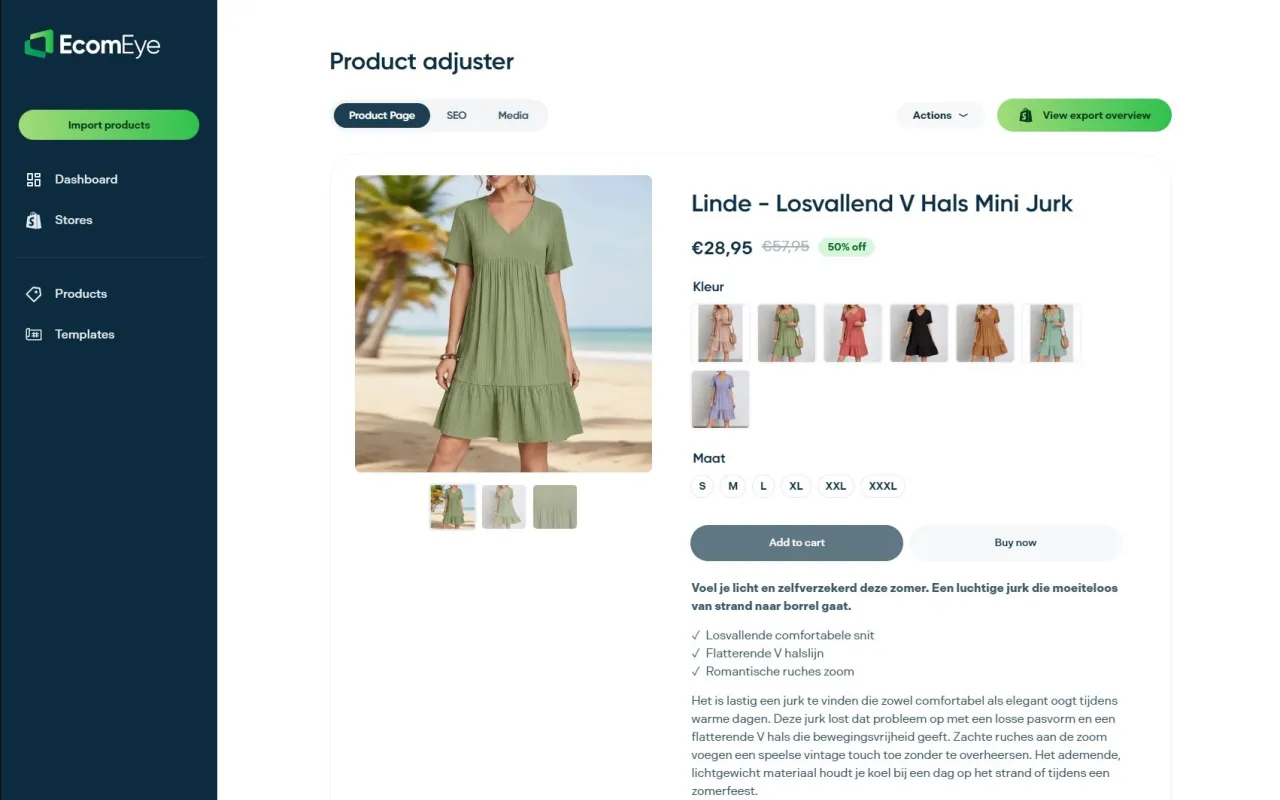
EcomEye is built for that exact stage. It generates bulk, copyright-safe product pages, with unique titles, clean descriptions, and high-quality AI images, then exports the whole batch to Shopify in one click, no manual rewriting and no duplicate-content risk hanging over your Merchant Center account. It works whether your source data comes from AliExpress, Amazon, Temu, or a competitor’s Shopify store, with multi-language pages available if you’re selling beyond one market.
It fits best for stores scaling past a few dozen SKUs, sellers who got flagged or disapproved for thin content, and anyone moving off manual marketplace-copy listings for good. If your test just proved a product works and you’re staring at forty descriptions to write before it’s ready to scale, start a free trial at EcomEye and get the whole batch published today instead of next week.
Sources
- Grand View Research — dropshipping market analysis
- Amazon Seller Central — Drop Shipping Policy
- Shopify — Amazon dropshipping guide
- Shopify Help — migrating from Amazon
FAQ
Is it legal to dropship from Amazon to Shopify?
It’s legal as long as you follow Amazon’s Drop Shipping Policy: you remain the seller of record and strip any Amazon branding or paperwork from what reaches the customer.
Can I make $10,000 a month dropshipping from Amazon?
It’s possible but unlikely as a sustainable outcome from Amazon retail arbitrage alone, given margins commonly sit at only 5 to 10% after fees; sellers hitting that level almost always migrate to wholesale or private-label supply once a product proves itself.
Is $100 enough to start dropshipping?
$100 can cover a Shopify plan and a small sample order, but it leaves almost nothing for paid traffic, so treat it as a setup budget rather than a full test budget.
Is it better to dropship with Amazon or Shopify as the sales channel?
Shopify gives you full control over branding, pricing, and product pages, which is why most serious sellers use it as the storefront and treat Amazon only as a temporary sourcing option, not the other way round.
What’s the best way to avoid duplicate-content penalties when importing from Amazon?
Rewrite every imported description before publishing, using AI-assisted tools such as EcomEye to generate unique titles, descriptions, and images in bulk rather than copying Amazon’s listing text directly.
Ready to boost your product pages?
Generate high-converting, SEO-optimized product pages in bulk using AI automation used by e-commerce experts.
No credit card required