Best page builder for Shopify: UK store owners' guide
Discover the best page builder for Shopify tailored for UK stores. Choose the right tool for landing pages, design control, and speed!

Best page builder for Shopify: UK store owners’ guide

For most UK Shopify stores, the practical shortlist is short: use Shopify’s native editor for your product catalogue, add a dedicated visual builder only for campaign landing pages, and use Ecom-eye if you need to publish bulk, SEO-safe product pages at speed. That covers nearly all real store needs.
The single recommended pick for high-volume dropshippers and merchants adding SKUs regularly is Ecom-eye — it solves the duplicate-content and scale problems that visual builders cannot touch. For everything else, here is where the main categories sit:
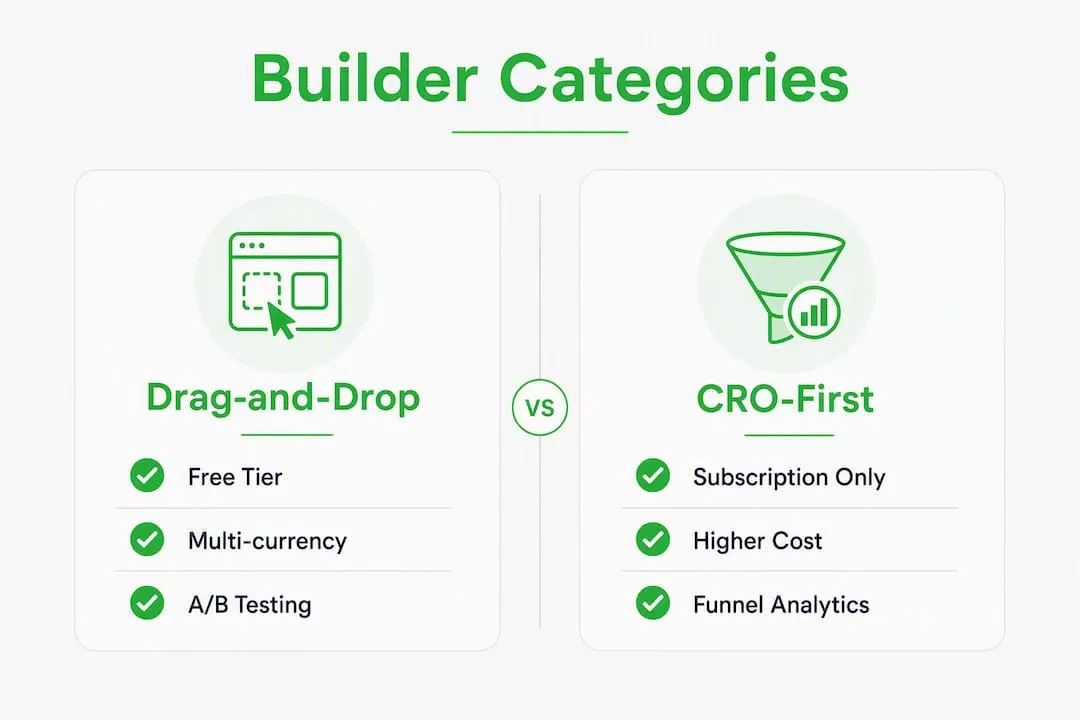
- Best for campaign landing pages and CRO: market-leading drag-and-drop builders (AI-assisted, A/B testing, 300+ templates, app-rendered output)
- Best for enterprise stores needing full design control: developer-grade or React-based builders (powerful but steep learning curve, Shopify Plus territory)
- Best for beginners on a budget: low-cost or free drag-and-drop builders (limited CRO features, good for simple pages)
- Best for bulk, SEO-safe product pages at scale: Ecom-eye (AI-generated titles, descriptions, images; one-click export; copyright-safe; multi-language)
- Best for conversion-first landing pages with analytics: CRO-first builders (built-in split testing, funnel analytics, higher price point)
Ecom-eye is the right pick if you are a UK dropshipper importing from AliExpress, Amazon, or Temu, a multi-language store, or any merchant who needs to publish dozens or hundreds of unique product pages without rewriting each one manually.
Pro Tip: If you are unsure which category fits, ask yourself one question: am I building one bespoke campaign page, or publishing 50 product pages this month? The answer tells you everything.
Table of Contents
- How do the main page builder categories compare for UK stores?
- What does each builder category actually do well?
- How do you choose the right page builder for your store?
- Will a page builder slow your Shopify store?
- How were these recommendations evaluated?
- When should you choose Ecom-eye over a visual builder?
- Key takeaways
- The case for being selective about page builders
- Ecom-eye: bulk product pages without the manual work
- Useful sources and testing tools
- FAQ
How do the main page builder categories compare for UK stores?
Analysis of 185,434 Shopify stores found that only about 2% use a detectable third-party drag-and-drop builder. The other 98% rely on Shopify’s native editor. That context matters before you spend money on any app.
| Category | Best for | Pricing shape | Ease of use | Output type | SEO/speed impact | CRO tools | AI/automation | Bulk product pages | Integrations | UK suitability |
|---|---|---|---|---|---|---|---|---|---|---|
| Market-leading drag-and-drop builders (e.g. PageFly, GemPages) | Campaign landing pages, CRO | Free tier + paid slots/month | Low learning curve | App-rendered | Medium (extra scripts) | A/B testing, templates | AI section generator | Limited | Strong | Good; check support hours |
| Conversion/CRO-first builders (e.g. Shogun, Replo) | Paid-traffic funnels, enterprise | Subscription, higher price point | Moderate | App-rendered or hybrid | Medium–high | Advanced split testing, analytics | Moderate | Limited | Strong | Good for Plus stores |
| Developer/React-based builders (e.g. Framer) | Custom storefronts, headless | Subscription | Steep | Custom/headless | Variable | Custom | Low | No | Requires dev work | Limited native Shopify support |
| Low-cost beginner builders (e.g. Foxify, Fudge, Tapita) | Simple pages, new stores | Free or low monthly fee | Very low | App-rendered | Low–medium | Basic | Minimal | No | Basic | Adequate |
| AI/bulk generators (Ecom-eye) | Bulk product pages, dropshipping | Subscription + credits | Very low | Native Shopify export | Low (native code) | SEO metadata built-in | Full AI generation | Yes, core feature | AliExpress, Amazon, Temu, Shopify | Excellent; multi-language, UK-ready |
Two quick takeaways from this picture:
- Avoid a third-party builder for your core product catalogue — if you are on a standard Shopify plan with fewer than 50 SKUs and no paid-traffic campaigns. The native editor handles it cleanly, with no extra app overhead.
On pricing shape: drag-and-drop builders typically charge per published page slot or per month at a flat rate. CRO-first builders tend to be subscription-only at a higher tier. Ecom-eye uses a subscription plus credit model, so costs scale with output rather than with the number of pages you keep live.

What does each builder category actually do well?
Market-leading drag-and-drop builders
These are the tools most merchants picture when they search for a page builder for Shopify: a visual canvas, 300-plus templates, and drag-and-drop sections for building landing pages without touching code. PageFly, for example, holds a large majority of the detectable page-builder install base among stores that use a builder at all. GemPages has helped create pages for a large number of Shopify merchants, according to its own figures.
Pros:
- Large template libraries covering landing pages, product pages, and homepages
- Built-in A/B testing and conversion analytics
- AI section generators for faster page creation
- Strong Shopify App Store ratings and active communities
Cons:
- Output is app-rendered, not native theme code — migration or theme changes require extra development work
- Page-slot pricing can become expensive as your store grows
- Stores using builders average 3.3 apps versus 1.8 for native-editor stores, adding complexity
- Not designed for bulk product-page generation
Pricing shape: free tier with limited published pages; paid plans typically unlock more page slots and A/B testing. Costs rise as you publish more pages.
UK suitability: good. Most major builders support multi-currency and integrate with Shopify Markets. Confirm support hours cover UK time zones before committing.
Conversion/CRO-first builders
Shogun and Replo sit in this tier. Shogun positions itself as a builder that marketing teams love, with a visual editor covering blog posts, product pages, collection pages, and landing pages. Replo targets performance-driven teams running paid traffic, with tighter analytics and faster iteration cycles.
Pros:
- Purpose-built for split testing and funnel optimisation
- Stronger analytics than general drag-and-drop tools
- Good fit for Shopify Plus stores running multiple campaigns
Cons:
- Higher price point than entry-level builders
- Shopify Plus stores are about 2.75× more likely to use a third-party builder than standard plan stores — these tools are priced accordingly
- Still app-rendered output; migration risk remains
- Overkill for stores not running significant paid traffic
Pricing shape: subscription-only, typically starting at a higher monthly rate. No meaningful free tier.
UK suitability: adequate to good. Shogun and Replo both support Shopify Markets and multi-currency. Support is primarily US-based, with variable response times during UK business hours.
Developer and React-based builders
Framer is the clearest example here. It is a powerful tool for custom storefronts and headless Shopify builds, but it requires developer involvement to connect properly to Shopify’s commerce layer. For most UK store owners reading this, it is not the right starting point.
Pros:
- Maximum design freedom
- Clean, exportable code when used correctly
- Strong for headless or custom storefront projects
Cons:
- Steep learning curve; not suitable without developer support
- Limited native Shopify feature integration out of the box
- No bulk product-page capability
- Higher total cost of ownership when developer time is included
Pricing shape: subscription, but the real cost is developer time.
UK suitability: limited for standard Shopify stores. Best reserved for enterprise projects with a dedicated development team.
Low-cost beginner builders
Foxify, Fudge, Tapita, Zipify Pages, and EComposer all sit in this tier. They are accessible, affordable, and good for merchants who need a simple landing page or a slightly customised product page without a large budget. Zipify Pages, for instance, focuses on one-click upsell funnels and post-purchase pages. EComposer offers a broad template library at a competitive price point.
Pros:
- Low or no monthly cost
- Minimal learning curve
- Adequate for simple landing pages and basic customisation
Cons:
- Limited CRO features compared to higher-tier tools
- AI and automation features are minimal or absent
- No bulk product-page generation
- Support quality varies; documentation can be thin
Pricing shape: free plans with limited features; paid plans typically under £20/month.
UK suitability: adequate. Most support Shopify Markets. Confirm VAT and multi-currency compatibility during your trial.
Ecom-eye: bulk AI product-page generation
Ecom-eye solves a different problem from every builder above. It is not a visual canvas for designing campaign pages. It is an AI SaaS platform that generates bulk, copyright-safe, SEO-optimised product pages and exports them directly to Shopify in one click.
The workflow: import product data from AliExpress, Amazon, Temu, or a competitor Shopify link. Ecom-eye automatically generates unique titles, clean descriptions, SEO-ready content, and high-quality AI product images. Pages can be produced in multiple languages. Then export to Shopify. No rewriting, no copyright risk, no manual work.
Pros:
- Bulk generation: publish dozens or hundreds of unique product pages in minutes
- Copyright-safe content eliminates Google Merchant disapprovals from duplicate descriptions
- AI product images reduce reliance on supplier photos
- Multi-language support for UK stores selling across Europe
- Native Shopify export means clean code, no app-rendered overhead
- Subscription plus credit model scales with output, not with page count
- Built-in SEO metadata: titles, descriptions, and structured content optimised from the start
Cons:
- Not a visual design tool; not suited for bespoke campaign landing pages
- Requires a credit budget for high-volume generation
- Best value at scale; lower-volume stores may not need the full capability
Pricing shape: subscription plus credits. New users can access a free trial. Volume discounts apply for larger credit purchases.
UK suitability: excellent. Multi-language capability covers UK stores selling into EU markets. No dependency on US-only supplier integrations. SEO product descriptions are generated to UK and international SEO standards.
Pro Tip: Ecom-eye is not a replacement for a drag-and-drop builder on your campaign landing pages. Use both: Ecom-eye for your product catalogue, a visual builder for your paid-traffic pages. They solve different problems.
How do you choose the right page builder for your store?
The decision is simpler than most comparison articles make it. Work through these criteria in order.

1. Performance impact first. Every third-party app adds scripts to your store. Stores using page builders average 3.3 apps versus 1.8 for native-editor stores — that gap compounds over time. If speed is a priority, start with the native editor and add a builder only where it genuinely earns its place.
2. Output type: native code or app-rendered? App-rendered pages live inside the builder’s infrastructure. If you ever switch themes or migrate, that content does not travel cleanly. Native-code output (or Ecom-eye’s direct Shopify export) avoids this entirely.
3. Bulk and automation needs. If you add more than 20 SKUs per month, manual page creation becomes a bottleneck fast. That is where bulk generation pays for itself.
4. CRO features. A/B testing and funnel analytics matter most for stores running paid traffic. If you are not running ads, they are a nice-to-have, not a necessity.
5. Pricing predictability. Page-slot pricing can surprise you as your store grows. Understand whether you are paying per published page, per month flat, or per credit before you commit.
6. Integrations. Confirm compatibility with your email platform, review app, and any loyalty tools you use. Most major builders support Klaviyo, Yotpo, and Shopify Markets.
7. Support availability. For UK merchants, this means checking whether live chat or email support covers GMT/BST hours. A builder with US-only support is a real inconvenience when you need help at 9 AM on a Monday.
Questions to ask during your trial
- Can I export my pages if I switch builders or themes?
- Does the builder give me full control of title tags, meta descriptions, and canonical URLs?
- Can I edit pages on mobile, and do they render correctly on mobile without extra work?
- How many pages can I publish on the free or entry-level plan?
- What is the support SLA, and does it cover UK business hours?
- Does the builder comply with UK GDPR requirements for any data it collects via forms or analytics?
Red flags to watch during test builds
- Elements that cannot be exported or that break when you switch themes
- Heavy inline scripts that inflate page weight
- Poor mobile rendering without manual fixes
- No control over schema markup or structured data
- Pricing that jumps sharply when you publish more than a handful of pages
Trial checklist
- Publish a test page and measure load time with Google PageSpeed Insights before and after installing the builder.
- Check structured data using Google’s Rich Results Test.
- Run a mobile rendering test on at least two device sizes.
- Attempt to export or copy your page content outside the builder.
- Submit a support query and note the response time and quality.
Will a page builder slow your Shopify store?
The short answer: it can, but careful use keeps the risk manageable. Analysis of Shopify stores shows that 98% of stores rely on the native editor, and most of those stores perform well without the overhead of a third-party builder. The risk is real but not inevitable.
The core issue: app-rendered pages load an additional JavaScript layer on top of Shopify’s own scripts. On a well-optimised store, this adds a modest overhead. On a store already running eight apps, it compounds.
Performance mitigation
- Use native theme sections for core product pages; reserve the builder for campaign landing pages only
- Enable lazy loading for images and videos on builder pages
- Limit external scripts embedded via the builder to what you genuinely use
- Keep image assets optimised before uploading (WebP format, compressed)
- Use Shopify’s CDN rather than hosting assets externally
- Audit your app stack regularly; remove unused apps that add scripts
What to measure
Run Lighthouse or PageSpeed Insights before installing a builder, immediately after, and again after your first published page goes live. The metrics that matter most are:
- LCP (Largest Contentful Paint): target under 2.5 seconds
- CLS (Cumulative Layout Shift): target under 0.1
- INP (Interaction to Next Paint): target under 200 milliseconds
A builder that pushes LCP above 4 seconds on a product page is a problem worth solving before you scale traffic to it. Practical guidance on avoiding common Shopify product page mistakes covers image layout and load-speed issues that apply equally to builder-created and native pages.
SEO checklist for builder pages
- Confirm you can set unique title tags and meta descriptions per page
- Check that canonical tags are set correctly (no duplicate URLs)
- Verify structured data/schema is present and valid
- For multi-language stores, confirm hreflang tags are generated correctly
- Use unique product copy on every page; copied supplier descriptions trigger duplicate-content penalties. Optimising your product page structure for SEO covers the metadata and schema requirements in detail.
Pro Tip: Use builders selectively. Landing pages for paid campaigns: builder. Product catalogue: native theme or bulk generation. That split keeps your core store fast and your campaign pages flexible.
How were these recommendations evaluated?
The shortlist here is based on a market scan, functional evaluation, and UK-suitability checks rather than a single sponsored test.
Approach:
- Market scan: StoreInspect’s analysis of 185,434 Shopify stores provided adoption data and install-base concentration figures. This established which categories are actually in use, not just which ones have the loudest marketing.
- Feature testing: each category was evaluated against vendor documentation for feature parity across CRO tools, AI/automation, bulk capability, and output type.
- Performance signals: real-store performance data and practitioner guidance informed the speed and SEO impact ratings.
- UK suitability checks: support hours, multi-currency and multi-language compatibility, and VAT/Shopify Markets integration were verified for each category.
Priorities used, in order:
- Speed and SEO impact (output type, script overhead)
- Bulk and automation capability (SKU volume, AI generation)
- CRO features (A/B testing, analytics)
- Pricing predictability (slot vs subscription vs credit)
- UK support and localisation
No builder paid for inclusion. Ecom-eye is the publisher of this article and is recommended on merit for the specific use case it addresses.
When should you choose Ecom-eye over a visual builder?
The industry is shifting. Analysts tracking Shopify app adoption note that the definition of “best” is moving away from pure visual flexibility toward conversion automation and scale. Merchants with frequent SKU churn now value bulk generation and AI features more than another template library.
The decision splits cleanly along two axes: store size and SKU velocity.
Choose bulk AI generation (Ecom-eye) when:
- You add more than 20 new SKUs per month
- You import products from AliExpress, Amazon, Temu, or competitor stores
- Google Merchant has flagged duplicate content or disapproved products
- You sell in multiple languages or plan to expand into EU markets
- Your product descriptions are currently copied from suppliers
Choose a visual drag-and-drop builder when:
- You are building bespoke campaign landing pages for paid traffic
- You need rapid design iteration with A/B testing
- Your catalogue is stable and small (under 50 SKUs)
- You are running a Shopify Plus store with a dedicated marketing team
The decision flow:
- How many SKUs do you add per month? More than 20: go to step 2. Fewer: consider native editor plus a landing-page builder.
- Are your current product descriptions unique? No: Ecom-eye. Yes: go to step 3.
- Are you running paid traffic campaigns that need bespoke landing pages? Yes: add a visual builder for those pages only. No: native editor is sufficient.
- Do you sell in multiple languages? Yes: Ecom-eye’s multi-language generation covers this. A visual builder alone does not.
Shopify page layouts for dropshipping explains how bulk management and layout strategies work together to improve SEO for high-volume stores.
Pro Tip: The highest-scaling merchants separate concerns: keep catalogue product pages inside native theme templates or generate them in bulk with an AI tool, and use visual builders only for paid-traffic landing pages where bespoke design and rapid iteration justify the cost.
Key takeaways
The most effective approach for UK Shopify stores is to use the native editor for your product catalogue, a visual builder selectively for campaign pages, and Ecom-eye for bulk, SEO-safe product-page generation at scale.
| Point | Details |
|---|---|
| Most stores don’t need a builder | 98% of Shopify stores use the native editor; a third-party builder is only justified for specific use cases. |
| Use builders for landing pages only | Visual builders are best suited to campaign and paid-traffic pages, not your core product catalogue. |
| Bulk SKU growth needs AI generation | Adding more than 20 SKUs per month makes manual page creation a bottleneck; bulk generation pays for itself quickly. |
| Performance requires active management | Builder users average 3.3 apps versus 1.8 for native-editor stores; measure LCP, CLS, and INP before and after install. |
| Ecom-eye for scale and SEO safety | Ecom-eye generates bulk, copyright-safe, SEO-optimised product pages with AI images and one-click Shopify export. |
The case for being selective about page builders
Most merchants I speak with install a page builder because they saw a competitor’s landing page and assumed a builder was how it was made. Often it was not. Shopify’s native editor, with a well-chosen theme, produces clean, fast pages that outperform many builder-created equivalents on Core Web Vitals.
The builders that genuinely earn their place are the ones used for a specific, bounded job: a product launch page, a Black Friday campaign, a paid-traffic funnel. Used that way, the extra script overhead is contained and the design flexibility is worth it.
Where I see merchants go wrong is applying a builder to their entire product catalogue. You end up with hundreds of app-rendered pages, a migration headache if you ever want to switch themes, and a performance tax on every product page load. For catalogue pages, the better answer is either the native editor or bulk AI generation, depending on your SKU velocity.
The rule I use: if you are adding many SKUs per month, the time cost of manual page creation exceeds the cost of automating it within a few weeks. That is when Ecom-eye makes obvious sense. Below that threshold, the native editor plus one well-chosen builder for campaign pages is the leaner, faster setup.
Ecom-eye: bulk product pages without the manual work
Duplicate product descriptions are the single most common reason UK dropshippers get flagged by Google Merchant and lose organic rankings. Ecom-eye fixes that at the source. Import products in bulk from AliExpress, Amazon, Temu, or a competitor Shopify link, and Ecom-eye generates unique, SEO-optimised titles, clean descriptions, and high-quality AI product images automatically. Multi-language pages are included, so UK stores expanding into EU markets do not need a separate translation workflow.
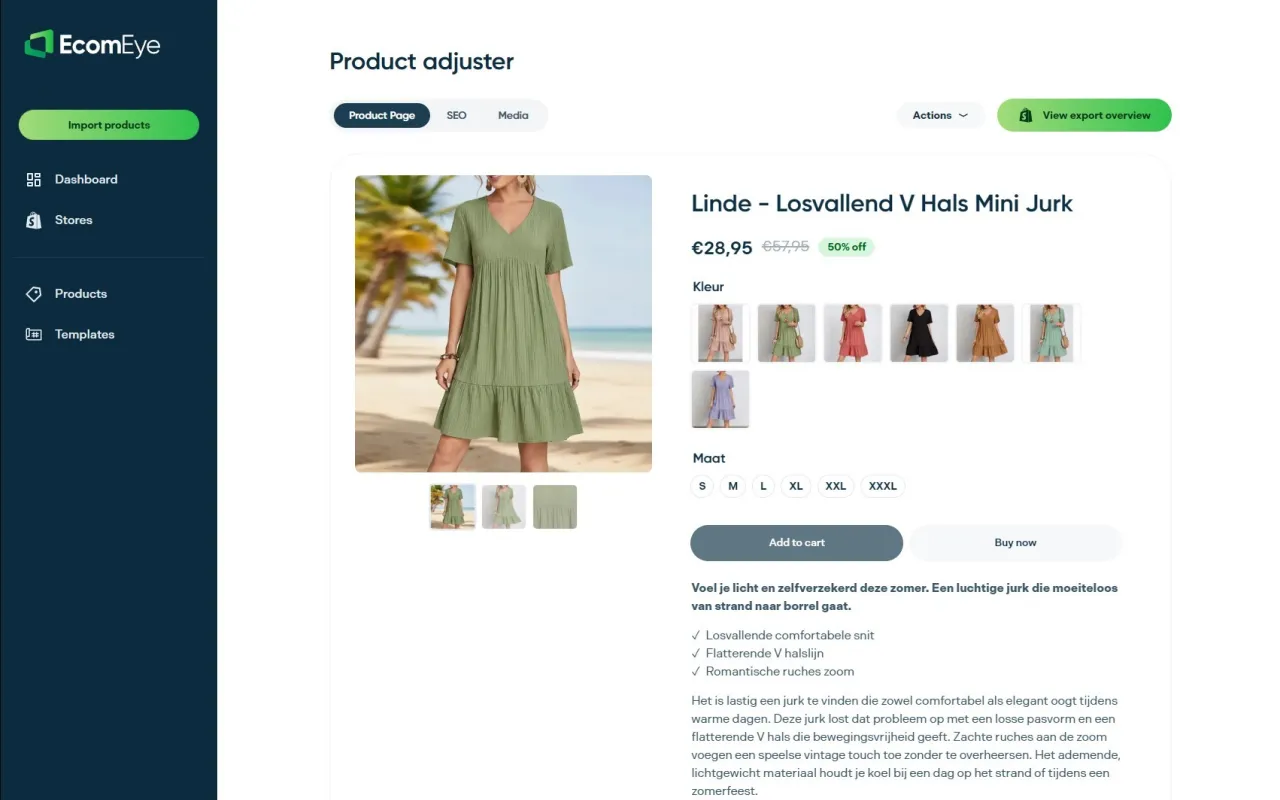
The pricing model is subscription plus credits, so you pay for what you generate rather than for a fixed number of live pages. There is no rewriting, no copyright risk, and no manual work. For UK dropshippers and high-volume merchants, it is the practical alternative to spending hours on product copy that Google will penalise anyway.
Start a free trial at Ecom-eye and see how many pages you can generate before your next product launch. If bulk SEO copy is the specific need, the SEO product descriptions page covers the full capability in detail.
Useful sources and testing tools
Authoritative references used in this article, plus tools for running your own performance checks:
- Ecom-eye: Bulk AI Product Lister — full capability overview for bulk product-page generation, AI images, and one-click Shopify export.
- Ecom-eye: SEO Product Descriptions — detail on copyright-safe, SEO-optimised description generation for large catalogues.
- Oxedent: Shopify product page mistakes to avoid — practical checklist for layout, image, and load-speed issues on product pages.
- Oxedent: Google Shopping feed optimisation tips — relevant for merchants publishing large catalogues and using bulk generation tools alongside Shopping campaigns.
Speed and SEO testing tools:
| Tool | What it measures | Where to find it |
|---|---|---|
| Google PageSpeed Insights | LCP, CLS, INP, overall performance score | pagespeed.web.dev |
| Google Lighthouse | Full audit: performance, accessibility, SEO, best practices | Built into Chrome DevTools |
| Google Rich Results Test | Structured data / schema validity | search.google.com/test/rich-results |
| Google Search Console | Real-user Core Web Vitals, indexing, coverage | search.google.com/search-console |
FAQ
Which is the best page builder for Shopify?
There is no single best option; it depends on your use case. For campaign landing pages and CRO, market-leading drag-and-drop builders with A/B testing are the strongest choice. For bulk, SEO-safe product pages at scale, Ecom-eye is the recommended pick for UK dropshippers and high-volume stores.
Does Shopify have its own page builder?
Yes. Shopify’s native online store editor includes a drag-and-drop sections system that covers the majority of layout needs for product pages, homepages, and collections. About 98% of Shopify stores use it without a third-party builder.
Do I need a page builder for Shopify?
Most stores do not. The native editor handles standard product pages, collections, and homepages cleanly. A third-party builder is worth adding only if you need bespoke campaign landing pages with A/B testing, or if you need bulk AI-generated product pages for a large or fast-growing catalogue.
Can AI build my Shopify product pages for me?
Yes, for product pages at scale. Ecom-eye imports product data from AliExpress, Amazon, Temu, or competitor links and automatically generates unique titles, descriptions, AI product images, and multi-language pages, then exports directly to Shopify. It does not replace a visual builder for bespoke campaign design, but for catalogue pages it removes the manual work entirely.
Ready to boost your product pages?
Generate high-converting, SEO-optimized product pages in bulk using AI automation used by e-commerce experts.
No credit card required