The product title formula every ecommerce seller should use
Unlock more sales with the right product title formula for ecommerce. Discover proven strategies that drive clicks and boost visibility!

The product title formula every ecommerce seller should use

Use a platform-calibrated formula: for marketplaces, lead with the primary keyword; for direct-to-consumer stores, lead with brand or benefit. That single decision drives most of what follows, because Amazon shoppers search by attribute while a warmed-up DTC audience already recognises your name.
Two formulas to copy right now:
- Amazon: [Brand] + [Primary keyword] + [Key attribute] + [Size/Colour/Quantity]
- Google Shopping: [Brand] + [Product type] + [Descriptor] + [Size/Colour]
Put the most decision-critical word or phrase inside the first 30 to 45 characters. Mobile search results and app feeds truncate aggressively, so if the term that gets someone to click sits at character 60, it never gets seen on a phone. Search engines typically cut titles off around 60 to 70 characters, which is why a 60 to 75 character window is the safe target on most channels. This isn’t a cosmetic detail either: 51% of shoppers say the product title and description are the most important factors in their buying decision, ahead of images and even price in some categories.
Key Takeaways
The most effective product title formula pairs platform-specific structure with front-loaded keywords inside a 30 to 45 character window, then scales through templates rather than manual rewrites.
| Point | Details |
|---|---|
| Match formula to platform | Lead with keyword on Amazon and Google Shopping; lead with brand or benefit on established Shopify stores. |
| Front-load the first 45 characters | Put the word that drives the click before mobile truncation cuts the title off. |
| Respect the 60 to 75 character window | This is the safe range across most feeds before full truncation risk rises sharply. |
| Test before rolling out | Run three variants per SKU for 7 to 14 days, then apply the winner across similar products. |
| Automate for scale | Ecom-eye applies title templates in bulk with built-in uniqueness checks when moving from tens to thousands of SKUs. |
Table of Contents
- Product title formula ecommerce sellers use by platform
- How many characters should a product title be?
- Copyable title templates for Amazon, Google Shopping and Shopify
- What do real title rewrites look like?
- Scaling title formulas across a full catalogue
- How to test product titles without wrecking your rankings
- What claims can’t you put in a product title?
- Why most sellers overthink the wrong half of the title
- Get your product titles right at catalogue scale with Ecom-eye
- Sources
- FAQ
Product title formula ecommerce sellers use by platform
Not every formula fits every channel, and forcing one into the wrong place tends to backfire. The right pattern depends on whether the platform’s shoppers are searching cold or already trust your name.
Keyword-first titles open with the exact term a shopper types into search. This wins on Amazon and Google Shopping, where the algorithm and the buyer are both scanning for a match before they’ve heard of you.
Brand-first titles lead with your name. This works when the brand carries weight, on Shopify stores with returning customers, or on Etsy where buyers often search a maker’s name directly after seeing it on social media.
Benefit-led titles open with the outcome (“Waterproof”, “Anti-Snore”, “24-Hour Battery”). These convert well on Shopify product pages and paid social landing pages, where the reader isn’t typing a search term at all. They’re scrolling, and the benefit has to stop the scroll.
Descriptor-stacked titles pack in material, use-case and finish (“Stainless Steel Insulated Travel Mug, Leak-Proof, 20oz”). Home goods and kitchenware benefit here because buyers filter mentally by material before anything else.
Numbered or quantified titles lead with a figure (“Pack of 6”, “3-in-1”). Multipacks and bundles need this because the quantity is often the deciding factor over the product itself.
Use-case-framed titles name the scenario (“Gym Bag for Weekend Travel”). Etsy and Walmart Marketplace both reward this because their shoppers browse by occasion as much as by keyword.
Comparison or differentiator titles flag what makes the item distinct from a near-identical competitor (“Original Formula”, “Upgraded 2nd Gen”). Useful anywhere your product sits in a crowded category with lookalike listings.
The decision rule is simple: choose keyword-first when discovery is the main job the title has to do, and brand-first when the traffic arriving on the page already knows and trusts the name. SEO practitioners generally recommend leading with the keyword for low-awareness brands and leading with brand once recognition is established, treating brand position as something to test rather than assume.
How many characters should a product title be?
Every platform enforces its own limit, and the limit that matters most is often the one nobody checks: the point where mobile search results cut a title mid-word.
Amazon’s own title rules vary by category, and some categories carry stricter caps and banned-content lists than others, so check the specific category guidance before assuming a blanket limit applies. The practical rule that works across every channel: keep the words that actually influence a purchase decision inside the first 30 to 45 characters, and treat 60 to 75 characters as the safe full-length window everywhere else.
Search engines don’t always display your title as written, either. Google Shopping frequently rewrites or re-scores titles based on relevance signals, which means a title stuffed with repeated keywords can get truncated or ignored in favour of a cleaner phrase further down. Clarity beats density. A title a human can read at a glance tends to survive automated rewriting better than one built purely to hit a keyword count.
Copyable title templates for Amazon, Google Shopping and Shopify
Grab one of these and swap in your own attributes. Each is built around the structural rule that a title should identify brand, category and differentiator without repeating any of them twice.
Amazon templates:
- [Brand] + [Product Type] + [Key Feature] + [Size/Quantity] + [Colour] — best for standard single SKUs with a clear standout feature.
- [Brand] + [Primary Keyword] + [Material] + [Use Case] + [Compatibility] — best for accessories that need to signal fit (phone cases, replacement parts).
- [Brand] + [Product Type], [Pack Of X], [Key Benefit] — best for consumables and multipacks where quantity drives the click.
Google Shopping templates:
- [Brand] + [Product Type] + [Attribute] + [Size/Colour] — the safest general-purpose format, since Google’s feed specification rewards clean attribute separation.
- [Product Type] + [Brand] + [Model Number] + [Key Spec] — better for electronics and tools, where shoppers often search by spec before brand.
Shopify templates:
- [Benefit] – [Product Type] by [Brand] — works well on a branded storefront where the visitor already trusts the site.
- [Product Type] + [Descriptor] + [Use Case] — better for cold traffic from paid ads landing directly on a product page.
For bundles and sets, add the count and the word “Set” or “Bundle” early rather than late: “3-Piece Bathroom Organiser Set” outperforms “Bathroom Organiser, Set of 3, Grey” purely because the eye catches the quantity first. For quantified SKUs (refill packs, multi-buy), the number belongs in the first 20 characters, not buried after three adjectives.
Placement order for attributes matters more than most sellers expect. Size and colour go near the end unless the shopper is specifically filtering by them (children’s clothing, for instance, where size is often the first filter applied). Model numbers belong immediately after brand, since that’s where a shopper cross-referencing a part number will look first. For Shopify-specific title structure, attribute order also affects how the SEO title tag gets displayed in Google’s snippet, so test the same product with attributes reordered before assuming one template wins everywhere.
What do real title rewrites look like?
Theory only goes so far. Here are five before-and-after pairs across common categories, with the reasoning behind each change.
- Electronics: “Bluetooth Earbuds Wireless Charging Case” → “TechCo Bluetooth Earbuds, 40H Battery, Wireless Charging Case, IPX7 Waterproof.” The rewrite adds a brand anchor, a hard number (battery life), and a spec shoppers filter by.
- Apparel: “Women’s Yoga Pants High Waist” → “High-Waisted Yoga Leggings for Women, Squat-Proof, Buttery Soft, Sizes XS-3XL.” Benefit language (“squat-proof”) and size range move up because apparel buyers scan for fit assurance before brand.
- Beauty: “Vitamin C Serum 30ml” → “Vitamin C Serum for Face, Brightening & Anti-Aging, 30ml, Dermatologist-Tested.” The rewrite front-loads the use (“for Face”) since generic serum searches return thousands of near-identical listings.
- Home: “Ceramic Plant Pot” → “8-Inch Ceramic Plant Pot with Drainage Hole, Modern Matte White Finish.” Adding the size and the drainage detail answers the two questions every planter buyer asks before clicking.
- Bundles: “Kitchen Knife Set” → “6-Piece Kitchen Knife Set with Wooden Block, German Stainless Steel.” The count moves to position one because multipack shoppers filter by quantity before material.
The beauty example shows keyword-first winning, since “Vitamin C Serum for Face” matches exact search intent in a saturated category. The electronics example shows brand-first winning, because TechCo’s returning customers search the brand name directly and the spec details close the sale once they land.
Pro Tip: Watch add-to-cart rate more closely than click-through rate when testing title changes. A title can pull clicks with a punchy claim and still convert poorly if it oversold what the listing delivers.
Scaling title formulas across a full catalogue
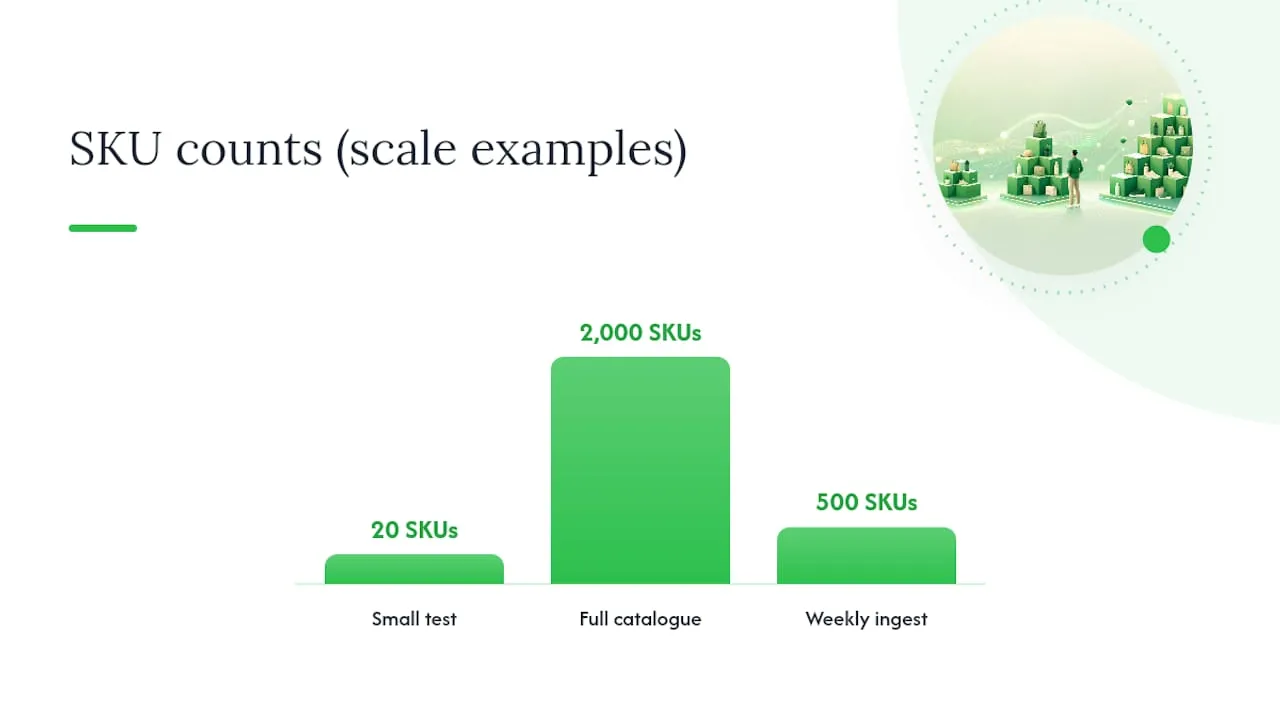
A formula only proves its worth when it survives contact with 2,000 SKUs instead of twenty. That means treating the title itself as a template with variables, not a sentence you write fresh each time.
Build a rule like [Brand] + [Type] + [Attribute] + [Size] as a structural template, then feed it product data so every title follows the same skeleton with different values slotted in. This is what makes bulk editing possible: change the template once, and every title built from it updates consistently instead of needing 2,000 manual rewrites.
Three things break this at scale if you skip them:
- Uniqueness checks. Titles built from the same template can end up near-identical across similar SKUs, which risks duplicate-content flags in Google’s index. A uniqueness scorer that flags titles above a similarity threshold catches this before it goes live.
- Supplier-data cleaning. Data imported from AliExpress or a supplier feed usually arrives full of SKU codes, promotional phrases, and inconsistent capitalisation. Strip that noise before it feeds into your title template, or the formula inherits the mess.
- Attribute fallbacks. When a product record is missing a colour or size field, the template needs a fallback rule rather than a blank space or a broken title.
This is precisely the gap Ecom-eye was built to close. It imports product data in bulk from AliExpress, Amazon, Temu or a competitor’s Shopify link, then generates unique, SEO-structured titles and descriptions using template rules rather than one-by-one manual writing, before exporting the finished pages to Shopify in one click. For a seller adding 500 SKUs in a week, that’s the difference between a coherent catalogue and a duplicate-content mess.
Pro Tip: Generate three title variants per SKU (keyword-first, benefit-led, brand-first), run them against a small holdout of products, then roll out whichever variant wins by conversion across the rest of that category rather than guessing which format suits your audience.
How to test product titles without wrecking your rankings
Measure click-through rate, add-to-cart rate and final conversion, in that order, and give each test 7 to 14 days before judging it. Anything shorter and you’re reacting to noise rather than a real pattern; anything longer and seasonal shifts start muddying the result.
The mistakes that trip up most sellers aren’t exotic. They’re small, repeated, and easy to miss until Google Merchant flags the whole feed.
- Keyword stuffing, where the same term appears three times to “improve relevance” and instead reads as spam to both shoppers and the algorithm.
- Copying supplier titles verbatim, which creates duplicate content across every store selling the same AliExpress product.
- Special characters (asterisks, emoji, ALL CAPS phrases) that many feeds reject outright or that trigger manual review.
- Promotional claims (“Best Seller”, “50% Off”) sitting inside the title field, which most marketplaces explicitly disallow.
Before pushing a bulk change live, spot-check a sample against the feed specification for banned terms and character overages. A batch of 3,000 titles with one systemic error costs far more time to fix after rejection than a five-minute check beforehand.
What claims can’t you put in a product title?
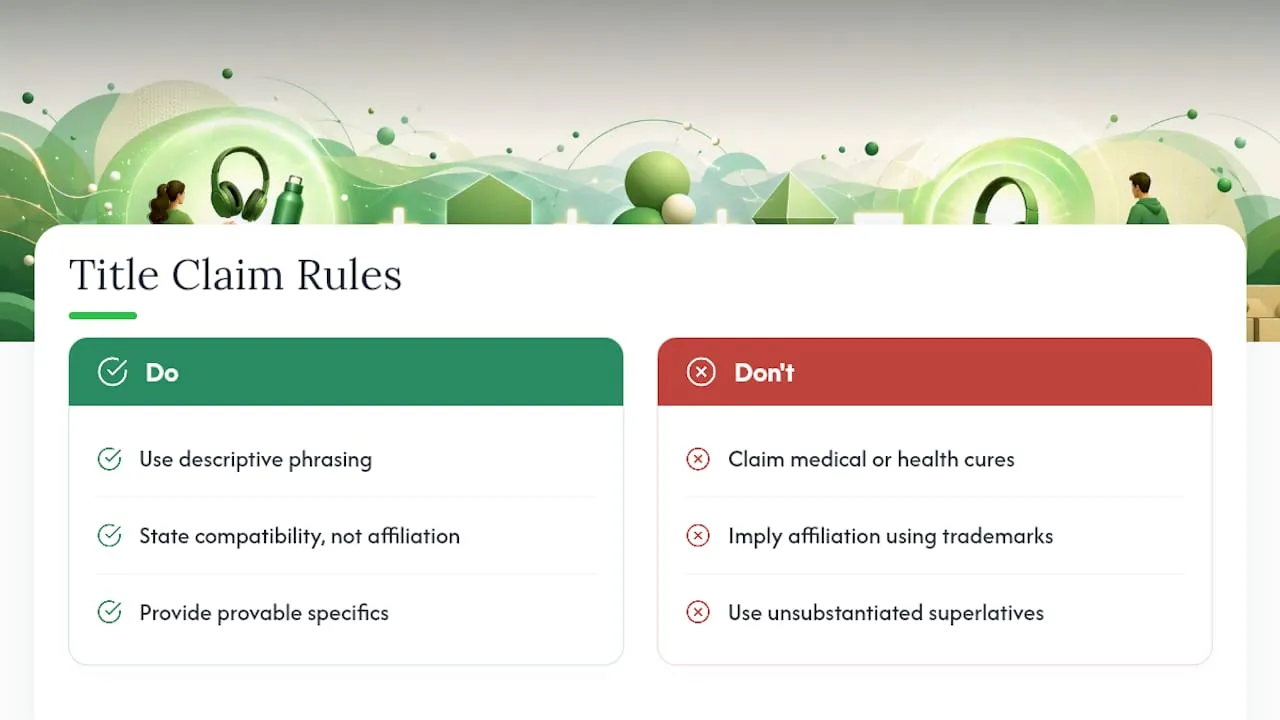
Regulatory exposure in a title is easy to overlook because it looks like ordinary marketing copy, but the same rules that govern advertising apply here. Medical or health claims (“Cures Insomnia”, “Treats Anxiety”) can trigger regulatory action in most jurisdictions unless the product is an approved drug or device, so descriptive language (“Supports Better Sleep”) is the safer route for supplements and wellness products.
Using a competitor’s trademarked name inside your own title, even to draw a comparison (“Fits iPhone Charger, Not Apple Brand”), risks a trademark complaint and a takedown on most marketplaces. Amazon and Google Shopping both allow compatibility language (“Compatible with iPhone 15”) but draw a firm line at implying affiliation or using a registered brand name as if it were your own.
Superlative claims (“Best”, “#1”, “Guaranteed”) without substantiation sit in a grey area. Some marketplaces reject them outright in the title field; others allow them but expose the seller to false advertising complaints if a customer challenges the claim. The safer pattern is specific and provable language: “Rated 4.8 Stars” beats “Best on the Market” because it’s a fact rather than a claim.
A mismatch here is one of the more common reasons Google Merchant disapproves a listing after it’s already live.
Why most sellers overthink the wrong half of the title
The conventional advice treats title-writing as a keyword exercise, and that’s only half the job. The harder problem, and the one most guides skip, is what happens once you’ve got the formula right for SKU one and need it to still work for SKU two thousand.
Sellers obsess over the perfect adjective order for a single hero product, then hand-write inconsistent titles for the rest of the catalogue because nobody built a template. That’s backwards. A slightly imperfect formula applied consistently across every listing will outperform a perfect title on twenty products and a mess on the other two thousand, because Google and Amazon both reward catalogue-wide consistency almost as much as individual title quality.
The other blind spot is treating the title as a solo asset. It doesn’t work alone. It works alongside the product description and the image set, and a title that overpromises against a thin description creates exactly the bounce-back Google penalises. Get the structure right first, then make sure everything downstream backs it up.
Get your product titles right at catalogue scale with Ecom-eye
Ecom-eye is built for the exact moment where a good title formula stops being enough on its own, the point where you’re adding hundreds of products a week and can’t write each one by hand. It imports product data in bulk straight from AliExpress, Amazon, Temu or a competitor’s Shopify link, then generates SEO-structured titles, clean descriptions and original product images using the platform-calibrated rules covered in this piece, all without copying supplier content word for word.
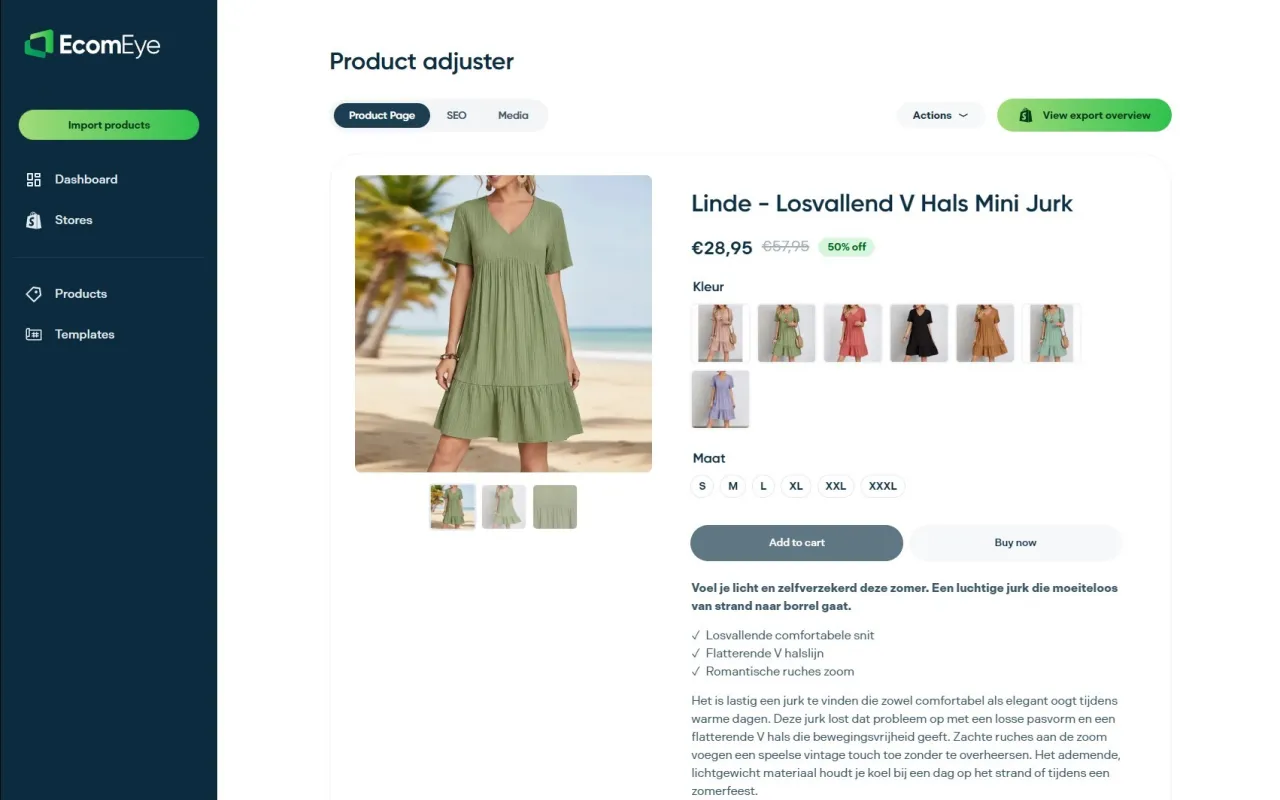
That matters because duplicate supplier copy is one of the fastest routes to a Google Merchant disapproval, and rewriting each listing manually simply doesn’t scale past a few dozen SKUs. Ecom-eye applies your title template consistently across the whole catalogue, checks for uniqueness automatically, and exports finished pages straight to Shopify in one click. If you’re scaling a dropshipping store and dreading the next bulk import, start with Ecom-eye and see how many product pages you can publish before lunch.
Sources
- Product title optimization tips (Salsify)
- Google Shopping product title optimisation
- Amazon product title rules (Feedvisor)
FAQ
How do you create a product title for ecommerce?
Combine brand, product type, a key attribute and a size or colour variant into a single formula, then front-load whichever element drives the click, keyword for cold search traffic, brand for warm traffic, inside the first 30 to 45 characters.
What is a product title?
A product title is the primary headline of a listing, the first text a shopper or search engine reads, and it functions as both a search-matching signal and the main conversion copy on the page.
What is a product lister?
A product lister is either the person responsible for creating and publishing product listings across marketplaces, or a software tool, like Ecom-eye, that automates bulk title, description and image generation for large catalogues.
How long should a product title be?
Aim for 60 to 75 characters as a safe full-length window, since most platforms truncate titles around 60 to 70 characters, with mobile display often cutting off even earlier.
Should you lead with the brand or the keyword?
Lead with the keyword if your brand isn’t yet recognised, since discovery depends on matching search intent; lead with brand once shoppers are already searching your name directly.
Ready to boost your product pages?
Generate high-converting, SEO-optimized product pages in bulk using AI automation used by e-commerce experts.
No credit card required