Shopify Dropshippers: Make Temu Imports Safe for Merchant Centre
Step by step guide to import Temu products into Shopify, rewrite listings in bulk, create AI images, and export Merchant Centre ready pages.

Shopify Dropshippers: Make Temu Imports Safe for Merchant Centre

Yes, you can import Temu product data into Shopify using URL importers, browser extensions or the official Temu-Shopify sync. What you cannot do is expect fully automated fulfilment. Orders from Temu typically need manual handling, and every imported listing needs a rewrite before it goes live, or you risk duplicate content flags and Google Merchant Centre rejections. Pick an import method first, then run a post-import checklist before anything goes to a customer.
TL;DR:
- Importing Temu products into Shopify requires manual editing of titles, images, variants, and prices to avoid duplicate content and comply with Google Merchant Centre rules.
- The three main methods—URL importers, the official Temu-Shopify app, and spreadsheet uploads—offer different benefits but none provide full automated order fulfillment.
- Regular checks on stock levels, setting margin buffers, and proactively pausing out-of-stock items help maintain inventory accuracy and protect profit margins.
- Differentiating your listings with unique descriptions, branding, and quality control measures is crucial, as Temu prices often undercut your markup and affect margins.
- Automated content rewriting and image generation tools like EcomEye can streamline listing optimization at scale, preventing duplicate content issues and speeding up the onboarding process.
Table of Contents
- What tools actually move Temu products into Shopify?
- How do you actually import a Temu product step by step?
- What should you fix before a Temu import goes live?
- Manual fulfilment or sync: which one do you actually need?
- Where does the margin actually disappear on Temu-sourced products?
- How EcomEye solves the post-import mess
- What happens when a Temu-sourced product gets returned?
- Which automation tools go beyond a basic import app?
- How do you keep Temu and Shopify inventory in sync?
- When Temu works as a sourcing channel, and when it doesn’t
- Fix duplicate listings before Google does it for you
- Sources
- FAQ
What tools actually move Temu products into Shopify?
Three real methods exist, and each suits a different stage of your business. There is no single “official” dropshipping bridge between the two platforms, so knowing what each tool does (and doesn’t do) saves you a wasted afternoon.
- URL or extension importers. You paste a Temu product link into a tool like Importify, which pulls the title, images, variants and price into a draft you edit before pushing to Shopify. Some newer tools, such as those behind the Temu-to-Shopify workflow, rewrite copy automatically during import to cut duplicate-content risk.
- The official Temu-Shopify app. This runs in reverse: it lets you sync your own Shopify catalogue onto Temu and manage inventory and orders from Shopify’s dashboard. It’s built for sellers listing their own stock on Temu’s marketplace, not for pulling Temu products into your store.
- CSV/spreadsheet fallback. Useful when you’re bulk-testing dozens of SKUs at once, or when an importer app hits a rate limit. Slower to prepare, but gives you full control over formatting before upload.
None of these options guarantee automated order fulfilment, wholesale pricing, or supplier vetting. You still own quality control.
How do you actually import a Temu product step by step?
Before you touch a single listing, sort three things: confirm your Shopify shipping zones match where Temu actually ships to, decide your minimum acceptable margin (a common starting rule is doubling landed cost, then adjusting for ad spend), and pick your import tool.
- Find the Temu product and copy its URL. Check the seller rating and recent reviews first; a product with patchy reviews will cost you in returns later.
- Paste the URL into your importer (extension or web app). It pulls title, description, images, variants and price into a staging area, not directly onto your storefront.
- Edit every imported field in Shopify before saving: rewrite the title, rewrite the description, swap or edit images, and check that variants (colour, size) mapped correctly rather than merging into one confused dropdown.
- Set your retail price manually. Imported prices reflect Temu’s cost, not your margin.
- Publish as a draft first. Run a test order yourself to confirm checkout, shipping fields and confirmation emails all behave as expected before flipping the listing live.
Skipping step 3 is the single most common reason new listings get flagged or simply don’t sell.
What should you fix before a Temu import goes live?
The import gets the bones onto your store. The edit pass is what makes it sellable and Google-safe.
- Titles and descriptions: rewrite them completely. Copying Temu’s listing copy verbatim is the fastest route to a duplicate-content problem and a possible Merchant Centre disapproval, since thousands of other dropshippers are pulling from the same source page.
- Images: replace or heavily edit them. Strip any supplier watermarks or Temu branding, and write proper alt text, not the filename the importer generated.
- Variants: trim option axes that don’t earn their place. Drop decorative variants like “pattern” or “bundle size” that multiply your variant count without adding real choice, and map SKUs cleanly so Shopify’s variant limits aren’t breached.
- Pricing: rebuild it from scratch using landed cost plus Shopify transaction fees, expected ad spend, and a return-rate buffer, not the number the importer suggested.
- SEO fields: fill in the meta title, meta description and product type properly. This is where a lot of imported listings get left half-finished.
Pro Tip: Write your product description around a customer benefit (“keeps drinks cold for 12 hours”) rather than a feature list (“double-wall insulation”), and it will read nothing like the fifty other stores that imported the same SKU.
Manual fulfilment or sync: which one do you actually need?
For most dropshippers, fulfilment stays manual. You place the order on Temu yourself using the customer’s shipping details, then update the Shopify order with tracking once it ships. Importify’s own guidance confirms this: full automated fulfilment exists for AliExpress but not reliably for Temu, so budget time for this manual step in your daily workflow.
Where sync genuinely helps is inventory accuracy, not order placement:
- Real-time inventory sync between your source and Shopify helps reduce the risk of overselling products that are out of stock upstream.
- The official Temu-Shopify integration enables one-click catalogue sync, live inventory updates and order routing, but this is built for merchants selling their own inventory through Temu’s local seller programme, a different use case entirely from sourcing Temu products to sell elsewhere.
- Once a SKU proves itself over several weeks of consistent orders, that’s your signal to move it to warehoused stock or an agent-fulfilment model, cutting shipping times and giving you actual quality control.
Where does the margin actually disappear on Temu-sourced products?
Temu often undercuts the exact products dropshippers are trying to sell, since Temu’s own retail price competes directly with your marked-up version. A customer who spots the same item cheaper on Temu itself has little reason to buy from your store, so price positioning and presentation carry more weight here than with less visible suppliers.
Three other risks compound that margin pressure:
- Shipping delays and quality inconsistency. Longer transit times mean more support tickets, and product quality can vary between batches even for the same listing.
- Duplicate-content exposure. Publishing raw supplier copy risks flagging your store for duplicate content and can trigger a Google Merchant Centre disapproval, since so many stores pull from identical source listings.
- Return handling costs. Cross-border returns eat margin fast if you haven’t planned for them.
Mitigate with branded photography, genuinely rewritten copy, product bundling to differentiate your listing, conservative introductory pricing, and small test batches (five to ten units) before committing ad spend to a SKU.
How EcomEye solves the post-import mess
Every problem above, duplicate copy, generic images, half-finished SEO fields, comes down to one thing: editing imported listings by hand doesn’t scale. EcomEye rewrites titles, descriptions and SEO fields in bulk for products imported from Temu, AliExpress or competitor links, and generates original AI product images so nothing traces back to a supplier’s watermark. Everything published is unique per user, which sidesteps the duplicate-content and DMCA exposure that gets so many imported catalogues flagged. Rather than editing fifty listings one at a time, you export the finished batch to Shopify in one click, ready for Merchant Centre without a manual rewrite pass on every field.

What happens when a Temu-sourced product gets returned?
Returns on imported products work differently to returns on stock you hold yourself, and setting expectations early avoids the worst customer service headaches. Because Temu-sourced items usually ship directly from the original order (or a re-order you place manually), you rarely get a simple domestic returns address to hand the customer.
Write your store’s returns policy to reflect reality rather than copying a generic template. State realistic timeframes: cross-border returns can take considerably longer than a domestic exchange, and setting that expectation in your policy page prevents a wave of “where’s my refund” tickets. For low-value items, many dropshippers find it cheaper to issue a refund or replacement outright rather than arrange a return shipment, since return postage can exceed the item’s cost.
Build a simple triage process for support requests:
- Damaged or wrong item: request a photo immediately, then decide between reship and refund based on item cost.
- Item never arrived: check tracking first; if it’s stalled past the expected window, refund or reorder rather than making the customer wait indefinitely.
- Change of mind: be upfront in your policy about whether you accept these at all, since chasing a return shipment across borders rarely makes financial sense for a low-cost item.
Keep a record of every return reason. Patterns matter here: a specific SKU generating repeated damage complaints is a signal to drop it, not just refund around it. Respond to customer messages quickly, even if the answer is “your refund is processing,” because response speed affects store ratings more than resolution speed for most buyers.
Which automation tools go beyond a basic import app?
Basic importers handle the one-time pull from Temu to Shopify. A separate category of tools handles what happens after that first import, and the two shouldn’t be confused.
Inventory and pricing automation tools monitor a source listing for stock or price changes and adjust your Shopify listing accordingly, without you checking manually every day. Content automation tools, EcomEye among them, handle bulk rewriting of titles, descriptions and images across dozens or hundreds of SKUs at once rather than one listing at a time. Order-routing tools, like the parts of the official Temu-Shopify app built for inventory and order sync, work best when you’re the one selling stock through Temu’s marketplace, not when you’re sourcing from it.
Treat these as separate layers of your stack rather than expecting one app to do everything. A URL importer gets the product in. A content tool makes it publishable and unique. An inventory monitor keeps stock numbers honest. Trying to force one tool to cover all three usually means it does each job poorly, and you end up patching gaps manually anyway.
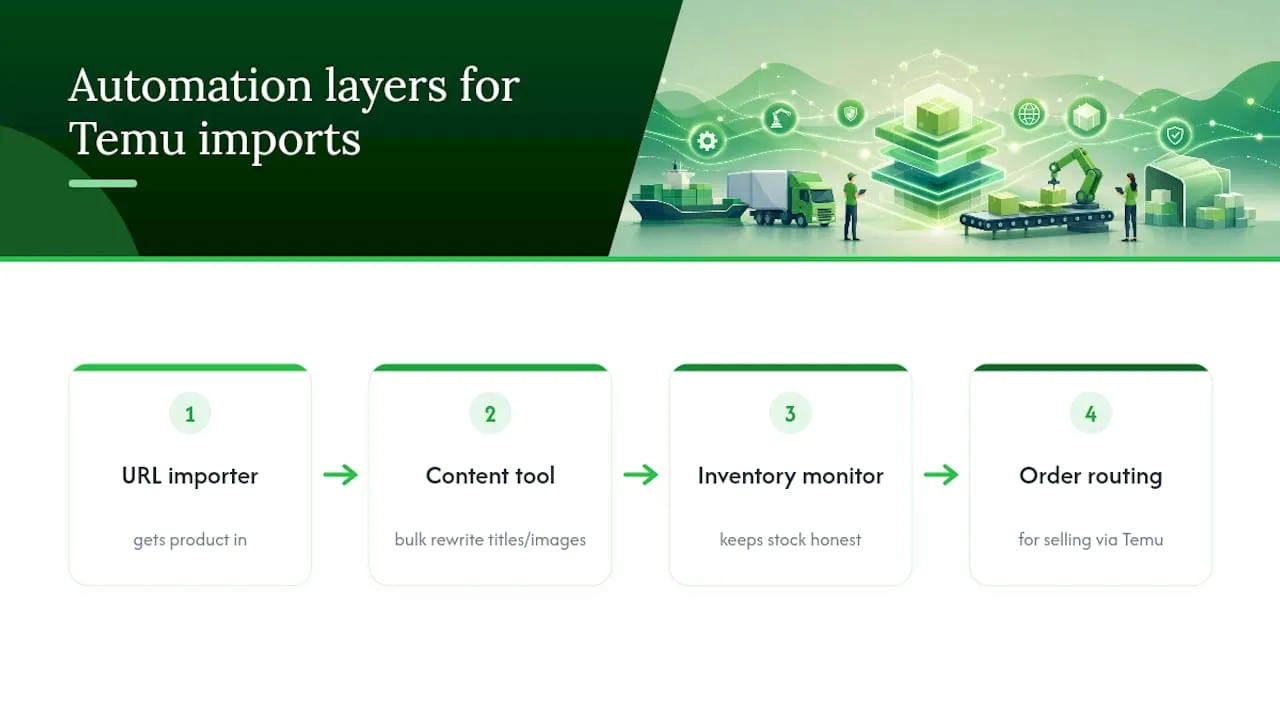
Before adding a new tool, ask what specific failure it fixes. If your listings are getting flagged for duplicate content, you need a rewriting tool, not another sync app. If you’re overselling stock that’s gone, you need inventory monitoring, not better product images.
How do you keep Temu and Shopify inventory in sync?
Stock mismatches are where dropshippers lose customer trust fastest. Selling an item that’s actually out of stock upstream means a cancelled order, a refund, and often a one-star review that has nothing to do with your store’s service.
Build a routine rather than relying purely on automation:
- Check stock levels on a fixed schedule, at minimum weekly for your best-selling SKUs, since Temu listings can sell out or change price without warning.
- Set a buffer in Shopify’s inventory count rather than matching the exact live number, so a sudden stock drop upstream doesn’t leave you promising something you can’t deliver.
- Watch price drift. If a supplier’s price rises, your margin quietly disappears unless you’re checking. A product that was profitable last month can become a loss-maker without any change on your end.
- Pause listings proactively the moment a source product goes out of stock, rather than waiting for a customer order to surface the problem.
For merchants who’ve moved into the official seller programme rather than sourcing from Temu, real-time sync through the official app removes most of this manual checking, since inventory updates flow automatically between platforms. For everyone else still sourcing product data via importers, manual or semi-automated checking remains the realistic approach.
When Temu works as a sourcing channel, and when it doesn’t
Temu earns its place as a discovery and testing ground, cheap enough to validate demand on a handful of SKUs before you commit real ad budget. Where it falls short is as a long-term backbone: once a product proves itself, the smart move is shifting it to warehoused stock or an agent-fulfilment partner for control over shipping and quality. Selling identical SKUs to everyone else sourcing the same listing is a race to the bottom on price, so protect your margin with genuinely unique copy and imagery, not just a rewritten title.
— Koen
Fix duplicate listings before Google does it for you
Every workflow above solves the sourcing problem. It doesn’t solve the rewrite problem, and that’s where most imported catalogues actually fail. Ecom-eye exists for exactly that gap: instead of manually rewriting titles, descriptions and images for every Temu import, you run the batch through Ecom-eye and get unique, SEO-ready pages generated for each product, even when a dozen other stores imported the identical listing.

The Try-out plan at €39 a month is built for testing this on a small batch before you commit further, and the Scaler plan at €99 a month suits a store pushing imports at volume. Run ten fresh Temu imports through it, compare the rewritten titles and descriptions against what the importer gave you, and check how the AI-generated product images hold up against the original supplier photos. If Merchant Centre rejections and duplicate-content flags have been holding your store back, that’s the fastest way to find out whether the fix actually works for your catalogue.
Sources
The workflows and figures in this guide draw on official app documentation and practitioner importer guides, cross-checked for accuracy before publication.
- Temu expands marketplace access for small businesses with new app for Shopify merchants
- Temu integration with Shopify provides merchants access to local seller programme
- How to Import Products From Temu With Importify
- Temu dropshipping on Shopify: how to import products (2026)
FAQ
Can I add Temu products to my Shopify store?
Yes. You can import Temu product data into Shopify using a URL importer, a browser extension, or a spreadsheet upload, then edit and publish the listing yourself. There’s no built-in native connector for pulling Temu products directly, so an importer tool like Importify or a similar app does the extraction.
How much does Shopify take from a sale?
Shopify’s fees depend on your plan and payment method rather than a single flat rate, so the exact cut on any sale varies by which plan you’re on and whether you use Shopify Payments. Check your specific plan’s transaction fee schedule directly on Shopify’s own pricing page rather than relying on a generic percentage, since rates differ by tier.
Is Shopify still worth it in 2026?
For dropshippers and small ecommerce sellers, Shopify remains a practical choice because of its app ecosystem, the range of importer and sync tools built around it, and Google Merchant Centre compatibility. Whether it’s “worth it” for you depends more on whether you can produce unique, non-duplicate product content at scale than on the platform itself, since duplicate listings are what actually sink most dropshipping stores.
How do I import products to Shopify generally?
The most common route is a URL-based importer or browser extension that pulls a source product’s title, images, variants and price into a draft you edit before publishing. A CSV upload works as a bulk fallback, and tools like Ecom-eye can rewrite that imported content into unique, SEO-ready pages before you export it to Shopify in one step.
Does importing from Temu guarantee automated order fulfilment?
No. Most importer tools extract product data only, and fulfilling the actual order (placing it on Temu, tracking it, updating Shopify) typically requires manual work. Importify’s own documentation confirms Temu orders often need manual completion, unlike some fully automated AliExpress workflows.
Ready to boost your product pages?
Generate high-converting, SEO-optimized product pages in bulk using AI automation used by e-commerce experts.
No credit card required