SEO Product Titles: How to Write Them for Shopify and Google
Learn how to write SEO product titles for Shopify: structure, keyword placement, length, wording to avoid, and how to test changes across a whole catalogue.

SEO Product Titles: How to Write Them for Shopify and Google

An SEO product title is a short, unique, descriptive name that puts the main keyword near the front, adds the details a shopper uses to tell products apart, and reads naturally to a person. Get that right and the same line works in three places: on the product page, in Google search results and in Google Shopping. Get it wrong, usually by copying supplier text, and thousands of pages end up looking identical.
This guide covers the structure we recommend, the limits that matter, what to leave out, how a product title differs from the SEO title tag, and how to produce good titles for hundreds of products without keyword stuffing.
TL;DR
- Give every product a unique, descriptive title. Shopify’s own guidance is that each page should have a unique, descriptive title.
- Put the most important keyword near the beginning, then add the brand, material, size, colour or benefit that sets the product apart.
- Google Merchant Center allows 1 to 150 characters, but front-load what matters, because the end of a long title is often cut off.
- Skip all caps, symbols, promotional text and unexplained foreign words.
- At scale, use templates with manual overrides, then test one change at a time and judge it after about two weeks.
Table of Contents
- What makes a product title SEO-friendly
- How to structure a product title
- Length: how long should a product title be?
- Wording to avoid
- Product title vs SEO title tag vs meta description
- Creating original titles for many products
- Perspective
- Measuring whether a title change worked
- A checklist before you publish
- Generate unique titles in bulk with Ecom-eye
- FAQ
- Sources
What makes a product title SEO-friendly
A good SEO title does two jobs at once. It tells Google what the page is about, and it persuades a shopper scanning a results page that this is the right product. Neither job is served by a title that is a list of keywords, and neither is served by a supplier’s generic name pasted in unchanged.
Four qualities carry most of the weight:
- Unique. No two pages on your store should share a title. Shopify says each page should have a unique, descriptive title.
- Descriptive. It names the product in the words a buyer would type, not an internal code or a vague label.
- Front-loaded. The key term sits at the start. Shopify recommends including the most important target keywords near the beginning of the title.
- Differentiated. It mentions a characteristic or benefit that helps one product stand out from similar ones.
Google’s guidance on title links makes a related point: it advises against repeated or boilerplate title text that varies by only a single piece of information, because it makes pages hard for users to tell apart. A catalogue of fifty near-identical t-shirts named “Men’s T-Shirt - Blue”, “Men’s T-Shirt - Red” and so on is exactly that pattern.
Start from what shoppers type
Keyword research should decide the main term. Shopify suggests using keyword research tools to find high-volume terms and comparing them with your web analytics to see which search terms bring paying customers. Volume alone misleads: a term searched 50,000 times a month that never converts is worth less than one searched 400 times that brings buyers.
A practical routine for each product:
- Write down the plain name a buyer would use (“stainless steel water bottle”, not “hydration vessel”).
- Check two or three close variants and pick the one that matches the product most accurately.
- Look at your own search and sales data for words buyers already use for similar items.
- Make sure the product really is what the keyword says. Matching search intent matters more than squeezing in a popular phrase.
How to structure a product title
There is no single mandatory formula, but a reliable pattern is:
Primary keyword + key attribute(s) + differentiator + brand (optional)
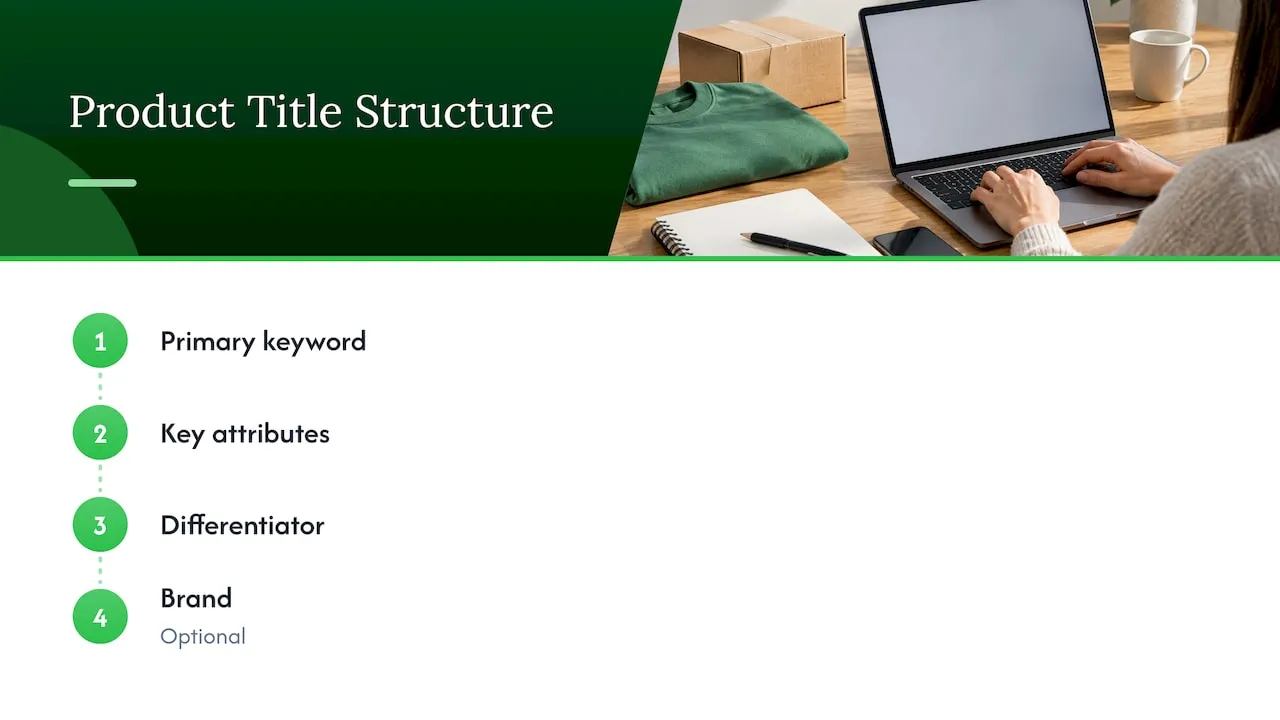
The order should follow what shoppers care about most for that kind of product. The main keyword goes first because searchers see their own term straight away, and Shopify’s guidance supports putting key terms near the start.
Choose details that are not obvious from the photo
Google Merchant Center advises focusing on relevant information that is not immediately visible in the product image, such as brand or size, so customers can identify the product quickly. A photo shows colour; it does not show capacity, compatibility or material. Put those in the title.
Examples by product type
The useful attributes change by category. These are illustrative patterns, not mandatory formulas:
| Category | Pattern | Example |
|---|---|---|
| Apparel | Product + gender + material + fit or style | Women’s Linen Wide-Leg Trousers, High Waist |
| Home and kitchen | Product + material + size or capacity | Stainless Steel Insulated Water Bottle, 750 ml |
| Electronics accessories | Product + compatibility + key feature | Magnetic Phone Case for iPhone 15, Shockproof |
| Pet supplies | Product + pet type + size | Orthopaedic Dog Bed for Large Dogs, Washable Cover |
| Beauty | Product + type + concern or size | Hydrating Face Serum with Hyaluronic Acid, 30 ml |
Notice what the examples leave out: no “BEST”, no “HOT SALE”, no string of synonyms. Each word either identifies the product or helps a buyer choose.
Add benefits and characteristics sparingly
Shopify notes that highlighting special product characteristics and customer benefits, with examples such as “Natural & Cruelty Free”, can help a title stand out and attract clicks. The word to hold on to is special. If every product in your store claims the same benefit, it stops being a differentiator. Use one that is true, specific and relevant.
We go deeper on why descriptive wording protects rankings in our piece on descriptive product titles and Shopify SEO penalties.
Length: how long should a product title be?
There are two different limits to keep apart.
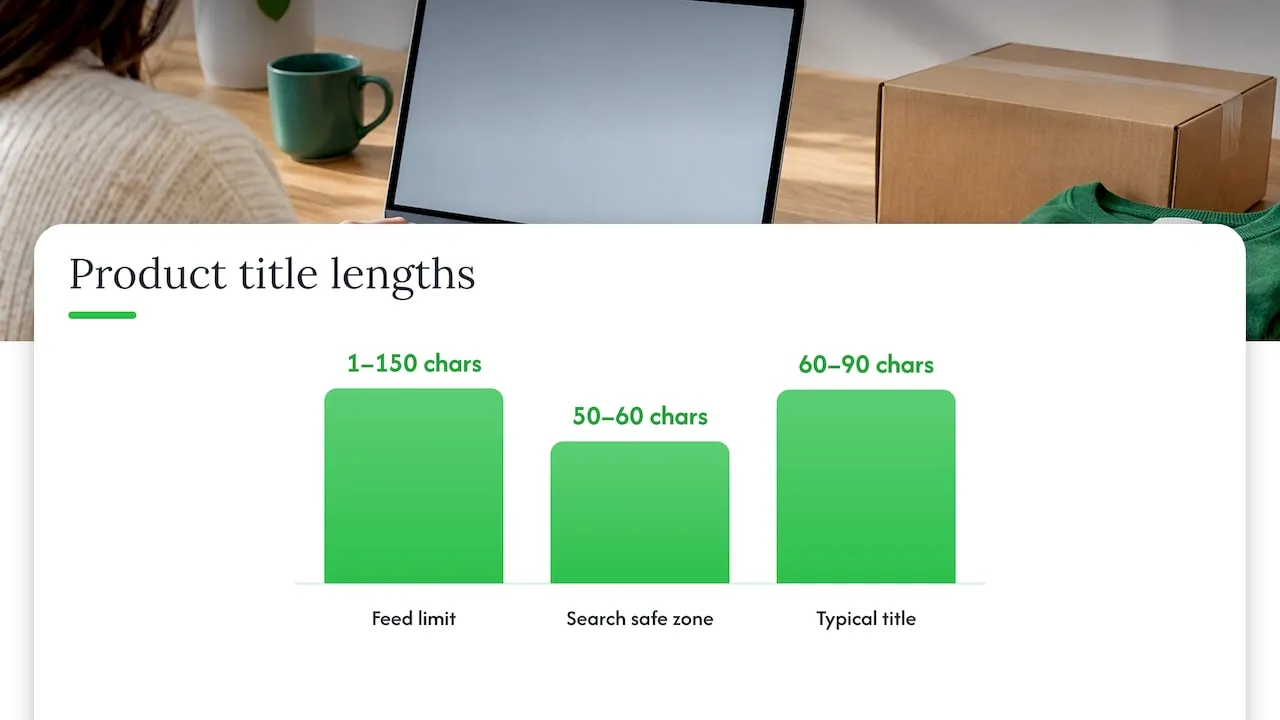
Google Merchant Center (Shopping feeds). Titles can be 1 to 150 characters long. That is a ceiling, not a target. Long titles are often shortened on display, so the words that identify the product should come first and the optional extras last.
Search results titles. The title shown in a Google search result is built from the page’s title element and may be shortened or rewritten to suit the layout. Treat roughly the first 50 to 60 characters as your safest zone for the words that must be seen, and keep everything else as a bonus.
In practice, a title of 60 to 90 characters that carries the product type, two or three attributes and the brand covers most catalogues. If you sell through Google Shopping, our guide to Google Shopping title length covers how to keep titles in range when you generate them in volume.
Wording to avoid
Google Merchant Center’s title requirements tell sellers to avoid gimmicky attention-grabbers, including all caps and symbols, promotional text and foreign-language words that are not well understood. Because titles feed straight into product listings, breaking these rules can cause feed problems as well as weaker click-through.
In plain terms, leave out:
- Capitals for emphasis. “PREMIUM QUALITY” adds nothing a buyer can verify.
- Symbols and decoration. Stars, arrows and similar characters. Our take on emojis in product titles explains why they are a poor trade for Shopify sellers.
- Promotional text. “Free shipping”, “20% off” and “Sale” change and belong in your promotion settings, not in a permanent title. Note that Shopify’s help page shows shipping wording as an example of text that can stand out in a page title; in a Merchant Center product title, Google asks you to avoid promotional text, so keep that distinction in mind.
- Keyword repetition. Saying “yoga mat” three times does not help. It reads as spam and takes space from useful details.
- Supplier jargon. Model numbers, truncated words and translated-sounding phrases copied from a marketplace listing.
Product title vs SEO title tag vs meta description
These three are easy to confuse, and mixing them up leads to either wasted effort or duplicated text.
- Product title: the name shown on your product page and in your catalogue. It is also the source of the URL handle.
- SEO title (title tag): the text used for the search listing. In Shopify, the SEO title is a separate
title_tagmetafield in the search engine listing, and by default it uses the product title. - Meta description: the short summary that can appear under the title in results. It does not replace the title but can improve the reasons to click.
That default matters. If you do nothing, your product title becomes your SEO title. That is fine when the product title is already descriptive and well-formed. When you want the page name on the store to be short and elegant while the search listing carries more detail, you can edit the SEO title separately.
Keep the URL clean
Shopify builds the URL handle from the product title, so a title stuffed with extra words produces a long, awkward handle. Check that the handle is short, readable and contains the main keyword, and edit it when the title is longer than the URL should be. Our guide to SEO metadata for dropshipping stores on Shopify walks through the fields in order.
Creating original titles for many products
The hardest part of product title SEO is not the formula. It is applying it to 200 or 2,000 products without every title coming out the same, and without simply copying the supplier’s wording.
That copying matters more than most sellers think. When a hundred stores import the same supplier name and description, Google has no reason to prefer yours, and Google Merchant Center feeds can run into quality problems. The remedy is to write your own wording, not to shuffle the supplier’s.
Use templates, then override
Conductor’s guidance for large stores is that managing titles manually becomes impractical, so templates that generate titles automatically, with manual overrides, are the recommended approach. A workable setup:
- Define a pattern per category (for example, Product type + Material + Size + Brand).
- Fill each slot from clean product data: attributes, variants, materials.
- Generate the titles in bulk.
- Review the top sellers and highest-margin products by hand and rewrite where the template reads stiffly.
Templates also expose a hidden risk. A flawed template repeats the same flaw across the whole catalogue, so run a handful of products first. Our checklist on Shopify product template SEO checks lists what to verify before you scale, and the five-SKU test for AI-written product titles shows a low-risk way to try it.
A before-and-after example
Supplier title as imported: “2024 New Fashion Women Men Thermal Cup Stainless Steel Portable Car Coffee Mug Hot”
Rewritten for a Shopify store:
- Title: “Insulated Stainless Steel Travel Mug, 450 ml, Leak-Proof Lid”
- Why it works: the product type leads, the material and size are stated, and there is one clear feature. Nothing is capitalised for effect, and “fashion”, “hot” and the year are gone.
The details (450 ml, leak-proof) must match the actual product. A title that overstates the item leads to returns and complaints, so always check attributes against the supplier specification before publishing.
Perspective
We built Ecom-eye around one observation: most dropshipping stores do not struggle because their owners cannot write a good title. They struggle because the title they publish is the same one a hundred other stores imported from the same supplier link.
That is why we generate titles, descriptions and images that are unique for each user, even when two people start from the same product link. A title is the first thing Google and a shopper read, so we treat it as the place where originality counts most, and we design our output to keep every listing distinct and ready for Google Merchant Center.
Our advice is simple. Decide your title pattern per category, generate in bulk so the whole catalogue follows it, and spend your own time on the products that earn the most. Doing the first two steps with software leaves you the time for the third.
Koen
Measuring whether a title change worked
Changing titles without measuring is guesswork. Shopify’s advice on listing optimisation is to test one variable at a time, such as a title, and then evaluate performance about two weeks later, including click-through rate.
A simple method:
- Pick a group. Choose 10 to 20 products with steady impressions, so a change shows up in the numbers.
- Record a baseline. In Google Search Console, note impressions, clicks and click-through rate for each page. If you run Shopping ads, note the same in your ads reports.
- Change only the title. Leave descriptions, images and prices alone so you know what caused any difference.
- Wait about two weeks, then compare the same metrics over an equal period.
- Keep, revert or refine. If click-through rate rose with no loss of impressions, apply the pattern to similar products.
Seasonality, promotions and ad changes can all distort results, so avoid testing during a sale. For the bigger picture on why this effort pays off, see the e-commerce growth case for optimising product titles.
A checklist before you publish
- The title is unique across your store.
- The main keyword is near the beginning.
- Brand, size, material or compatibility appears where buyers expect it.
- No all caps, symbols, promotional text or unexplained foreign words.
- The title is accurate against the real product.
- The URL handle is short and readable.
- The SEO title is either left to default on purpose or edited on purpose.
- The description supports the title instead of repeating it. Our product description ideas for Shopify SEO and the wider Shopify ecommerce SEO best practices cover the rest of the page.
If you want more on turning titles into sales rather than only rankings, our article on optimising product page titles for Shopify SEO and conversions picks up from here.
Generate unique titles in bulk with Ecom-eye
If you are importing products from AliExpress, Amazon, Temu or a competitor’s Shopify store, Ecom-eye turns that source data into unique titles, clean descriptions and AI product images, and exports them to Shopify in one click. Pages can be created in several languages, and there are built-in tools for bulk editing, templates and Google Merchant Center.
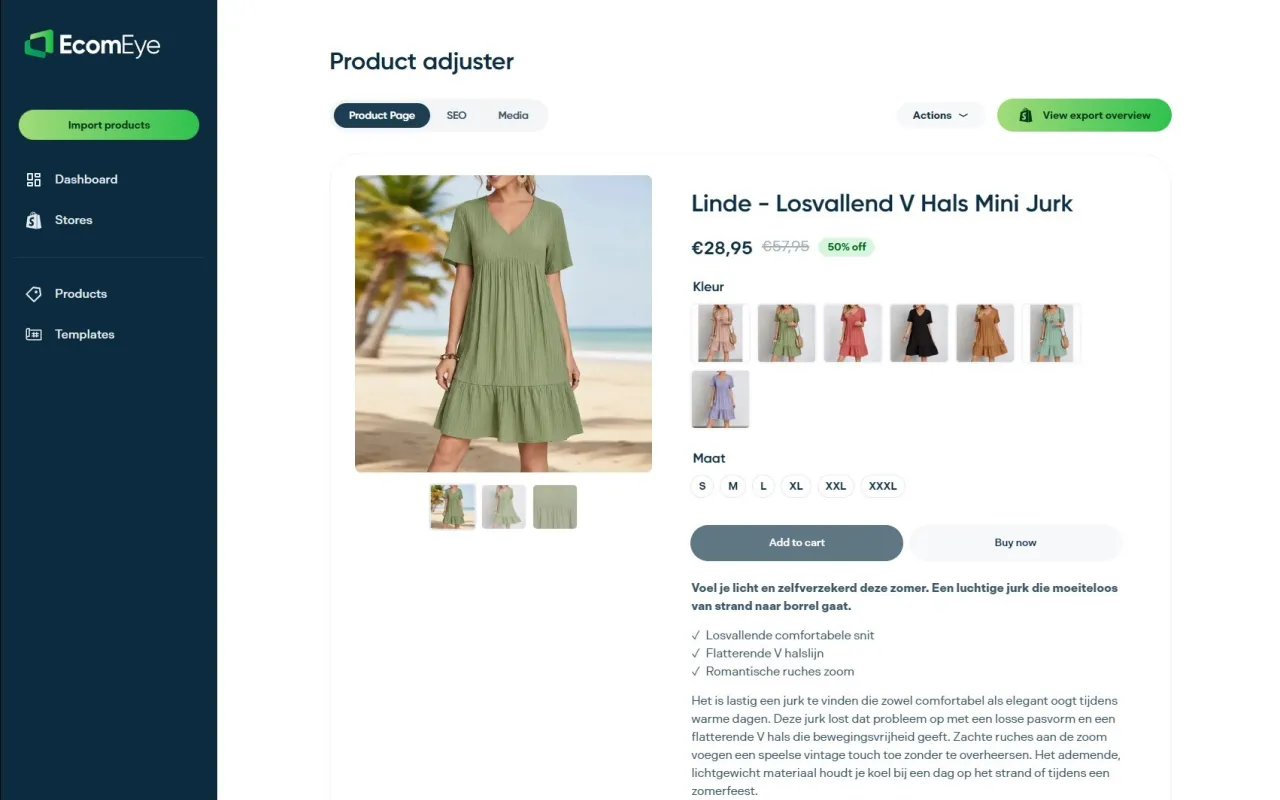
The Try-out plan costs €39 per month and the Scaler plan €99 per month; see the pricing page for what each includes. You can also look at the AI product description generator and the AI product image generator to see how the content side works.
FAQ
How long should an SEO product title be?
Google Merchant Center accepts titles of 1 to 150 characters, but that is a maximum. Aim to place the product type and main attributes within the first 50 to 60 characters, because long titles are often shortened on display. Add the optional detail after that.
Should the keyword go at the start of the title?
Yes, wherever it reads naturally. Shopify recommends putting the most important target keywords near the beginning of the title. The title should still read like a product name a person would say, not a list of search terms.
Is the Shopify product title the same as the SEO title?
Not necessarily. The SEO title is a separate field in the search engine listing, but by default it uses the product title. You can edit it separately when you want the search result to say something different from the name shown on the page.
Can I include promotional words like “sale” or “free shipping”?
For Google Merchant Center product titles, no: Google asks sellers to avoid promotional text. Promotions change quickly, so they are better handled through your promotion and shipping settings than written into a permanent title.
How do I know if a new title is working?
Change one variable, such as the title, and compare click-through rate roughly two weeks later. Use Google Search Console for the baseline and the comparison, and avoid testing during a sale.
Sources
- Shopify Help Center: Adding keywords for SEO
- Shopify Blog: Product listing optimisation
- Google Search Central: Influencing title links in Google Search
- Google Merchant Center Help: Title and structured title
- Google Merchant Center Help: Tips to optimise your product data
- Shopify Dev Docs: Optimise storefront SEO
- Conductor Academy: Product page SEO
Ready to boost your product pages?
Generate high-converting, SEO-optimized product pages in bulk using AI automation used by e-commerce experts.
No credit card required