Stop Merchant Rejections: Shopify Product Localization for Dropshippers
Shopify dropshippers: automate product localization with a repeatable CSV/API workflow and avoid Google Merchant Centre rejections.

Stop Merchant Rejections: Shopify Product Localization for Dropshippers

Automating product localisation lets you generate bulk, SEO-ready, copyright-safe product pages and export them to Shopify in minutes. Rather than rewriting every title and description by hand for each market, you can batch-generate unique content and images across languages, cutting the duplicate-content and Google Merchant Centre rejection risks that stall most dropshipping stores. Some platforms build this directly into the export step.
TL;DR:
- Automated localisation adjusts all product page fields, including titles, meta descriptions, images, and variant labels, to match target markets, not just translate words.
- Shopify caps translation storage at 20 locales, and changing product handles after publishing can break SEO redirects and harm rankings if not planned upfront.
- Titles over 150 characters in Google Shopping are truncated, so character limits must be checked to prevent loss of key benefits or keywords.
- Ensuring feed language matches the landing page language and using unique URLs for each locale are critical for Merchant Centre approval and avoiding disapprovals.
- Running scale AI-generated localisation requires documented review, logging, and governance to mitigate copyright, abuse, and disclosure risks when applying to many SKUs.
Table of Contents
- What automated product localisation actually covers
- Shopify’s limits and technical requirements you must plan for
- Keeping translated listings compliant with Google Merchant Centre
- Step-by-step: a bulk localisation workflow you can run today
- Governance: copyright, scaled content and disclosure risk
- Rollout checklist and the CSV fields you actually need
- Handling updates and version control for localised content
- Common pitfalls and how to troubleshoot them
- Data privacy and compliance when using AI tools
- Metrics and KPIs that show whether localisation is working
- When to automate and when to keep manual control
- How EcomEye handles bulk localisation for Shopify stores
- FAQ
- Sources
What automated product localisation actually covers
Localising a product page is not the same as translating it. Automation needs to handle every field a shopper and Google see: the title, meta title and description, the body HTML, option names and values, variant labels, and the product images themselves.
- Title and meta fields: rewritten per locale, not machine-translated word for word
- Body HTML: restructured for tone, units and local shopping habits
- Option and variant labels: sizes, colours and materials adapted to the target market
- Images: regenerated or re-captioned so text overlays and sizing charts match the locale
Straight translation swaps words. Localisation adjusts sizing systems, currency framing and cultural references so the page reads as if it was written for that market. Done well, automation gives you speed, consistency across hundreds of SKUs, and content that is SEO-ready from the first publish rather than needing a second editing pass.
Shopify’s limits and technical requirements you must plan for
Before you batch anything, map it against how Shopify actually stores and publishes translations. Shopify manages multilingual content through Shopify Markets and the Translate & Adapt app, and shops are practically capped at 20 published locales.
- Storage and caps: translations live as structured data tied to each resource, up to the 20-locale limit
- URLs and handles: product handles do not translate automatically, so changing a handle after publishing breaks existing redirects and can quietly tank rankings
- Publishing routes: CSV import, the Translate & Adapt app, or the GraphQL Admin API with the correct translation scopes enabled
- Theme and checkout caveats: themes need their own translation pass, since only visible text should be localised and checkout steps have separate translation requirements
Decide your URL and handle strategy before you run a single bulk import. Fixing it afterwards is far more expensive than planning it upfront.
Keeping translated listings compliant with Google Merchant Centre
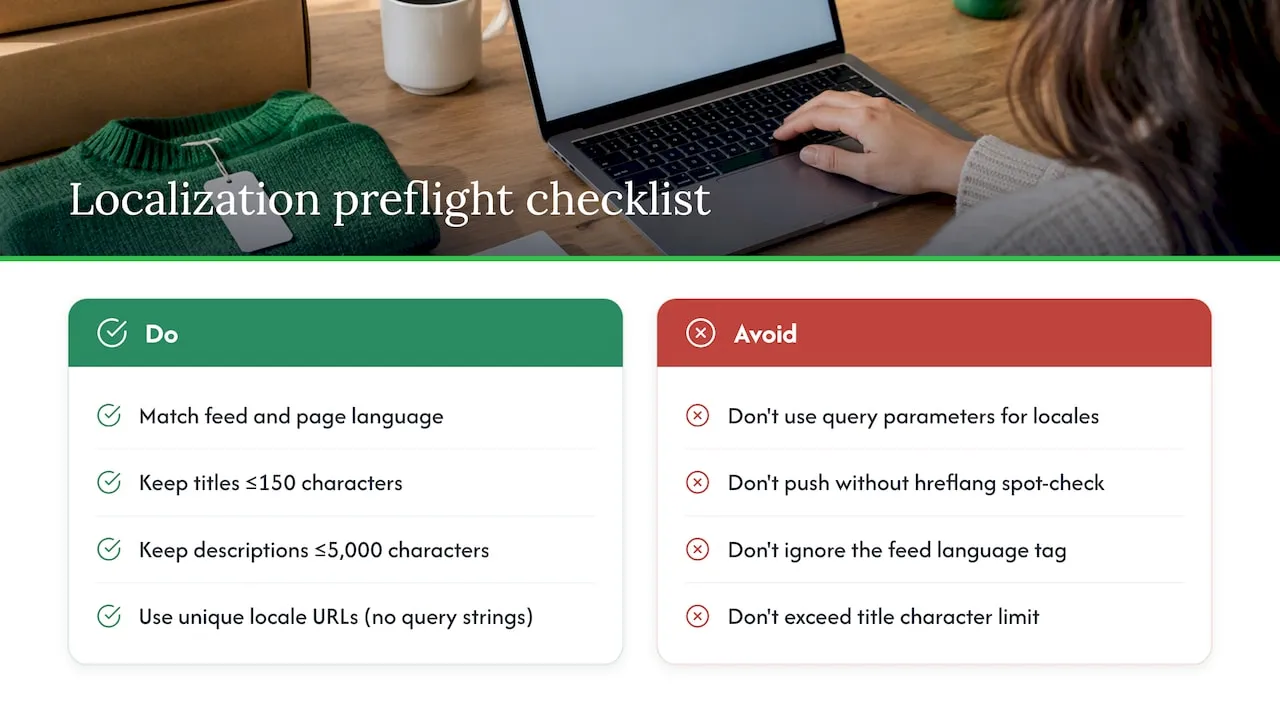
Google Merchant Centre will reject or suppress listings that don’t match basic language and formatting rules, and this is where many automated rollouts fail quietly. The feed language has to match the landing page language exactly, and titles are capped at 150 characters with descriptions limited to 5,000 characters.
Character limits aren’t a formality. Titles over 150 characters get truncated in Shopping ads and organic snippets, cutting off the keyword or benefit you most wanted a shopper to see.
Shopify handles some of the heavy lifting automatically: it adds hreflang tags and includes published languages in your sitemap, which helps Google detect the right version of a page for the right searcher. That only works if each locale has a genuinely unique URL rather than the same page served with a query parameter.
Before you push a batch live, run a quick preflight: confirm the feed language tag matches the live page, check title and description lengths per locale, and spot-check that hreflang entries resolve to working pages rather than redirects.
Step-by-step: a bulk localisation workflow you can run today
A repeatable process beats ad hoc translation every time, especially once you’re managing more than a handful of SKUs across multiple markets.
- Build a spec block per SKU: list core attributes, target keywords, permitted claims and the tone you want, so every generation run starts from the same brief rather than a blank prompt
- Prepare your CSV or API payload: include locale codes, every translatable field, and placeholders for localised image assets
- Batch generate: produce unique titles, descriptions and AI images from each spec block, then run automatic uniqueness and language-detection checks across the batch
- Sample and edit: pull a human-reviewed sample from each locale batch before anything goes live, checking tone, factual accuracy and any claims that need softening
- Publish: push the approved batch via Shopify CSV import, the Translate & Adapt app, or the GraphQL Admin API, depending on your scale and developer access
- Verify: check hreflang tags resolve correctly, confirm the sitemap includes the new locale pages, match the Merchant feed language tag to the live page, and review a handful of pages manually before calling the batch done
Pro Tip: Keep your spec block format for descriptions and your spec block format for images identical across every SKU. It’s the single biggest time-saver when you need to re-run a batch after a feed rejection.
This structure works whether you’re doing 20 SKUs by hand or several hundred through an API, because the QA gate at step 4 catches problems before they reach Google or a customer, not after. Our spec block approach to AI descriptions covers how to write the brief itself in more depth.
Governance: copyright, scaled content and disclosure risk
Running AI generation at scale brings three separate risk areas that are easy to overlook when you’re focused on speed.
- Copyright: purely AI-generated output is not automatically protected, so document the human selection, arrangement or editing you apply to each batch to support any future authorship claim
- Scaled content abuse: Google treats mass-produced, low-value pages as a ranking risk regardless of whether AI wrote them, so each localised page needs to add something beyond a word-for-word swap
- Disclosure: if any part of your marketing uses AI-generated testimonials or endorsement-style claims, the FTC requires clear and conspicuous disclosure rather than presenting them as genuine customer statements
Shopify stores running bulk AI content at scale reduce approval risk when they can show a documented review step for every batch, according to FTC guidance on disclosure clarity. A simple governance layer covers most of this: keep an audit log of what was generated and when, run a uniqueness score on each batch, sample a fixed percentage for QC, and record who approved the edit. Our checklist for detecting low-quality AI content gives a practical 12-point structure for the sampling step.
Rollout checklist and the CSV fields you actually need
Before you flip a locale live, run through a short checklist rather than relying on memory across dozens of SKUs.
- Locales enabled in Shopify Markets and matched to your actual target countries
- Theme compatibility confirmed, including checkout and notification translations
- URL and handle strategy locked in before the first bulk import
- Merchant feed language matching the live landing page language exactly
- QA pass completed on a sample from the batch, not just the first few rows
For the import itself, your CSV or API payload needs: product_id, locale, title, body_html, meta_title, meta_description, option names and values, image_urls, and handle (treated carefully, since editing it later breaks redirects). Run a final per-language pass checking character limits, confirming slugs resolved as expected, and verifying hreflang and sitemap entries before calling the rollout complete.
Handling updates and version control for localised content
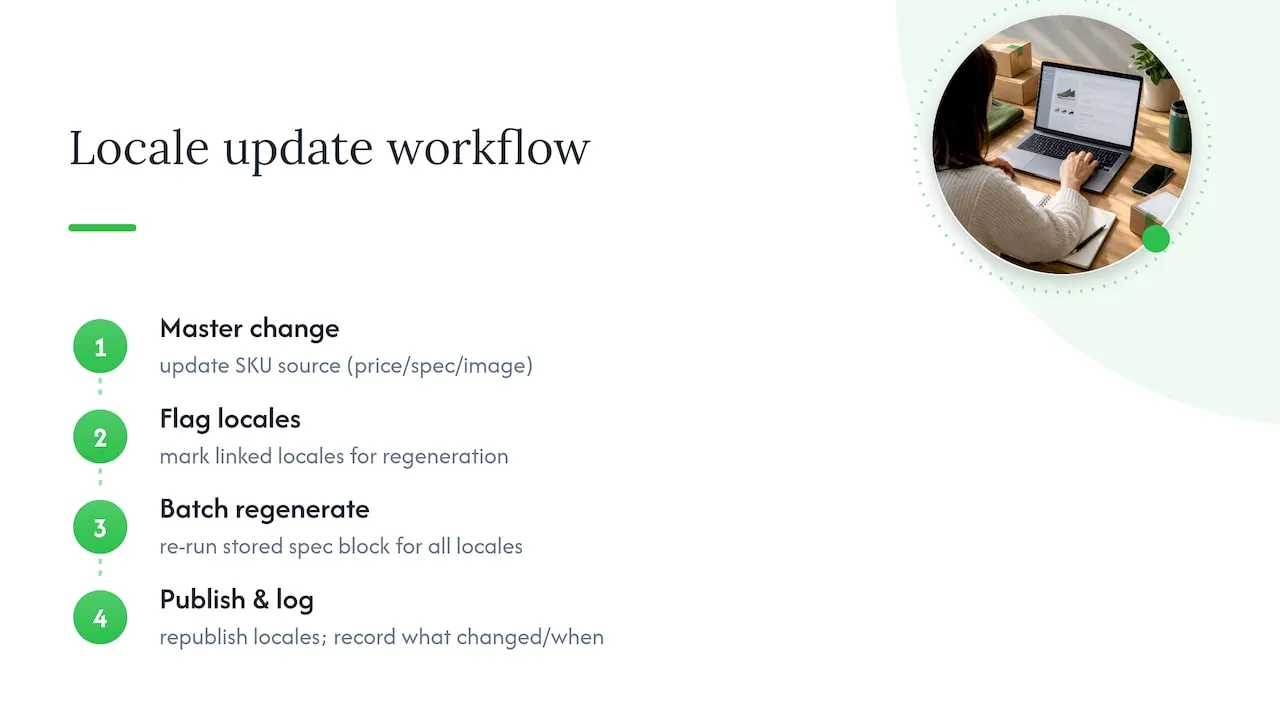
Once a product changes, price, stock, specification or a core image, every localised version needs the same update, and this is where manual processes fall apart fastest. A spreadsheet tracking five languages across two hundred SKUs becomes unmanageable within a few update cycles.
The practical fix is treating each localised page as a version tied to its source SKU rather than an independent document. When the English master changes, flag every linked locale for regeneration rather than editing each one separately. Batch regeneration through the same spec block you used originally keeps tone and structure consistent, rather than drifting language by language as different people patch things manually over months.
Keep a simple log of what changed and when: a price update doesn’t need full regeneration, but a specification change usually does. Store the spec block itself as the source of truth, so regenerating a locale means re-running the block rather than reconstructing context from an old product page. This also protects you if a Merchant feed rejection forces a rapid fix across several languages at once: you update the spec block, regenerate, and republish, rather than hunting through five separate manual edits.
Common pitfalls and how to troubleshoot them
Most automated localisation problems trace back to a handful of repeat issues.
Handle changes breaking redirects. Changing a product handle after it’s indexed strips the old URL’s SEO value unless you set up a proper redirect. Lock your handle naming convention before the first bulk run.
Feed and landing page language mismatches. This is the most common cause of Merchant Centre disapprovals, and it usually happens when a translation publishes to Shopify but the feed setting wasn’t updated to match.
Literal translation reading badly. Machine-translated units, idioms or sizing references often land oddly in the target market. A human sampling pass catches most of this before it reaches a shopper.
Truncated titles in Shopping ads. Titles generated without a character check regularly exceed the 150-character limit and get cut off mid-phrase in search results.
Theme text left untranslated. Liquid code and hardcoded theme strings don’t translate through the product content pipeline, so checkout and navigation elements need a separate theme translation pass.
Most of these are caught by the same QA gate: a fixed sample review before publishing, checked against a short list rather than relying on spot checks alone.
Data privacy and compliance when using AI tools
Feeding product data into an AI localisation tool means that data, descriptions, pricing, sometimes customer-facing copy, passes through a third-party system. Before committing to a tool, check how it handles data retention: whether your product data is used to train shared models, how long generated content and source inputs are stored, and whether you can request deletion.
For stores operating across multiple markets, be aware that privacy expectations differ by region, and a tool built for one market’s data rules won’t automatically satisfy another’s. If you’re pulling product data from AliExpress, Amazon or competitor listings to seed your spec blocks, keep in mind that the compliance question that matters most is what happens to your generated output and customer data, not the sourced product details themselves. Ask any vendor directly how generated content is stored and whether it’s ever reused across other customers’ accounts.
Metrics and KPIs that show whether localisation is working
Speed of publishing is not the metric that matters. What matters is whether localised pages get indexed, get found, and convert.
Track indexation rate first: are your new locale pages actually appearing in search results within a reasonable window? Then track Merchant feed acceptance rate per locale, since a batch that publishes cleanly to Shopify but gets rejected in Merchant Centre has achieved nothing commercially. Finally, track conversion rate on localised pages against your baseline market, because a page that reads naturally in the target language but uses the wrong sizing system or currency framing will show weak conversion even with strong traffic.
A small pilot batch gives you reliable signals on all three before you commit to translating your full catalogue into a dozen languages.
When to automate and when to keep manual control
Automate high-volume commodity SKUs where speed and consistency matter more than a distinctive voice. Keep hero products and flagship brand pages under manual control, since that’s where tone and nuance earn their keep.
Run a pilot of 50 to 200 SKUs first. Measure indexation and conversion before scaling further, and keep a recurring human audit in place rather than treating automation as a one-off setup.
— Koen
How EcomEye handles bulk localisation for Shopify stores
Our platform is built around the workflow above: bulk import from AliExpress, Amazon, Temu or competitor Shopify links, then AI generation of unique titles, descriptions and product images across multiple languages, exported to Shopify in one click. Every generated page is unique per user, which helps keep duplicate-content and Merchant Centre disapprovals from piling up as you scale.
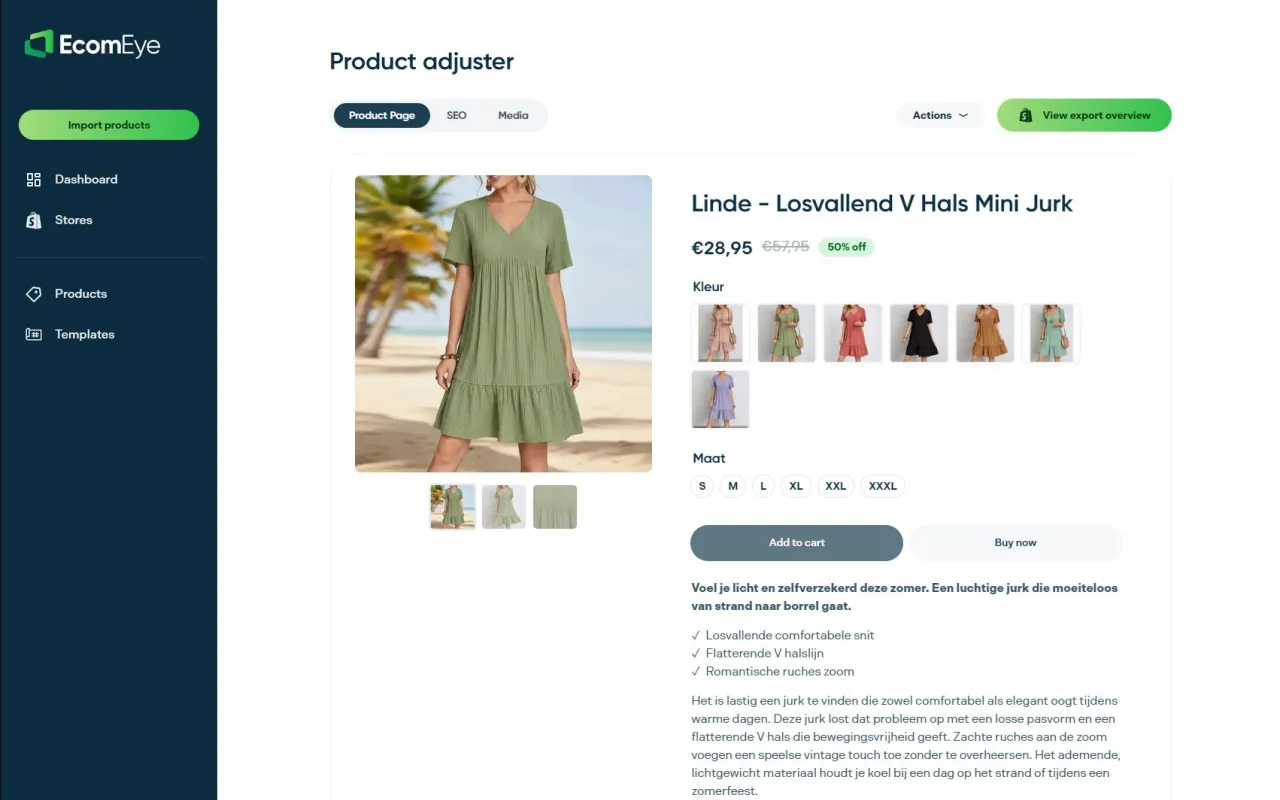
Compared to building your own pipeline, this approach reduces manual QA and API work into one export step.
| What you get | Detail |
|---|---|
| Bulk import | From AliExpress, Amazon, Temu or competitor Shopify links |
| AI content | Unique titles, descriptions and product images per listing |
| Multi-language export | One-click publish to Shopify across locales |
| Pilot plan | Try-out |
| Scale plan | Scaler |
A sensible first step is running a pilot across 20 to 50 SKUs, checking Merchant feed acceptance and Shopify publishing before expanding further. Our AI product description generator and AI product image generator pages cover each capability in more detail if you want to start with one piece before running the full workflow.
FAQ
What does “automate product localisation” mean for Shopify?
It means generating unique, SEO-ready titles, descriptions, images and variant labels for each target language automatically, then publishing them to Shopify through CSV import, the Translate & Adapt app or the GraphQL Admin API. The goal is scaling multilingual listings without manually rewriting every field per language.
How many languages can a Shopify store publish?
Shopify shops are practically capped at 20 published locales through Shopify Markets. Each locale needs its own translated fields and, ideally, a unique URL for proper indexing.
Will AI-generated product pages pass Google Merchant Centre review?
They can, provided the feed language matches the landing page language and titles and descriptions stay within Google’s character limits. Disapprovals usually come from language mismatches or missing structured data rather than the use of AI itself.
Does changing a product’s URL handle affect SEO when localising?
Yes. Shopify product handles don’t translate automatically, and [changing a handle after it’s indexed] breaks existing redirects(https://www.searchenginejournal.com/seo-best-practices-migrating-shopify/440086/) unless you set one up manually. Decide your handle strategy before running a bulk import.
Can EcomEye export localised product pages directly to Shopify?
Yes, EcomEye generates unique titles, descriptions and AI images per language and exports them to Shopify in one click, with plans starting at Try-out for 39 EUR per month. It’s built for bulk import from AliExpress, Amazon, Temu or competitor Shopify links rather than one-off manual edits.
Sources
Ready to boost your product pages?
Generate high-converting, SEO-optimized product pages in bulk using AI automation used by e-commerce experts.
No credit card required