500+ Products: Use CSV, API or SaaS to Bulk Translate Shopify
Choose the Shopify native route, Translate & Adapt, CSV export, or the Translations API, and learn when a managed SaaS like EcomEye keeps bulk...

500+ Products: Use CSV, API or SaaS to Bulk Translate Shopify

For a handful of pages, Shopify’s native Translate & Adapt app does the job. For a full catalogue, you want the CSV export and import workflow or the Translations API, and once you are dealing with hundreds or thousands of SKUs, a managed bulk-generation tool can save the most time while keeping every page unique and SEO-safe.
TL;DR:
- Shopify’s Translate & Adapt app is suitable for small catalogs with up to two languages, requiring manual review of auto-translated strings.
- For catalogs with 50 to 500 products, merchants should use CSV export and import workflows for bulk translation management.
- Large catalogs or frequent updates benefit from API-driven translation automation or managed SaaS platforms that handle bulk operations efficiently.
- Common issues include exceeding translation key limits, encoding errors, conflicting hreflang tags, and theme translation scope, which require careful planning and auditing.
- Using third-party bulk platforms like EcomEye helps generate unique, SEO-safe pages across multiple languages, ideal for high SKU counts and fast rollout needs.
Table of Contents
- Choosing between native, CSV, API or managed SaaS
- Bulk translating with the CSV export and import workflow
- What Translate & Adapt covers, and where it falls short
- Scaling translations with the API and bulk operations
- Getting hreflang, sitemaps and slugs right
- Fixing the most common bulk translation problems
- How EcomEye handles bulk translation at catalogue scale
- Rolling out translations without losing quality control
- Try EcomEye for bulk, SEO-safe Shopify translation
- Sources
- FAQ
Choosing between native, CSV, API or managed SaaS
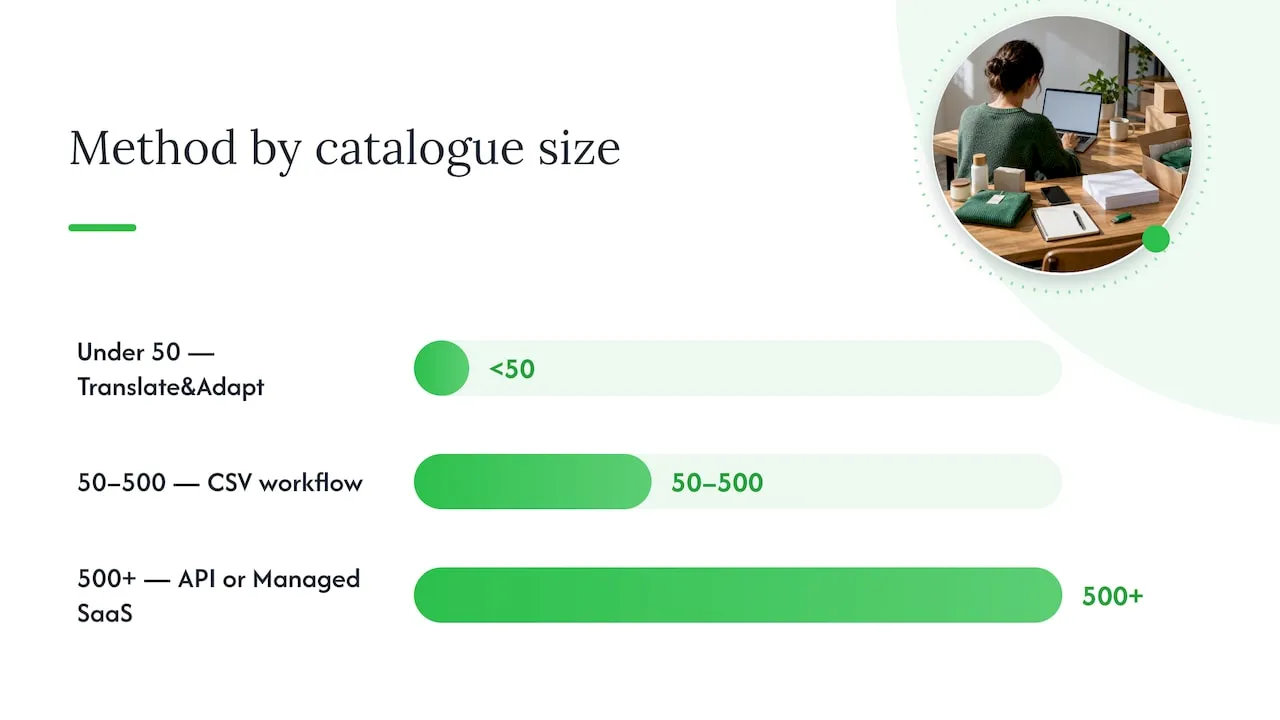
The right method depends on how many products you carry, whether you have a developer on hand, and how much manual review you can afford. Translate & Adapt suits stores with a small catalogue and one or two target languages, since it handles translation inside the admin with no extra tooling. CSV export and import scales further and keeps control with the merchant, but every row still needs a human or automated pass for accuracy. The Translations API suits agencies and stores with development resources that want translations pushed automatically from another system. Managed SaaS platforms suit merchants who want bulk output without writing a script or hiring a developer.
Cost shape differs too. Native and CSV methods cost time rather than money, since Shopify includes them at no extra charge. API work costs developer hours upfront, then very little afterwards. A managed platform charges per generation or per month but removes almost all the manual editing.
Accuracy also varies by method. Automatic translation through Translate & Adapt is convenient but limited in scope, so it needs a review pass before publishing. CSV workflows are only as accurate as whoever edits the file. API-driven translations are as good as the translation service feeding them.
Use this as a rough decision guide:
- Under 50 products, one extra language: start with Translate & Adapt and review manually.
- 50 to 500 products, no developer available: use the CSV export and import workflow.
- 500+ products or frequent catalogue updates: build on the Translations API or bulk operations.
- Large catalogues needing fast, unique, SEO-safe pages: consider a managed platform to handle bulk generation and export in one pass.
None of these routes is exclusive. Many stores start with Translate & Adapt for their first language, then move to CSV or API once the catalogue and language count grow.
Bulk translating with the CSV export and import workflow
CSV import and export is the most accessible bulk method for merchants without developer support, and it works entirely inside Shopify’s own tools.
- Open Settings > Languages in the Shopify admin, then choose the language you want to export.
- Export the translations CSV for that language, which contains every translatable field: product titles, descriptions, metafields, collection text and theme content.
- Open the file in a spreadsheet tool that preserves UTF-8 encoding, since mishandled encoding is the most common cause of garbled accented characters on import.
- Edit only the translation column, leaving the key and reference columns untouched. Renaming or reordering columns is a common cause of failed imports.
- Decide whether to overwrite existing translations or add incrementally. Overwrite replaces everything in that file, while incremental import only fills blank fields, which is safer once a language is partially live.
- Import the finished file back through the same Languages screen.
- Check the storefront in that language, paying close attention to product titles, checkout text and any dynamic content pulled from theme sections rather than product fields.
Pro Tip: Keep a master copy of each exported CSV before editing, so a failed import or accidental overwrite never costs you a re-export from scratch.
Import errors usually trace back to one of three causes: broken encoding, a renamed column, or a row where the translation exceeds a field’s character allowance. Shopify’s documentation on localisation and translation confirms that CSV import and export exists specifically so merchants can manage bulk translations without a third-party subscription, which makes this the natural first stop before reaching for developer tools.
What Translate & Adapt covers, and where it falls short
Shopify’s own Translate & Adapt app covers product pages, collections, blog posts, theme content and checkout text, and it lets merchants edit any of those translations directly inside the admin.
- It offers automatic translation for individual resources or for up to two languages at no charge, which is enough for a first international market but not for a multi-language rollout.
- Every automatically translated string still needs a review pass before publishing, since machine output on product-specific terms and brand names often needs correction.
- CSV import is built into the same app, so merchants can move from manual editing to bulk import without switching tools.
- Beyond two automatic languages, or once catalogues run into the hundreds of products, the manual review burden inside Translate & Adapt becomes the bottleneck rather than the translation itself.
Translate & Adapt is the right starting point for most stores entering their first new market. It becomes the wrong tool once you need a third or fourth language, or once your catalogue is large enough that manual review of every string is no longer realistic. At that point, CSV workflows or the API give you more control over how translations are generated and checked before they reach the storefront.
Scaling translations with the API and bulk operations
Developers who need translations to flow automatically from another system, whether a translation service, a content pipeline or a bulk-generation tool, work with Shopify’s GraphQL Translations API rather than the admin interface.
- The translationsRegister mutation registers or updates a translation for a given resource, and it accepts a marketId so a translation can be scoped to buyers in a specific market rather than applied globally.
- For catalogues with thousands of products, bulk operations are the correct tool rather than single queries, since bulk operations are built for large data sets and are not bound by the same rate and cost limits.
- A single-query approach that loops over thousands of products one at a time will hit rate limits long before it finishes, which is why Shopify’s own guidance points developers toward bulk operations for anything beyond a small batch.
- Theme content sits in a separate bucket from product and collection translations, and it runs into its own constraint described below.
Pro Tip: Batch your translationsRegister calls by resource type rather than by language, since grouping similar mutations together makes it far easier to spot and retry the handful that fail.
One constraint worth planning around from the start: Shopify’s community reporting on translatable resource limits describes a cap of roughly 3,400 translation keys per theme locale. Large themes with extensive custom sections can approach that ceiling faster than expected, and the practical mitigation is to audit which keys actually need translation, move non-critical text into metafields, or load some strings client-side rather than through the theme locale files.
Getting hreflang, sitemaps and slugs right
Bulk translation only pays off if search engines can find and correctly attribute the translated pages, which means a few SEO tasks sit alongside the translation work itself.
- Shopify automatically generates language-aware URLs and adds hreflang tags for stores using Markets, and it includes published languages in the sitemap, so the baseline technical setup usually needs no extra code.
- URL slugs are not rewritten automatically. Translating them, through Translate & Adapt, a compatible app, or the same CSV and API methods used for content, is one of the most commonly skipped steps and one of the more effective ones for local search visibility.
- When bulk translating slugs, prioritise the pages that already rank or drive traffic in your home market, since a translated, localised handle on a high-value product page carries more weight than a blanket rewrite of every URL at once.
- If a theme or third-party app already outputs its own hreflang tags, Shopify’s developer guidance on hreflang recommends turning off the automatic tags rather than running both, since duplicate or conflicting annotations confuse search engines rather than helping them.
Pick one authoritative source for hreflang output, whether that is Shopify’s automatic system or an app, and stick with it. For a fuller walk-through of slug translation and its effect on organic traffic, see this guide to product page translation and SEO.
Fixing the most common bulk translation problems
- Hit the roughly 3,400 key limit for a theme locale: audit which theme strings genuinely need translation, then move low-priority text to metafields or a client-side rendering approach.
- CSV import fails or produces garbled characters: re-export a fresh copy, confirm the file is saved in UTF-8, and check that no column headers were renamed or reordered.
- Two apps produce conflicting hreflang tags: pick one authoritative source, either Shopify’s automatic tags or a single app, and disable the other rather than running both.
- Translations appear correct in the CSV but not on the storefront: check whether the content lives in a theme section rather than a product field, since theme text follows a separate translation path.
How EcomEye handles bulk translation at catalogue scale
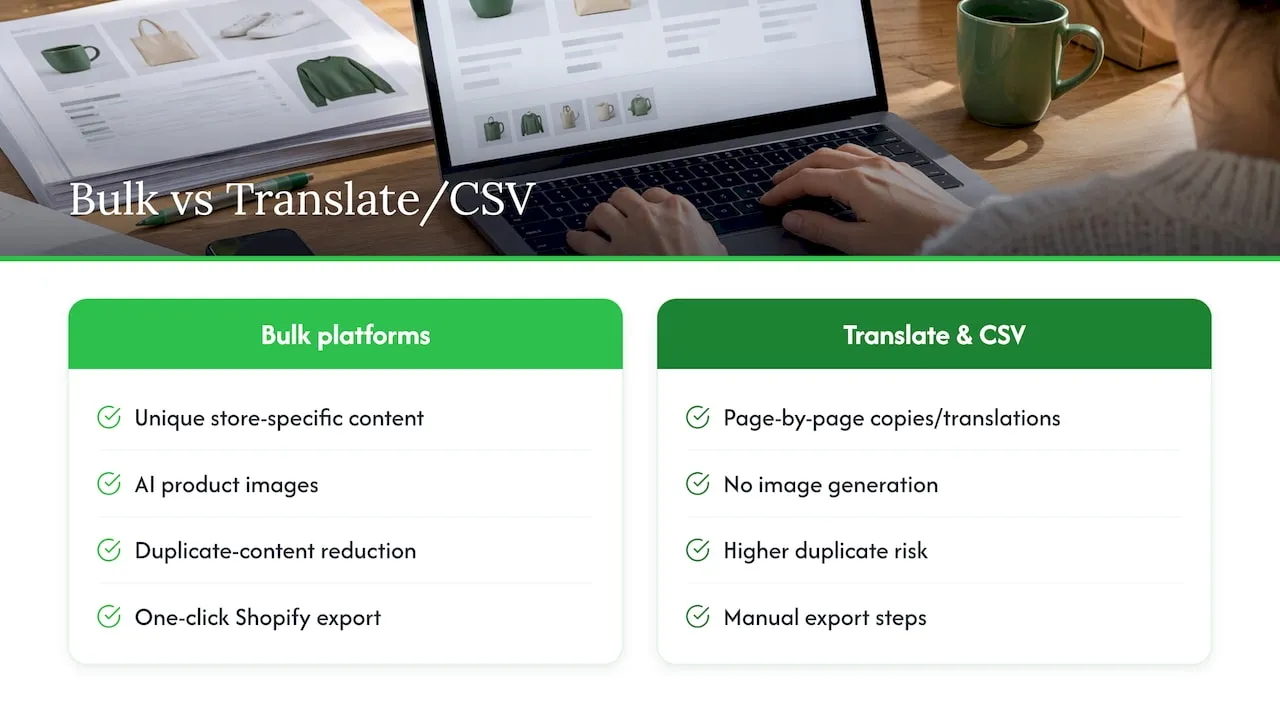
Some bulk-generation platforms are built for merchants who need bulk output rather than a page-by-page workflow. They may generate unique titles, descriptions and SEO-ready content in multiple languages directly from imported product data, and produce AI product images alongside the text.
Because generated pages are unique to each store rather than copied from a source listing, this approach can help avoid duplicate-content issues that cause Google Merchant disapprovals. These platforms can export finished pages to Shopify in one click, removing manual copy-paste steps that usually follow bulk translation projects.
Such tools suit dropshippers and stores with large SKU counts who need several languages live quickly, more than merchants translating a small, already-established catalogue where Translate & Adapt or a CSV pass will do. For a catalogue-wide implementation example, see this guide to scaling product translation across 20 locales.
Rolling out translations without losing quality control
Start with one to three priority languages rather than translating everything at once, and measure both search visibility and conversion before adding more. Put manual review effort where it matters most: top-selling SKUs and the SEO-critical pages that already drive traffic. Reach for API development once translation volume and update frequency justify the engineering time, and reach for a managed platform when speed and catalogue size matter more than custom logic.
— Koen
Try EcomEye for bulk, SEO-safe Shopify translation
Merchants running large catalogues rarely have time to review thousands of machine-translated strings by hand. EcomEye generates the multi-language product content and images in bulk from the start, so there is far less manual cleanup once the pages reach the storefront.
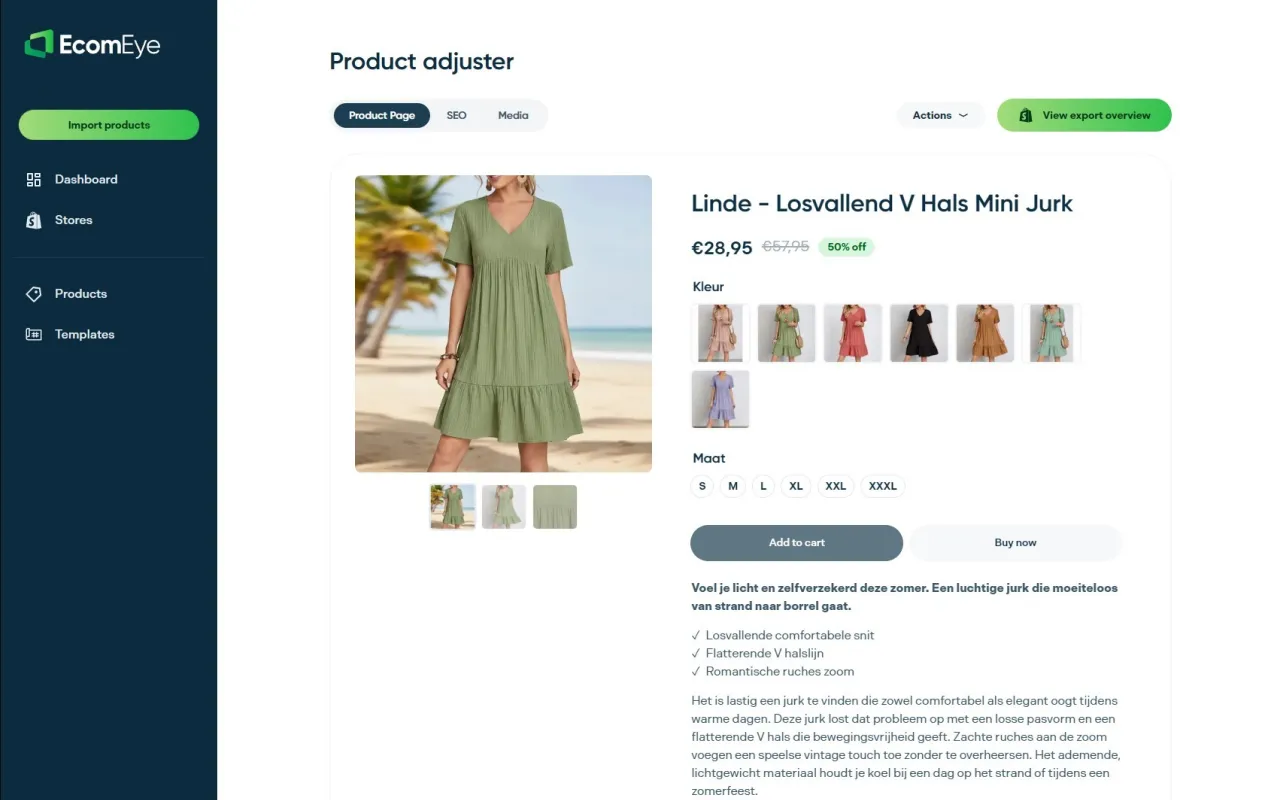
- Generate unique, multi-language product pages from AliExpress, Amazon, Temu or competitor listings in one pass.
- Export finished pages to Shopify with one click, without a separate CSV round trip.
- Cut Google Merchant disapproval risk by avoiding duplicate content across translated listings.
Compare the Try-out and Scaler plans to see which fits your catalogue size, or explore the AI product description generator and AI product image generator to see the output before you commit.
Sources
For further reading, see Shopify’s guides to localisation and translation and the Translate & Adapt app, the translationsRegister mutation reference, and the hreflang implementation checklist for developers verifying tag output.
- Shopify Help Center | Localization and translation
- translationsRegister mutation (Shopify developer docs)
- Shopify community thread on translatable resource limits
FAQ
How can I translate my Shopify store?
Use Shopify’s Translate & Adapt app for a small catalogue and one or two languages, the CSV export and import workflow for larger merchant-controlled bulk translations, or the Translations API for developer-driven automation at scale. Each option sits inside Shopify’s own tools, so no third-party subscription is required to get started.
Which AI works best with Shopify?
There is no single AI tool officially built into Shopify beyond its own automatic translation inside Translate & Adapt, which covers up to two languages for free. For bulk, multi-language product content and images generated automatically from imported product data, platforms such as EcomEye connect directly to Shopify through a one-click export.
What are the best conversion apps for Shopify?
Conversion tools vary by goal, from checkout optimisation to page speed to localisation, and Shopify’s own app store lists options across each category. For bulk translation specifically, the tools that most directly affect conversion are the ones covered here: Translate & Adapt, CSV import and export, and the Translations API.
How long does a bulk Shopify translation project take?
Timelines depend on catalogue size and method: a small store using Translate & Adapt can go live in a day or two, while a CSV workflow across hundreds of products typically takes a few days for export, editing and review. API-driven or managed platform rollouts can push a large catalogue live faster, since bulk generation and export replace most of the manual editing step.
Is there a limit to how many translations I can add on Shopify?
Yes, community reporting on Shopify’s developer forum describes a cap of roughly 3,400 translation keys per theme locale, which can affect large or heavily customised themes. Product and collection translations sit outside this theme-specific limit, though large catalogues should still plan translation work around it.
Ready to boost your product pages?
Generate high-converting, SEO-optimized product pages in bulk using AI automation used by e-commerce experts.
No credit card required