How to Translate Product Dimensions for a US Shopify Store
Turn supplier measurements into clear US listings: which order to use, how to convert cm to inches, where to store dimensions in Shopify, and what to check.

How to Translate Product Dimensions for a US Shopify Store

To translate product dimensions for a US listing, do three things in order. Keep what each number measures (product, box or parcel). Convert the units to inches. Then write the result in a consistent, labelled format such as “Length 23.6 in × Width 15.7 in × Height 11.8 in”. Most mistakes happen because sellers convert the numbers first and never check what the supplier actually measured.
This guide shows the method step by step, with a worked example, the conversion figures you need, and the places in Shopify where dimensions belong. It is written for dropshippers and store owners who import supplier data and need it to read cleanly for American shoppers.
TL;DR
- Work out what each supplier number describes (the item, the retail box or the shipping carton) before you convert anything.
- Use inches for US customers and label every value, because the order of length, width and height is not universal.
- Convert with 1 inch = 2.54 cm, keep one or two decimals, and round only at the final display step.
- Shopify’s standard product page holds weight, so store dimensions in metafields or a shipping app, and keep product size and package size as separate fields.
- Shipping rates depend on the packed box, not the product, so never paste product size into a shipping field.
Table of Contents
- What “product dimensions” actually means
- Length × width × height, or width × depth × height?
- A three-step method: identity, units, presentation
- Converting centimetres and millimetres to inches
- A worked example
- Where dimensions go in Shopify
- How dimensions affect shipping
- A pre-publish checklist for supplier dimensions
- Our perspective
- Put it into practice with EcomEye
- FAQ
- Sources
What “product dimensions” actually means
Product dimensions describe the item itself. Box dimensions describe the carton it ships in. Amazon FBA documentation explained by a seller tool makes the same split: each set of numbers is used for a different part of a shipment.
Supplier listings blur this constantly. A single line reading “Size: 40×30×20” can mean the assembled item, the folded item, the retail box or the outer parcel. A buyer’s guide to product size versus package size recommends checking whether a measurement describes the product, the assembled or folded item, the retail box, the shipping carton or the outer parcel, and confirming units, orientation and the selected option.
There is also a formal definition. GS1 US defines height as base to top, width as left to right and depth as front to back, measured while facing the “Default Front” of the product. The default front is the surface with the largest area that the manufacturer uses to sell the item. You do not need to apply the full standard to a dropshipping catalogue, but it shows why the same object can legitimately be described in more than one way.
Four numbers you may meet
| What the supplier calls it | What it usually describes | Where it belongs in your store |
|---|---|---|
| Product size / item size | The item, often assembled | Product page, specifications |
| Folded size | The item in storage or transit shape | Specifications, if useful to buyers |
| Retail box size | The box the customer opens | Optional, for gifts and storage |
| Package / carton size | The outer parcel | Shipping field only |
If the supplier gives only one measurement and does not say which it is, treat it as unconfirmed until you have checked it against product photos, a sample or the supplier’s own answer.
Length × width × height, or width × depth × height?
There is no single universal order. According to a guide on listing dimensions, freight and shipping typically use length × width × height, while furniture and retail often use width × depth × height. Because of that ambiguity, its best-practice advice is to label every measurement explicitly.
For US packaging, the convention is clearer. A US packaging manufacturer states that packaging dimensions are universally written as length × width × height, and another packaging guide calls it the most widely accepted convention. The same US packaging source on writing dimensions notes that furniture specifications often use width × depth × height instead.
For your listings, the practical rule is:
- Use L × W × H for anything that ships in a box, and for shipping fields.
- Use W × D × H for furniture, shelving, appliances and decor that shoppers picture standing on a floor or shelf.
- Always write the labels out in the product specification, at least once, so nobody has to guess.
The order does not change the volume of a box. It does, though, cause confusion in warehouse systems and packaging software, where each side has a specific role. A shopper who reads “24 × 16 × 12” as width × depth × height when you meant length × width × height may order a product that does not fit the space.
A three-step method: identity, units, presentation
A guide to translating product dimensions puts the safest principle neatly: preserve dimension identity first, convert units second, localise presentation last. Here is how that works at catalogue scale.
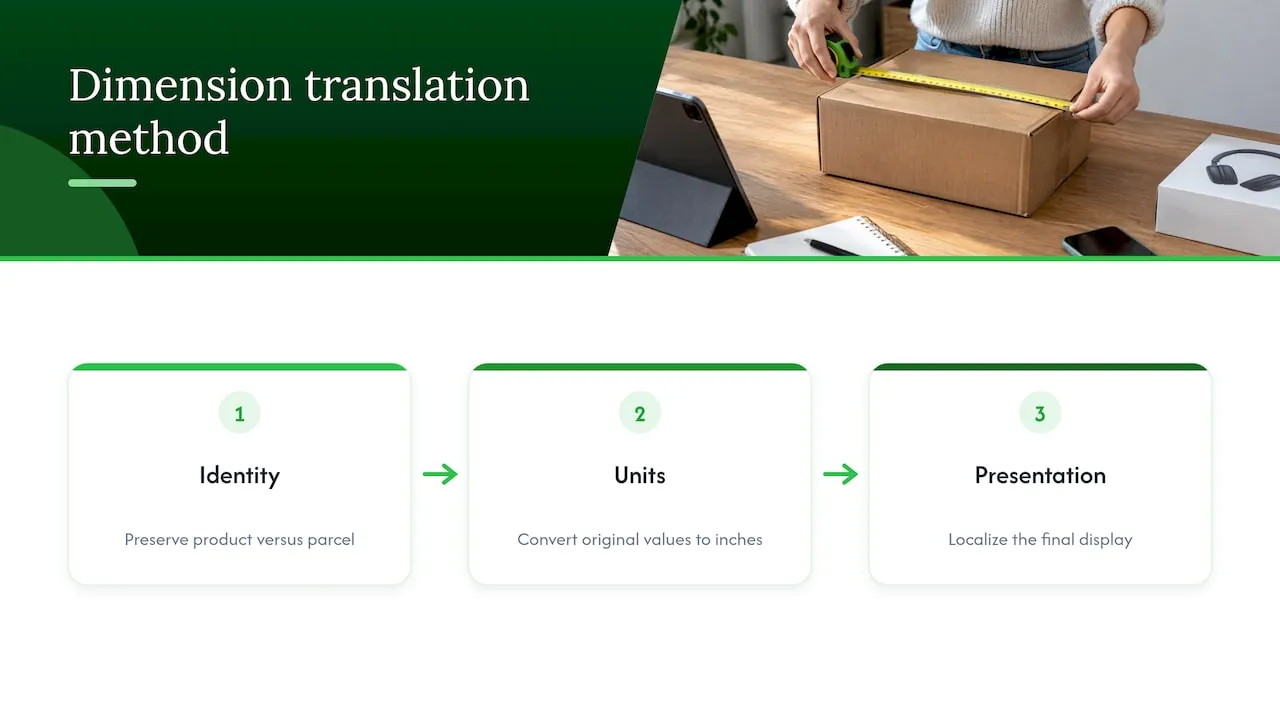
Step 1: Preserve identity
For every imported product, record which measurement you have. A useful record, as a Shopify text guide on units and sizes suggests, includes the product or variant, the dimension name, the source value and unit, the measurement method and product state, the data source, an owner and a review date. For a dropshipping store you can shrink this to a spreadsheet with these columns:
- SKU or variant
- Dimension name (length, width, height, diameter)
- Source value and source unit
- What it describes (item, box, parcel)
- Assembled or folded
- Checked by and date
Variants matter here. A “Large” and a “Small” often share one supplier line, and the dimensions in the description may belong to only one of them. Keep a separate row for each variant.
Step 2: Convert units
Convert the source value to inches, using the original number, never a number that has already been rounded. Our own guide to Shopify measurement units covers weight and unit pricing alongside dimensions, and our five-step guide to size conversion goes deeper on sizing for clothing and accessories.
Step 3: Localise presentation
Only now do you decide how it looks on the page: inches first, optional centimetres in brackets, labelled values, a sensible number of decimals, and a consistent separator. Inches are the norm in US packaging, shipping and printing, and using centimetres for US orders creates confusion across the supply chain.
Converting centimetres and millimetres to inches
The fixed relationship is 1 inch = 2.54 centimetres, which is the figure in NIST’s conversion table as cited by a Shopify units guide. Divide centimetres by 2.54 to get inches. For millimetres, divide by 25.4.
| Centimetres | Inches (2 decimals) | Display as |
|---|---|---|
| 10 | 3.94 | 3.9 in |
| 15 | 5.91 | 5.9 in |
| 25 | 9.84 | 9.8 in |
| 30 | 11.81 | 11.8 in |
| 40 | 15.75 | 15.7 in or 15.75 in |
| 50 | 19.69 | 19.7 in |
| 60 | 23.62 | 23.6 in |
| 100 | 39.37 | 39.4 in |
A few habits keep conversions honest:
- Round once. Convert from the original number and round at display time only. Rounding twice drifts the result.
- Match decimals to the product. A phone case deserves two decimals; a sofa does not need more than one.
- Do not turn decimals into fractions by guesswork. 15.75 in is 15 3/4 in, but only write fractions if you do it consistently across the catalogue.
- Keep centimetres in brackets if the supplier’s range is cm-based. Some US buyers also compare against international sizes.
The same logic applies to clothing measurements, where supplier charts often list cm for chest or waist. Our clothing size conversion pilot guide walks through a 50 to 200 SKU test, and the guide on size chart mapping shows how to match each product to the right chart.
A worked example
Say a supplier lists a storage bin as “Size: 60×40×30cm”, with no further explanation.
1. Identity. You check the photos and the supplier’s note. The bin is shown assembled, and a separate line says “Package: 62×42×12cm”, so the bin ships flat. The 60×40×30 figure is the assembled product. The second figure is the parcel.
2. Units. Convert the product figures:
- 60 ÷ 2.54 = 23.62 in
- 40 ÷ 2.54 = 15.75 in
- 30 ÷ 2.54 = 11.81 in
Convert the parcel figures from the original numbers as well: 62 cm is 24.41 in, 42 cm is 16.54 in and 12 cm is 4.72 in.
3. Presentation. The product page reads:
Assembled size: Length 23.6 in × Width 15.7 in × Height 11.8 in (60 × 40 × 30 cm). Ships flat.
The parcel measurements go into a shipping field or metafield, and do not appear on the product page unless buyers care.
The shopper sees a clear product size, and your shipping setup sees the carton. Neither contaminates the other.
Where dimensions go in Shopify
Shopify’s standard product details hold weight rather than dimensions. One guide to shipping dimensions explains the usual route: create product metafields under Settings > Metafields and enter length, width and height for each product. A separate walkthrough also describes a packed product size field in the admin, with length, width and height in inches or centimetres. Check your own admin, since Shopify changes its interface regularly.
A sensible structure for a US store:
- Product dimensions (metafields): length, width and height of the item, in inches, displayed in the specifications block.
- Package dimensions (shipping app or packed-size field): the outer parcel, in inches, used for rates.
- Weight: the standard Shopify weight field, in pounds or ounces.
Doing it in bulk
Editing dimensions product by product does not work past a few dozen SKUs. Many shipping apps let you export a CSV, add length, width and height in a spreadsheet and import it again. That is the same spreadsheet you built in step 1 of the method, with converted inches in the right columns.
If you import products from several marketplaces, the descriptions will contain dimensions in different units and different formats (“604030CM”, “L60 W40 H30”, “23.6x15.7x11.8 inch”). Cleaning that up is covered in our guides on bulk editing product pages and cleaning up product listings.
How dimensions affect shipping
Shipping rates are driven by the packed box. A quality-inspection guide explains that carriers apply dimensional weight formulas to the exterior size of the packed box, not the product. Using product size in a shipping field can therefore under- or over-charge customers.
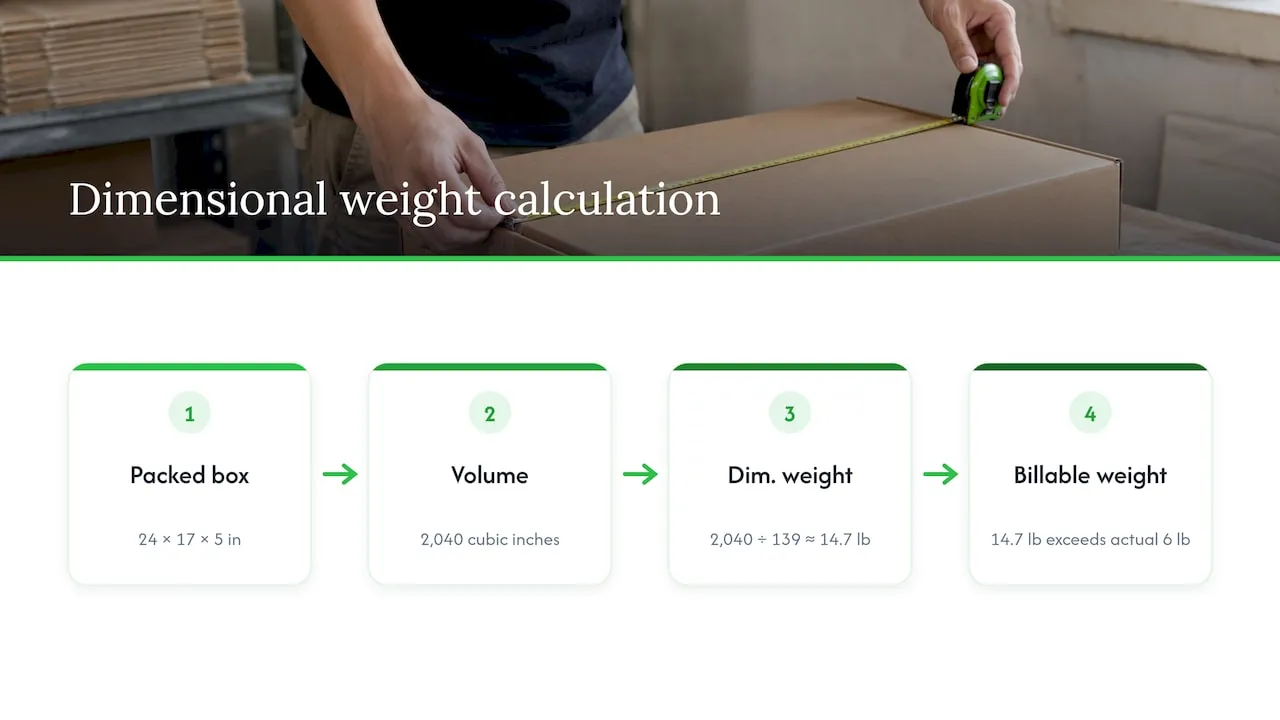
Carriers publish their own formulas. In one UPS rate and service guide, dimensional weight is length × width × height in inches, each rounded to the nearest whole inch, divided by 139. Billable weight is the greater of actual weight and dimensional weight. That guide covers the U.S. Virgin Islands, so check the current guide for your own service and lanes, because divisors and rules differ.
Using that formula as an illustration only: a parcel of 24 × 17 × 5 in (rounded from the example above) gives 2,040 cubic inches, and 2,040 ÷ 139 is about 14.7 lb. If the parcel weighs 6 lb, the carrier bills on the larger figure. A flat-packed item can therefore cost more to ship than its weight suggests, which is a good reason to store parcel measurements precisely.
A pre-publish checklist for supplier dimensions
Run this before a product goes live.
- Identity confirmed. You know whether the figures describe the item, the box or the parcel, and in what state.
- Units confirmed. Every value has a unit, and you converted from the original number.
- Order labelled. The listing says which number is length, width, height or depth.
- Variants separated. Each size option has its own measurements.
- Tolerance considered. In one inspection study, package dimensions varied by up to 0.2 inch, enough to stop boxes fitting a master carton. Add a margin when sizing for fit.
- Product changes tracked. GS1 standards say a change of more than 20% in a physical dimension on any axis, or in gross weight, requires a new GTIN. If your supplier changes an item that much, treat it as a new product in your records.
- Review date logged. Suppliers revise products without telling you.
If you sell products with GTINs or submit a feed to Google, consistent data helps there too. For a broader view on making each page distinct, see our guide on building unique product catalogs and the common listing challenges fix guide.
Our perspective
Dimensions look like a small detail until you list 300 products. Then they become the line that most often goes wrong: a centimetre figure copied untouched, a box size mistaken for an item size, three formats in one catalogue.
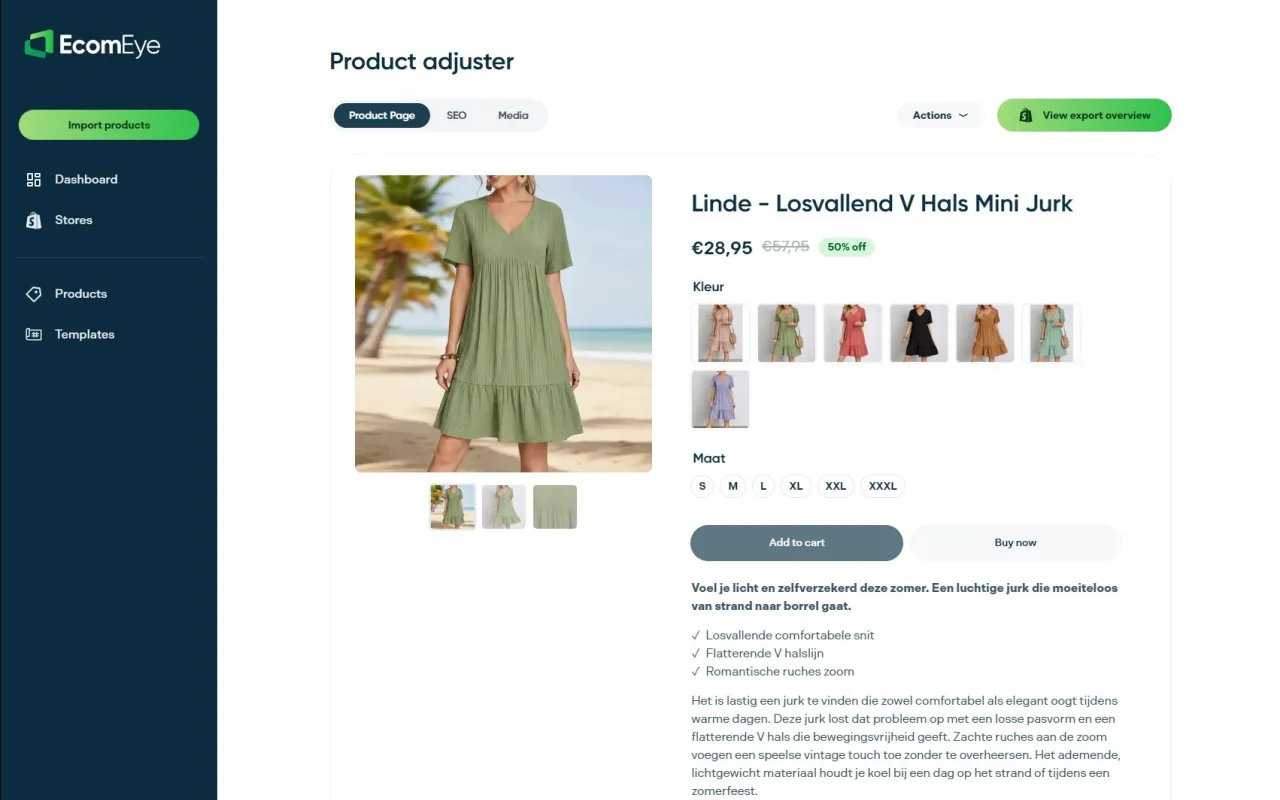
Our view is that translation should happen in the same pass as everything else on the page. When you import a product from AliExpress, Amazon, Temu or a competitor’s Shopify link into EcomEye, the title, the description and the specification block are generated together, and the size system conversion sits beside the template and bulk editing tools. That means one consistent format across the whole batch, instead of fixing each product by hand.
We also think the editorial rule matters more than the tool: keep identity, then units, then presentation. Our platform is designed to make that routine for stores that publish in bulk, so your pages read as unique, clean and ready for Google Merchant Center.
Koen
Put it into practice with EcomEye
If you are publishing dozens or hundreds of products, we built EcomEye to remove the manual part. Import products in bulk, generate unique titles and descriptions with consistent, converted measurements through our AI product description generator, then export to Shopify in one click. Plans on our pricing page start with Try-out at €39 per month, with Scaler at €99 per month.
Need matching visuals? The AI product image generator creates product images for the same batch, and our guide on Shopify image dimensions explains sizing images at scale.
FAQ
What is the correct way to write dimensions?
Write each value with its unit and label, in a fixed order. For shipped boxes use length × width × height, and for furniture-style items use width × depth × height. A line such as “Length 23.6 in × Width 15.7 in × Height 11.8 in” leaves no room for misreading.
Is it L × W × H or W × D × H?
Both are used. Shipping and packaging in the US use length × width × height, while furniture and retail often use width × depth × height. Pick the one that fits the product type and label the values.
How do I add dimensions to a Shopify product?
The standard product page has a weight field, so create product metafields for length, width and height under Settings > Metafields, or use a shipping app that stores a packed size. Check your current Shopify admin, as the layout changes. For many products, export a CSV, fill in the columns and import it again.
Are product dimensions the same as package dimensions?
No. Product dimensions describe the item, and package dimensions describe the box it ships in. Carriers calculate rates from the packed box, so keep the two in separate fields.
Should I show centimetres to US customers?
Lead with inches, since they are the norm in US packaging and shipping. Adding centimetres in brackets is fine for international buyers, as long as both come from the same original number.
Sources
- What Is the Difference Between Box Dimensions and Product Dimensions
- Product Size or Package Size? 7 Measurements to Check
- Add Product Dimensions to your GTIN, GS1 US
- Product Data Quality in Data Hub, GS1 US
- Length Width Height Order: How to List Dimensions
- How to Write Dimensions for Packaging Boxes and Design
- How to Properly Write Dimensions: Length, Width, and Height
- How to Write Dimensions: Order and Guidelines
- Translate Product Dimensions & L×W×H
- How to Handle Units, Sizes, and Measurements in Global Shopify Stores
- How to Add Shipping Dimensions in Shopify
- Can you add product dimensions without coding?
- Product Dimensions in SMART Shipping Rates & Rules
- Product Dimensions vs. Package Dimensions: A Quality Inspector’s Guide
- UPS Rate and Service Guide, U.S. Virgin Islands