Unique Product Titles on Shopify: How to Write Them at Scale
Learn how to write unique Shopify product titles that rank, pass Google Merchant checks and stay readable, with formulas, examples and a bulk workflow.

Unique Product Titles on Shopify: How to Write Them at Scale

A unique Shopify product title describes one specific product in plain words, puts the main keyword near the front, stays at around 60 characters and differs from every other title in your store and from the supplier’s original. Do that for each product and each variant, and you avoid the duplicate-content and feed problems that sink many dropshipping stores. This guide shows the rules, the formulas and a workable way to do it for hundreds of products.
TL;DR
- Write each title for one product, with the primary keyword first, the key attributes (colour, size, material) next and the brand last. Shopify recommends 60 characters or fewer for the page title.
- Never paste the supplier’s title. Copied titles create duplicates across stores, and duplication is the most common title mistake in large catalogues.
- Keep promotional text such as ‘free shipping’ or ‘buy one get one’ out of titles. Google’s feed rules prohibit it and non-compliance can lead to disapproval.
- Use a repeatable pattern, then generate and edit in bulk through CSV or an AI tool rather than one product at a time.
Table of Contents
- What ‘unique’ means for a Shopify product title
- Why duplicate titles hurt
- The anatomy of a good product title
- Before and after: titles that pass the test
- How long should the title be?
- Handling variants and near-identical products
- Titles for shoppers and for AI search
- A simple process for writing titles that are unique
- Updating titles in bulk on Shopify
- Our perspective
- Generate unique titles in bulk with EcomEye
- Mistakes that make titles less unique
- What to expect, realistically
- FAQ
- Sources
What ‘unique’ means for a Shopify product title
Unique does not mean clever or unusual. It means two things at once: no two products in your store share a title, and your title is not a copy of the one on the supplier’s listing or a rival’s page.
The first part is about clarity. If you sell ten similar phone cases and all are called ‘Phone Case’, neither shoppers nor search engines can tell them apart. The second part is about originality. Dropshippers who import from AliExpress, Amazon or Temu tend to inherit the same keyword-stuffed titles as thousands of other stores. Identical text on many sites gives Google no reason to prefer yours.
It also helps to separate three fields that people often mix up:
| Field | What it is | Where shoppers see it | Typical length |
|---|---|---|---|
| Product title | The name of the product in Shopify admin. Shopify uses it to generate the page’s H1 | On the product page, in collections and in cart | As short as it can be while staying specific |
| Page title (title tag) | The clickable link in search results | Google results, browser tabs | Up to 70 characters in the field, 60 recommended |
| Meta description | The summary shown under the title tag | Google results | Around 120 to 160 characters |
If you leave the page title blank, the theme builds one from the shop name and the product title, in either order. That is fine as a fallback, but it means a weak product title becomes a weak search listing too. Shopify’s own guidance on metadata describes a meta title of roughly 50 to 60 characters and a meta description of 120 to 160, and says unique metadata for each page helps pages stand out from competitors and from your own other pages.
Why duplicate titles hurt
There are three practical costs.
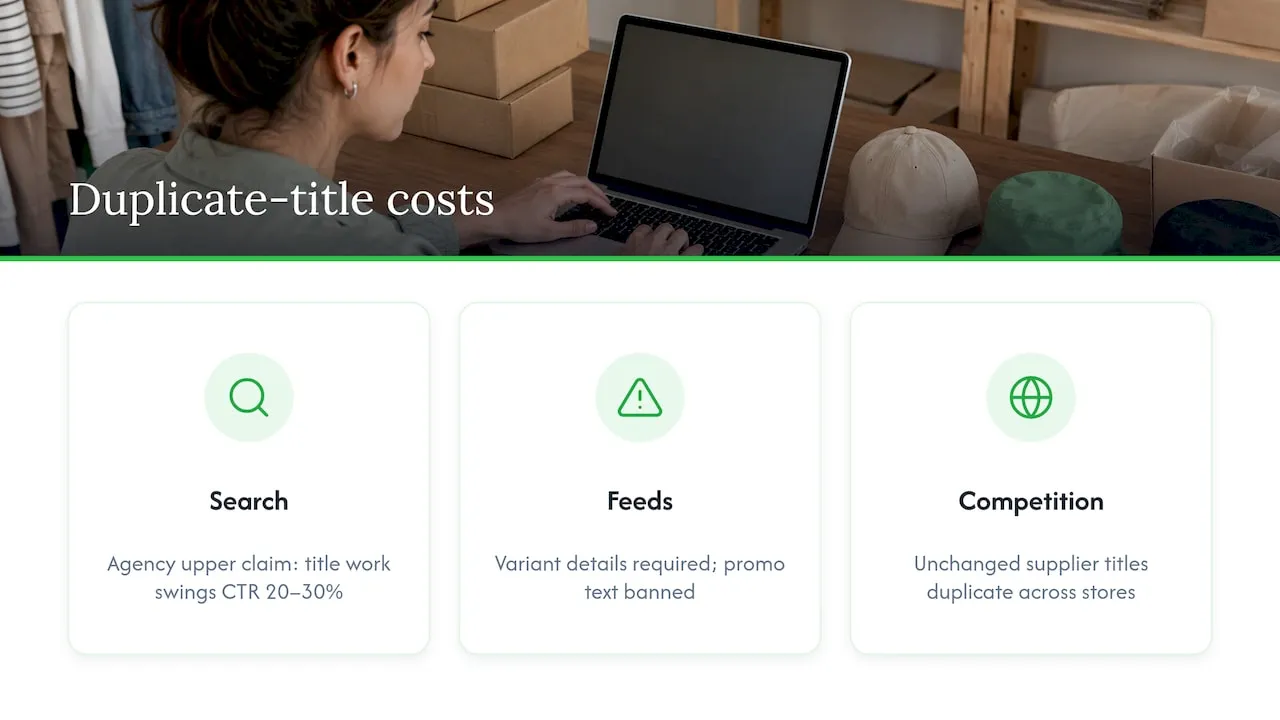
Search listings blur together. When several of your pages carry the same title tag, Google and shoppers cannot tell which one answers a query. One marketing agency’s feed guide calls duplication the most common title mistake in large catalogues, and says focused title work can swing Google Shopping click-through rate by 20 to 30%. Treat that as an upper-range claim from one agency, not a promise for your store.
Feeds get disapproved. Google’s product data specification asks you to tell variants apart by adding each variant’s distinguishing details to the title, and it bans promotional text and extra white space, according to an analysis of 151 Shopping listings. If your titles are copied and generic, you are more likely to trip those checks.
You compete with every store using the same source text. A dropshipping store that imports a supplier title unchanged is one of many pages with the same words. Our guide on why product page uniqueness matters for Shopify SEO goes deeper on the page-level version of this problem.
The anatomy of a good product title
Shopify’s help centre advice is short: use a unique, descriptive title with the important keywords near the beginning, and make it easy to understand. Other guides add detail. Here is a structure that fits that advice.
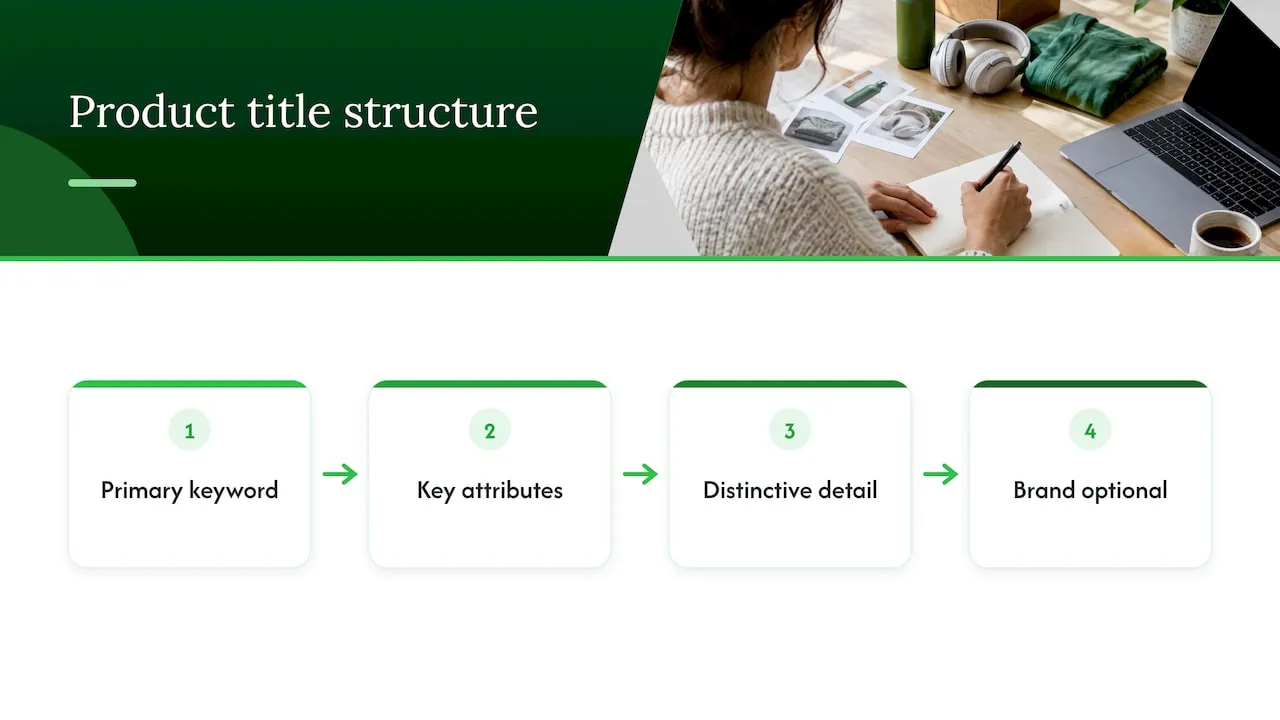
Primary keyword + key attributes + distinguishing detail + brand (optional)
Start with what the shopper types
Put the product noun first. A ConvertCart analysis makes the point that search engines and shoppers both weight the front of a title more heavily. Their example: ‘Whole Home Security System 9-piece - White’ beats ‘White 9-piece SimpliSafe Kit for Whole Home Security’, because the second buries the phrase shoppers actually search for.
Google makes a similar point for Merchant Center. It says users usually see only the first 70 or fewer characters of a title and recommends putting the most important details first.
Add the attributes people filter by
Colour, size, material, gender, style and compatibility are the usual modifiers. A Cloudinary guide suggests including the most important variant attributes when they are common search terms. Do not add all of them. Choose the two or three that actually separate this product from its neighbours.
This is where specificity pays. An independent retailer’s online fashion retail guide shows how a category such as skate-inspired clothing gets its identity from concrete product attributes, which is exactly what a useful title does in a few words.
End with the brand, if it helps
Search Engine Land’s advice on bulk optimisation is to use the product name followed by the business or brand name at the end, and to aim for a relevant title rather than fancy keywords. For a small store with little brand recognition, the brand suffix is optional in the product title and often better left to the page title template.
Leave out the noise
Remove:
- promotional phrases (free shipping, sale, best price)
- repeated keywords
- capital-letter shouting and symbols
- the supplier’s code strings and model numbers, unless shoppers search for them
- double spaces
Before and after: titles that pass the test
Here is how typical imported titles can be rewritten. These are illustrative examples, not data from a live store.
| Imported supplier title | Problem | Unique rewrite |
|---|---|---|
| 2025 NEW Hot Sale Women Yoga Pants High Waist Gym Leggings Free Shipping | Promo text, year, stacked keywords | High-Waisted Yoga Leggings for Women, Black, Sizes S-XL |
| Pet Dog Cat Bed Warm Soft Cozy Round Sleeping Mat Kennel | Six synonyms, no clear product | Round Calming Dog Bed, Washable Plush, 24 in |
| Mini Portable Blender USB Rechargeable Juicer Cup Smoothie Fruit Mixer | Keyword list | Portable USB Blender for Smoothies, 380 ml, Rechargeable |
Each rewrite names the product first, adds two or three real attributes and reads like something a person would say. Each stays within 60 to 70 characters.
Note what the rewrites do not do. They do not invent features. If the source product does not wash in a machine, the title must not say washable. Accuracy is part of uniqueness, because a unique but wrong title creates returns and feed problems.
How long should the title be?
There are three numbers worth knowing, and they come from different places.
- 60 characters is Shopify’s recommendation for the page title, to avoid shortened titles in search results. The field itself allows up to 70.
- Roughly 600 pixels is the display width Shopify’s blog cites as Google’s limit, which is why it suggests 50 to 60 characters for title tags. Wide letters take more room than narrow ones, so character counts are a guide only.
- 150 characters is the maximum Google allows for an item group title in Merchant Center, though users usually see only the first 70 or so.
In practice: keep the on-page product title short and clear, aim for 60 or fewer in the page title, and put the essential words in the first half so nothing important is cut off.
Handling variants and near-identical products
The hardest uniqueness problem is not between different products. It is between a product and its own variants, or between near-identical items such as the same hoodie in six colours.
Google Merchant Center’s approach is to use an item group title for the shared name of all variants, kept shorter and more generic, while each variant has its own title with the distinguishing attribute. Shopify’s structure maps onto this naturally:
- Give the product a clean, generic title: ‘Fleece Pullover Hoodie for Men’.
- Let colour and size live in variant options in Shopify.
- Make sure your feed or app adds the variant attribute to the variant title, for example ‘Fleece Pullover Hoodie for Men, Forest Green, L’.
For genuinely similar products, such as two blenders with different capacity, put the differentiating spec in the title (capacity, power, material) rather than a vague adjective like ‘premium’.
Titles for shoppers and for AI search
Titles now serve two readers. One guide on AI agent discovery describes it as one reader scanning for size and colour and the other ingesting the title for embedding. The advice that follows is simple: a title that is clear to a person and explicit about attributes tends to work for both. Avoid cute names that need context. A title should make sense when read alone, with no image or collection heading beside it.
If you want to go further on this, our article on descriptive product titles and SEO covers what vague titles cost, and the one on optimising product page titles covers conversion.
A simple process for writing titles that are unique
Whether you have 20 products or 2,000, the same steps apply.
- Define your pattern. Pick one formula per product type, such as: product noun, key attribute, audience or use, size or count. Write it down so every title follows it.
- Collect the real attributes. Pull colour, material, dimensions and compatibility from the supplier’s data and check them against the product.
- Write the primary keyword first. Use the words a shopper would type, not the supplier’s phrasing.
- Check for collisions. Sort your titles alphabetically in a spreadsheet and look for duplicates and near-duplicates. Rename anything that matches.
- Set the page title and meta description separately if the product title is long or you want a brand suffix.
- Review a sample by eye. Read ten titles aloud. If one sounds like a keyword list, rewrite it.
Updating titles in bulk on Shopify
Shopify’s own guide to bulk editing lists four options: the built-in bulk editor, CSV upload, third-party apps and API integration. It recommends CSV files once you are editing more than 50 products at once.
A CSV workflow looks like this:
- Export your products from Shopify admin.
- Open the file in Excel or Google Sheets and edit the title and SEO title columns. One practical walkthrough suggests using find and replace on the SEO Title Tag column for pattern fixes.
- Re-import the file with the option to overwrite existing products selected.
- Spot-check ten products on the live store.
Take a backup export before you import. Overwriting is fast, and so is a mistake.
Developers can also use the productUpdate mutation in the GraphQL Admin API to change product-level fields such as the title. For most store owners, CSV or an app is the easier route. More on this in our bulk editing guide.
The limit of CSV editing is that it changes words but does not write them. Find and replace can tidy a pattern, yet it cannot turn 500 supplier titles into 500 distinct ones. That needs either a lot of hours or a generator.
Our perspective
Most dropshipping stores that struggle in Google do not have a traffic problem first. They have a sameness problem. The titles, descriptions and images come from the same supplier feed that many other stores use, and the store ends up as a copy of copies.
We built EcomEye around the idea that every listing should be unique to the store that publishes it, even when two merchants start from the same product link. Our platform generates titles, descriptions and AI product images for each user, so there is no copied text to carry copyright or duplicate-content baggage. We designed it to produce SEO-optimised content that fits Google Merchant Center expectations, with tools for variant management built in.
The title is where we would start. It is short, it is the part shoppers read first, and it is the part most likely to be pasted unchanged. Fix the title pattern, and the rest of the page has a foundation to build on. Doing that in bulk, with a template you control and an export to Shopify in one click, turns a week of rewriting into a short review session.
Koen
Generate unique titles in bulk with EcomEye
If you import products from AliExpress, Amazon, Temu or a competitor’s Shopify link, EcomEye generates optimised titles, clean descriptions and AI product images for each one, in several languages if you sell across markets. You can use built-in templates and bulk editing to keep your title pattern consistent, then export to Shopify in one click.
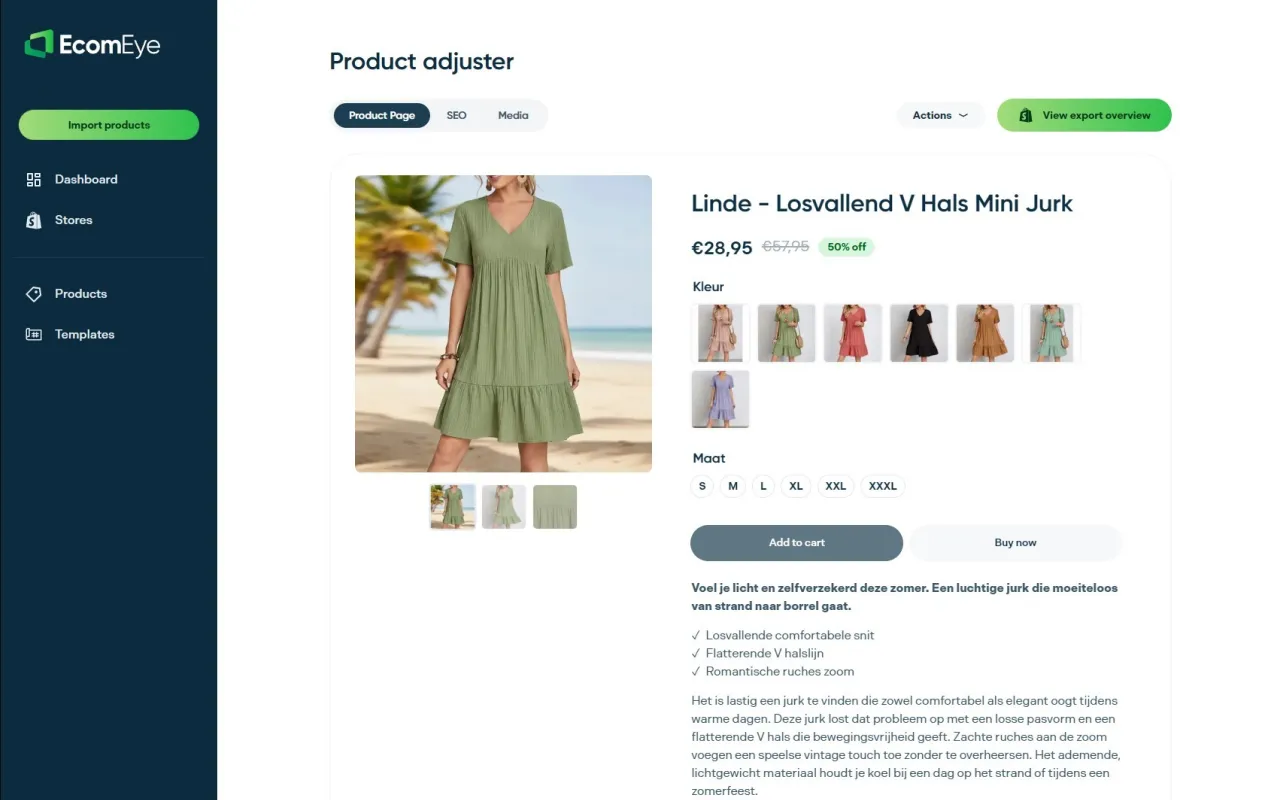
The Try-out plan costs €39 per month and the Scaler plan costs €99 per month, as published on our pricing page. If you only want to start with copy, try the AI product description generator, and add the AI product image generator when your visuals need the same treatment.
For a hands-on way to begin, our walkthrough on how to test five SKUs for SEO-ready AI titles shows a low-risk first run.
Mistakes that make titles less unique
- Changing one word. Swapping ‘Hot Sale’ for ‘Best Seller’ is not a rewrite. Rebuild the title from the product’s attributes.
- One title pattern for every product type. A formula for apparel will not suit electronics. Define a pattern per category.
- Identical titles across variants in feeds. If a feed shows six identical titles, the shopper cannot choose, and Google’s rules ask for variant details in the title.
- Over-optimising. The goal is a relevant, readable title, not a clever one. Search Engine Land makes the same point about bulk title tags.
- Forgetting the meta fields. A strong product title with an empty meta description leaves a gap in the search listing. Our post on SEO metadata for dropshipping stores explains how to fill it.
What to expect, realistically
Titles are one part of ranking. Page content, internal links, speed and reviews all count. Titles are also one of the quickest things to fix across a whole catalogue, and they affect both organic listings and Shopping feeds. Treat rewriting as the first pass in a wider plan, like the one in our Shopify product SEO guide and our ecommerce SEO best practices. Once titles are clean, descriptions are the next layer, and our product description ideas show where to go.
Give changes time to be recrawled, and compare results by product group rather than store-wide, so you can see which pattern works.
FAQ
Does every Shopify product need a different title?
Yes. Each product page should carry its own title and its own page title, so search engines and shoppers can tell them apart. Shopify’s guidance asks for a unique, descriptive title for exactly this reason. Variants of one product can share a product title, with the variant detail added in feeds.
Is the product title the same as the SEO title?
Not necessarily. The product title is the name shown on the page and used to generate the H1. The SEO title is the title tag shown in search results. If you leave the SEO title blank, the theme builds one from the shop name and the product title, so you can customise it when you need a different length or a brand suffix.
What is the best length for a Shopify product title?
Aim for 60 characters or fewer for the page title, since Shopify recommends that to avoid truncation. The field allows up to 70. Put the most important words first, because Google says users usually see only the first 70 characters or fewer of a Merchant Center title.
Can I edit hundreds of titles at once?
Yes. Shopify supports bulk editing through its built-in editor, CSV upload, apps and the API, and recommends CSV for more than 50 products. If you also need new wording rather than edits to existing text, a generator such as EcomEye can create unique titles in bulk and export them to your store.
Should I include my brand name in the product title?
It is optional. The usual advice is to put the brand at the end, after the product name, and many stores add it through the page title template rather than the product title. Keep the keyword and key attributes at the front either way.
Sources
- Shopify Help Center: Adding keywords for SEO
- Shopify Blog: Metadata for SEO
- Shopify Blog: How to write SEO title tags
- Shopify Blog: SEO bulk editor
- Shopify.dev: Update product data
- Google Merchant Center: Item group title
- Search Engine Land: Bulk product optimisation
- Scube Marketing: Optimising product feeds for large catalogues
- Store Growers: Product title optimisation
- ConvertCart: Product title optimisation
- Cloudinary: Shopify product page SEO
- Kahunam: Bulk-correcting meta titles
- Lumio: Writing product titles for AI agents
Ready to boost your product pages?
Generate high-converting, SEO-optimized product pages in bulk using AI automation used by e-commerce experts.
No credit card required