Product listing audit checklist for Shopify dropshippers
Enhance your Shopify store's performance with our product listing audit checklist. Stop conversion leakage and boost sales today!

Product listing audit checklist for Shopify dropshippers

A clean product listing audit delivers one outcome: every page on your store earns its place by being unique, crawlable, commercially accurate, and ready to be cited by both Google and AI discovery tools. Run this checklist and you will stop the three most common causes of conversion leakage: duplicate supplier copy, missing schema, and broken feed attributes.
Priority actions to run right now:
- Export your Shopify catalogue as a CSV and flag any title or description that matches a supplier page word-for-word.
- Open Google Search Console and filter for pages with impressions but zero clicks — these are your highest-ROI rewrite targets.
- Check your Google Merchant Centre for active disapprovals; fix price mismatches and missing GTINs before anything else.
Table of Contents
- What does a product listing audit checklist cover?
- Technical SEO checks: URLs, canonicals, meta tags and schema
- How do you detect and fix duplicate content at scale?
- Image and media audit: what to check and how to scale it
- Commerce and conversion checklist: pricing, VAT, shipping and trust signals
- Google Merchant Centre checks: common disapprovals and UK feed fixes
- How do you make listings discoverable by AI and generative search tools?
- How to run bulk audits at scale: cadence, CSV templates and roles
- How do you measure whether listing fixes actually worked?
- Sample CSV checklist and scoring rubric
- Key takeaways
- Why audits must become an operating rhythm, not a one-off task
- Ecom-eye cuts the bulk rewrite bottleneck for Shopify dropshippers
- Useful sources and references
- FAQ
What does a product listing audit checklist cover?
A complete listing audit spans five grouped areas. Use the table below to triage by severity, then work through each group, in order.
| Group | Check | Severity |
|---|---|---|
| Technical SEO | Canonical tag present and correct | Critical |
| Technical SEO | Unique meta title (includes key descriptor) | Critical |
| Technical SEO | Product schema (JSON-LD) valid | High |
| Content | Title unique vs supplier and competitors | Critical |
| Content | Description 150+ words, original copy | High |
| Content | Bullets lead with benefit, not feature | Medium |
| Media | Hero image should have a neutral background and sufficiently high resolution for clear display. | High |
| Media | Alt text descriptive, includes product attributes | High |
| Media | Images copyright-safe or AI-generated | Critical |
| Commerce | Price matches Merchant feed exactly | Critical |
| Commerce | Shipping cost or free-shipping threshold visible | High |
| Commerce | UK VAT-inclusive price displayed | Critical |
| Feed | GTIN or brand present in feed | Critical |
| Feed | Availability field matches live stock | High |
| Feed | No mismatched price between page and feed | Critical |
Statistic callout: A practical product listing checklist uses multiple validation points across SEO, media, Google Shopping, and UX, noting that qualitative checks require human review. identifies that several items are automatable, but qualitative checks — copy uniqueness and image quality — always require human review.
CSV column names for a rapid sweep: handle, title, body_html, vendor, variant_sku, variant_price, variant_inventory_qty, image_src, meta_title, meta_description, google_shopping_gtin, google_shopping_mpn.
Technical SEO checks: URLs, canonicals, meta tags and schema
Fix technical issues first. A page-by-page copy rewrite on a broken crawl foundation wastes every hour you spend on it.

| Element | Test | Pass criteria |
|---|---|---|
| URL slug | Lowercase, hyphens only, no parameters | /blue-cotton-tote-bag not /product?id= |
| Canonical tag | Present on every product and variant URL | Points to the clean, primary product URL |
| Meta title | Unique, includes material/use case/model | Under 1000 pixels on longest side |
| Meta description | Unique, benefit-led | — |
| Product schema | JSON-LD with name, image, description, offers | Validates in Google’s Rich Results Test |
| Core Web Vitals | Fix LCP before moving on | Measured in Lighthouse or PageSpeed Insights |
Step-by-step technical audit:
- Crawl your store with Screaming Frog or Sitebulb; export all product URLs.
- Filter for pages missing a canonical tag or carrying a
noindexdirective. - Check variant URLs (e.g.
/product-red,/product-blue) — each should carry a canonical pointing to the primary product URL. - Validate schema on your top 20 revenue pages using Google’s Rich Results Test.
- Run Lighthouse on mobile for your three highest-traffic templates; fix LCP before moving on.
Pro Tip: Audit by template, not by page. If one product page has a missing meta description, they all do. Fix the template and the change propagates across your entire catalogue instantly.
For a detailed walkthrough, the product page audit workflow guide covers each step with Shopify-specific field references.
How do you detect and fix duplicate content at scale?
Duplicate copy is the single biggest SEO liability for dropshippers. Google has repeatedly reduced visibility for product pages with thin or copied content, and the problem compounds when you import hundreds of SKUs from AliExpress or Temu.
Detection methods:
- Run a checksum comparison on your
body_htmlcolumn in the exported CSV; identical hashes flag exact duplicates instantly. - Use a fuzzy-match tool (e.g. Python’s
difflibor a spreadsheet formula) to catch near-duplicates where only the colour or size name differs. - Sample 10% of your catalogue manually each month; if more than two pages share the same opening sentence, treat the whole batch as at risk.
Rewriting to a GEO-ready format:
Before (scraped supplier copy): “High quality tote bag. Good for shopping. Available in blue.”
After (unique, outcome-first): “This 300g cotton tote carries a full weekly shop without the handles stretching. The reinforced base holds up to 8kg, and the natural dye is certified OEKO-TEX Standard 100.”
The after version answers a buyer’s real question, includes a verifiable fact, and gives an LLM something concrete to cite. That is what GEO-ready content looks like in practice.
Pro Tip: When supplier specs are accurate and verifiable (dimensions, certifications, material weights), cite them directly rather than paraphrasing. Paraphrasing introduces errors; citing adds credibility.
The bulk content generation guide explains how to apply this at catalogue scale without rewriting each page by hand.
Image and media audit: what to check and how to scale it
Images carry the conversion burden on mobile. A blurry hero image or a watermarked supplier photo costs you the sale before the buyer reads a word.
Image standards checklist:
- Hero image: neutral or white background, minimum 1000px on the longest side, WebP format preferred.
- At least three angles per product; lifestyle shot optional but high-impact for fashion and home categories.
- Alt text: descriptive, includes product name and one key attribute (e.g.
300g natural cotton tote bag with reinforced base). Never stuff keywords. - No supplier watermarks, no screenshots, no images pulled from competitor listings.
- AI-generated images: confirm your generation tool produces commercially licensed output before publishing.
Bulk image workflow:
- Export
image_srccolumn from Shopify CSV. - Run a batch check for broken URLs (HTTP 404) using a URL checker script or Screaming Frog.
- Compress all images through Squoosh or ShortPixel before re-upload; target under 150KB per image.
- Name files using the SKU convention:
sku-angle-colour.webp(e.g.TB001-front-blue.webp). - Map each image file to its SKU in a master spreadsheet before bulk upload.
Ecom-eye’s AI image generator produces copyright-safe product images at scale, removing the supplier watermark problem entirely.
Commerce and conversion checklist: pricing, VAT, shipping and trust signals
UK shoppers expect to see the VAT-inclusive price before they reach checkout. Displaying a price ex-VAT and then adding it at the basket is a known conversion killer and, for B2C sales, a legal requirement under UK Consumer Rights Act pricing rules.
Conversion checklist:
- Price shown on the product page matches the Google Merchant feed exactly (penny-perfect).
- VAT-inclusive price displayed for all B2C listings; VAT rate applied correctly for the product category.
- Shipping cost or free-shipping threshold visible above the fold, not buried in a footer.
- Estimated delivery date shown (e.g. “Delivered in 5–9 working days”) rather than a vague “ships soon.”
- Variant names consistent across the catalogue (e.g. always “Navy Blue,” never mixing “Navy,” “Dark Blue,” and “Navy Blue” for the same colour).
- Low-stock badge triggers at a defined threshold (e.g. fewer than five units) and reflects live inventory.
- Returns summary visible on the product page: minimum return window and who pays return postage.
Pro Tip: Treat your product page like a retail display — if a shopper has to hunt for the price, the shipping cost, or the returns policy, they will leave. Put the three most conversion-critical facts within the first screen.
Google Merchant Centre checks: common disapprovals and UK feed fixes
Merchant disapprovals stop your products appearing in Shopping results entirely. Fix suppression issues before any other feed work, as Eva’s audit workflow confirms: suppressed listings cannot earn impressions regardless of how good the copy is.
Most common UK disapproval reasons:
- Price mismatch between the landing page and the feed.
- Missing or invalid GTIN (use the product’s barcode; if none exists, set
identifier_exists: false). - Missing
brandattribute. availabilityfield set toin stockwhen the variant is actually out of stock.- Images failing Google’s policy (watermarks, text overlays, placeholder images).
Step-by-step feed fix:
- Download the Merchant Centre diagnostics report as a CSV.
- Sort by “Affected items” descending; fix the highest-volume disapproval reason first.
- Correct the feed values in your Shopify product CSV or feed management tool.
- Re-upload and request a manual review for suppressed items.
- Check Google’s UK Shopping compliance requirements for dropshippers specifically, as fulfilment-from-overseas listings carry additional shipping and availability constraints.
| Disapproval reason | Fix |
|---|---|
| Price mismatch | Sync feed price with Shopify variant price in real time |
| Missing GTIN | Add barcode or set identifier_exists: false |
| Invalid image | Replace with clean, policy-compliant image |
| Incorrect availability | Connect feed to live inventory; update on every stock change |
How do you make listings discoverable by AI and generative search tools?
GEO (Generative Engine Optimisation) means writing listings so that LLMs like ChatGPT, Perplexity, and Google’s AI Overviews can extract and cite specific facts from your pages. Keyword density alone does not achieve this.
GEO signals to include in every listing:
- What it is: one clear sentence stating the product type, material, and primary use.
- Who it is for: a specific audience or use case (e.g. “for runners logging over 30 miles per week”).
- Constraints: size range, weight, compatibility, warranty length.
- Verifiable facts: certifications, test results, material percentages.
Short-answer FAQ template (place at the bottom of each product page):
Q: What is this product made from? A: 300g OEKO-TEX certified natural cotton.
Q: What is the return policy? A: 30-day returns; buyer pays return postage unless the item is faulty.
Testing GEO readiness:
- Paste your product description into ChatGPT and ask: “What is this product, who is it for, and what are its key specs?”
- If the model cannot answer all three questions from your copy, the listing lacks sufficient citeable facts.
- Repeat for your five best-selling SKUs; treat any failure as a rewrite trigger.
Pro Tip: Entity consistency matters sitewide. If your product page calls it a “tote bag” but your meta title says “shopping bag” and your alt text says “carry bag,” LLMs will treat them as three different products. Pick one canonical term per product type and use it everywhere.
How to run bulk audits at scale: cadence, CSV templates and roles
AwsamTech recommends a weekly light pass and a monthly comprehensive audit to prevent catalogue drift. That cadence works well for dropshipping stores where supplier stock, pricing, and availability change constantly.
Suggested cadence:
- Weekly (30 minutes): Check Merchant Centre for new disapprovals; scan Search Console for pages with dropping impressions; verify that prices in the feed match live pages.
- Monthly (2–3 hours): Full CSV export; run duplicate-content check; validate schema on top 50 SKUs; review image compliance; update low-performing descriptions.
- Ad hoc: Run a targeted audit whenever you add a new supplier batch, change a pricing rule, or receive a Merchant Centre warning.
Workflow steps:
- Export full product CSV from Shopify (Admin → Products → Export).
- Open in Google Sheets; apply conditional formatting to flag blank
meta_title,meta_description, andimage_srccells. - Run automated checks (URL format, image URL status, price consistency).
- Assign manual review tasks for qualitative items (copy uniqueness, image quality) to a team member or use Ecom-eye to regenerate at scale.
- Publish fixes via Shopify CSV import or direct bulk edit.
- Record before/after metrics in the audit report template.
For a detailed bulk optimisation workflow built specifically for Shopify dropshippers, Ecom-eye’s guide covers the exact export fields and import steps.
Pro Tip: Assign a named owner to each audit area — one person owns feed compliance, another owns content quality. Audits without ownership become everyone’s lowest priority.
How do you measure whether listing fixes actually worked?
Run a sequential test: fix one group of SKUs, leave a comparable group unchanged for four weeks, then compare the metrics below. Saucery recommends monitoring rank, CTR, and conversion trends continuously rather than waiting for a quarterly review to catch regressions.
| Metric | Where to measure | Target after fix |
|---|---|---|
| Organic impressions | Google Search Console | Upward trend within 4 weeks |
| Click-through rate (CTR) | Google Search Console | Improvement vs control group |
| Add-to-cart rate | Shopify Analytics | Measurable lift vs pre-fix baseline |
| Checkout completion | Shopify Analytics | Reduction in cart abandonment |
| Merchant feed approvals | Google Merchant Centre | Zero active disapprovals |
Test sequence:
- Select 20 SKUs with impressions but low CTR (under 2%).
- Rewrite titles and meta descriptions; update schema.
- Record baseline metrics for the week before the change.
- Measure weekly for four weeks; compare against an unchanged control group of similar SKUs.
- If CTR lifts, roll the changes across the full template.
Sample CSV checklist and scoring rubric
Export these columns from Shopify for every audit run:
handle,title,body_html,vendor,type,tagsvariant_sku,variant_price,compare_at_price,variant_inventory_qtyimage_src,image_alt_textmeta_title,meta_descriptiongoogle_shopping_gtin,google_shopping_mpn,google_shopping_brand
Scoring rubric (apply per SKU):
| Score | Meaning | Action |
|---|---|---|
| — | Fail — attribute missing or copied | Fix before publishing |
| 1 | Needs work — present but below standard | Schedule rewrite |
| 2 | Pass — meets all criteria | No action needed |
Calculate a completeness score: sum all attribute scores, divide by (number of attributes × 2), multiply by 100. A score below 70% means the SKU group needs immediate attention.
Sample audit report snippet:
| SKU group | Pre-audit score | Post-audit score | CTR change | Feed status |
|---|---|---|---|---|
| Tote bags | — | — | — | — disapprovals |
| Phone cases (30 SKUs) | — | — | +—.9 percentage points | — disapprovals |
Key takeaways
A complete product listing audit fixes duplicate content, broken feeds, and missing schema first — then builds GEO-ready copy and conversion signals on top of that clean foundation.
| Point | Details |
|---|---|
| Fix feed disapprovals first | Price mismatches and missing GTINs suppress all impressions; resolve these before any copy work. |
| Audit by template, not by page | One broken meta description on a template means every product page shares the fault. |
| GEO readiness requires citeable facts | Each listing needs a clear what, who-for, and key spec so LLMs can extract and cite it. |
| Run weekly light checks | A 30-minute weekly pass catches supplier price changes and new Merchant disapprovals before they compound. |
| Ecom-eye for bulk fixes | Ecom-eye regenerates unique titles, descriptions, and copyright-safe images at catalogue scale, removing the manual rewrite bottleneck. |
Why audits must become an operating rhythm, not a one-off task
The conventional wisdom is that you run an audit, fix the problems, and move on. That framing is wrong for dropshipping, and it is wrong in a specific way: your catalogue is not static. Supplier prices change overnight. Stock levels fluctuate. A new batch of 200 imported SKUs arrives with copied descriptions and watermarked images. Every one of those events creates fresh conversion leakage, and a one-off audit catches none of it.
The stores that protect their ad spend are the ones that treat the audit as an operating rhythm. A 30-minute weekly pass on feed compliance and a monthly full CSV sweep costs far less than the revenue lost to a suppressed Shopping campaign or a Google penalty for thin content. The common listing challenges that sink dropshipping stores are almost always preventable with a consistent process rather than a heroic one-time fix.
GEO readiness makes this even more pressing. As AI discovery tools become a meaningful traffic source, listings that lack citeable facts simply will not appear in generated answers. That is not a future problem. It is already affecting stores that copied their descriptions from suppliers and never rewrote them.
The operational shift is straightforward: assign ownership, set a cadence, and automate the checks that can be automated. Reserve human judgement for the qualitative work — copy voice, image selection, and the creative decisions that separate a high-converting listing from a passable one.
Ecom-eye cuts the bulk rewrite bottleneck for Shopify dropshippers
The audit checklist above tells you what to fix. The bottleneck for most dropshippers is the fixing itself: rewriting 500 product descriptions, generating clean images, and keeping everything consistent across a growing catalogue is not a one-person job done manually.
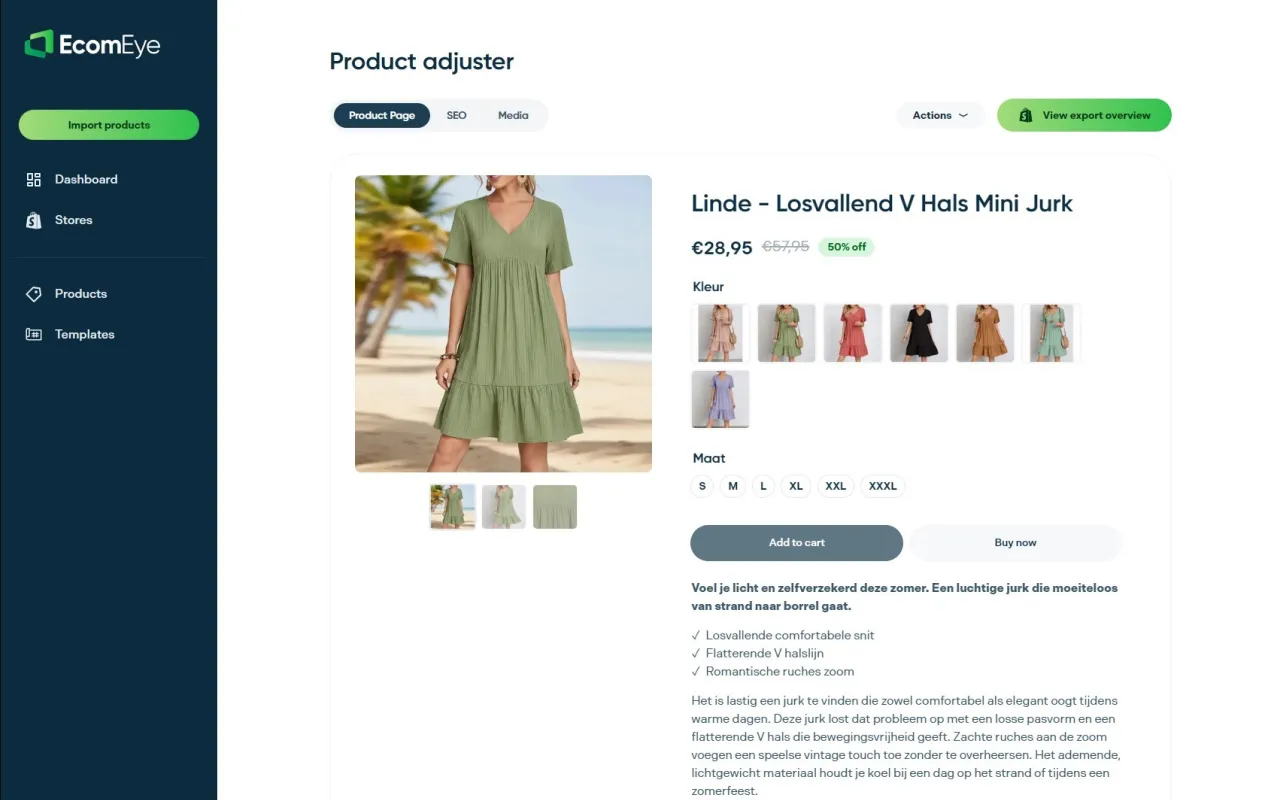
Ecom-eye generates unique, copyright-safe product titles, descriptions, and AI product images in bulk. Import product data directly from AliExpress, Amazon, Temu, or a competitor Shopify link, and Ecom-eye produces SEO-ready content that passes Google’s duplicate-content checks and Merchant Centre policies. Multi-language pages, built-in bulk editing, and one-click Shopify export mean the fixes you identified in your audit go live in minutes, not days.
Start with the AI product description generator to regenerate your highest-risk SKUs first, then scale across your full catalogue.
Useful sources and references
- Growthegy — Free Ecommerce Website Audit Checklist: covers UX, SEO, and GEO signals; use for AI readiness checks and structured-data guidance.
- Eva — Amazon Listing Audit: 2026 Checklist: strong on triage logic and prioritising suppression fixes; adapt the scoring model for Shopify.
- Seegea — Product Listing Checklist (24 points): the most practical automated-vs-manual split; use for image standards and feed compliance.
- AwsamTech — Ecommerce Audit Checklist 2026: best source for cadence recommendations and conversion leakage framing.
- Saucery — E-commerce Listing Optimisation Guide: useful for testing methodology and continuous monitoring advice.
- Ecom-eye resources: bulk generation, CSV templates, and Shopify export guides for implementing fixes at scale.
FAQ
What should I fix first in a product listing audit?
Fix Google Merchant Centre disapprovals first — price mismatches and missing GTINs suppress all Shopping impressions regardless of copy quality. Then address duplicate descriptions and missing schema.
How often should I audit my Shopify product listings?
Run a light check weekly (30 minutes covering feed compliance and Search Console) and a full CSV audit monthly. Add an ad hoc review whenever you import a new supplier batch.
What is GEO and why does it matter for product listings?
GEO (Generative Engine Optimisation) means writing listings with clear, citeable facts so AI tools like ChatGPT and Google’s AI Overviews can extract and surface your products in generated answers. Listings without specific facts — material, dimensions, certifications — are invisible to these tools.
How do I check for duplicate content across hundreds of SKUs?
Export your Shopify CSV and run a checksum comparison on the body_html column. Identical hashes flag exact duplicates; a fuzzy-match comparison catches near-duplicates where only colour or size names differ.
Can Ecom-eye help me fix duplicate listings in bulk?
Yes. Ecom-eye imports product data from AliExpress, Amazon, Temu, or competitor Shopify links and generates unique, SEO-ready titles, descriptions, and copyright-safe images in bulk, then exports directly to Shopify in one click.
Ready to boost your product pages?
Generate high-converting, SEO-optimized product pages in bulk using AI automation used by e-commerce experts.
No credit card required