2,048 Variants: Shopify SEO and Bulk Workflow for Merchants
Stop duplicate Shopify variant pages with canonicals, ProductGroup schema, and bulk metadata workflows to scale unique product pages.

2,048 Variants: Shopify SEO and Bulk Workflow for Merchants

Most stores should keep variants on one canonical product page and make each variant distinct through metadata, images and structured data. Reserve separate pages only for variants that target genuinely different search intent. Three technical levers stop duplicate content before it starts: a clear canonical strategy, accurate Product or ProductGroup schema, and disciplined internal linking. The rest of this guide covers both the decision rules and the implementation steps.
TL;DR:
- Using one canonical product page for variants is best, unless variants target distinct search intent, have different prices, or require unique images and descriptions.
- Duplicate URL issues arise from Shopify’s multiple URLs per product; fixing this requires canonical tags, consistent internal links, and redirect or noindex for old URLs.
- Metadata for variants should focus on one key attribute, avoiding repetitive templates to prevent duplicate content flags and improve search relevance.
- Structure data with Product schema for individual variants and ProductGroup schema for related variants, ensuring attribute consistency across groups.
- To optimize speed on variant-heavy pages, replace variant loops with lightweight option objects and defer detailed data loading to improve performance.
Table of Contents
- Should you use one page or separate pages for each variant?
- Fixing duplicate URLs and canonical issues on variant pages
- Writing metadata that stays unique across hundreds of variants
- Structured data that tells search engines which items are variants
- Keeping variant-heavy pages fast without overloading the theme
- Making variant images and alt text work for search, not against it
- Combined listings: when parent and child products make sense
- A practical audit and fix order for variant SEO
- What I keep seeing go wrong with variant SEO
- A faster way to keep variant pages unique at scale
- FAQ
- Sources
- Primary sources and further reading
Should you use one page or separate pages for each variant?
The default answer is one page per product, with variants handled as options on that single URL. Splitting variants into separate pages only earns its keep when the variants genuinely differ in what someone is searching for, not just in colour or size.
A few signals tell you it is time to split:
- Each variant has its own measurable search volume with different intent (for example, “running shoes for flat feet” versus “running shoes for trail”).
- Variants carry meaningfully different prices, stock patterns or specifications that shoppers compare before buying.
- Each variant needs its own set of images and a product description that would otherwise look identical to its siblings.
- You can commit to writing and maintaining unique content for every separate page, not just at launch but as the catalogue grows.
When none of those apply, separate pages just multiply thin, near-identical content across your domain, which is precisely what causes duplicate-content problems in Google’s eyes. A t-shirt in five colours rarely needs five URLs. A mattress in three firmness levels, each attracting different buyer questions, might.
Before changing any structure, fix your master data first. Shopify’s variant limit increase to 2,048 means stores can now carry far larger variant sets on a single product, but that only works smoothly when every variant has a unique SKU and consistent attributes feeding your theme, your feed and your schema. Restructuring after you have scaled is expensive; getting the source of truth right before you expand variant count saves that rework.
Pro Tip: Map out your variant decision on paper before touching Shopify: list each variant, its expected search term and whether that term differs meaningfully from its siblings.
Fixing duplicate URLs and canonical issues on variant pages
Shopify’s URL structure quietly creates more pages than most merchants realise. A single product can be reached through its own /products/ URL and through one or more collection-prefixed URLs depending on how it is linked across the store, and search engines can index both versions separately unless you tell them not to. Left unmanaged, this dilutes crawl budget and splits link equity across near-duplicate addresses for the same product.
The fix is a short, repeatable process:
- Set the canonical tag on every product template to point at the clean
/products/handleURL, not the collection-prefixed variant. - Replace any hardcoded or collection-relative links in your theme with
{{ product.url }}, so internal links always resolve to the canonical path rather than a collection-scoped duplicate. - For old collection URLs already indexed with no canonical value, add a 301 redirect where the content has genuinely moved, or a noindex tag where the page should simply stop competing with the main product URL.
- Crawl the site with a tool such as Screaming Frog to list every indexable variant and collection permutation still live.
- Cross-check the crawl against Google Search Console’s coverage report to confirm which duplicate URLs Google has actually indexed, then prioritise fixes on those first.
Our practical walk-through on canonical tags covers the template-level changes in more detail, and a related piece on product page indexing issues walks through the most common causes of duplicate indexing on Shopify specifically.
Pro Tip: Re-run the Search Console coverage check four to six weeks after applying canonicals: indexing changes are rarely immediate.
Writing metadata that stays unique across hundreds of variants
The fastest way to end up with duplicate-content flags is to let a title template spit out “Product Name - Colour” five hundred times with no other change. Metadata needs a structure that scales without becoming a copy-paste exercise.
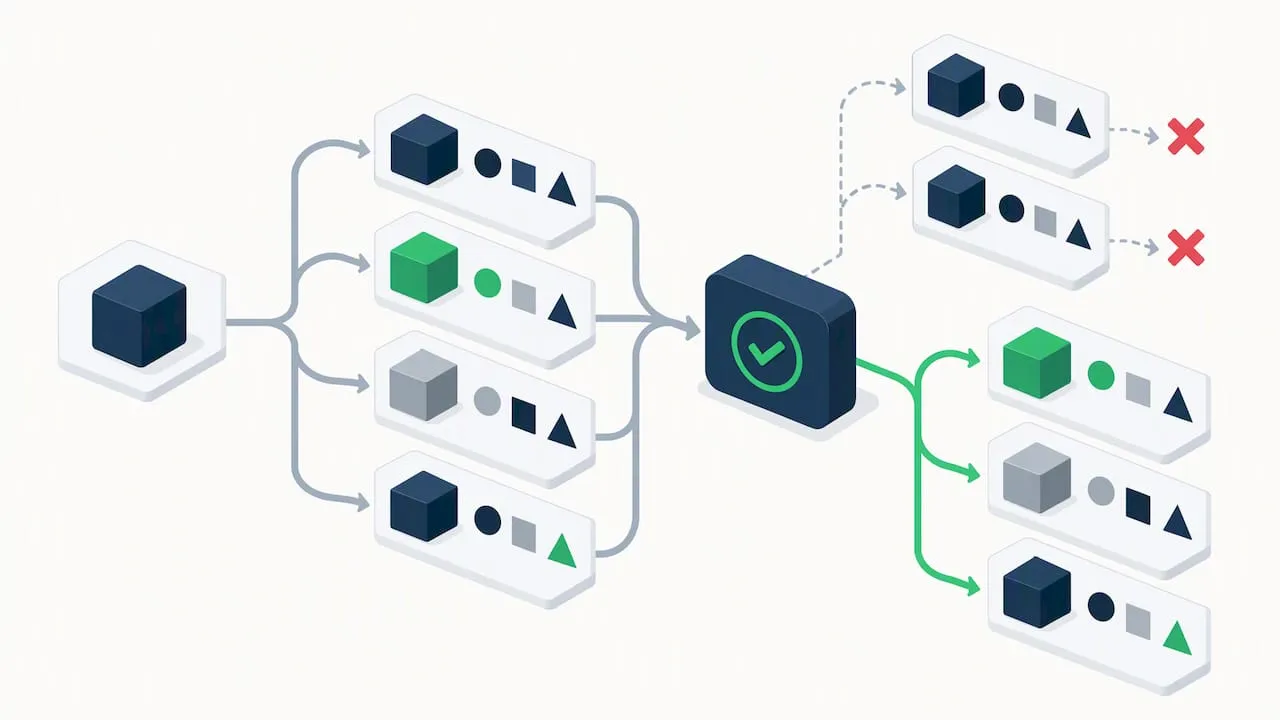
Pick one keyword theme per page and build outward from it, following Shopify’s own guidance to match page type to intent rather than targeting the same broad term on every variant. A product page for “ceramic coffee mug” should not fight its own “ceramic coffee mug navy” variant for the same ranking position; the main page owns the broad term, and variant-specific long-tail phrases only get added where a real search pattern supports them.
A workable template set looks like this:
- Title: Core product name plus the one attribute that actually changes buyer intent, never every attribute at once.
- Meta description: One sentence on the core benefit, one sentence naming the specific variant detail (size, shade, material) that distinguishes this listing from a near-identical one.
- Short description: Two to three sentences where the first is generic to the product line and the second carries the variant-specific fact, not a reworded restatement of the title.
Run bulk edits through a spreadsheet export rather than typing each field by hand, but add a validation pass afterwards: spot-check a sample of generated titles and descriptions for the same three or four sentence patterns repeating verbatim across unrelated products. That pattern repetition is what triggers duplicate-content flags even when no two strings are byte-for-byte identical.
Structured data that tells search engines which items are variants
Product schema and ProductGroup schema serve different jobs, and mixing them up confuses how search engines and AI shopping features group your listings. Use standard Product schema when a page represents one buyable item with its own price and availability. Use ProductGroup schema when a parent page represents a family of variants and you want search engines to understand the relationship between the group and its individual members, which matters more as AI-driven discovery features start reading structured data to decide what counts as a genuine alternative versus a near-duplicate.
- Map variant-defining attributes (size, colour, material) into dedicated metafields rather than burying them in free-text descriptions, so they feed schema and your feed consistently.
- Use Shopify Catalog mapping to control how those metafields group products for AI-driven sales channels, including which delimiter or tag defines a variant cluster.
- Keep the mapped attribute values exactly consistent across every variant in a group, since inconsistent capitalisation or wording breaks the grouping logic even when the underlying product is correct.
Our guide on fixing Shopify product schema covers the markup itself in more depth.
Pro Tip: Audit your metafields before your schema: broken grouping almost always traces back to inconsistent attribute values, not the schema markup itself.
Keeping variant-heavy pages fast without overloading the theme
Looping through product.variants in Liquid feels like the obvious way to build an option picker, but on a product with hundreds of variants it means loading every variant object just to render a dropdown. That slows time to first byte noticeably, and it gets worse as merchants take advantage of the 2,048-variant ceiling to consolidate larger catalogues onto single products.
- Replace variant loops with
product.options_with_values, which renders option pickers using lightweight option objects instead of pulling every variant’s full data. - Use
product_option_valueto render each selectable option cleanly, avoiding the overfetching that comes from loading full variant records just to display a swatch or a size label. - Defer the detailed variant data, such as price and inventory for the selected combination, using the Section Rendering API with the
option_valuesparameter so that data loads on demand rather than on every page request. - Build a test product with over 100 variants and benchmark render time with the Theme Inspector’s flame graph before and after the change, rather than guessing at the improvement.
- Run an A/B comparison on time to first byte between the old loop-based template and the new options-based one, on the same product, before rolling the change out store-wide.
Pro Tip: If your theme still loops over product.variants anywhere, search the codebase for that exact string first. It is almost always hiding in the option picker or an old price-range calculation.
Making variant images and alt text work for search, not against it
Shopify assigns each variant a single featured image by default, which is fine for simple colour swaps but leaves search engines with nothing new to index when the real difference between variants is visual, such as a fabric texture or a size comparison chart. Apps that assign a full image gallery per variant are worth the setup when those visual differences actually matter to buyers and to Google Images traffic.
- Write alt text that names the specific variant attribute shown, not a repeated boilerplate line copied across every image on the product.
- Use descriptive filenames before upload, since Shopify keeps the original filename in the image URL and a generic “IMG_4821.jpg” carries no SEO value.
- Where you generate images in bulk, keep a naming convention that ties each file to its variant and check licensing on any source imagery to avoid copyright exposure at scale.
- Compress images before upload rather than relying on Shopify’s automatic optimisation alone, since page speed drops fast on variant-heavy pages with large galleries.
Combined listings: when parent and child products make sense
Combined listings let you present several separate products as if they were variants of one parent, while each child keeps its own indexable URL. That is useful when products are similar enough to shop together but different enough that each deserves its own page, such as the same jacket sold under slightly different model numbers for different retailers.
- A parent product in a combined listing can hold multiple child products, with a combined maximum variant option values ceiling across the group. The feature is available on Shopify Plus.
- The SEO benefit is real: each child keeps a separate indexable URL instead of collapsing into one page, which helps when children target different keywords.
- The performance cost is also real, since loading every child’s full content up front multiplies backend queries; defer that loading rather than rendering it all on page load.
- Configure Search & Discovery display settings carefully so the combined group shows the right default child and does not surface duplicate entries in collection grids.
A practical audit and fix order for variant SEO
Work through this roughly in order, since later steps depend on the earlier ones being clean.
- Count your current variants per product and flag anything approaching the practical limits for your plan or theme.
- Crawl the site to find duplicate or collection-prefixed URLs serving the same product.
- Check canonical tags on every product template and confirm internal links use
{{ product.url }}. - Scan metadata for repeated sentence patterns across unrelated products, not just exact duplicate strings.
- Validate Product or ProductGroup schema against a sample of variant-heavy pages.
- Benchmark theme performance on your highest-variant product using the Theme Inspector.
- Review variant image coverage and alt text for anything still using generic filenames.
Quick fixes you can apply this week: correct canonical tags, update internal links, noindex stale collection URLs, and add proper alt text to variant images. Medium-term engineering work, such as combined listings, Section Rendering API adoption and Catalog mapping, takes longer and is worth planning as a project rather than squeezing in alongside daily store operations. A related playbook on bulk edits and batch changes is useful once you are ready to apply fixes across hundreds of products at once, and the product optimisation checks from DropshipXL are a solid complementary read for the CRO side of the same pages.
Pro Tip: Fix canonicals and internal links before touching schema. Schema changes mean little if Google is still indexing three duplicate URLs for the same page.
What I keep seeing go wrong with variant SEO
The same pattern shows up across most dropshipping catalogues: a product gets imported with its base listing unique, then every colour and size variant inherits an identical description with one word swapped. That is not a content problem so much as a workflow problem, and it is the single biggest cause of Google Merchant Center disapprovals I see in variant-heavy stores. Unique content generated at import time, rather than patched in after the fact, avoids most of it.
— Koen
A faster way to keep variant pages unique at scale
Writing genuinely unique titles, descriptions and images for every variant across a large catalogue is the part most stores quietly skip, which is exactly where duplicate-content and Merchant Center problems come from. We offer a tool to close that gap: import products in bulk from AliExpress, Amazon, Temu or a competitor’s Shopify link, and generate unique SEO-ready titles, descriptions and AI product images for each one before exporting to Shopify.
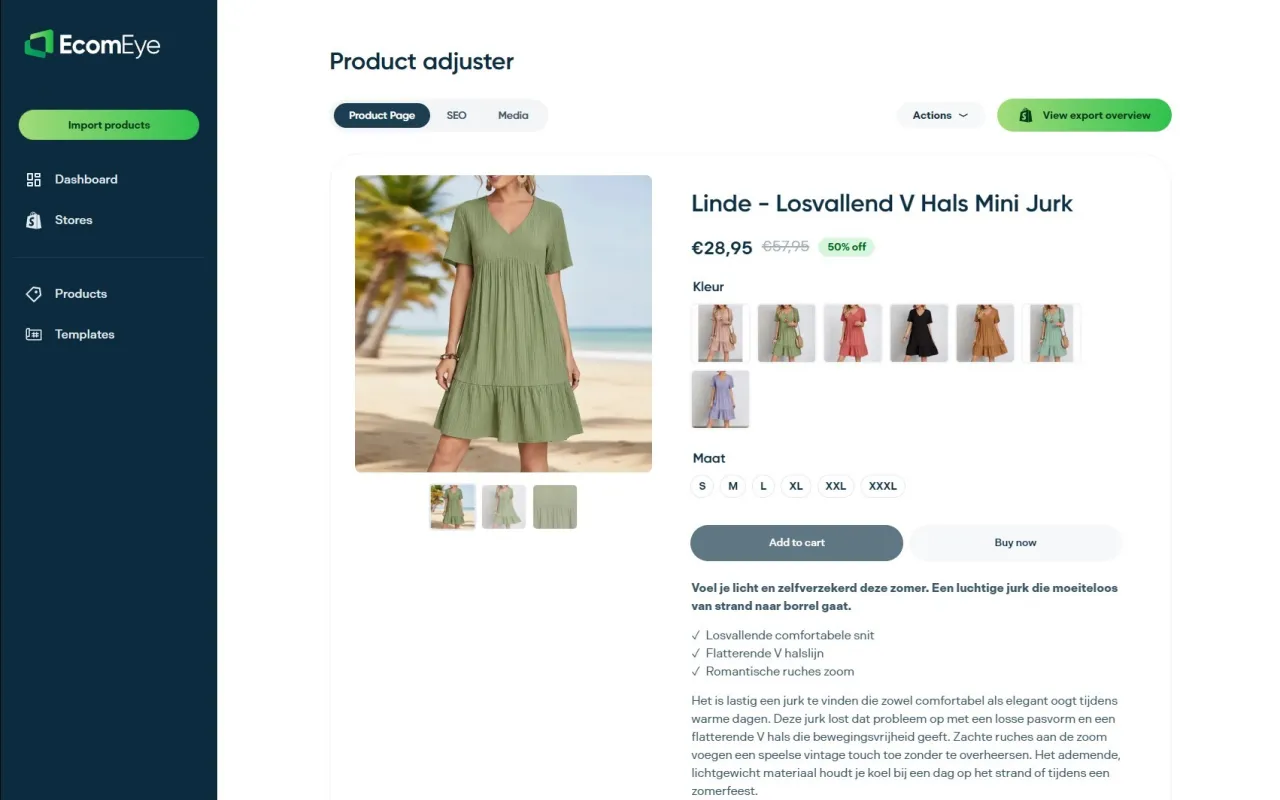
- Bulk import from AliExpress, Amazon, Temu or a competitor’s product link, with no manual rewriting.
- Unique SEO titles and descriptions generated per product, reducing the duplicate-content risk that triggers Merchant Center disapprovals.
- AI-generated product images and multi-language pages, exported to Shopify with one click.
If your catalogue is growing faster than your team can write unique copy for every variant, our AI product description generator and AI product image generator handle that at scale. Start with the Try-out plan at €39 per month or move straight to the Scaler plan at €99 per month if you are publishing in volume.
FAQ
What are product variants in Shopify?
Product variants are the different versions of a single product, such as size or colour, that share one product listing but carry their own SKU, price and inventory. They let a shopper choose options on one page rather than browsing separate listings for each combination.
How many variants can a product have on Shopify?
A Shopify product can now hold up to 2,048 variants, up from the previous cap of 100. The higher limit is useful for stores with many size or colour combinations, but it makes clean master data and theme performance more important, not less.
Can you do SEO on Shopify?
Yes. Shopify supports the core technical SEO levers, including canonical tags, structured data, editable titles and meta descriptions, and customisable URLs, and Shopify’s own SEO guidance recommends matching page type to search intent and using one keyword theme per page.
What is the best product variant app for Shopify?
There is no single definitive answer, since the right tool depends on whether you need combined listings, per-variant image galleries, or bulk content generation for unique metadata. For stores that need unique titles, descriptions and images generated in bulk across many variants, a tool such as EcomEye is built specifically for that gap.
Sources
- More To Sell, Less To Manage: Introducing 2,048 Product Variants on Shopify
- Shopify Catalog mapping
- Shopify SEO: How to Generate More Store Traffic (Shopify blog)
Primary sources and further reading
These are the Shopify documentation pages and guidance referenced above for variant limits, performance and combined listings.
Ready to boost your product pages?
Generate high-converting, SEO-optimized product pages in bulk using AI automation used by e-commerce experts.
No credit card required