AI Model Product Images: How Shopify Dropshippers Use Them Safely
How to use AI model product images in a Shopify store: which types work, how to keep them faithful to the product, and what Google and US copyright rules mean.
AI Model Product Images: How Shopify Dropshippers Use Them Safely
AI model product images are pictures of your product, often worn or held by a generated person, that a model builds from a supplier photo instead of a camera. For a dropshipper they solve one problem: supplier photos are shared by every store selling the same item, so your listing looks identical to the next. The way to win is to generate a unique set per product, keep the product itself faithful to the source, and do it in bulk rather than one image at a time. That is what our AI product image generator is built for: unique images created for each user, exported to Shopify with the rest of the page.
TL;DR
- Use AI for lifestyle shots, model shots and backgrounds. Keep the product itself true to the supplier photo, because a pretty picture of the wrong item becomes a return.
- Google Merchant Center expects the main image to show the real product with minimal staging and no promotional overlays. Put the creative scenes in additional images.
- In the US, purely AI-generated material is not copyrightable, so unique output per SKU and your own selection and edits matter more than ownership claims.
- Change one thing per generation (background, then light, then props), and check the product before the mood.
- At scale, the bottleneck is not making one good image but making hundreds that are unique, correctly sized and consistent. Bulk tooling is what removes it.
Table of Contents
- What “AI model product images” actually covers
- Why dropshippers need their own images
- What Google and marketplaces expect from your images
- How to make AI model images that still look like your product
- A checklist to judge whether an image is ready
- Who owns an AI image? What US sellers should know
- Doing it in bulk without losing control
- Our view
- Start with a few products
- FAQ
- Sources
What “AI model product images” actually covers
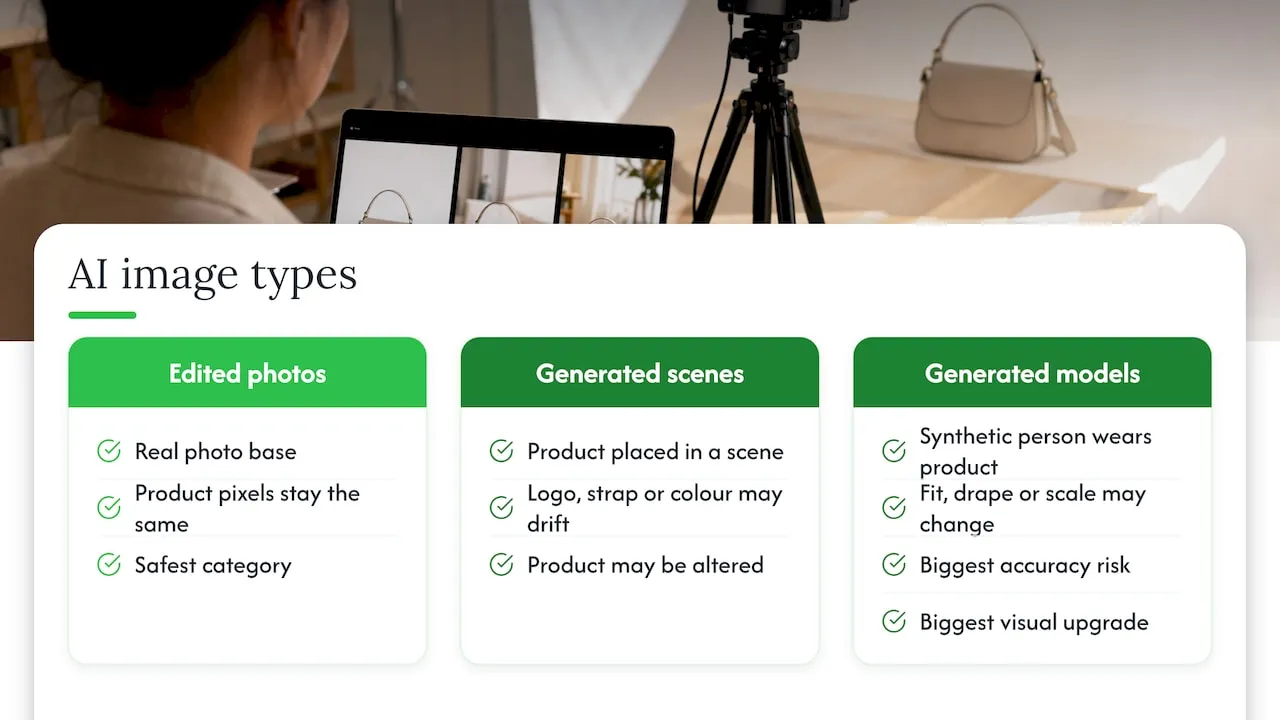
The phrase is used for three different things, and mixing them up causes most of the mistakes.
Edited photos. You start from a real photo and the model changes something around it: a new background, better light, a cleaner crop. The product pixels stay the same. This is the safest category.
Generated scenes with the product placed in. The model builds a room, a table or a street and sets your product inside it. This is where products get quietly altered: a logo softens, a strap changes length, a colour drifts.
Generated human models. A synthetic person wears or holds the product. Clothing, jewellery, bags and accessories are the usual cases. This gives the biggest visual upgrade over a flat supplier shot, and also carries the biggest accuracy risk, because fit, drape and scale are things the model can invent.
If you want the longer catalogue of formats, including white-background, lifestyle, detail and spin images, our guide to types of ecommerce product images shows which job each one does on a product page.
Why dropshippers need their own images
The supplier photo on AliExpress, Amazon or Temu is the same file every competing store imports. Two things follow.
First, shoppers who compare tabs see the same picture and decide on price alone. Second, identical images and descriptions across many stores make your page one of many near-duplicates, which is a weak starting point for organic search and for Shopping feeds.
A unique image set per product is the cheapest way to break that sameness. It does not need a photo studio. It needs a source image, a clear brief for the scene and a way to repeat the process across a catalogue. For the SEO and conversion side, we cover the reasoning in why AI images change ecommerce conversion and SEO, and for the duplication problem specifically in our piece on unique AI images per SKU.
What Google and marketplaces expect from your images
The rules differ by channel, so decide where each image will appear before you generate it.
| Channel | Main image | Where AI scenes fit |
|---|---|---|
| Google Merchant Center (Shopping) | The actual product, whole item, minimal staging, no placeholders or promotional overlays | Additional and lifestyle image fields |
| Amazon | Pure white background (RGB 255,255,255), product filling about 85% of the frame, no text or props not included | Additional images |
| Etsy | At least one unedited photo of the actual item against a real background for most items | Other photos, if they accurately represent what the buyer receives |
| Your Shopify store | Your choice, but it should match what ships | Anywhere, including model shots |
The Google row comes from Google’s product image guidelines, which require the image to show the product itself and allow Google to disapprove items whose image is obstructed or does not represent the product. Etsy’s position is set out in its own listing image requirements, including the disclosure expected when an item is made with AI.
For a Google dropshipper the practical rule is simple. The first image is the product as it ships, cleanly isolated. The model shots, lifestyle scenes and close-ups come after it. That order protects the feed from disapprovals and still gives shoppers the richer pictures once they land on the page.
Keep the metadata intact
Generated images can carry provenance data, such as an IPTC digital source type tag that marks them as AI-made. Google Shopping accepts AI images in its additional image fields when that tag is left in place, so do not strip metadata in a later compression step. We explain how to preserve it in the post on IPTC and unique images per SKU.
How to make AI model images that still look like your product
The common failure is the “mega prompt”: one request that asks the model to invent a room, light it, dress a model, place the product and leave the product untouched. Five jobs in one pass, and the product is the one that gets sacrificed. A workflow that holds up works in stages.
1. Start with the best source photo you can get
Use the highest-resolution, evenly lit supplier image available, with the whole product visible and good contrast against the background. Shopify’s own guidance for product photos favours clear subjects and good contrast, and a poor source gives the model nothing reliable to preserve.
2. Separate the product from its background
Cutting out the subject first means later steps change the surroundings, not the product. Check the edges, especially on hair-like fibres, transparent materials and thin straps.
3. Change one variable at a time
Generate the background first. Then adjust light. Then add props. Then crop. After each step compare the result with the source: colour, proportions, logo, stitching, number of parts. If the product drifted, go back one step rather than adding more instructions.
4. Describe the scene in a few short phrases
Short, concrete phrases work better than paragraphs: for example, “studio setting, concrete backdrop, warm even light”. Describe the place and the light, not the product, since the product should come from the source image.
5. Add a model only where fit and scale are easy to judge
A generated person holding a mug or wearing a necklace is easy to check. A generated person in a tailored jacket makes claims about fit that your supplier photo never made. For apparel, compare sleeve length, hem and neckline against the supplier’s size chart before you publish.
6. Export at a size that will not slow the store
Huge files hurt page speed, and page speed hurts mobile conversion. Our write-up on 2048×2048 AI backgrounds for Shopify covers sizing so the images stay sharp without weighing the page down. The wider product image best practices for Shopify list the rest: consistent aspect ratio, descriptive file names and alt text.
A checklist to judge whether an image is ready
Before a generated image goes live, run it through five questions. Each takes seconds once it is a habit.
- Is it the same product? Colour, shape, logo, number of items included.
- Is the scale believable? A phone case should not look like a tablet sleeve next to the model’s hand.
- Is anything implied that you do not ship? Props, accessories or a second colourway that are not in the box.
- Are there generation artefacts? Extra fingers, warped text, melted edges, mirrored logos.
- Does it fit its slot? White-background main image for the feed, scene for the gallery, tight crop for the thumbnail.
To see whether images are helping, compare product page conversion and add-to-cart rate before and after a set goes live, and watch returns that cite “not as described”. An image that raises clicks but also returns is not doing its job. Test one change at a time, on products with enough traffic to show a difference.
Who owns an AI image? What US sellers should know
This section is general information, not legal advice. For a specific dispute or a trademark question, see an intellectual property attorney.
The US Copyright Office’s 2025 report on copyrightability concluded that copyright protects human-authored expression. Purely AI-generated material is not protected, and prompts alone do not give enough control over the result. Human contributions can be protected: your own creative selection and arrangement, and creative modifications you make to an output.
What this means for a store owner in practice:
- You can generally use generated images commercially under your tool’s terms, but you should not expect to stop others copying a purely generated picture.
- The value of your images comes from being unique to your store and from the work you add: choosing, arranging, editing and combining them with your own page.
- Platform terms can differ by tool and by feature. Read the commercial-use terms of whatever generator you use, and do not remove content credentials where the terms ask you to keep them.
- Never prompt a model to reproduce another brand’s protected product or a named person’s likeness. That is a separate risk from copyright ownership.
The upside for dropshippers is that supplier and competitor photos are exactly what you are trying to avoid. A fresh set, generated for your store, removes the main reason stores copy each other’s pictures.
Doing it in bulk without losing control
One product is easy to hand-check. Two hundred is not. The pattern that scales has four parts:
- Import products in bulk from AliExpress, Amazon, Temu or a competitor’s Shopify link.
- Generate titles, descriptions and images together so the page reads as one piece.
- Review in a bulk editor with templates, rather than opening each product separately.
- Export to Shopify in one click.
This is how our platform works: every image and description is generated uniquely for each user, even when two users start from the same product link, and there are built-in tools for Google Merchant Center and product variant management. Multi-language pages and size system conversion are included, which matters if you sell apparel across US and international sizing. The text half of the page comes from the AI product description generator, so the images and copy stay consistent with each other.
Your review time then goes where it should: the five-question check above on the main image and the model shots, not on file handling.
Our view
Most dropshippers do not fail because their images are ugly. They fail because their pages are copies. The same supplier photo, the same description, the same feed, and nothing for a shopper or a search engine to prefer.
We built Ecom-eye around that. Every image and every description is generated uniquely for each user, so two stores starting from one product link do not end up with the same page. That removes the copyright and DMCA worry that comes with lifting pictures from competitors, and it is designed to keep listings clear of the Google Merchant disapprovals that duplicated content invites.
Our advice on model images is to be strict about the main image and generous with the rest. Let the first image show the product as it ships, then use model shots and lifestyle scenes to sell the use of it. Check the product before the mood, and do it across the whole catalogue in one pass, not product by product.
Koen
Start with a few products
If you want to see unique images and pages for your own catalogue, our Try-out plan is €39 per month and Scaler is €99 per month, both listed on the pricing page. New users can start with a free trial, and credits cover both product pages and images.
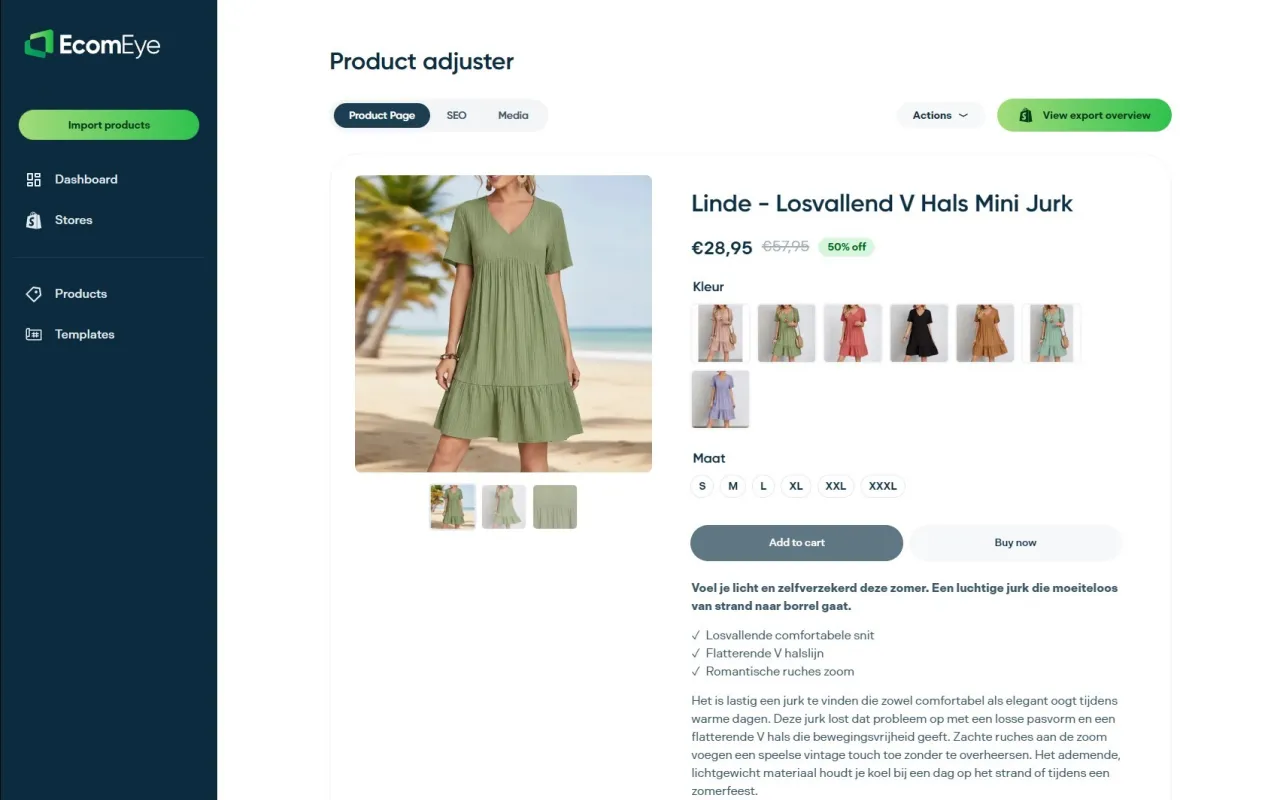
Pick ten products you already sell, import them, generate the page and the image set, and compare them with the supplier versions on the same Shopify theme.
FAQ
Can I use AI model images as my main product image?
On your own store, yes, as long as the image matches what ships. For Google Shopping and Amazon, the main image should show the actual product with minimal staging, so use a clean product shot first and put model images in the additional slots.
Are AI-generated product images copyrighted?
Under the US Copyright Office’s January 2025 report, purely AI-generated material is not protected, while human creative selection, arrangement and modification can be. You can still use images commercially under your tool’s terms, but your real advantage is that the set is unique to your store.
Will AI images get my products disapproved in Google Merchant Center?
Disapprovals are tied to what the image shows, not to how it was made. An image that hides the product, adds promotional overlays or shows something other than the item is at risk. Keep the main image faithful, keep any AI provenance metadata in place, and use scenes in additional images.
How many AI images does a product page need?
Most pages work well with a clean main image, two or three lifestyle or model shots, and one or two detail crops. Add more for products where fit or scale is the main question, such as clothing and accessories.